Zum Inhalt






Die meisten Vertriebsteams automatisieren die falschen Dinge – sie fügen Tools hinzu, versenden Massen-E-Mails und wundern sich dann, warum ihr CRM überladen ist und die Reputation ihrer Domain sinkt.
Vertriebsautomatisierung funktioniert nur, wenn sie als System konzipiert ist und nicht aus unzusammenhängenden Shortcuts zusammengesetzt wird. Dieser Leitfaden enthält Architektur, Blaupausen und Checklisten zum Aufbau einer Vertriebsautomatisierung, die zuverlässig bleibt, die Reputation des Absenders schützt und die Pipeline konvertiert:
- Eine sechsstufige Systemarchitektur (Signale → Daten → Entscheidungen → Maßnahmen → CRM → Überwachung)
- 12 Workflow-Entwürfe mit Triggern, Logik und Fehlerbehandlung
- Checklisten für den Betrieb für Lieferbarkeit, Wartung und 30/60/90-Tage-Einführung
Bis zu 70 % der Vertriebsmitarbeiter verfehlten 2024 ihre Quote mit durchschnittliche Erreichung bei etwa 43 %. Über 81 % der Vertriebsteams nutzen KI, dennoch gehen die Ergebnisse weiter zurück. Die Tools sind nicht der Engpass. Das Systemdesign ist es.
Was ist Vertriebsautomatisierung (und was ist sie nicht)?
Vertriebsautomatisierung nutzt Software, Workflows und Regeln, um wiederkehrende Vertriebsaufgaben zu bewältigen – Lead-Weiterleitung, Nachverfolgungssequenzen, CRM-Aktualisierungen, Aufgabenerstellung, Berichterstellung – mit Triggern und Logik, die für Geschwindigkeit, Konsistenz und weniger Fehler in Ihrer Pipeline sorgen.
Der Teil, den die meisten Definitionen überspringen: Vertriebsautomatisierung ist nicht „einmal einrichten und dann vergessen”. Behandeln Sie sie wie ein Produktionssystem, das Architektur, Überwachung und Wartung erfordert.
Vertriebsautomatisierung vs. Marketingautomatisierung
Marketing-Automatisierung kümmert sich um die Nachfrage vor der Übergabe: Kampagnen, Pflege, Bewertung. Die Vertriebsautomatisierung übernimmt die Ausführung nach der Übergabe: Weiterleitung, nächste Maßnahmen, Nachverfolgung, CRM-Hygiene. Sie teilen sich Lebenszyklusdefinitionen, Weiterleitungsregeln und Absichtssignale – dürfen jedoch niemals Sendungen an denselben Kontakt duplizieren.
| Vertriebsautomatisierung | Marketing-Automatisierung | |
|---|---|---|
|
Schwerpunkt |
Pipeline-Ausführung, CRM-Hygiene |
Nachfrage generieren, pflegen, bewerten |
|
Eigentümer |
Vertriebsingenieure / GTM-Ingenieure |
Marketing-Operationen |
|
Wichtige Maßnahmen |
Weiterleitung, Reihenfolge, Nachbereitung von Besprechungen |
Kampagnen, Anzeigenorchestrierung, Bewertung |
|
Risiko bei Bruch |
Verpasste Leads, CRM-Müll, Verwirrung bei Vertriebsmitarbeitern |
Spam-Beschwerden, Imageschaden |
Grundlegende Definitionen finden Sie unter IBM, Salesforceund HubSpot. Unser Fokus: ein System zu entwickeln, das Bestand hat, nachdem Sie das Konzept verstanden haben.
Die Realität im Jahr 2026: Warum die meisten Automatisierungsprozesse im Vertrieb scheitern
Das Produktivitätsparadoxon
Automatisierung senkt die Kosten für die Kundenansprache → Teams versenden mehr → Kanäle werden überlastet → Antwortraten sinken → Teams versenden noch mehr. Dies ist das Jevons-Paradoxon, angewandt auf den Vertrieb. Salesforce , dass Vertriebsmitarbeiter nur 28 % ihrer Arbeitswoche mit dem Verkauf verbringen– der Rest entfällt auf Verwaltungsaufgaben und die Verwaltung von Tools, die eigentlich Zeit sparen sollen. Lösung: Messen Sie die Konversionsrate und Zustellbarkeit, nicht die Aktivitäten pro Mitarbeiter.
Verbesserte Zustellbarkeit (2024+)
Im Jahr 2024 Google und Yahoo strengere Anforderungen für Massenversender ein. Massenversand von geringer Qualität wird schneller blockiert. Die Reputation Ihrer Domain ist nun ein Risiko für den Vertrieb.
Die Instandhaltungssteuer
APIs ändern sich ohne Vorwarnung. OAuth-Token verfallen unbemerkt. Feldzuordnungen verschieben sich, wenn jemand eine CRM-Eigenschaft umbenennt. Workflows schlagen stillschweigend fehl. Doppelte Schreibvorgänge beschädigen Pipelines. „Low-Code” bedeutet nicht „wartungsarm” – Automatisierung verursacht technische Schulden, sobald sie eingeführt wird.
Signale schlagen zeitbasierte Sequenzen
Zeitverzögerungen sind nicht beabsichtigt. Signale sind: Ein Ziel stellt einen VP Sales ein, schließt eine Finanzierung ab, zeigt einen Nutzungsanstieg, besucht Ihre Preisseite, ein Champion wechselt den Job. Signalbasierte Auslöser erhalten Antworten; zeitbasierte Tropfen werden ignoriert.
„Dunkle KI“ – Blindstelle bei der Zuschreibung
Die Zahl der AI-bezogenen Sitzungen stieg im Vergleich zum Vorjahr um über 500 % (Studie zu vorhersehbaren KI-Daten für 2025). Forrester prognostiziert, dass KI bis Ende 2025 einen Anteil von 20 % am organischen B2B-Traffic erreichen könnte– und die aktuellen Tools unterschätzen dies. Lösung: Kombinieren Sie Einstellungsdaten, Produktnutzung und Erkenntnisse aus Gesprächen mit Signalen aus Webbesuchen.
Die Aufgabenteilung des GTM-Ingenieurs
Ein einzelner GTM-Ingenieur– ein technischer Operator, der das Automatisierungssystem aufbaut und wartet – kann mehr gebuchte Demos generieren als fünf herkömmliche SDRs. Die Stellenausschreibungen stiegen im Jahresvergleich um 205 % (2024–2025). Lassen Sie technische Mitarbeiter die Maschine bauen; lassen Sie den Conversation Owner (SDR/AE) die Antworten, die Entdeckung und die Beziehungen übernehmen.
Grundprinzip: Zuverlässigkeit > Volumen. Relevanz > Kadenz. Governance ist nicht optional.
Die Architektur des Vertriebsautomatisierungssystems
Der technische Kern. Ein sechsstufiges Modell, das jedes Vertriebsteam anpassen kann – vom Einzelgründer auf HubSpot bis hin zu einem aus 15 Tools zusammengesetzten Stack.
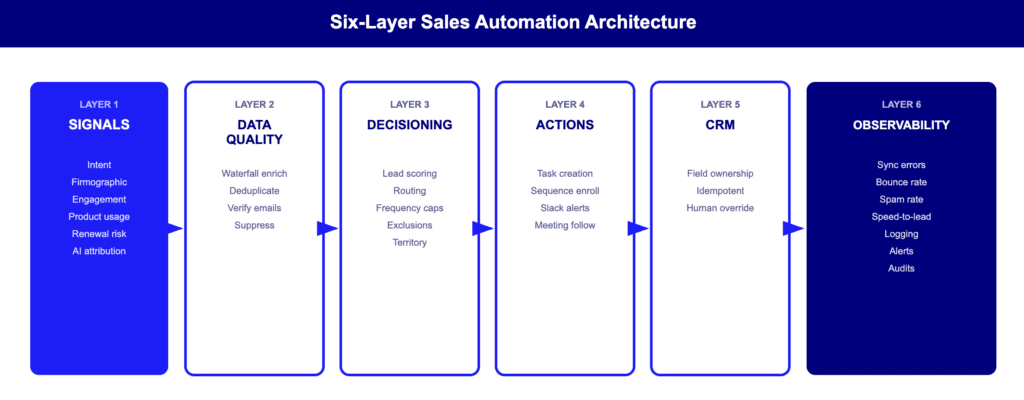
Schicht 1: Signale (kein Signal, keine Automatisierung)
Jeder Workflow beginnt mit einem Ereignis, nicht mit einem Kalenderdatum. Signalkategorien: Absicht (Preisseite, Demo-Anfrage), firmografische Veränderung (Finanzierung, Einstellung von Führungskräften), Interaktion (Antwort, Terminvereinbarung), Produktnutzung (Anstieg, Rückgang), Verlängerung/Risiko (NPS-Rückgang, Vertragsablauf), Hinweise zur KI-Attribution (LLM-Verweisetraffic). Kein Signal = kein Grund, eine Maßnahme auszulösen.
Schicht 2: Datenqualität und -anreicherung
Wasserfall-Anreicherung fragt mehrere Anbieter nacheinander ab – Anbieter A liefert keine Ergebnisse? Versuchen Sie es mit B, dann mit C. Dies verbessert die Abdeckung und reduziert die Absprungraten. B2B-Kontaktdaten verfallen jährlich um 22–30 % (Marketing Sherpa/Cognism), sodass einzelne Quellen schnell veralten. Regeln: vor der Eingabe in das CRM doppelte Einträge entfernen, E-Mails vor der Sequenzierung überprüfen, Bounces/Abmeldungen/Nicht-Kontaktieren unterdrücken.
Schicht 3: Entscheidungsfindung (Leitplanken)
Lead-Bewertung legt Prioritäten fest (firmografische Eignung + Verhaltenssignale). Lead-Weiterleitung weist Verantwortlichkeiten zu (Gebiet, Round-Robin, Kapazität – immer mit einer Ausweichmöglichkeit ohne Verantwortlichen). Sicherheitsvorkehrungen sind der Punkt, an dem die meisten Systeme versagen: Frequenzbegrenzungen über Kanäle hinweg, Ausschlusslisten (Kunden, offene Opportunities, aktive Sequenzen, rechtliche Aufbewahrungspflichten), Gebietsschutz, „bereits in Sequenz”-Prüfungen. Ohne diese führt die Automatisierung zu Kollisionen, doppelten Sendungen und Verwirrung bei den Vertriebsmitarbeitern.
Schicht 4: Aktionsschicht
Aufgabenerstellung, Sequenzregistrierung, Slack-Benachrichtigungen, Nachverfolgung von Besprechungen, Übergabe von SDR an AE. Automatisieren Sie die nächstbeste Maßnahme, nicht die Routinearbeit.
Die Nachbereitung von Besprechungen ist sehr zeitaufwendig: Vertriebsmitarbeiter verbringen nach einem Anruf 15 bis 30 Minuten mit Notizen, CRM-Aktualisierungen und Entwürfen. tl;dv automatisiert dies –zeichnet auf und transkribiert, erstellt KI-Zusammenfassungen mit nächsten Schrittenund synchronisiert mit CRM. 15–30 Minuten Zeitersparnis pro Anruf bei besserer Datenqualität als bei manueller Eingabe.
Schicht 5: CRM-Rückschreibregeln
Feldbesitz: Legen Sie fest, welches System in welche Felder schreibt – widersprüchliche Schreibvorgänge beschädigen Daten. Idempotente Aktualisierungen: Die zweimalige Ausführung derselben Automatisierung führt zum gleichen Ergebnis (keine Duplikate, keine Überschreibungen). Manuelle Übersteuerung: Sensible Felder (Transaktionsbetrag, Abschlussdatum, Phase) erfordern eine Bestätigung durch einen Mitarbeiter.
Schicht 6: Beobachtbarkeit und Governance
The layer most teams skip entirely. Monitor: sync error rate, bounce rate per domain/sequence, spam complaints (<0.1%), speed-to-lead, meeting-to-follow-up time. Build: logging for every action, failure alerts (not just success notifications), monthly audits, error budgets.
Wenn Sie nur drei Ebenen festlegen: Signale (1), Leitplanken (3), Beobachtbarkeit (6). Diese verhindern irrelevante Kontaktaufnahmen, Sequenzkollisionen und stille Ausfälle.
Zustellbarkeit an erster Stelle: Die Go/No-Go-Checkliste
Nichts in Ihrer Outbound-Vertriebsautomatisierung wird versendet, bevor nicht alle Gates grün sind.
- ✅ SPF, DKIM, DMARC konfiguriert und abgestimmt
- ✅ Ein-Klick-Abmelde-Header für alle ausgehenden E-Mails
- ✅ Spam-Beschwerdequote unter 0,1 %
- ✅ Absprungrate unter 2 % (Ziel unter 1 %)
- ✅ Alle E-Mails werden vor der Sequenzierung überprüft.
- ✅ Unterdrückungslisten aktiv (Bounces, Abmeldungen, Nicht kontaktieren)
- ✅ Kill Switch: Automatische Pause bei Überschreitung des Schwellenwerts
Google und Yahoo erzwingen: obligatorische SPF/DKIM/DMARC-Authentifizierung, Abmeldung mit einem Klick in den Kopfzeilen, Beschwerdequote unter 0,1 % (über 0,3 % besteht die Gefahr einer Massenblockierung) und Übereinstimmung der „Von”-Domain mit den Authentifizierungsdatensätzen. Das Versenden von Kaltakquise-E-Mails von Ihrer primären Domain ohne diese Überprüfungen gefährdet jede E-Mail, die Ihr Unternehmen versendet.
Sequenz zur Listenhygiene: Wasserfall-Anreicherung (mehrere Anbieter) → E-Mail-Verifizierung (jede Adresse) → Unterdrückungsprüfung (Bounces, Abmeldungen, Nicht-Kontaktieren). Senden Sie niemals unverifizierte E-Mails in großem Umfang. Ein einziger fehlerhafter Datensatz kann den Ruf Ihrer Domain für Monate schädigen.
Blaupause für den Kill Switch
Auslöser: Absprungrate >2 % ODER Beschwerdequote >0,08 %. Automatische Aktionen: Alle Sequenzen auf der betroffenen Domain pausieren → Eigentümer benachrichtigen → Checkliste für Vorfälle öffnen. Menschliche Aktionen: Untersuchen Sie die Ursache → beheben Sie die Ursache → setzen Sie die Sequenzen erst fort, wenn sich die Raten normalisiert haben.
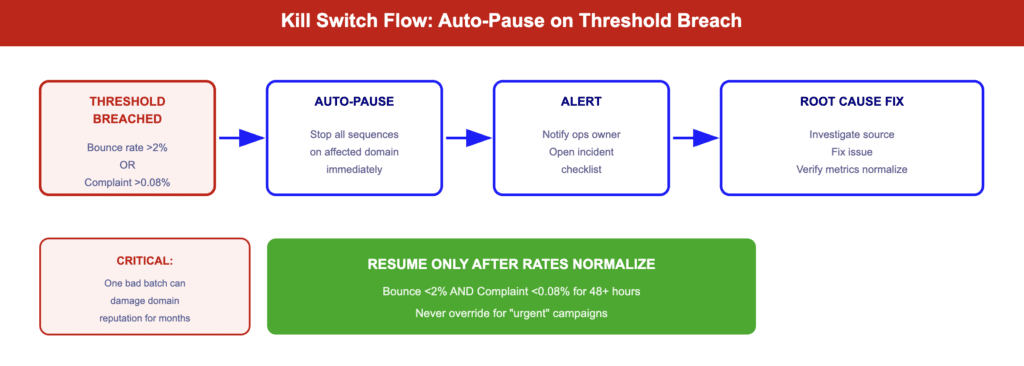
Versenden Sie diesen Workflow zuerst. Er schützt alles andere, was Sie erstellen.
12 Blaupausen zur Automatisierung von Vertriebsabläufen
Jeder verwendet die Struktur: Trigger → Logik → Aktionen → CRM-Rückschreibung → Fehlerbehandlung → KPI. Wählen Sie 2–3 aus, überprüfen Sie die Stabilität und erweitern Sie dann.
# | Arbeitsablauf | Auslöser | Hauptrisiko | KPI |
1 | Weiterleitung eingehender Leads | Demo-Anfrage | Nicht zugewiesene Leads | Geschwindigkeit bis zur Kundenkontaktaufnahme |
2 | Signalbasierter Outbound | Einstellungs-/Finanzierungssignal | Spam, Irrelevanz | Antwortquote |
3 | Wasserfallanreicherung | Neuer Lead erstellt | Abpraller | Absprungrate |
4 | Duplikatsvermeidung | Sequenz-Anmeldung | Doppeltippen | Kollisionsrate |
5 | Besprechung → CRM | Das Treffen ist beendet. | Datenlücken | CRM-Vollständigkeit |
6 | Einwand erfassen | Anruf beendet | Verpasste Erkenntnisse | Einwandabdeckung |
7 | Automatisierung des Coachings | Wochenende / wichtige Anrufe | Geringe Akzeptanz | Playbook |
8 | Rohrleitungshygiene | Stufenwechsel | Schlechte Prognosen | Feldfertigstellung % |
9 | Nahbereichssignale | Seitenaufruf-/Nutzungsanstieg | Überautomatisierung | Signal-zu-Meeting-Rate |
10 | MQL → SQL-Handshake | MQL-Schwellenwert | Doppeltippen | Übergabegeschwindigkeit |
11 | Verlängerungen/Erweiterungen | Verwendungs-/Unterstützungssignal | Abwanderung | Speicherrate |
12 | Integrationsresilienz | API-Synchronisierung | Datenverlust | Synchronisierungsfehlerrate |
Blaupause 1: Automatisierung von Vertriebsleads – Inbound-Routing
Auslöser: Demo-Anfrage oder Ausfüllen eines Formulars mit hoher Kaufabsicht. Logik: Anreichern → Bewertung anhand des ICP → Gebiet zuordnen. ICP + Gebiet = AE zuweisen; nur ICP = SDR-Warteschlange; keine Übereinstimmung = „nicht zugewiesen” mit 5-minütiger Eskalationswarnung. Fehlerbehandlung: Kein Eigentümer nach 10 Minuten → automatische Zuweisung eines Backups. Anreicherung fehlgeschlagen → manuelle Überprüfungswarteschlange (Lead nicht blockieren). KPI: Geschwindigkeit bis zum Lead unter 5 Minuten.
Blaupause 2: Automatisierung des Outbound-Vertriebs – signalbasiert
Auslöser: VP Sales eingestellt, Serie-B+-Finanzierung, Signal eines Mitbewerbers bei einem Zielkunden. Logik: Bereits Kunde → unterdrücken. Offene Opportunity → Kontext an Eigentümer weiterleiten. Aktive Sequenz → überspringen. Abgemeldet → Hard Stop. Alles klar → anreichern → überprüfen → in 2–3-stufiger Sequenz unter Bezugnahme auf das spezifische Signal registrieren. Fehlerbehandlung: Überprüfung fehlgeschlagen → überspringen + protokollieren. Rücklauf beim ersten Versand → entfernen + unterdrücken. KPI: 8–15 % Antwortrate (gegenüber 1–3 % bei generischen Kaltakquise-Mails).
Blaupause 5: Besprechung → CRM (Zero-Admin Follow-Through)
Auslöser: Das Meeting endet. Logik: Teilnehmer mit CRM-Datensätzen abgleichen → Zusammenfassung, Einwände, nächste Schritte extrahieren → CRM-Feldern zuordnen → Entwurf für Nachverfolgung zur Überprüfung durch den Vertriebsmitarbeiter erstellen. Fehlerbehandlung: Mangelhafte Transkription → manuelle Überprüfung kennzeichnen. CRM-Synchronisierung fehlgeschlagen → erneut versuchen + Warnung. KPI: 95 %+ Feldausfüllung; Zeit vom Ende des Meetings bis zum Versand der Nachverfolgung.
tl;dv kümmert sich um den gesamten Prozess: zeichnet auf und transkribiert, erstellt strukturierte KI-Zusammenfassungenund überträgt die Daten an CRM + 5.000 Apps. Seine Konversationsintelligenz unterstützt auch Blueprints 6 (Einwandserfassung) und 7 (Coaching).
Blaupause 10: Handschlag zwischen Vertriebs- und Marketingautomatisierung (MQL → SQL)
Auslöser: Lead erreicht MQL-Schwellenwert. Logik: Bereits zugewiesen → Vertriebsmitarbeiter benachrichtigen + Marketing-Nurturing unterdrücken. Nicht zugewiesen → Weiterleitung über Blueprint 1. Einzelverantwortlichkeitsregel: Sobald der Vertrieb akzeptiert, pausiert das Marketing. Keine doppelten Kontaktaufnahmen. Fehlerbehandlung: Lebenszyklus-Synchronisierung fehlgeschlagen → Ops benachrichtigen. Vertrieb lehnt ab → Zurück zur Pflege mit Protokollierung des Grundes. KPI: MQL-zu-SQL-Rate; Double-Touch-Rate nahe Null.
Blaupause 12: Integrationsresilienz (API-sichere Synchronisierung)
Puffer-Synchronisierungsanforderungen in einer Warteschlange innerhalb der API-Ratenbeschränkungen verarbeitet. Bei Fehler: Wiederholung mit exponentiellem Backoff. Nach X Fehlversuchen: Dead-Letter-Warteschlange + Alarmierung des Betriebs. Jede Aktualisierung muss idempotentsein – eine zweimalige Ausführung muss zum gleichen Ergebnis führen. KPI: Synchronisierungserfolgsrate von 99,5 %+.
Auswahl einer Vertriebsautomatisierungssoftware (ohne Liste)
All-in-One vs. zusammensetzbarer Stack
All-in-one (HubSpot, Salesforce , Zoho): schnellere Einrichtung, einfachere Wartung – oft die beste Vertriebsautomatisierungssoftware für kleine Unternehmen. Composable (Best-of-Breed pro Ebene): höhere Datengenauigkeit und Flexibilität für GTM-Teams mit dedizierten Ops. SaaS-Portfolios schrumpften 2023 kurzzeitig, expandierten aber 2024 wieder (Zylo). Budget für die Wartung der Integration in jedem Fall einplanen.
Entscheidungsregel: Weniger als 3 Mitarbeiter im Betrieb → All-in-One starten. Spezielle Betriebe, die an die Grenzen der Datenqualität stoßen → auf Composable umsteigen.
Was ist das beste KI-Tool für die Vertriebsautomatisierung?
Falsche Frage. Die richtige Frage lautet: Für welche Aufgabe setzen Sie KI ein?
KI, die hilft: Recherche/Zusammenfassung, Meeting Intelligence (Extrahieren von Aktionspunkten, Einwänden), Routing-Vorschläge, Entwurfsgenerierung mit menschlicher Überprüfung, Coaching und Anrufbewertung. KI, die schadet: große Mengen an Texten ohne Überprüfung, generische „Personalisierung”, vollständiger Autopilot, der Menschen aus dem Prozess herausnimmt.
Bewertungscheckliste: Datenzugriffskontrollen, Admin-Sicherheitsvorkehrungen, SOC2/DSGVO, Erklärbarkeit, manuelle Übersteuerung, Integrationsgrad. Warnsignale: Keine Unterdrückungslogik, keine Audit-Protokolle, Black-Box-Ausgaben.
Für Meeting Intelligence, tl;dv automatische Aufzeichnungen, erstellt Zusammenfassungen, CRM-Felder ausfüllt– SOC2/DSGVO-konform, passt zu komponierbaren und All-in-One-Stacks.
Die Wartungssteuer: So bleibt Ihr Vertriebsautomatisierungssystem funktionsfähig
Häufige Fehler: API-Änderungen, Ablauf von Tokens, Abweichungen bei der Feldzuordnung, stille Workflow-Fehler, doppelte Schreibvorgänge, teilweise Synchronisierungen aufgrund von Ratenbeschränkungen. All dies tritt regelmäßig auf – die Frage ist wann, nicht ob.
Eigentumsmodell: Jede Automatisierung benötigt einen primären Eigentümer, einen Backup-Eigentümer, ein Änderungsprotokoll, einen Staging-/Testschritt vor der Produktion und einen Rollback-Plan.
Monatliche Prüfung:
- Synchronisierungsfehlerprotokolle überprüfen
- API-Token und OAuth-Verbindungen überprüfen
- Überprüfen Sie die CRM-Feldzuordnungen anhand der aktuellen Struktur.
- Bestätigen Sie, dass Unterdrückungslisten Bounces und Abmeldungen erfassen.
- Kritische Workflows durchgängig testen
- Zustellbarkeitsmetriken überprüfen
- Bestätigen Sie, dass die Automatisierungsbesitzer aktuell sind.
30/60/90-Tage-Einführungsplan
Tage 0–30: Sicherheit + Grundlagen
Vollständige Checkliste für die Zustellbarkeit (Go/No-Go). Erstellen Sie Unterdrückungslisten. Definieren Sie die CRM-Feldzugehörigkeit. Richten Sie Basis-Dashboards ein. Versenden Sie Blueprint Nr. 1 (Lead-Weiterleitung), Nr. 5 (Meeting → CRM) und den Kill Switch. Weisen Sie Automatisierungsverantwortliche zu.
Tage 31–60: Signale + Bereicherung
Wasserfall-Anreicherung implementieren (Nr. 3). Alle ausgehenden Listen mit einer Verifizierung versehen. Signalbasierte ausgehende Kommunikation starten (Nr. 2). Duplikatsvermeidung (Nr. 4) und MQL → SQL-Handshake (Nr. 10) aktivieren. Die Kennzahlen der ersten 30 Tage überprüfen und anpassen.
Tage 61–90: Governance + Skalierung
Legen Sie einen monatlichen Audit-Rhythmus fest. Aktivieren Sie Kill-Switches für alle Sequenzen. Starten Sie Coaching (#7) und Pipeline-Hygiene (#8). Bewerten Sie die Aufgabenteilung des GTM-Ingenieurs. Verlagern Sie KPIs von Aktivitäten zu Gesprächen und Ergebnissen.
Nachrichten zur Vertriebsautomatisierung (2024–2026)
- Die Durchsetzbarkeit der Zustellbarkeit ist real. Google/Yahoo setzen SPF/DKIM/DMARC, Ein-Klick-Abmeldung und Beschwerdegrenzen durch. Behandeln Sie die Zustellbarkeit als eine Art Starttor. (Google, Yahoo)
- KI-Traffic verzerrt die Attribution. AI-vermittelte Sitzungen +527 % im Jahresvergleich; Forrester prognostiziert bis Ende 2025 einen Anteil von ~20 % an organischem B2B-Traffic. Diverse Signalquellen überlagern.
- GTM Engineer ist eine eigenständige Rolle. 205 % Wachstum bei den Stellenausschreibungen im Vergleich zum Vorjahr. Ein GTME kann fünf SDRs beim Pipeline-Durchsatz übertreffen.
- Die Komplexität der Stack-Strukturen bleibt bestehen. SaaS-Portfolios schrumpften kurzzeitig, expandierten dann aber wieder (Zylo 2025). Budget für die Wartung der Integration.