Pipedrive integrazione con tl;dv

Get your meeting notes logged automatically by connecting tl;dv to your Pipedrive account. Every call lands in the exact deal it belongs to, the moment a call ends. Wave goodbye to manual data entry.
Forever.

What Gets Synced to Pipedrive?

A synced call always shows up in Pipedrive as a completed Meeting activity, sitting under the person you spoke to or the deal you’re working, attendees matched automatically by email.

Don’t have a contact in your CRM? tl;dv can create one on the spot, so calls never vanish into thin air.


What tl;dv Sends Where It Appears in Pipedrive Configurazione
AI meeting notes & summary A Meeting or Note under the matched Person, or a Meeting on the Deal Automatico
Full transcript (40+ languages) Linked from the logged meeting activity Automatico
Timestamped recording links In the note — click to jump to the exact moment Automatico
Action items & next steps Inside the summary pushed to the record Automatico
Meeting highlights Synced to the matched Person or Deal Automatico
Chosen note sections (e.g. budget, competitors) Standard or custom Pipedrive fields you map Field mapping
★★★★★

"the integration with my email and CRM system works great."

Jonathan G. — Mid-Market · verified review on G2
Rated 4.7 / 5 on G2 across 537 reviews · 2M+ users · GDPR & SOC 2

Fill In Deal Fields Without Logging Onto Pipedrive

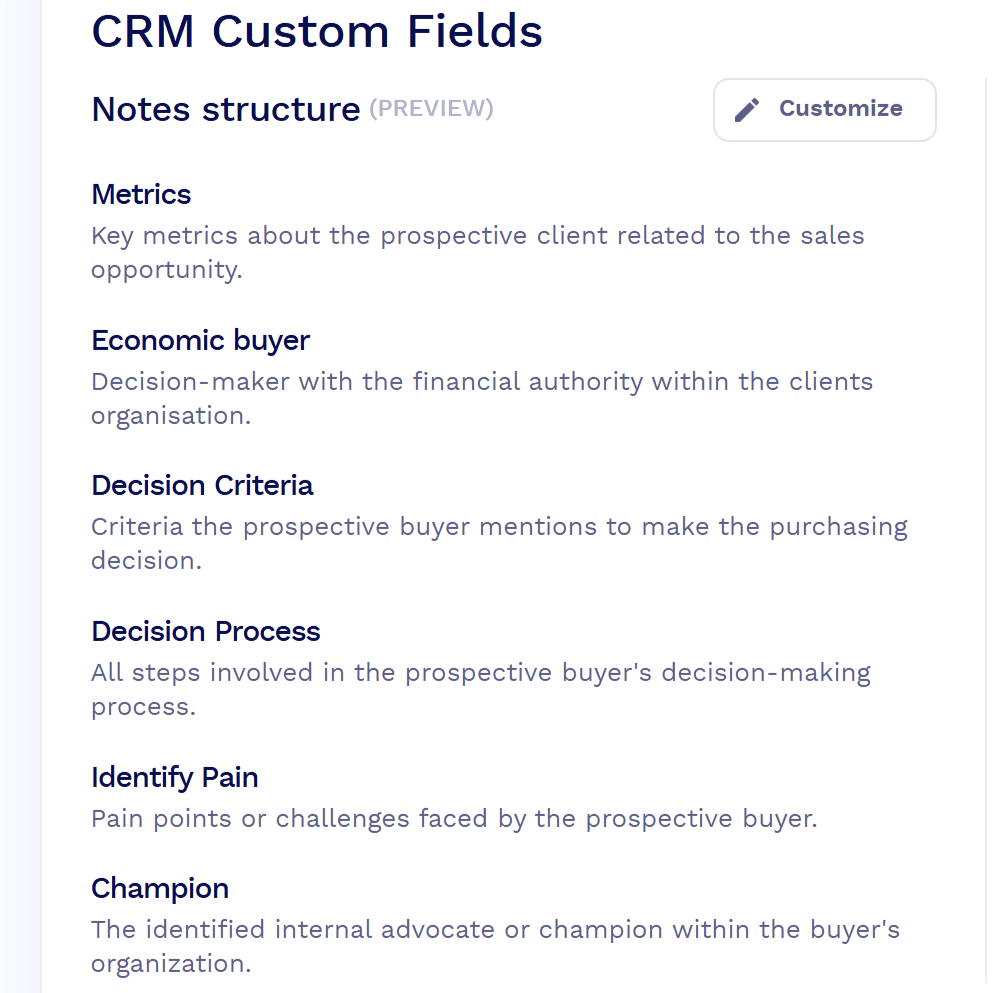
Never input CRM data manually again. With field mapping, tl;dv reads your meeting notes and writes the answers into the exact Pipedrive fields you choose. Automatically. After every relevant call.

Let’s say a discovery call covers budget, timeline, and who signs off. Map those template sections once, and every future call populates them on the deal by itself.

Keep in mind that template sections pair with fields one to one, and you map a single object at a time (Persons or Deals), so pick where each answer belongs at the start.

★★★★★★★★★★

"Automating tasks like... data entry is a game-changer for productivity"

Giri S. — Associate Vice President of Sales & Business Development · verified review on G2
Rated 4.7 / 5 on G2 across 537 reviews · 2M+ users · GDPR & SOC 2

Connect tl;dv to Pipedrive in One Minute

integrazioni tl;dv
tl;dv records from calendar.
CRM custom fields in tl;dv

Connect Your Account.

Add tl;dv from the Pipedrive Marketplace, or open the Integrations page in tl;dv and connect Pipedrive with OAuth.

Set the rules.

Decide whether calls log to the contact or the deal, and which meetings tl;dv records off your calendar.

Map the fields you care about.

This is an optional step, but it’s important if you want the pipeline to run itself.

Native, Zapier, or API: Pick Your Setup

Most teams never need anything more than the native integration.

When your workflows get ambitious and you’re spinning up new deals from calls, firing multi-step automations, or wiring meeting data into something you built yourself, you have two more options.

Percorso Ideale per What It Handles Piano
Pipedrive integrationNative Most sales & CS teams Auto-logs notes, summaries & recording links to the matched Person or Deal; maps notes to Pipedrive fields Pro & up
Zapier
Add-on
Custom triggers without code 5,000+ app workflows, auto-create deals from recordings, multi-step automations Pro & up
API & MCP server Developer RevOps & custom builds Programmatic access to recordings, transcripts & notes; lets an AI assistant act in your CRM Pro & up

Pipedrive Integration FAQ

Yes. It’s a native integration listed in the Pipedrive Marketplace. Calls you record in tl;dv log automatically to the right contact or deal. CRM sync is on Pro, Business, and Enterprise.


Install it from the Pipedrive Marketplace or connect Pipedrive from the tl;dv Integrations page, then authorize with OAuth. Setup takes about a minute and you can do it on your own account.

The AI summary, meeting notes, action items, meeting highlights, a full transcript (40+ languages), and a timestamped link back to the recording — logged as a completed Meeting activity.

Your choice. Set calls to log as a Meeting or Note on the contact, or as a Meeting on the deal, in the configuration settings.

tl;dv matches attendees by email and can create the record for you if it doesn’t exist, based on the automations you switch on.

Yes. Field mapping writes notes from your meeting template into standard or custom Pipedrive fields, one object at a time, with sections matched to fields one to one.

One-way. tl;dv pushes meeting data into Pipedrive; it doesn’t pull Pipedrive data back.

Not for the core integration. That’s native. Zapier or the API cover extras like creating new deals from calls, updating stages, or custom automations.

CRM sync starts on Pro and is included on Business and Enterprise. Free covers recording and transcription.

Yes: OAuth connection (no password stored), encrypted data, GDPR-compliant and SOC 2.


Right after the meeting, once the recording is transcribed and summarized. It’s usually within a minute or two.


Yes, choose which meetings auto-record from your calendar, so internal or personal calls stay out of the CRM.


Iniziare con tl;dv
Registrare, trascrivere, clip e condividere con Google Meet, Zoom e Microsoft Teams.

Integrazioni simili

Flussi di lavoro simili

Integrate senza problemi i dialoghi di Microsoft Teams, Zoom e Google Meet in Asana, assicurando che ogni milestone del progetto sia rafforzata dalle discussioni del team.
Unite la spontaneità delle conversazioni di Microsoft Teams con il mondo strutturato di Google Docs.
Ottenete di più dalle vostre interazioni con Zoom influenzando direttamente i record e le analisi di Salesforce.
Aggiornare i contatti Salesloft con gli appunti delle riunioni AI e i file di registrazione
Creare attività e pagine di Monday.com da appunti e file di registrazione di riunioni AI