


TL;DR: Ist RemNote im Jahr 2026 ein lohnenswerter Lernbegleiter?
Trotz einiger anfänglicher Startschwierigkeiten hat sich RemNote als eines der besten KI-Lerntools erwiesen, die ich bisher ausprobiert habe. Es war in der Lage, Informationen aus meinen hochgeladenen Dateien zu verarbeiten, diese auf leicht verständliche Weise aufzuschlüsseln und relevante Lernkarten und Quizfragen zu erstellen, die mir wirklich dabei geholfen haben, den Stoff zu lernen und im Gedächtnis zu behalten.
Was es für mich noch besser gemacht hat, war der hervorragende kostenlose Tarif. Die meisten Lerntools, die ich getestet habe, versuchen, einen so schnell wie möglich an einen Tarif zu binden. RemNote gibt dir Zeit, die meisten seiner Funktionen (mit Ausnahme von „Aufzeichnen“ und „Transkribieren“) auszuprobieren – mithilfe eines kreditbasierten Systems, das bewusst so konzipiert ist, dass alle bereits abgefragten Informationen gespeichert werden (damit keine Credits zweimal für dieselbe Sache verschwendet werden). Noch besser: Die Limits des kostenlosen Tarifs werden monatlich zurückgesetzt.
Allerdings bin ich bei meinem allerersten PDF-Upload auf eine Panne gestoßen, und es gab Momente, in denen die Kommunikation mit dem KI-Chat frustrierend war. Es sollte auch beachtet werden, dass sich die häufigsten Beschwerden der Nutzer auf die iOS-App beziehen, sodass diese für iPhone-Nutzer möglicherweise nicht die beste Wahl ist. Schließlich ist der Pro+AI-Tarif auch etwas teuer, insbesondere für Studierende.
Am besten geeignet, wenn: Sieanhand von PDFs oder Vorlesungsaufzeichnungen lernen müssen und am besten mit Lernkarten, Quizfragen und ausführlichen Erklärungen lernen.
Nicht empfehlen, wenn: Sie die Live-Transkription kostenlos ausprobieren möchten oder wenn Lernkarten und Quizze nicht zu Ihrem Lernstil passen. Ebenso sollten Sie als iOS-Nutzer die aktuellen Berichte zur Zuverlässigkeit der App noch einmal überprüfen.
Das Fazit: RemNoteist ein hochwertiges Tool, das mich mit seiner Fähigkeit beeindruckt hat, komplexe Informationen zu verarbeiten und sie schnell so wiederzugeben, dass ich sie besser verstehen und mir besser merken konnte. Es lohnt sich auf jeden Fall, den kostenlosen Tarif auszuprobieren, wenn du auf der Suche nach einem großartigen Tool zum Lernen bist.
RemNote ist ein leistungsstarkes KI-Lerntool, das bereits über 1 Million Schülern dabei geholfen hat, verschiedene Themen zu wiederholen. Es erfreute sich solcher Beliebtheit, dass es bereits 2021 in einer von General Catalyst, einer der größten Risikokapitalgesellschaften der Welt, angeführten Seed-Finanzierungsrunde 2,8 Millionen Dollar einnehmen konnte. General Catalyst veröffentlichte sogar einen Artikel darüber, warum genau das Unternehmen der Ansicht ist, dass sich eine Investition lohnt.
Allerdings hatte ich zu Beginn dieses RemNote-Testberichts keine allzu hohen Erwartungen. Ich hatte kürzlich Coconote, Turbo AI und StudyFetch ausprobiert und hatte Mühe, meine Begeisterung für KI-Lernhilfen aufrechtzuerhalten, die offensichtlich noch nicht ganz ausgereift waren – das galt insbesondere für die ersten beiden.
Aber ich bin froh, dass mich das nicht aufgehalten hat. RemNote hat sich als beeindruckender erwiesen als alle drei zusammen. Lies weiter unten meinen Erfahrungsbericht, um zu erfahren, warum.
Ehrliche Bewertung von RemNote: Wie hat es sich in meiner Praxis bewährt?
Ich habe RemNote heruntergeladen, um meine Russischkenntnisse zu verbessern. Ich wollte herausfinden, ob die App mir dabei helfen kann, Vokabeln besser abzurufen, aber auch, ob sie mir dabei helfen kann, Grammatikregeln besser zu verstehen.
Ein Hinweis: Ich bin freiberuflicher Autor für tl;dv, einen KI-Besprechungsassistenten, der aufzeichnet, transkribiert, Notizen macht und vieles mehr. Zwar gibt es einige Überschneidungen mit den Funktionen von RemNote, diese sind jedoch minimal. tl;dv konzentriert sich auf Unternehmensbesprechungen und Verkaufsgespräche, während RemNote für das Lernen konzipiert ist. Da ich die App als echter Nutzer ausprobiert habe, steckt hinter diesem Artikel keine voreingenommene Haltung. Dies sind lediglich meine persönlichen Eindrücke nach dem Ausprobieren des kostenlosen Tarifs.
Mein derzeitiger Sprachlernprozess umfasst drei Einzelstunden pro Woche mit einem menschlichen Lehrer. Ich nehme diese oft auf, um Notizen zu erstellen, die ich anschließend manuell durchsehe, um Lernkarten auf Quizlet zu erstellen. Mein Lehrer schickt mir außerdem PDF-Dateien, die größtenteils ungelesen in meinen Dokumenten liegen bleiben. Ich hatte gehofft, dass RemNote diesen Prozess komplett verändern und alles optimieren könnte.
Der erste Eindruck war nicht gerade toll, aber fangen wir mal mit der Einarbeitung an.
RemNote-Einführung: Wie einfach ist der Einstieg bei RemNote im Jahr 2026?
Die Einarbeitung bei RemNote verlief recht reibungslos. Ich kann mich nicht daran erinnern, dass mich zu Beginn irgendetwas besonders beeindruckt hätte, aber es gab auch keinen Anlass zur Sorge. Einfach und unkompliziert.

Es wurden alle grundlegenden Fragen gestellt, darunter auch: „Was möchtest du erreichen?“
Ich habe „Etwas auswendig lernen, um ein persönliches Lernziel zu erreichen“ ausgewählt, obwohl ich mir nicht sicher bin, inwieweit sich das tatsächlich auf die Erstellung des Dashboards auswirkt.
E-Mails von RemNote: Lesen oder nicht lesen?
RemNote hat mich überrascht, indem es mir schon am ersten Tag eine E-Mail geschickt hat, in der erklärt wurde, wie man aus jedem beliebigen Satz in Sekundenschnelle Lernkarten erstellen kann.

RemNote hat hier mein Interesse geweckt, indem es Lernkarten als eine der „einfachsten und effektivsten Lernmethoden“ bezeichnete. Da genau das meine Erwartungen an RemNote waren, habe ich dies sehr ernst genommen.
Sie haben sogar ein GIF in die E-Mail eingefügt, das Sie unten sehen können.
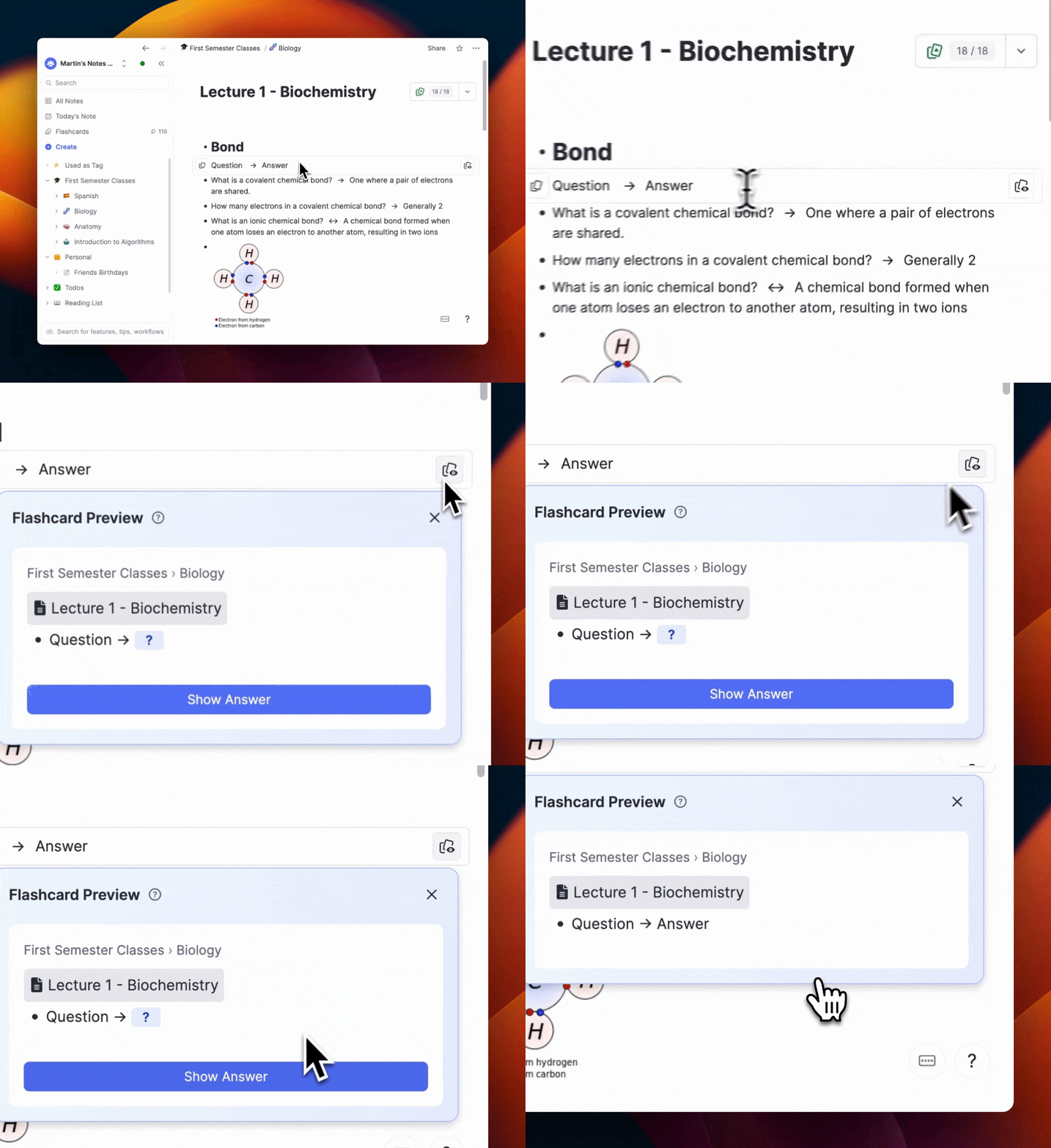
Aus diesem kurzen GIF ging mir nicht ganz klar hervor, wie das genau funktionierte, doch in der E-Mail wurde erklärt, dass ich einfach „==“ eingeben müsse und dann automatisch eine Verknüpfung zwischen Frage und Antwort hergestellt würde.
Als ich es ausprobieren wollte, erschien sogar ein kleines Hilfefenster.

Das machte es noch einfacher. Anstelle des doppelten Gleichheitszeichens konnte man stattdessen einfach die Tabulatortaste drücken. Ich habe es kurz ausprobiert, nur um zu sehen, wie es funktioniert. Überraschend einfach.

Wenn du möchtest, kannst du sogar eine KI nutzen, um eine Antwort für dich zu generieren. Ich brauchte allerdings keine KI, um mir zwei Buchstaben zu nennen.

Danach habe ich kurz auf dem „Flashcard“-Bildschirm nachgesehen, um sicherzugehen, dass es dort zu finden war und ich es in Zukunft auch tatsächlich nutzen konnte. Und tatsächlich war es ganz oben unter der Kategorie „Neu“ aufgeführt.
Weitere E-Mails
RemNote hat mir nicht nur am ersten Tag eine E-Mail geschickt. Eine ganze Woche lang habe ich jeden Tag eine E-Mail von ihnen erhalten, doch jede einzelne davon war darauf ausgerichtet, mir bestimmte Funktionen besser verständlich zu machen. Auch wenn es etwas überwältigend war, in so kurzer Zeit so viele E-Mails zu erhalten, waren diese doch sehr durchdacht zusammengestellt.
PDFs hochladen: Wie gut hat RemNote die Lernmaterialien verarbeitet?
Ich will ehrlich sein: Im März 2026 habe ich eine einzige PDF-Datei hochgeladen. Darin standen lediglich Vokabeln in russischer Sprache (Kyrillisch) mit der englischen Übersetzung daneben. Ich hatte gehofft, damit testen zu können, wie einfach es ist, Vokabelkarten zu erstellen. Das Ergebnis war jedoch so schlecht, dass ich einen ganzen Monat lang keine Lust mehr hatte, RemNote erneut zu nutzen.
Erstes Problem: Die PDF-Datei ließ sich nicht einmal ordnungsgemäß hochladen.

Ich habe es noch einmal versucht, und beim zweiten Mal hat es geklappt. Aber von da an wurde es nur noch schlimmer …
Hier ist das PDF, das ich eingegeben habe – zur Verdeutlichung.

Es fragte mich, wie gut ich mich mit dem Stoff auskenne. Ich antwortete: „Ich habe ein grundlegendes Verständnis“, und es erstellte Lernmaterialien für mich.
Ich dachte, das wäre ein einfacher Einstieg. Wie sehr konnte ich mich doch irren?

Zu diesem Zeitpunkt hielt ich RemNote für eine Farce. Ich klickte auf „Zusammenfassung lesen“ und wurde mit einem Pop-up-Fenster konfrontiert, in dem mir mitgeteilt wurde, dass das Programm verwirrt sei, da das PDF das kyrillische Alphabet und nicht das koreanische Hangul verwende. Ich wurde gebeten, zu präzisieren, was ich gerade lerne.
Obwohl dies eine gelungene Rettung in letzter Minute war, konnte ich anhand der Art und Weise, wie die KI von RemNote die russischen Wörter in der Nachricht geschrieben hatte, bereits ahnen, was kommen würde.

Die KI von RemNote verwendete das bekannte kyrillische Alphabet, dargestellt als „HosBpbIe cnoBa“.
Was ist passiert, als ich anhand des Vokabular-Dokuments Lernkarten erstellt habe?
Es hätte eigentlich eine einfache Aufgabe sein sollen, trotz der kleinen Hürde, dass es um Koreanisch ging. Ich dachte mir: Es kann doch nicht so schwer sein, ein Wort auf die Vorderseite einer Lernkarte und ein anderes Wort auf die Rückseite zu schreiben.
Ich hätte mich nicht mehr irren können.


Während der Einrichtung konnte ich höchstens 3–5 Karten erstellen. Das hat mich schon genervt. Das PDF enthielt Dutzende von Wörtern, aber ich hatte keine Möglichkeit, sie alle abzufragen.
Ich habe eine Eingabeaufforderung ausgefüllt und ausdrücklich darum gebeten, für jedes der übersetzten russischen Wörter im PDF-Dokument eine Lernkartei zu erstellen. Ich bin zwar kein professioneller Prompt-Engineer, aber ich dachte, das würde ausreichen, damit das System versteht, was ich meine.
Das habe ich bekommen.

RemNote hat mir sage und schreibe4 Lernkarten erstellt. Hier sind sie in ihrer ganzen Pracht:
- Auf der Vorderseite steht das englische Wort für „Entschuldigung“, auf der Rückseite das russische Wort für „Entschuldigung“.
- Auf der Vorderseite steht das russische Wort für „Entschuldigung“, auf der Rückseite das englische Wort für „Entschuldigung“.
- Auf der Vorderseite steht das englische Wort für „Hilfe“, auf der Rückseite das russische Wort für „Hilfe“.
- Auf der Vorderseite steht das russische Wort für „Hilfe“, auf der Rückseite das englische Wort für „Hilfe“.
Das war's.
Genial.
Vier ganze Lernkarten, von denen zwei identisch sind, nur in umgekehrter Reihenfolge, und von denen keine etwas mit meiner hochgeladenen PDF-Datei zu tun hat.
Da ich RemNote für ein absolutes Chaos hielt, habe ich es über einen Monat lang nicht mehr benutzt. Als ich wieder damit anfing, hatte ich die meisten dieser Fehler schon fast vergessen und beschloss, die Quiz-Funktion mit derselben hochgeladenen PDF-Datei auszuprobieren.
Wie wäre es mit der Quiz-Funktion von RemNote?
Als ich mich schließlich wieder mit RemNote beschäftigte, fiel es mir schwer, mich genau daran zu erinnern, was daran eigentlich so schlecht war. Und ich bin froh, dass ich es getan habe. Das Quiz war vielversprechend, wurde aber letztendlich durch die Verwechslung von Koreanisch und Russisch zunichte gemacht.


Das war ein ziemliches Durcheinander. Bei manchen Fragen ging es um koreanische Substantive, doch dann wurde für ein echtes russisches Substantiv das kyrillische Alphabet verwendet. In anderen Fällen wurden russische Adjektive abgefragt, wobei die Wörter jedoch in einer Mischung aus lateinischem und kyrillischem Alphabet angegeben wurden. Und wieder in anderen Fällen ging es um koreanische Adverbien, wobei das lateinische Alphabet verwendet wurde. Da war wirklich kein System zu erkennen.
Ich habe die Funktion „Ask AI Tutor“ genutzt, um der Sache auf den Grund zu gehen, und dort geschrieben, dass „es wohl einen Kodierungsfehler im Ausgangsmaterial gegeben haben muss“.

Aus diesem Grund dachte ich mir, dass es höchste Zeit wäre, einen neuen PDF-Upload zu versuchen. Ich betrachtete das Ganze nun mit einem neuen Blick und erkannte unter der fehlerhaften koreanischen Übersetzung einen Funken Potenzial.
Wie gut hat RemNote komplexere PDF-Dateien verstanden?
Anstatt ihm ein Vokabelblatt zu geben, habe ich ihm eine neue PDF-Datei eingegeben, die ich erhalten hatte und die sich speziell mit dem Unterschied zwischen den vier wichtigsten Bewegungsverben im Russischen befasste. Darin werden die Unterschiede erklärt und Beispiele aufgeführt. Ich dachte, das wäre ein viel besseres Lernmaterial für RemNote.
Ausnahmsweise hatte ich einmal recht.

RemNote hat nicht nur den zweiten PDF-Upload verstanden, sondern ihn auch klar und verständlich erklärt. Ich konnte mir die Erklärung durchlesen und die Informationen viel leichter verarbeiten. Das Dashboard zeigte außerdem meinen Fortschritt sowie verschiedene Lerntechniken an, die mir zur Verfügung standen – das war wirklich toll.

Dieses kleine Feld, das auf der rechten Seite des hochgeladenen Dokuments erscheint, bietet die Möglichkeit, Lernkarten, Quizze oder Zusammenfassungen zu erstellen. Es gibt einen KI-Tutor, mit dem man sich über das PDF austauschen kann, und sogar zusätzliche Übungs- und Lernmaterialien in einem Dropdown-Menü. Außerdem gibt es einen „Mastery Tracker“, der den Überblick darüber behält, was ich gelernt habe und womit ich noch Schwierigkeiten habe.
Das war tatsächlich ziemlich hilfreich, denn jedes Mal, wenn ich Fragen zum Lernstoff beantwortete, merkte sich das Programm, was ich richtig und was ich falsch beantwortet hatte. Manchmal, wenn ich zu dieser Seite zurückkehrte, wurde sie stattdessen so angezeigt:

Wenn ich etwas falsch gemacht habe, erschien ein riesiges rotes Feld mit der Meldung: „2 Themen erfordern Aufmerksamkeit“.
Das hat meine Aufmerksamkeit geweckt und mich sofort dazu veranlasst, auf die Schaltfläche „2-Minuten-Zusammenfassung lesen“ zu klicken. Tatsächlich habe ich so schnell darauf geklickt, dass ich keinen Screenshot vom ursprünglichen Bild machen konnte; daher stammt dieser hier aus einer PDF-Datei, die ich später hochgeladen habe.
Es hat mir außerdem riesigen Spaß gemacht, mir den Mastery Tracker anzusehen und zu erkennen, wie nah ich schon daran war, den gesamten Stoff aus dem PDF zu lernen.

Wie Sie sehen können, wird überprüft, ob ich die Zusammenfassungen gelesen habe (bei umfangreicheren PDF-Dateien gibt es mehrere Zusammenfassungen, die in verschiedene Kategorien unterteilt sind), die Lernkarten genutzt habe oder Quizze absolviert habe.
Außerdem werden alle Elemente der PDF-Lernmaterialien einzeln aufgeschlüsselt und mit einer Punktzahl von 100 % bewertet. Hier sieht man, dass mein Thema „One-Direction-Bewegung“ eine Schwäche war. Ich hatte 0 %, weil ich zwei Fragen dazu falsch beantwortet hatte. Das war eine großartige Möglichkeit, meine Schwächen zu erkennen und gezielt dort zu üben, wo ich noch Defizite hatte, anstatt mich auf Dinge zu konzentrieren, die ich bereits gut beherrschte.
Mittlerweile machte mir RemNote tatsächlich Spaß, und ich begann,wirklich Nutzendaraus zu ziehen. Also tat ich, was jeder vernünftige Mensch tun würde: Ich lud alles hoch, was ich konnte.

Ich habe einen Ordner „Russisch“ angelegt und sechs weitere Dateien hochgeladen, jeweils eine für jeden der sechs Grammatikfälle.
Zu diesem Zeitpunkt war ich bereits positiv überrascht, wie viel ich aus dem kostenlosen Tarif herausholen konnte. Bei manchen RemNote-Alternativen sind nicht einmal so viele Uploads erlaubt, ganz zu schweigen von der Anzahl der Credits, die ich für die Erstellung von Lernkarten, Quizfragen und Zusammenfassungen nutzen konnte.
RemNote-Lernkarten: Wie nützlich waren sie beim Lernen?
Bei meinem früheren Versuch mit den Lernkarten von RemNote hatte ich also ein PDF verwendet, das offensichtlich nicht mit dem System kompatibel war. Es gab offenbar einen Fehler beim Hochladen des PDFs. Es war an der Zeit, die Lernkarten von RemNote noch einmal von Grund auf auszuprobieren: Und ich bin froh, dass ich ihnen eine weitere Chance gegeben habe, denn sie gehörten zu den besten, die ich je ausprobiert habe.
Allerdings war ich etwas beunruhigt, als die „RemNote Automatic Button Basher Intelligence Technology“ (RABBIT) auftauchte und anfing, alle meine Lernkarten in rascher Folge für mich zu beantworten …

Bedenkt, dass ich RemNote seit über einem Monat nicht mehr benutzt hatte und zuvor auch nur kurz. Ich dachte mir: Was zum Teufel??
Es stellte sich heraus, dass es der 1. April war und das ein Streich von RemNote war. Die haben mich reingelegt, das gebe ich zu.
Nachdem der Spaß vorbei war, habe ich den Hasen gefeuert und mich an die Arbeit gemacht.
Es gab allerdings etwas Seltsames. Wie man auf dem Screenshot oben sehen kann, gab es nirgendwo ein Feld, in das ich meine Antwort tatsächlich eingeben konnte. Das ist zwar nicht unbedingt notwendig, vor allem nicht bei Lernkarten, aber ich hatte es erwartet, da die Fragen als solche formuliert waren. Bei Quizlet gebe ich meine Antworten zum Beispiel auch nicht ein, aber dort handelt es sich lediglich um einfache Eins-zu-Eins-Übersetzungen.
Ich musste die Option zum Eingeben meiner Antworten manuell hinzufügen (zu finden im Dropdown-Menü „Einstellungen“ […]). Sobald das erledigt war, funktionierten die Lernkarten hervorragend.

Was mir an den Lernkarten von RemNote am besten gefallen hat, war, dass ich auch Feedback vom KI-Tutor erhalten konnte. Egal, welche Antwort ich gab, der KI-Tutor konnte sie bewerten und mir sagen, wo ich richtig lag oder wo ich noch ein wenig von der exakten Antwort abgewichen war.
Das führte zu gemischten Ergebnissen. Wenn ich die Antwort zwar im Großen und Ganzen richtig hatte, aber ein wichtiges Detail übersehen hatte, wies mich die Lernkarten-KI selten darauf hin (wie du jedoch bald sehen wirst, tat dies die Quiz-KI sehr wohl).
Im folgenden Beispiel sehen Sie, dass mir mitgeteilt wurde, dass meine Antwort richtig war. Zwar war meine Aussage korrekt, doch habe ich dabei etwas Wichtiges außer Acht gelassen: Das Verb bezieht sich ausdrücklich auf das Gehen zu Fuß, nicht auf das Fahren in einem Fahrzeug. Das ist deshalb wichtig, weil ein Teil meiner Antwort auch auf ein anderes, ähnliches Verb zutreffen könnte, ich jedoch nach genau diesem bestimmten Verb gefragt wurde.

In der Erklärung der KI wird zwar erwähnt, dass das Verb „eine zu Fuß zurückgelegte Hin- und Rückreise beschreibt“, aber ich werde nicht auf diese kleine Ungenauigkeit meinerseits hingewiesen.
Was mir wirklich Sorgen bereitete, war, als ich eine Lernkarte hatte, bei der ich auf Russisch tippen musste. Ich habe eine englische Tastatur, und obwohl ich mir eine russische Tastatur heruntergeladen habe, zwischen der ich umschalten kann, habe ich das Tippen damit noch nicht richtig gemeistert, weil ich die Buchstaben nicht sehen kann.
Ich habe mich stattdessen entschieden, es phonetisch zu schreiben. Zu meiner Überraschung hat das tatsächlich funktioniert!

Bei der Bewertung wurde mir angezeigt, dass meine Antwort richtig war, aber dann wurde die Lösung in kyrillischer Schrift angezeigt. Das war sehr hilfreich.
Der einzige Nachteil dabei war, dass man als falsch gewertet wird, wenn man die Transkription nicht ganz korrekt eingibt – selbst wenn man eigentlich das richtige Wort bzw. die richtigen Wörter im Sinn hatte. Das ist aber kein Weltuntergang. Für solche Situationen gibt es Pop-up-Tastaturen.
RemNote-Quizze: Inwieweit haben sie mir beim Lernen geholfen?
Die Quizze von RemNote haben mich tatsächlich überrascht. Bei anderen KI-Lerntools, die ich ausprobiert habe, wie Coconote und Turbo AI, ließen die Quizze viel zu wünschen übrig. Ich konnte mir nie wirklich vorstellen, sie zu nutzen. Bei RemNote hingegen gelang es dem Programm, meine PDF-Dateien so zu verarbeiten, dass der Quiz-Bereich wirklich nützlich war.
Als Erstes fiel mir auf, dass die Erklärungen der KI viel besser waren als die Lernkarten. Wenn ich beispielsweise eine Antwort teilweise richtig hatte, wies sie mich ausdrücklich darauf hin, welche Teile richtig waren und was mir gefehlt hatte. Im folgenden Beispiel hatte ich die Frage leicht falsch verstanden. Was ich gesagt hatte, war zwar richtig, aber ich hatte die Frage nicht ganz beantwortet. Die KI hat mich darauf hingewiesen, was beim Lernen super hilfreich ist.

Mir hat auch gefallen, wie RemNote eine Vielzahl unterschiedlicher Fragen in die Quizze einbaut. Es bietet zwar nicht ganz so viele Anpassungsmöglichkeiten wie StudyFetch, wenn es darum geht, Abwechslung zu schaffen, aber die Fragen waren gut genug, um mich zum Weitermachen zu motivieren. StudyFetch hingegen war im Umgang mit mehreren Sprachen nicht besonders gut.
RemNote bietet verschiedene Fragetypen, von Fragen, bei denen man eine Antwort eintippen muss, bis hin zu Multiple-Choice-Fragen und vielem mehr dazwischen.

Was mir an den Quizzen von RemNote außerdem besonders gut gefallen hat: Sobald man eines abgeschlossen hat, gelangt man zu einer Seite, auf der einem die eigenen Stärken und Schwächen aufgezeigt werden. Dort wird hervorgehoben, welche Themen noch wiederholt werden müssen, und man erfährt, wie viele Fragen man richtig beantwortet hat und wie lange man dafür gebraucht hat. Außerdem kann man jede Frage noch einmal genauer betrachten, um eine ausführlichere Erklärung zu erhalten.
Das hilft dir dabei, deine Lernziele im Blick zu behalten, und ich fand es wirklich hilfreich, um bestimmte Inhalte aus den hochgeladenen Materialien zu lernen.

Das Einzige, was ich während meiner Tests mit RemNote nicht ganz herausgefunden habe, ist, wie man Quizze oder Lernkarten erstellt, die auf mehreren Lernmaterialien gleichzeitig basieren. Ich habe zum Beispiel für jeden der sechs russischen Grammatikfälle eine eigene PDF-Datei hochgeladen, konnte mich aber nur einzeln, also jeweils einen Fall nach dem anderen, dazu abfragen. Es wäre super hilfreich gewesen, mich zu allen sechs Fällen gleichzeitig abfragen zu können.
Allerdings könnte ich das Problem – genau wie zuvor bei der Tastatur – manuell beheben, wenn ich es wirklich wollte. Ich könnte diese Dateien zu einer einzigen PDF-Datei zusammenführen und diese stattdessen hochladen. Das hätte ich auch versucht, wenn meine kostenlosen Uploads nicht bereits aufgebraucht wären. Das Problem ist, dass KI diese Aufgaben eigentlich für uns vereinfachen soll. Es wäre eine einfach hinzuzufügende Funktion, die viele Vorteile mit sich bringen würde.
RemNote-Gamification: Wie gut motiviert sie dich zum Üben?
Was mich an RemNote außerdem überrascht hat: Die Gamifizierung war überraschend gut. Ich habe gemerkt, dass ich einfach weiterkommen wollte, nur damit sich alles vollständig und zu 100 % abgeschlossen anfühlt. Auch wenn ich mich anfangs vielleicht darüber lustig gemacht habe, hatte ich doch wirklich das Gefühl, der Meisterschaft immer näher zu kommen.
Ich habe bereits den Lernfortschritts-Tracker und die Quiz-Ergebnisse angesprochen, die deine Punktzahlen anzeigen, aber es gab noch viele andere kleine Details, die mir ein echtes Gefühl des Fortschritts vermittelt haben. Und das war nicht nur eine Illusion. Ich konnte mir die Informationen tatsächlich besser merken.


RemNote bietet Tagesziele, Serien und sogar wöchentliche Zusammenfassungen, die dir zeigen, wie viele Dinge du vergessen hast im Vergleich zu den Informationen, die du behalten hast. Es gibt sogar grafische Darstellungen wie Diagramme, die zeigen, wie viel du jeden Tag gelernt hast. Das ist gut durchdacht und ein subtiler, aber wirkungsvoller Motivationsfaktor.

RemNote-Zusammenfassungen: Wie gut funktionieren sie eigentlich?
Die Zusammenfassungen von RemNote sind eine weitere Funktion, die mich besonders beeindruckt hat. Sie waren nicht nur prägnant und zugleich ausführlich, sondern haben auch die Inhalte meiner Lernmaterialien wirklich gut aufgeschlüsselt.
Was mir hier besonders gut gefallen hat: Wenn man im Quizbereich (oder anderswo) einige Fragen falsch beantwortet, leitet das Dashboard von RemNote einen zu dem Teil der Zusammenfassung weiter, der genau diesen Abschnitt behandelt. Es scrollt einen zum entsprechenden Abschnitt und hebt ihn durch einen goldenen Rahmen hervor, damit er besser ins Auge fällt.
Hier ist ein Beispiel.

Völlig klar, oder?
Was mir an den Zusammenfassungen von RemNote außerdem besonders gut gefallen hat, ist, dass man jeden beliebigen Teil der Zusammenfassung markieren kann und die KI ihn einem dann sofort und automatisch erklärt. Es ist fast so, als würde sie deine Gedanken lesen und allein anhand der Markierung deine Frage vorhersagen.

Das ist mir in der gesamten Zusammenfassung gelungen, sodass wirklich jeder einzelne Punkt leicht verständlich war. Wenn ich etwas nicht verstanden habe, hat eine einfache Markierung das Problem gelöst. Außerdem gibt es auf der rechten Seite den „Ask AI Tutor“, über den man detailliertere Fragen stellen kann.
Wie nützlich ist der „Ask AI Tutor“ von RemNote?
Einer der Nachteile von RemNote ist, dass die KI ein wenig frustrierend ist. Sie übernimmt niemals die Verantwortung für irgendetwas, selbst wenn es Widersprüche gibt. Sie deckt zwar den Widerspruch auf und erklärt mir, dass ich deshalb verwirrt bin, weigert sich aber anzuerkennen, dass sie es war, die mir die Zusammenfassung überhaupt erst geliefert hat.
Einmal hat es die PDF-Datei für mich zusammengefasst, mir eine Frage dazu gestellt, und als ich mit einem direkten Zitat aus der Zusammenfassung antwortete, hat es meine Antwort als falsch gewertet und eine andere Regel angeführt (die es zwar in der Realität gibt, die aber nicht im Ausgangsmaterial enthalten war).
Als ich darauf klickte, wurde mir lediglich mitgeteilt, dass diese Regel im PDF nicht ausdrücklich erwähnt wird, und man schloss daraus, als ob dies den eigenen Standpunkt beweisen würde.

Es ist jedoch anzumerken, dass der KI-Tutor, wenn er funktionierte, seine Aufgabe gut erfüllte. Er konnte Dinge, die mir sonst Unklarheiten bereiteten, verständlich erklären, darunter auch bestimmte grammatikalische Endungen bei Adjektiven, Substantiven oder Adverbien.

Insgesamt fand ich es hilfreich, aber manchmal auch etwas schwierig.
Was mir besonders gut gefallen hat, ist, dass der KI-Tutor beim Lesen der Zusammenfassung auf der rechten Seite mehrere Fragen zusammenstellt. Ähnlich wie bei der Quiz-Funktion können diese Fragen entweder direkt oder nach dem Lesen der Zusammenfassung beantwortet werden, um zu zeigen, dass man den Stoff verstanden hat. Auch diese Fragen fließen in den Lernfortschritt im Bereich „Beherrschung“ ein.
Mir sind hier hin und wieder ein paar kleinere Fehler aufgefallen. Einmal hat es mir zum Beispiel bereits die Antwort angezeigt.

Das ist bei all meinen Tests nur einmal vorgekommen.
Ein anderes Mal bekam ich Punktabzug wegen der zuvor erwähnten falschen Transkription. Was mir an den falschen Antworten jedoch gefiel, war, dass man sofort zu den richtigen Informationen in der Zusammenfassung weitergeleitet wurde und diese hervorgehoben wurden, sodass man zurückgehen und genau diesen Teil nachlesen konnte.

Das ist eine unglaublich nützliche Funktion, die wirklich dabei helfen kann, Wissen im Gedächtnis zu verankern.
RemNote im Überblick: Hat es meine Erwartungen erfüllt?
Ganz ehrlich? Ich hatte keine großen Erwartungen an RemNote, vor allem nachdem mein erster Versuch, das Tool zu nutzen, zu einigen lächerlich schlechten Ergebnissen geführt hatte. Doch RemNote hat sich zu einem der besten KI-Lerntools entwickelt, die ich bisher verwendet habe.
Tatsächlich hat es mir so gut gefallen, dass ich ernsthaft darüber nachdenke, das kostenpflichtige Abonnement auszuprobieren. Ich habe den Schritt noch nicht gewagt, aber wenn ich es tue, werde ich hier wieder vorbeischauen, um meine Eindrücke zu den erweiterten Funktionen (Audioaufzeichnung) zu teilen.
Ich würde den kostenlosen Tarif ohne zu zögern weiterempfehlen. Im Gegensatz zu vielen anderen kostenlosen Tarifen in dieser Branche ist der von RemNote tatsächlich nützlich. Man erhält nicht nur genügend Credits, um wirklich zu sehen, wie es funktioniert, sondern diese werden auch jeden Monat erneuert. Noch besser: RemNote löscht niemals Inhalte, für die man einen Credit verbraucht hat, sodass man auch später wieder zurückkommen kann und die Lernmaterialien immer noch vorhanden sind.
Was halten echte Nutzer im Alltag von RemNote?
Genug zu meiner Meinung – was sagen echte Abonnenten über RemNote? Ich habe alle großen Bewertungsplattformen von Drittanbietern sowie Reddit, X und YouTube durchforstet, um herauszufinden, was – wenn überhaupt – die Leute dazu sagen.
Bewertungen von RemNote auf Plattformen von Drittanbietern
Ich habe auf Capterra, G2, TrustPilot und JustUseApp nach Bewertungen zu RemNote gesucht. Auf Capterra gab es keine, auf G2 nur eine veraltete Bewertung aus dem Jahr 2023, während JustUseApp 35 und TrustPilot 9 Bewertungen aufweist. Aufgrund der geringen Anzahl habe ich auch im Chrome Web Store nachgeschaut, allerdings handelt es sich bei der Chrome-Erweiterung um RemNote Clipper und nicht um RemNote selbst.
Auf JustUseApp und TrustPilot erhielt RemNote bei insgesamt 44 Bewertungen eine Gesamtbewertung von 4,53 von 4.
Beginnen wir zunächst mit den aktuellsten TrustPilot-Bewertungen: Diese sind überwiegend positiv.

Diese Bewertungen von MJ und Eliot sind die einzigen beiden RemNote-Bewertungen aus dem Jahr 2026 auf TrustPilot. Im Idealfall gäbe es mehr davon, aber zwei positive Bewertungen sind besser als gar keine.
MJ sagte, er „versuche, eine Alternative zu Quizlet zu finden, weil deren Werbung so aufdringlich ist“, und fügte hinzu, dass die Karteikarten-Funktion von RemNote „fantastisch“ sei. Außerdem bezeichneten sie die Benutzeroberfläche als„blitzsauber“.
Eliot stimmte zu. Er sagte: „Der Aspekt mit den Lernkarten ist einfach perfekt.“ Besonders gefiel ihm, dass er die App auch unterwegs nutzen und so gleichzeitig den Stoff wiederholen konnte. Ein großes Lob:„Ohne diese App wäre ich aufgeschmissen.“
Wenn du ins Jahr 2025 zurückspringst, bekommst du Lilys 2-Sterne-Bewertung.

Lilys Bewertung zu RemNote stammt aus dem August 2025, daher ist sie möglicherweise nicht ganz so aktuell wie die beiden vorherigen. Sie beginnt jedoch positiv und schreibt: „RemNote hat eine sehr benutzerfreundliche Oberfläche.“ Ihre Erfahrung wurde jedoch getrübt, als sie die Lernkarten in einer bestimmten Reihenfolge nutzen wollte, was ihr jedoch nicht möglich war. Sie war frustriert, da sie den Pro-Tarif speziell erworben hatte, um die Funktion „In Reihenfolge lernen“ zu nutzen, nur um festzustellen, dass eine richtig beantwortete Karte vollständig verschwindet und anschließend ohne die ursprünglich vorhandenen Multiple-Choice-Antworten wieder erscheint. Stattdessen kann man nur zwischen „Überspringen“, „Vergessen“ oder „Erinnert“ wählen.
Lilys Hauptkritikpunkt ist, dass„es keine Möglichkeit gibt, mithilfe der verteilten Wiederholung in einer logischen Reihenfolge zu lernen“.
Auf JustUseApp hat RemNote eine ordentliche Anzahl an Bewertungen, doch die Plattform zeigt nicht an, wann diese Bewertungen abgegeben wurden, sodass man nicht erkennen kann, ob sie aktuell oder veraltet sind.

Die meisten negativen Bewertungen für RemNote beziehen sich auf die mobile App. Viele Nutzer sagen, die mobile App hinke der Browser-Version (die ich bisher genutzt habe) weit hinterher. Ein anderer Nutzer war zwar insgesamt mit der App zufrieden, verlor jedoch ein wenig das Vertrauen in RemNote, als der Kundensupport nur langsam reagierte und die Prüfungen kurz bevorstanden.

RemNote hat größtenteils 5-Sterne-Bewertungen erhalten, doch im Sinne eines konstruktiven Feedbacks habe ich einige der Bewertungen aus dem oberen mittleren Bereich mit aufgenommen.
Ein Nutzer lobte die Veröffentlichung der iOS-App, wünschte sich jedoch die Möglichkeit, PDFs auch aus anderen Quellen zu exportieren. Ein anderer meinte, das Abonnement lohne sich und die App werde zu seinem wichtigsten Werkzeug zum Erstellen von Notizen werden.
Zahlreiche Nutzer loben die Funktion der verteilten Wiederholung, die Lily nicht mochte.#
Bewertungen im Chrome Web Store für RemNote Clipper
Mit einer Bewertung von 4,6/5 aus 23 Bewertungen ist der RemNote Clipper bei denjenigen beliebt, die ihn ausprobiert haben. Allerdings gibt es seit 2024 nur zwei Bewertungen. In einer davon, vom Januar 2026, wird die Möglichkeit gefordert, die RemNote-Seite in einem separaten Tab zu öffnen – für Browser, die das Seitenpanel nicht unterstützen.
Mitte 2025 bewertete ein Nutzer die App mit 3 Sternen und gab an, der einzige Nachteil sei, dass jedes gespeicherte Wort einer Webseite eine neue Datei erstelle, sodass er am Ende viele unnötige Dateien habe.
Was sagen die Nutzer auf Reddit über RemNote?
Wenn Sie wissen möchten, was die Leute wirklich von einem Produkt halten, schauen Sie bei Reddit vorbei. Dort lassen die Leute oft ihrem Frust freien Lauf, daher bietet sich dort ein guter Einblick in die Wahrnehmung eines Produkts. Was mich überrascht hat, als ich bei Reddit vorbeigeschaut habe, war, dass RemNote dort eine recht aktive Community hat. Und nicht nur das: Auch RemNote selbst ist in den Kommentaren aktiv und geht proaktiv auf Probleme ein, um den Nutzern zu helfen.
Nehmen wir zum Beispiel diesen Thread vom 14. April 2026, in dem die iOS-App kritisiert wird und behauptet wird, sie sei, solange er sich erinnern könne, „grundsätzlich unzuverlässig“ gewesen.

Der Nutzer „Nihilistic-Overdrive“ sagt, er finde das Konzept großartig, aber die iPad-App treibe ihn in den Wahnsinn. Viele Kommentatoren stimmen darin überein, dass die iPad-App von RemNote unterdurchschnittlich läuft, einfriert oder gerade dann nicht funktioniert, wenn man sie braucht. Es herrscht fast einhellige Übereinstimmung darüber, dass die App unzuverlässig ist. Ich besitze keine Apple-Geräte und kann die RemNote-App daher nicht testen, aber ich kann sagen, dass die Browser-Version keine derartigen Probleme hatte.
Was mir daran aber besonders gut gefallen hat, war, dass es einen angehefteten Kommentar gab: eine Antwort von RemNote selbst.

RemNote hat das Problem nicht nur anerkannt und sich dafür entschuldigt, sondern auch einen Fix veröffentlicht und empfohlen, die App zu aktualisieren.
Im RemNote-Subreddit gibt es mehr oder weniger jeden Tag neue Beiträge. Dort herrscht reges Treiben, das insgesamt positiv geprägt ist, abgesehen von gelegentlichen Hinweisen auf Fehler oder feature-Wünschen. Es scheint ein großartiger Ort für Nutzer zu sein, um sich auszutauschen und ihre Frustrationen oder Erfolge zu teilen. Einige Nutzer berichten sogar über ihre täglichen Serien.

Alles in allem scheint Reddit ein guter Ausgangspunkt zu sein, wenn man schnell Kontakt zu RemNote aufnehmen möchte.
Was sagen Nutzer über RemNote auf X und YouTube?
Bei X ist es relativ ruhig. RemNote hat einen Account und veröffentlicht halbwegs regelmäßig Updates, doch diese finden nicht besonders viel Resonanz, und es gibt insgesamt nicht allzu viele Beiträge über die Plattform.
Auf YouTube schien es letztes Jahr oder früher mehr Videos zu geben, aber in letzter Zeit sind keine mehr erschienen. Hier ist das beliebteste Video aus dem Jahr 2025. Es bietet einen guten Einblick, wie RemNote in Echtzeit für verschiedene Funktionen genutzt wird.
Auch die Kommentare zu dem Video sind überwiegend positiv. Ein Nutzer schreibt: „Am Ende des Videotitels sollte kein Fragezeichen stehen. Es ist zweifellos die beste Notiz-App für Schüler und Studenten“, während ein anderer die bereits erwähnten iOS-Fehler anspricht.

Preise für RemNote: Wie viel kostet RemNote im Jahr 2026?
Im Gegensatz zu vielen Mitbewerbern von RemNote gibt es hier tatsächlich eine übersichtliche Preisseite. Man weiß genau, worauf man sich einlässt und wie viel die einzelnen Leistungen kosten. Hier ist eine Aufschlüsselung.
Es gibt drei Tarife:
- Frei ($0)
- Pro (10 $ pro Monat oder 96 $ bei jährlicher Abrechnung)
- Pro mit KI (20 $ pro Monat oder 216 $ bei jährlicher Abrechnung)

Der kostenlose Tarif umfasst unbegrenzt viele Notizen, Lernkarten und synchronisierte Geräte. Er umfasst 3 mit Anmerkungen versehene PDF-Dateien, 5 Bildausblendungskarten und 3 handschriftliche Notizen. Außerdem erhalten Sie 100 KI-Credits, die monatlich erneuert werden.
Mit dem Pro-Tarif erhalten Sie unbegrenzte Möglichkeiten zur PDF-Annotation, zum Ausblenden von Bildern sowie zur Nutzung von Tabellen und Vorlagen. Er umfasst den Prüfungsplaner, handschriftliche Notizen und Sie erhalten 1.000 KI-Credits pro Monat.
Was die Pro-Version mit KI betrifft, so stehen Ihnen deutlich höhere Limits zur Verfügung: 20.000 KI-Credits.
Die kostenlose Version reicht aus, um die App auszuprobieren. Die Pro-Version ist nützlich, und ich überlege mir selbst, sie zu kaufen. Die Pro-Version mit KI ist für diejenigen gedacht, die viele Prüfungen vor sich haben und RemNote täglich nutzen werden.
RemNote-Alternativen: Welches Tool eignet sich 2026 am besten zum Lernen?
Im Jahr 2026 kann die Auswahl des richtigen KI-Lerntools überwältigend wirken. RemNote hat sich eine treue Anhängerschaft unter ambitionierten Studierenden und Wissensarbeitern aufgebaut, doch sein Ruf, komplex zu sein, kann Neulinge abschrecken, noch bevor sie überhaupt angefangen haben. Die kostenlose Version vermittelt Ihnen einen authentischen Eindruck vom System, doch aufgrund der steilen Lernkurve erfordert es echtes Engagement, bevor Sie den vollen Nutzen daraus ziehen können.
Welche Tools sind also Ihre Zeit wert? Das hängt ganz davon ab, wofür Sie sie benötigen.
Werfen wir einen Blick auf die besten KI-Lern-Apps, die das Jahr 2026 zu bieten hat. Ich habe „ tl;dv “ mit aufgenommen, um zu zeigen, wie sich KI-gestützte Meeting-Intelligenz von reinen Lernhilfen unterscheidet.
| Tool | Kernidee | Am besten für | Ausgaben | Interaktionsniveau | Stärke | Schwäche | Lernphase |
|---|---|---|---|---|---|---|---|
| RemNote | Wissenssystem | Ernsthafte Studenten | Verknüpfte Notizen + verteilte Wiederholung | Sehr hoch | Zweites Gehirn + Gedächtnis | iOS-Apps erhalten viele Beschwerden | Meisterschaft |
| StudyFetch | All-in-One-Lernplattform | Prüfungsvorbereitung für die meisten Fächer | Notizen, Lernkarten, Quizze, Podcasts, Nachhilfestunden | Sehr hoch | Umfassendes Toolkit aus Ihren eigenen Materialien | Nur eine Sprache, Probleme bei der Rechnungsstellung | Auswendiglernen & Verstehen |
| Turbo-KI | Aktiver Rückrufgenerator | Prüfungen und Auswendiglernen | Notizen, Karteikarten, Quiz, Podcasts | Hoch | Wandelt Inhalte in Lernmaterialien um | Die Genauigkeit variiert | Auswendiglernen |
| Coconote | Vortragszusammenfassung | Vorlesungen an der Universität | Notizen, Quiz, Lernkarten, Spiele | Niedrig | Übersichtliche, gut strukturierte Notizen | Passives Lernen | Verstehen |
| Memrizz | Gedächtnisorientiertes Lernen | Sprach- und faktenlastige Themen | Karteikarten, verteilte Wiederholung | Sehr hoch | Auf Kundenbindung ausgerichtet | Schwache Notenerfassung | Langfristige Aufbewahrung |
| Raena KI | Persönlicher KI-Tutor | Komplexe Themen | Erklärungen, angeleitetes Lernen | Sehr hoch | Erklärt Ideen | Weniger Automatisierung | Beherrschung des Konzepts |
| Feynman KI | Durch Lehren lernen | Tiefes Verständnis | Vereinfachte Erklärungen | Hoch | Klarheit schaffen | Kein Notensystem | Verstehen |
| tl;dv | Meeting Intelligence | Anrufe und Teamgespräche | Transkripte, Zusammenfassungen, Aktionspunkte | Mittel | Zusammenarbeit & Suche | Nicht zum Lernen | Zusammenarbeit |
Um ganz offen zu sein: Bis April 2026 habe ich RemNote, StudyFetch, Turbo AI und Coconote persönlich ausprobiert. Ich arbeite mich jedoch nach und nach durch die Liste.
Die meisten bieten kostenlose Testversionen oder Tarife an, sodass Sie sie selbst ausprobieren können. Einige bieten keine Audioaufzeichnung an – wenn Sie diese Funktion benötigen, sollten Sie daher sorgfältig auswählen. Andere sind auf bestimmte Nischen ausgerichtet; prüfen Sie daher unbedingt, ob das Programm Ihren Anforderungen entspricht.
Alternativen zu RemNote: Zusammenfassung
- Bestes Wissenssystem: RemNote
- Bester Allrounder: StudyFetch
- Ideal für die mühelose Notizerstellung: Coconote
- Am besten für das Langzeitgedächtnis: RemNote oder Memrizz (habe ich noch nicht getestet)
- Am besten für schwierige Fächer: Raena oder Feynman
- Am besten zum Sprachenlernen geeignet: RemNote oder Memrizz
- Am besten für Arbeitsbesprechungen geeignet: tl;dv
Lohnt sich RemNote im Jahr 2026?
Nach meinen ersten Tests würde ich sagen:vielleicht. Es ist auf jeden Fall die beste Lern-App, die ich bisher ausprobiert habe. Ich spiele mit dem Gedanken, selbst ein Abonnement abzuschließen – was man von den anderen nicht behaupten kann.
Der kostenlose Tarif hat mir wirklich gut gefallen, und ich hatte das Gefühl, dass ich damit bisher am meisten behalten habe. Die Lernkarten, Quizze und Zusammenfassungen sind alle großartig, aber der „Mastery Tracker“ ist das, was die App wirklich auszeichnet. Er motiviert dich durch Gamification dazu, weiterzulernen, bis du jedes deiner hochgeladenen Materialien „beherrschst“.
Ich gehe davon aus, dass sich die kostenpflichtigen Tarife lohnen werden, allerdings lautet die häufigste Beschwerde der Nutzer, dass die iOS-App fehlerhaft und unzuverlässig ist. Wenn Sie vorhaben, die iOS-App zu nutzen, ist RemNote vielleicht nicht das Richtige für Sie (allerdings hat der Anbieter mitgeteilt, dass er im April 2026 gerade ein Update veröffentlicht hat, sodass noch weitere Bewertungen ausstehen, ob es funktioniert hat).
Insgesamt lohnt es sich auf jeden Fall, zumindest den kostenlosen Tarif auszuprobieren. Laden Sie ein paar Materialien hoch und testen Sie die Funktionen selbst.
Wenn Sie auf der Suche nach Funktionen zur Analyse von Gesprächsinhalten sind, darunter botfreie Aufzeichnung, Speicherung mehrerer Besprechungen und benutzerdefinierte Vorlagen für Besprechungsnotizen, können Sie stattdessen „ tl;dv “ ausprobieren.
Häufig gestellte Fragen zu RemNote im Jahr 2026
Ist die Nutzung von RemNote kostenlos?
Ja. RemNote bietet einen wirklich nützlichen kostenlosen Tarif, der unbegrenzt viele Notizen und Lernkarten, 3 mit Anmerkungen versehene PDF-Dateien sowie 100 KI-Credits umfasst, die jeden Monat zurückgesetzt werden. Alles, wofür du bereits ein Credit verbraucht hast, wird dauerhaft gespeichert, sodass dir dasselbe Material niemals doppelt in Rechnung gestellt wird.
Wie viel kostet RemNote?
Es gibt drei Tarife: „Free“ (0 $), „Pro“ (10 $/Monat oder 96 $/Jahr) und „Pro mit KI“ (20 $/Monat oder 216 $/Jahr). Mit dem „Pro“-Tarif stehen unbegrenzte PDF-Anmerkungen und 1.000 KI-Guthabenpunkte pro Monat zur Verfügung, während der „Pro mit KI“-Tarif diese Anzahl für intensive tägliche Nutzung auf 20.000 erhöht.
Eignet sich RemNote zum Sprachenlernen?
Das kann durchaus der Fall sein, insbesondere bei Materialien mit viel Grammatik. Die Lernkarten unterstützen die Transliteration, und der KI-Tutor kann Grammatikregeln ausführlich erklären. Allerdings bin ich bei meinem ersten PDF-Upload auf einen Fehler gestoßen: Das Programm konnte kyrillische Zeichen nicht erkennen. Später war das kein Problem mehr. Dennoch lohnt es sich, zunächst eine Testdatei hochzuladen, bevor man sich entscheidet, das Programm als Hauptwerkzeug zum Sprachenlernen zu nutzen.
Wie funktioniert das Spaced-Repetition-System von RemNote?
Die Spaced-Repetition-Funktion von RemNote ist eine der größten Stärken der App. Sie erfasst, was Sie bei Lernkarten, Quizfragen und Zusammenfassungen richtig und falsch beantwortet haben, und zeigt Ihnen anschließend die Themen, in denen Sie Schwächen haben, häufiger an. Der „Mastery Tracker“ visualisiert Ihren Fortschritt und motiviert Sie dazu, bei jedem hochgeladenen Lernstoff 100 % zu erreichen.
Ist die RemNote-App wirklich gut?
Die Browser-Version funktioniert gut, doch die iOS- und iPad-Apps gelten als unzuverlässig – sie frieren ein, stürzen ab oder hinken der Desktop-Version hinterher. RemNote hat dies im April 2026 auf Reddit eingeräumt und einen Fix veröffentlicht, doch die Rückmeldungen der Nutzer darüber, ob das Problem damit behoben wurde, gehen noch ein.
Inwiefern unterscheidet sich RemNote von Anki?
Beide nutzen das Prinzip der verteilten Wiederholung, doch RemNote kombiniert dies mit einem umfassenden Notizsystem, KI-generierten Lernkarten und Quizfragen, PDF-Uploads, Zusammenfassungen und einem KI-Tutor – alles an einem Ort. Anki lässt sich auf einer detaillierteren Ebene besser anpassen, doch RemNote erfordert weitaus weniger manuelle Einrichtung, um loszulegen, und ist deutlich einsteigerfreundlicher.
Für wen eignet sich RemNote am besten?
RemNote eignet sich am besten für Studierende, die mit strukturierten Materialien wie PDFs oder Vorlesungsskripten lernen und über das passive Lesen hinausgehen möchten. Durch die Kombination aus Lernkarten, Quizfragen, Zusammenfassungen und einem Lernfortschritts-Tracker ist die App besonders gut für alle geeignet, die fakten- oder konzeptlastige Fächer studieren und das Gelesene auch wirklich behalten möchten.