Pular para o conteúdo



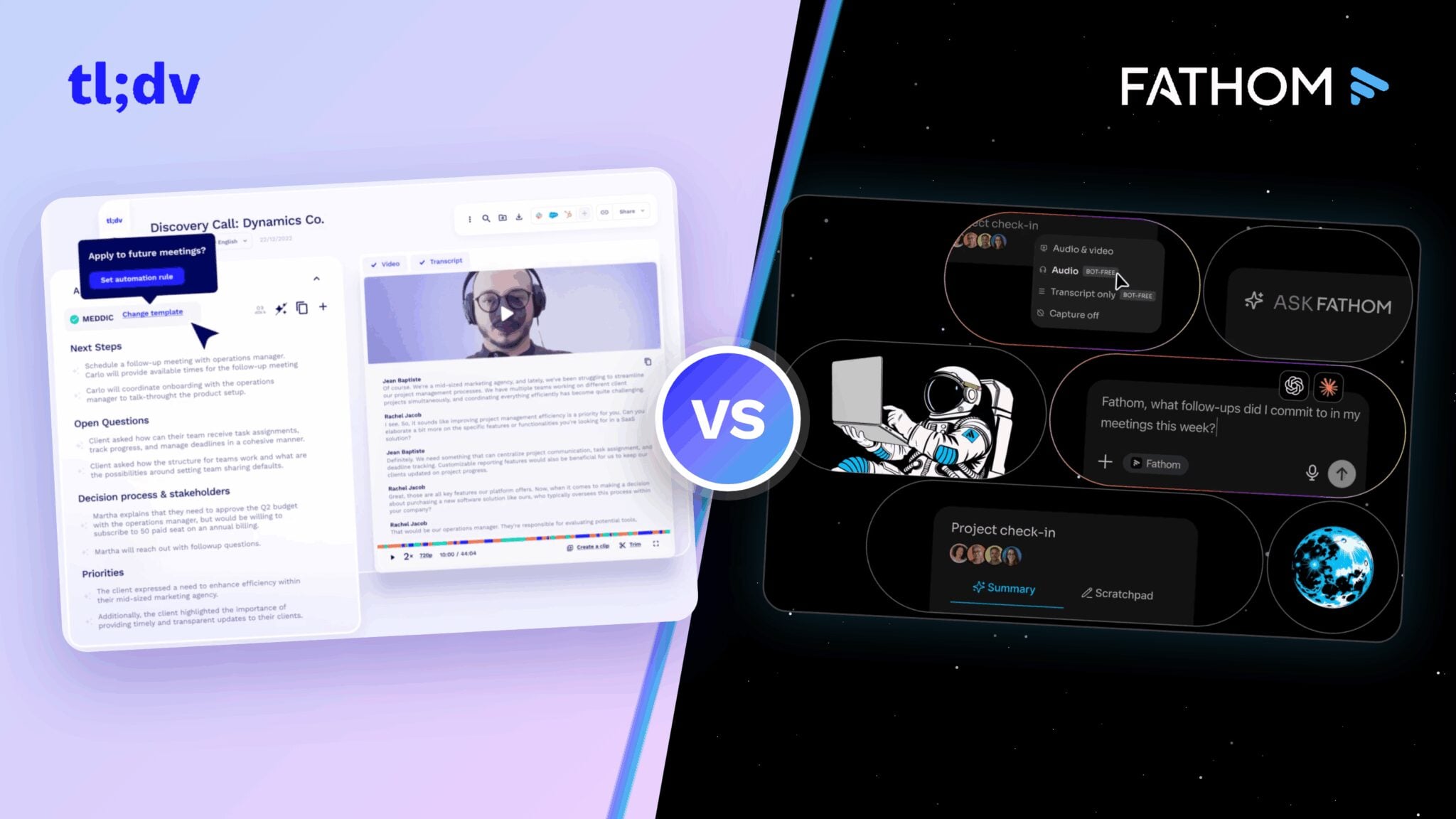

tl;dv vs Fathom is a much closer comparison in 2026 than it used to be. Both can record meetings, create transcripts and summaries, pull out action items, and help you search past conversations.
In the quest for the most efficient AI notetaking solution, both platforms have been frequently mentioned for their innovative approaches to meeting management, transcription services, and actionable insights generation.
À medida que as organizações dependem cada vez mais da IA para extrair informações valiosas de suas interações diárias, a escolha entre tl;dv Fathom significativa.
Nesta análise abrangente e sem complicações do tl;dv (baseado na UE) e do Fathom (baseado nos EUA), exploraremos os recursos exclusivos, os pontos fortes e as áreas em que cada plataforma se destaca, bem como os pontos em que elas podem ficar aquém.
Desde recursos de transcrição e opções de integração até padrões de segurança e experiência do usuário, abordaremos todos os ângulos para fornecer uma visão clara do que diferencia esses dois concorrentes.
October 2026 update: Fathom has changed quite a bit since our last update. It now offers bot-free capture, Account-Wide Ask Fathom, Trackers, AI Scorecards, MCP connections to tools like ChatGPT and Claude, and Slack Huddle capture. We retested the newer Fathom experience and updated the comparison below where those changes affect the result.
TL;DR
| Capacidade | tl;dv | Fathom |
|---|---|---|
| Zoom, Google Meet & Teams | ✓ | ✓ |
| Unlimited meeting capture | ✓ | ✓ |
| Captura sem bots | ✓Mac + Windows | ✓Mac beta |
| Slack Huddles | ✓Bot-free audio capture | ✓Bot-free; manual by default |
| Resumos com IA | ✓ | ✓ |
| Pesquisa de IA entre reuniões | ✓ | ✓ |
| Relatórios recorrentes de IA | ✓ | ✗No direct equivalent |
| Track topics across calls | ✓ | ✓Trackers on Team plans |
| ChatGPT / Claude via MCP | ✓Pro+ | ✓ |
| Integrações de CRM | ✓ | ✓ |
| Vendas coaching | ✓Playbooks, objections, speaker insights | ✓Metrics + AI Scorecards |
| SOC 2 Tipo II | ✓ | ✓ |
| Armazenamento de dados | EU | EUA |
Fathom has added a lot since our last comparison. It now supports cross-meeting search, coaching tools, bot-free recording, Trackers, and MCP integrations.
Both tools cover the basics well, including meeting transcription, AI summaries, and searchable meeting history. The bigger difference now is what you can do with those conversations afterwards.
tl;dv gives teams more ways to keep working across multiple calls, with recurring AI reports, automated workflows, playbook tracking, and objection analysis. These features make it particularly useful for teams that want more from an AI note-taking tool than a transcript and summary.
Fathom is still a strong choice for solo users because of its free plan, and for teams that mainly want structured summaries, CRM workflows, and a lower-cost paid plan.
If you’re mainly looking for an AI meeting note taker that can record, transcribe, and summarize meetings, both cover that well. The differences become more noticeable once you start working across a larger set of calls.
tl;dv vs Fathom: Factors to Consider While Choosing the Best AI Notetaker
Recursos de transcrição
| Capacidade | tl;dv | Fathom |
|---|---|---|
| Transcrições incluídas | ✓Unlimited | ✓Unlimited |
| Live in-meeting summary | ✗ | ✓New bot-free experience |
| Idiomas suportados | ✓30+ | ✓38 |
| Dialetos suportados | ✓ | ✗No dedicated dialect support |
| Remoção de palavras de preenchimento | ✗ | ✗ |
| Reconhecimento de voz | ✓ | ✓ |
| Nomes dos palestrantes | ✓ | ✓ |
| Transcrever uploads de vídeo/áudio | ✓5 files free; more on paid plans | ✗No external uploads |
| Exportar transcrições | ✓ | ✓ |
| Clipes da transcrição | ✓ | ✓ |
| Vocabulário personalizado | ✗* | ✓Team accounts |
| Full-transcript search | ✓ | ✓ |
| Editar transcrição | ✓ | ✓ |
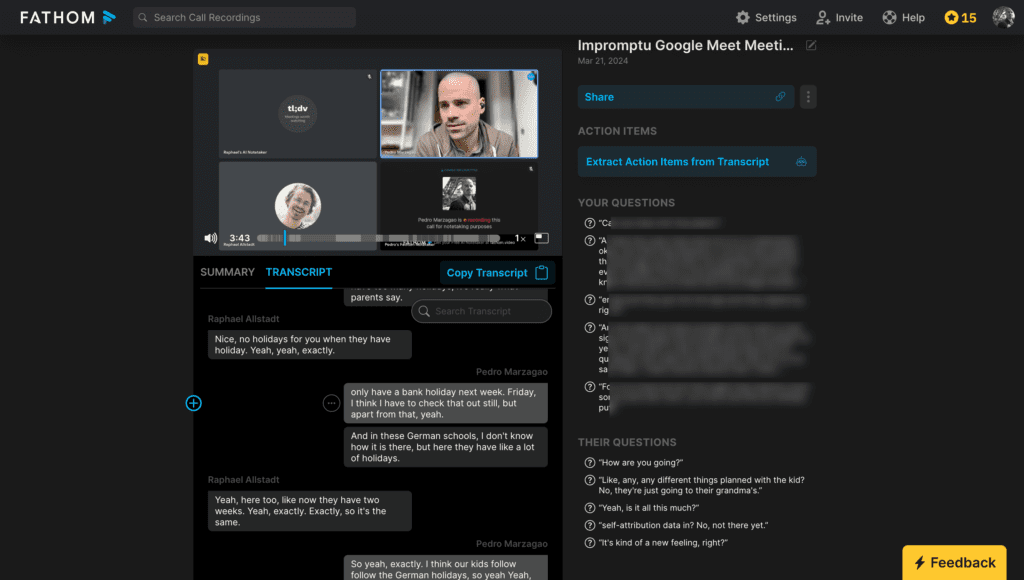
Live In-Meeting Summary
Fathom’s new bot-free experience can generate a live summary while the meeting is still running. I saw this during testing: once the call had enough content, Fathom started adding key points while it was still listening. A shorter test call was too brief to generate one.
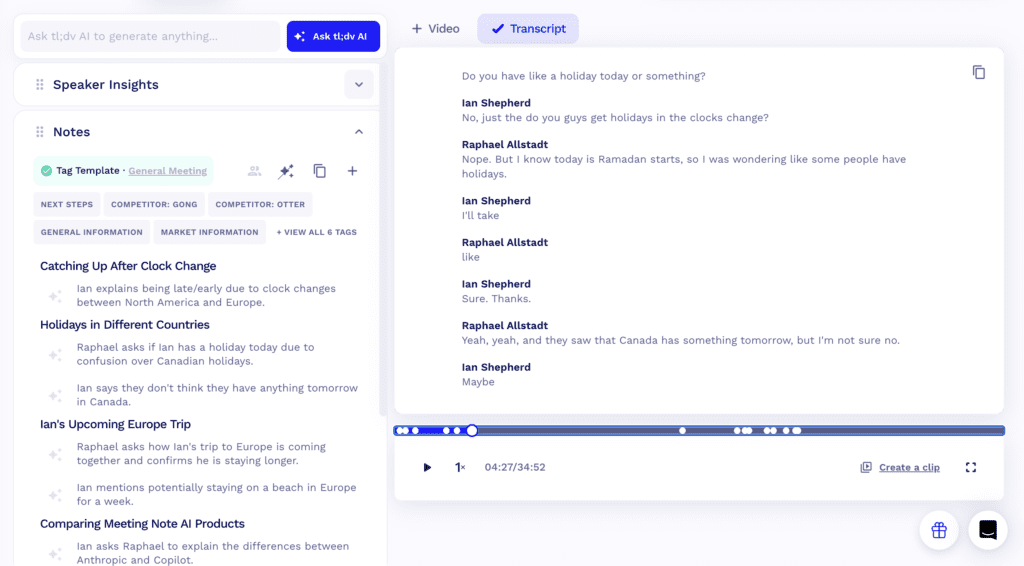
tl;dv doesn’t display a running live transcript or summary during the meeting. Its transcript and AI notes are available after the call.
Suporte a Idiomas
tl;dv supports transcription, notes, and reports in 30+ languages.
Fathom has expanded considerably since the previous version of this comparison. Its current documentation lists support for at least 38 transcription languages, so the old six-language comparison is no longer accurate.
Suporte a Dialetos
Dialect recognition is a feature where tl;dv excels, offering enhanced transcription accuracy for users of diverse dialects. This capability ensures that the nuances of regional accents are accurately captured.
Fathom supports a much wider range of languages than it did before, but it doesn’t currently list a separate dialect-selection feature.
Remoção de Palavras Vazias
Nem tl;dv nem Fathom oferecem remoção de palavras de preenchimento no momento. No entanto, esse será o caso apenas por um curto período, pois tl;dv está no processo de adicioná-lo aos seus serviços de transcrição. Esse recurso futuro ajudará a produzir transcrições mais limpas e concisas, eliminando palavras e frases desnecessárias, marcando um futuro diferencial.
Transcrever uploads de vídeo/áudio
tl;dv lets you upload existing video and audio files for transcription. The Free plan includes five uploads, while Pro and above remove the upload limit.
Fathom currently doesn’t support importing external recordings for transcription or analysis.
Vocabulário Personalizado
Both tools now support custom vocabulary.
tl;dv includes custom vocabulary on Business, which helps with product names, company names, acronyms, and other specialist terms.
Fathom’s Transcription Dictionary is available to Team and Account Admins. They can add up to 50 company-specific terms, including acronyms, product names, customer names, and industry jargon.
Recursos de Gravação
| Recording capability | tl;dv | Fathom |
|---|---|---|
| Plataformas de vídeo | ✓Zoom, MS Teams, Google Meet | ✓Zoom, MS Teams, Google Meet |
| Armazenamento | ✓Unlimited recordings; Free retained up to 3 months | ✓Unlimited |
| Vídeo de registros | ✓ | ✓ |
| Captura sem bots | ✓Mac + Windows | ✓Mac beta |
| Slack Huddle capture | ✓Bot-free audio capture | ✓Bot-free, manual by default |
| Reuniões simultâneas | ✓ | ✗ |
| Registros de download | ✓ | ✓ |
| Captura de slides | ✓ | ✗ |
| Visualização de análises | ✓ | ✗ |
| Integrated calendar | ✓ | ✓ |
| Full recording editing | ✗ | ✓ |
| Reels / clips | ✓ | ✓ |
Gravação sem bots
Both tl;dv and Fathom now support bot-free recording.
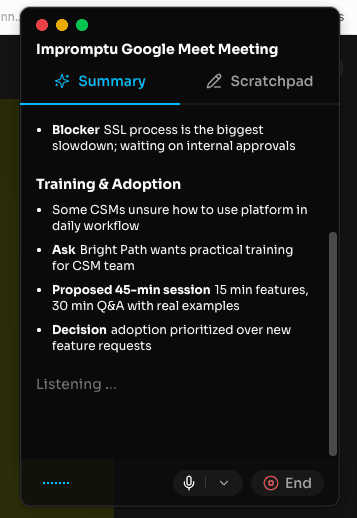
The tl;dv desktop app captures system audio without adding another participant to the call and works on Mac and Windows.
Fathom’s new desktop experience lets you choose Video & Audio, Audio, or Transcript Only. You can also choose whether Fathom should never send a bot, send one only when needed, or always send one. Fathom 3.0’s bot-free experience is currently available on Mac, with Windows still to come.

Slack Huddles
Both tools can capture Slack Huddles without adding a meeting bot.
In my test, tl;dv detected the Slack Huddle in Chrome and offered audio-only recording straight away.
Fathom also supports Slack Huddles through its bot-free desktop experience, but it didn’t detect mine automatically. That matches Fathom’s default setup: Huddles are treated as impromptu meetings and normally need to be started manually unless Slack Huddle auto-capture is enabled separately in Settings.
The tl;dv bot-free recording guide also lists Slack Huddles as a supported system-audio source.
Reuniões Simultâneas
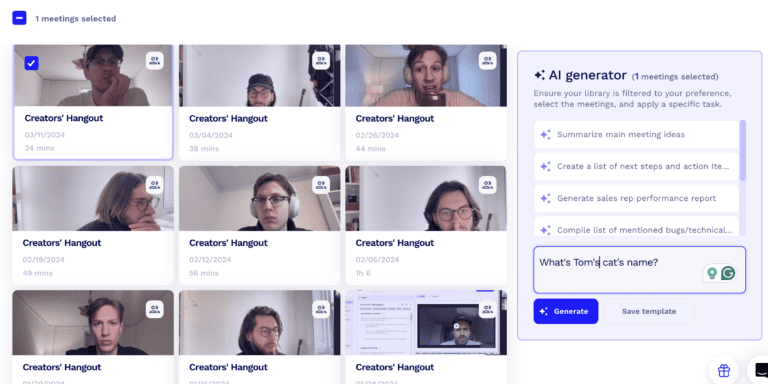
tl;dv supports the recording of concurrent meetings regardless of the meeting platform, making it an ideal choice for large organizations or teams with heavy meeting schedules that occur simultaneously. On the Pro plan, you can record 2 meetings simultaneously, while on the Business and Enterprise plans, you can record 3.
On the other hand, Fathom does not offer support for concurrent meetings, which may limit its utility for users with extensive simultaneous recording needs (e.g. virtually being present in multiple meetings at the same time with the recorder)
Captura de Slides
tl;dv oferece a funcionalidade de capturar slides durante uma reunião, garantindo que os recursos visuais e as apresentações sejam incluídos na gravação para uma captura abrangente da reunião. Esse recurso é particularmente útil para fins educacionais e colaborativos, em que os slides são um componente central da discussão. Fathom não tem esse recurso, o que pode resultar na perda da gravação de componentes visuais cruciais das reuniões.Análises de Visualização
A análise de visualização está disponível no tl;dv, oferecendo insights sobre como os usuários se envolvem com as gravações. Esse recurso pode ajudar as equipes a entender a eficácia de suas reuniões e como o conteúdo é consumido, permitindo decisões baseadas em dados para melhorar as reuniões futuras. Fathom não oferece análise de visualização, limitando a capacidade de analisar o envolvimento e a eficácia da reunião.Edição de gravação
Fathom se diferencia por oferecer recursos de edição de gravação, permitindo que os usuários refinem e editem suas gravações de reuniões após a captura. Esse recurso é particularmente útil para a criação de conteúdo polido e compartilhável ou para a remoção de segmentos desnecessários antes da distribuição. tl;dv não oferece edição de gravação no momento, concentrando-se em fornecer um conjunto abrangente de outros recursos de gravação e transcrição.Recursos de inteligência de conversação

| Conversation intelligence capability | tl;dv | Fathom |
|---|---|---|
| Single-meeting AI insights | ✓ | ✓ |
| Informações de IA sobre várias reuniões | ✓ | ✓Account-wide Ask |
| Relatórios recorrentes de IA | ✓ | ✗No direct equivalent |
| Keyword / topic tracking | ✓ | ✓Trackers on Team plans |
| Análise de sentimento | ✗No, per EU AI Act | ✗ |
| Key topic detection | ✓ | ✓ |
| Speech analytics | ✓ | ✓ |
| Detecção de itens de ação | ✓ | ✓ |
| Detecção de perguntas | ✓ | ✓ |
Account-Wide Ask is now available across all Fathom plans, with Team users able to search their own calls plus team calls they have permission to access.
Insights de IA por Reunião
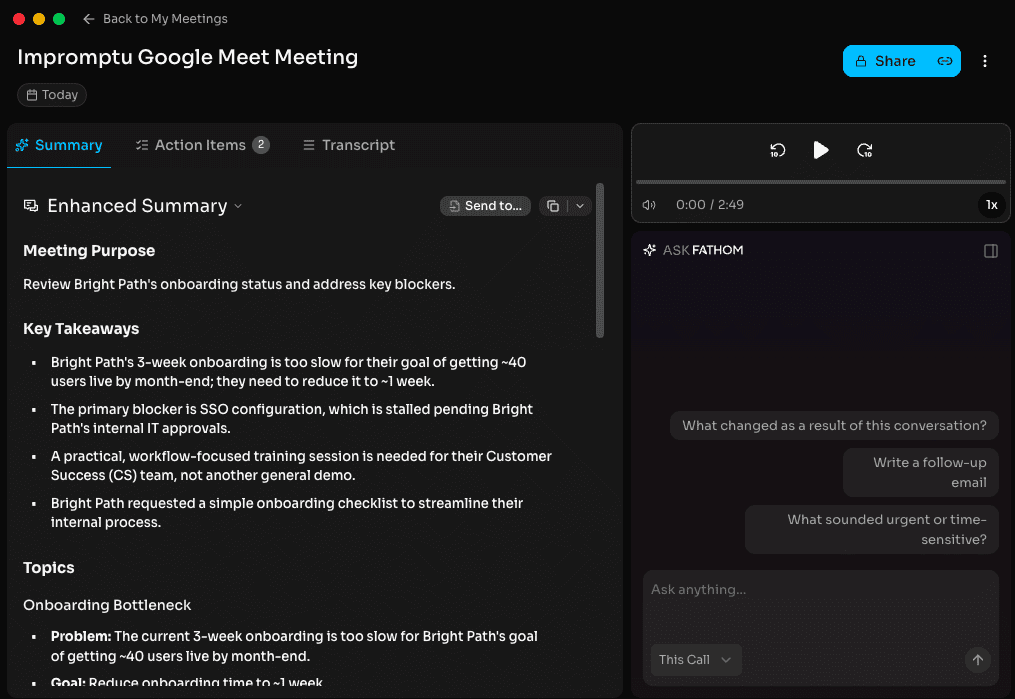
Both tools can now answer questions about an individual meeting and generate structured AI notes.
Fathom’s old limitation around fixed summaries is also out of date. Paid users can customise summary templates, and in my test its Enhanced Summary pulled out the meeting purpose, key takeaways, topics, and action items.
tl;dv also lets you create custom AI meeting notes and summaries around the information you want to capture.
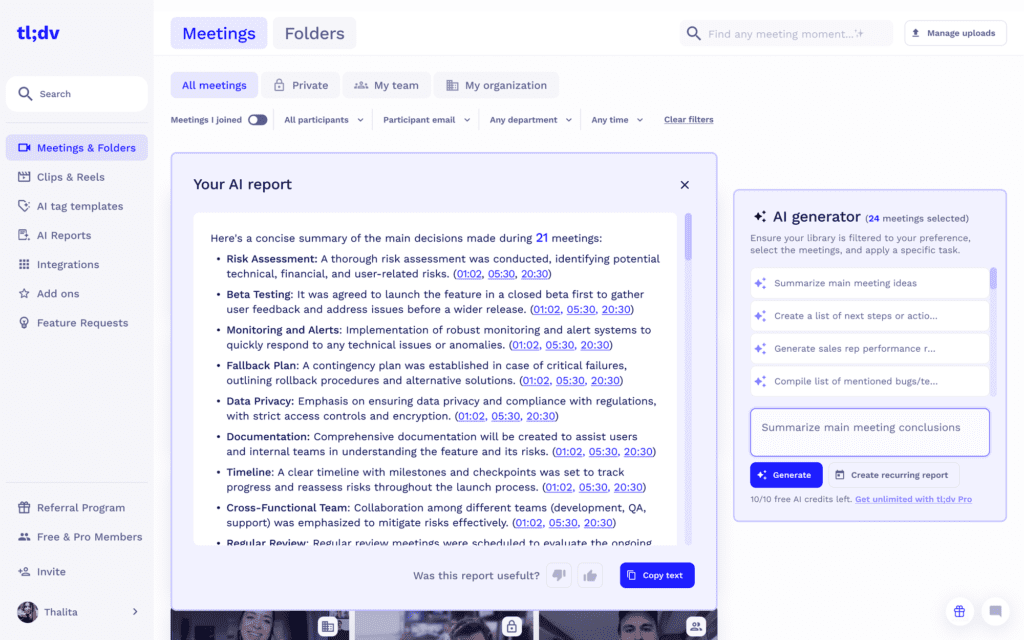
Análise de Múltiplas Reuniões
tl;dv does stand out by offering AI insights across multiple meetings, enabling organizations to track trends, gather insights over time, and make informed decisions based on comprehensive data analysis.
Esse também é um recurso valioso não apenas para pessoas que desejam compilar os tópicos discutidos, itens de ação e conclusões de várias reuniões ao mesmo tempo, mas também para gerentes que gostariam de ter uma visão ocasional de como os principais clientes estão sendo tratados.
Fathom now has genuine cross-meeting search.
Account-Wide Ask Fathom lets you ask a question across your meeting history rather than opening calls one at a time. Free and Premium users can search their own calls, while Team users can also include team meetings they have permission to view.
I tested it across 2 separate calls. Fathom pulled the main problem and follow-up actions from both meetings into the same answer and referenced the relevant calls.
Rastreamento de Palavras-chave
Keyword tracking is available on tl;dv, and lets you monitor recurring topics across meetings and combine that with multi-meeting analysis and scheduled reports.
Fathom still offers keyword Alerts, but Trackers go further. They can find concepts such as pricing concerns, competitor mentions, feature requests, or churn risk even when the exact keyword wasn’t used. Trackers are available on Fathom’s Team plans.
Capacidades de Automação e Integração
| Automation & integration capability | tl;dv | Fathom |
|---|---|---|
| Integrações de CRM | ✓Pro+ | ✓Core CRM sync available |
| Email integrations | ✓ | ✓ |
| Zapier integrations | ✓Pro+ | ✓All plans, lower-tier limits apply |
| Post-meeting summary email | ✓ | ✓ |
| Scheduled / recurring AI reports | ✓ | ✗No direct equivalent |
| API pública | ✓Pro+ | ✓ |
| MCP | ✓Pro+ | ✓ |
| ChatGPT / Claude connection | ✓Via MCP | ✓Via MCP |
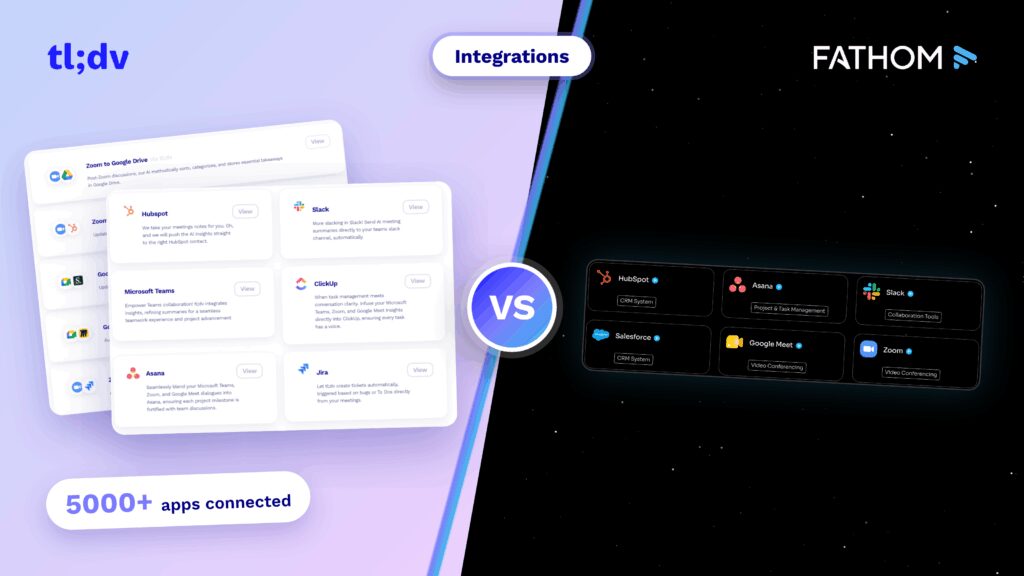
tl;dv’s current MCP server is available on Pro and above and is listed in both the Claude and ChatGPT connector directories. Fathom made Zapier available on all plans, and its current product also has a public API and MCP.
Integrações com CRM
Both products can push meeting information into major CRMs.
tl;dv unlocks CRM integrations on Pro. Fathom provides core CRM sync on its lower plans, while Business adds CRM field sync and Deal View.
For teams using HubSpot specifically, you can also naturally link HubSpot integration to your existing HubSpot integrations article if you want another relevant internal link here.
Relatórios Agendados
tl;dv’s Recurring AI Reports can run the same analysis on a schedule and send the result into tools your team already uses.
For example, a sales manager could receive a weekly pricing-objection report in Slack or send recurring customer-feedback insights into Notion.
Fathom can search across meetings with Account-Wide Ask and monitor themes with Trackers, but I couldn’t find a direct equivalent that automatically reruns a custom multi-meeting report on a schedule.
MCP and AI Integrations
Both tools now connect meeting data to external AI assistants through MCP.
tl;dv runs a read-only MCP server on Pro and above, with connectors for ChatGPT and Claude.
I connected Fathom to ChatGPT and asked it to find my follow-up actions from the week. It retrieved four Fathom meetings and combined actions and deadlines from Acme, Northstar, and Bright Path into one checklist.
So MCP itself is no longer a meaningful difference between the two.
Funcionalidades de Anotações com IA
| Note-taking capability | tl;dv | Fathom |
|---|---|---|
| AI notes | ✓ | ✓ |
| Anotações manuais durante as chamadas | ✓Needs app | ✓Scratch Pad |
| Marcar pessoas em notas | ✓ | ✓@mentions in Scratch Pad |
| Assign tasks inside the meeting tool | ✗ | ✓ |
| AI tags / bookmarks | ✓ | ✓ |
| Custom note / summary templates | ✓ | ✓Paid plans |
| Comentários | ✓ | ✓Team plans |


Notas Geradas por IA
Both products give you more control over AI notes than the old comparison suggests.
tl;dv lets you create custom AI meeting notes and organise them around the topics you care about.
Fathom Premium and Team users can customise its summary templates with their own instructions, so the old claim that its templates cannot be customised should go.
Marcar Pessoas nas Notas
tl;dv lets you tag teammates on meeting moments.
Fathom’s new Scratch Pad also supports @mentions, including people who weren’t on the call.
Atribuir Tarefas
Fathom can detect who an action item belongs to, let users manage those actions, and send tasks into tools such as Asana, HubSpot, or Salesforce.
tl;dv identifies action items and can send meeting outputs into other workflows, but you can’t assign a task directly to a teammate from the notes interface.
Comentários
The ability to add comments on notes or transcripts is available on tl;dv, further enhancing its collaborative features by allowing team members to discuss and clarify meeting outcomes within the platform. Fathom now also supports comments.
Recursos de segurança
| Security & privacy capability | tl;dv | Fathom |
|---|---|---|
| Retenção de dados | ~Free: up to 3 months; paid: until account deletion | ✓Stored until deleted; custom retention on Enterprise |
| SOC 2 Tipo II | ✓ | ✓ |
| SAML SSO | ✓ | ✓Enterprise |
| SCIM | ✓Enterprise | ✓Enterprise |
| Em conformidade com o RGPD | ✓ | ✓ |
| EU AI Act compliant | ✓ | –Not publicly stated |
| Primary data location | Europa | Estados Unidos |
| Third-party AI providers allowed to train on customer data | ✗No | ✗No |
| Own models may use de-identified customer data | ✗No | ~Yes, opt-out available |
| Custom retention controls | ✓ | ✓Enterprise |
Retenção de Dados
tl;dv keeps Free-plan recordings for up to three months. Paid-user recordings are retained until account deletion, subject to any additional workspace controls.
Fathom keeps recordings until the user deletes them by default. Enterprise customers can request an organisation-wide retention policy that automatically deletes meetings after a set period.
Conformidade com SOC2
Both tl;dv and Fathom are SOC 2 Type II compliant, demonstrating that both platforms have controls in place for protecting customer data and managing security risks.
tl;dv’s security and compliance measures also include GDPR compliance, encryption in transit and at rest, and European data hosting.
Fathom is also SOC 2 Type II compliant and provides additional security and access controls for Enterprise customers.
Login com SAML (SSO)
Both tl;dv and Fathom support SAML-based SSO for enterprise customers.
tl;dv offers SAML SSO on its Enterprise plan, along with SCIM provisioning for managing users as teams grow or change.
Fathom also offers SAML-based SSO on Enterprise. Its current setup supports identity providers such as Okta, and Fathom has also added SCIM provisioning for Okta and Microsoft Entra ID.
Conformidade com a Lei de IA da UE
Baseado na UE, com servidores na Europa. tl;dv está em conformidade com a Lei de IA da UE, demonstrando sua dedicação às práticas éticas de IA e à adesão às normas. O status de conformidade do Fathom com a Lei de IA da UE ainda não foi divulgado, o que pode ser uma consideração para os usuários que operam dentro das regulamentações da UE ou que se preocupam com elas.
Armazenamento Privado
O armazenamento privado, um recurso essencial para organizações que priorizam a soberania e a segurança dos dados, está disponível no tl;dv para usuários corporativos. A posição da Fathomem relação ao armazenamento privado não foi divulgada, o que pode afetar o processo de tomada de decisão dos usuários com necessidades específicas de armazenamento.
Dados confidenciais anônimos enviados aos LLMs
tl;dv torna anônimos os dados confidenciais antes de enviá-los para modelos de linguagem grandes (LLMs), uma prática que aumenta a privacidade e a proteção de dados.
A abordagem do Fathom em relação à anonimização de dados confidenciais enviados aos LLMs não é divulgada, o que deixa uma lacuna na compreensão de suas práticas de tratamento de dados.
Fragmentação e Aleatorização de Dados de Reunião
tl;dv implementa a fragmentação e a randomização dos dados da reunião, reduzindo o risco de reconstrução de conversas completas a partir dos dados processados pelos LLMs e aprimorando a segurança dos dados.
Fathom não divulgou suas práticas com relação à fragmentação e randomização dos dados das reuniões, o que pode ser um fator crítico para as organizações focadas na privacidade dos dados.
Acordo de Associação Comercial com Provedores de LLM
tl;dv confirma ter um Contrato de Associado Comercial (BAA) com os provedores de LLM, garantindo que o manuseio e o processamento de dados estejam em conformidade com as normas legais e regulamentares.
FathomO status da empresa em relação aos BAAs com os provedores de LLM não é divulgado, o que pode influenciar a decisão dos usuários que exigem garantias documentadas de proteção e conformidade de dados.
AI Training and Data Location
tl;dv does not use customer meeting data to train AI models. Customer data is stored in Europe, and users can choose whether AI processing takes place in Europe or the US.
Fathom stores its data in the US. Its third-party AI providers are not permitted to train on customer data, but Fathom says it may use de-identified customer data to improve its own proprietary AI models. Users and organisations can opt out.
Capacidades Coaching
| Coaching capability | tl;dv | Fathom |
|---|---|---|
| Playbook / scorecard evaluation | ✓ | ✓AI Scorecards on Business |
| Custom playbooks / scorecards | ✓ | ✓Business |
| Template sales frameworks | ✓ | ~Summary templates, including sales frameworks |
| Tratamento de objeções | ✓Dedicated | ~Can be tracked through Trackers / scorecards |
| Behavioral / speaker metrics | ✓ | ✓Team & Business |
Both platforms now offer coaching features, although they take different approaches.
Fathom’s Coaching area includes Behavioral Metrics such as talk-time distribution, questions asked, and monologue length. Business users also get AI Scorecards, which can automatically evaluate selected meetings against criteria set by the team.
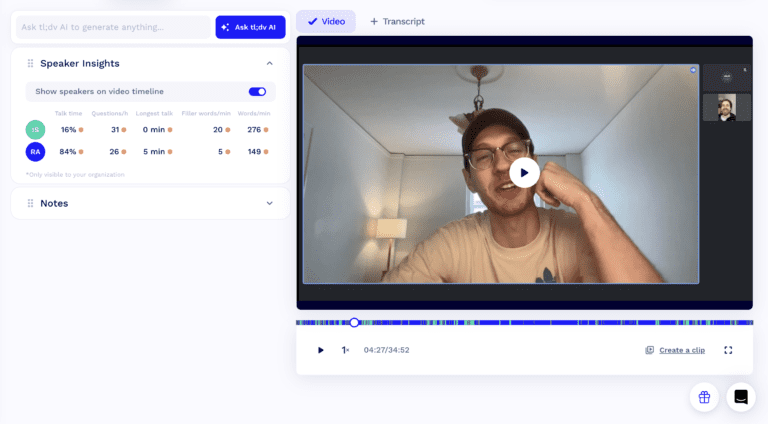
tl;dv’s sales coaching tools go further into playbook monitoring and objection handling. Teams can work with frameworks such as MEDDIC, SPICED, and BANT, build their own playbooks, review speaker insights, and see how reps handle recurring objections across calls.
For sales teams, the difference is less about whether coaching exists and more about how much structure you want around it. Fathom provides scorecards and behavioral metrics, while tl;dv adds dedicated playbook monitoring and objection analysis.
Recursos administrativos
| Admin capability | tl;dv | Fathom |
|---|---|---|
| Apply auto-capture settings to team meetings | ✓ | ✓ |
| Set team meeting visibility / sharing defaults | ✓ | ✓ |
| Prevent recording deletion | ✓ | ✓Enterprise |
| Admin controls over team recordings | ✓ | ✓Permission-based |
Apply Auto-Capture to Team Meetings
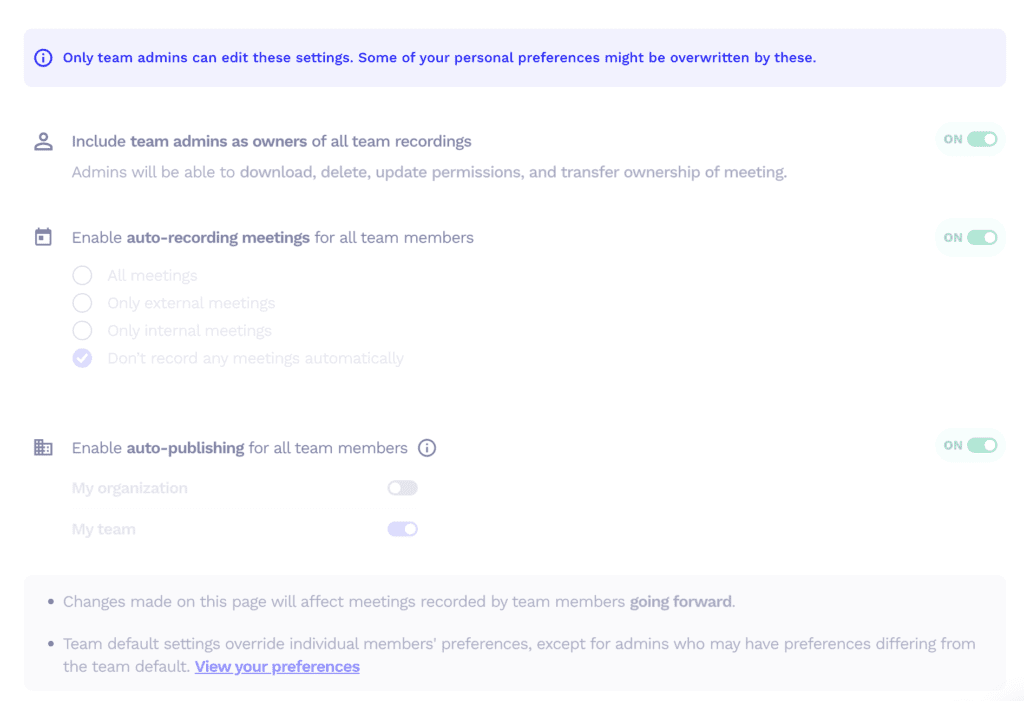
tl;dv lets admins control how meetings are recorded across a workspace, helping teams keep meeting capture consistent without relying on every user to configure it individually.
Fathom also gives Account and Team Admins auto-capture controls. They can set different defaults for external, internal, and unscheduled meetings, with options to turn capture on, off, or leave the choice to individual users.
Meeting Visibility and Sharing
Both platforms give admins control over how team recordings are shared internally.
Fathom lets admins set meeting visibility to All Teams, the user’s team, private, or user-selected. Team-level rules can also override organization defaults, which gives different departments their own sharing setup.
Impedir Exclusão
tl;dv gives admins controls for protecting team meeting data.
Fathom Enterprise also lets organizations disable recording deletion across the workspace. Enterprise admins can separately disable recording downloads and set an organization-wide retention period.
Capacidades organizacionais
| Organizational capability | tl;dv | Fathom |
|---|---|---|
| Team workspaces / team views | ✓ | ✓Team plans |
| Meetings library | ✓ | ✓ |
| Meeting filters | ✓ | ✓ |
| Global / account-wide search | ✓ | ✓Team plans |
| Pesquisa dentro das reuniões | ✓ | ✓ |
| Pastas | ✓ | ✓Team plans |
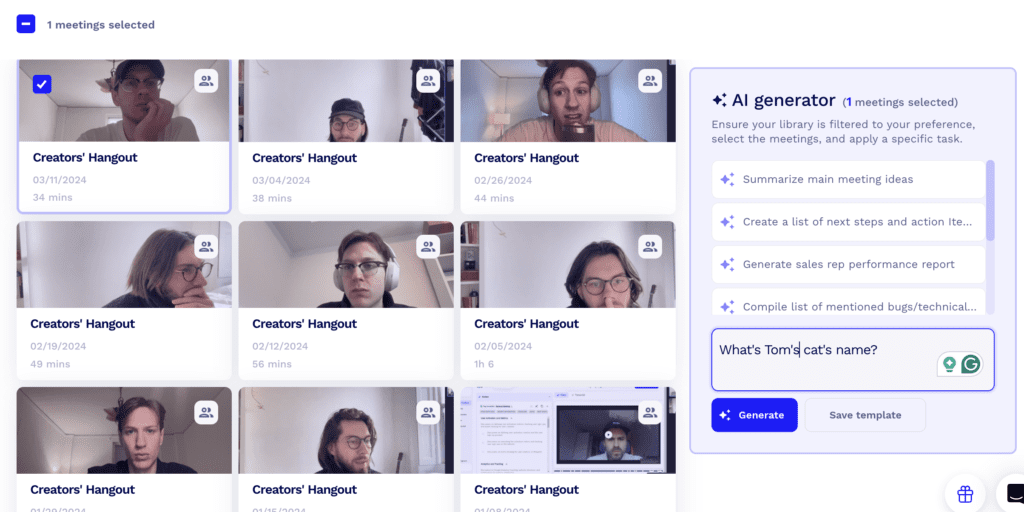

Espaços de Trabalho em Equipe
tl;dv supports shared meeting libraries and team-wide access to meeting insights.
Fathom’s Team plan also gives teams a shared view of meetings, folders, comments, and global search. Meeting visibility depends on the organization and team permissions set by admins.
Search and Filters
Both platforms provide ways to narrow down and search a larger meeting library.
tl;dv combines meeting filters with cross-meeting AI analysis, making it easier to work with calls by team member, topic, customer, or other meeting criteria.
Fathom also provides meeting filters and global search on its Team plan. Account-Wide Ask adds natural-language search across the meetings a user has permission to view.
Recursos de suporte
| Support capability | tl;dv | Fathom |
|---|---|---|
| Support on Free plan | ✓Chat & email | ✓Email/ticket + AI assistant |
| Suporte prioritário | ✓Business | ✓Enterprise priority SLA |
| Dedicated success manager | ✓Enterprise | ✓Enterprise |
Suporte no Plano Gratuito
Both platforms provide support without requiring an Enterprise subscription.
tl;dv offers chat and email support, while Fathom users can contact support by email, submit a ticket through the Help Center, or use its AI support assistant for product questions.
Suporte Prioritário
tl;dv includes priority support on Business, with dedicated customer success available on Enterprise.
Fathom reserves its dedicated Success Manager and priority support SLA for Enterprise customers.
Recursos de Inteligência de Receita
| Revenue intelligence capability | tl;dv | Fathom |
|---|---|---|
| Revenue forecasting | ✗ | ✗ |
| Dedicated deal / opportunity view | ✗ | ✓Business |
| CRM field sync | ✓Business | ✓Business |
| Conversation intelligence | ✓ | ✓ |
Neither tl;dv nor Fathom is a full revenue-intelligence platform with dedicated forecasting.
Fathom does move closer to that category with Deal View on Business. For teams using HubSpot or Salesforce, it brings open opportunities, recent activity, deal stage, amount, and close date into a dedicated view alongside meeting information.
tl;dv focuses more heavily on conversation intelligence, sales coaching, and sending meeting insights into CRM workflows.
If revenue forecasting and full pipeline management are your main requirements, you’ll still need a dedicated revenue-intelligence platform.
Para Quem É?
| tl;dv | Fathom | |
|---|---|---|
| G2 rating | 4.7/5 | 5.0/5 |
| Ease of setup | ✓Easy setup + free plan | ✓Easy setup + free plan |
| Plataforma localizada | ✓Multiple interface languages | ✗Primarily English |
| Best suited for | Teams using cross-meeting analysis, coaching & automation | Solo users and teams focused on summaries, CRM workflows & lower paid pricing |
Both tools work for individual users and customer-facing teams, but they suit slightly different workflows.
tl;dv is better suited to teams that want to work across a larger meeting library, automate recurring insights, or use meetings as part of a wider coaching and workflow system.
Fathom is more appealing to solo users because its Free plan includes unlimited recordings, transcripts, and standard AI summaries. Team and Business add shared search, Trackers, CRM workflows, Deal View, and coaching.
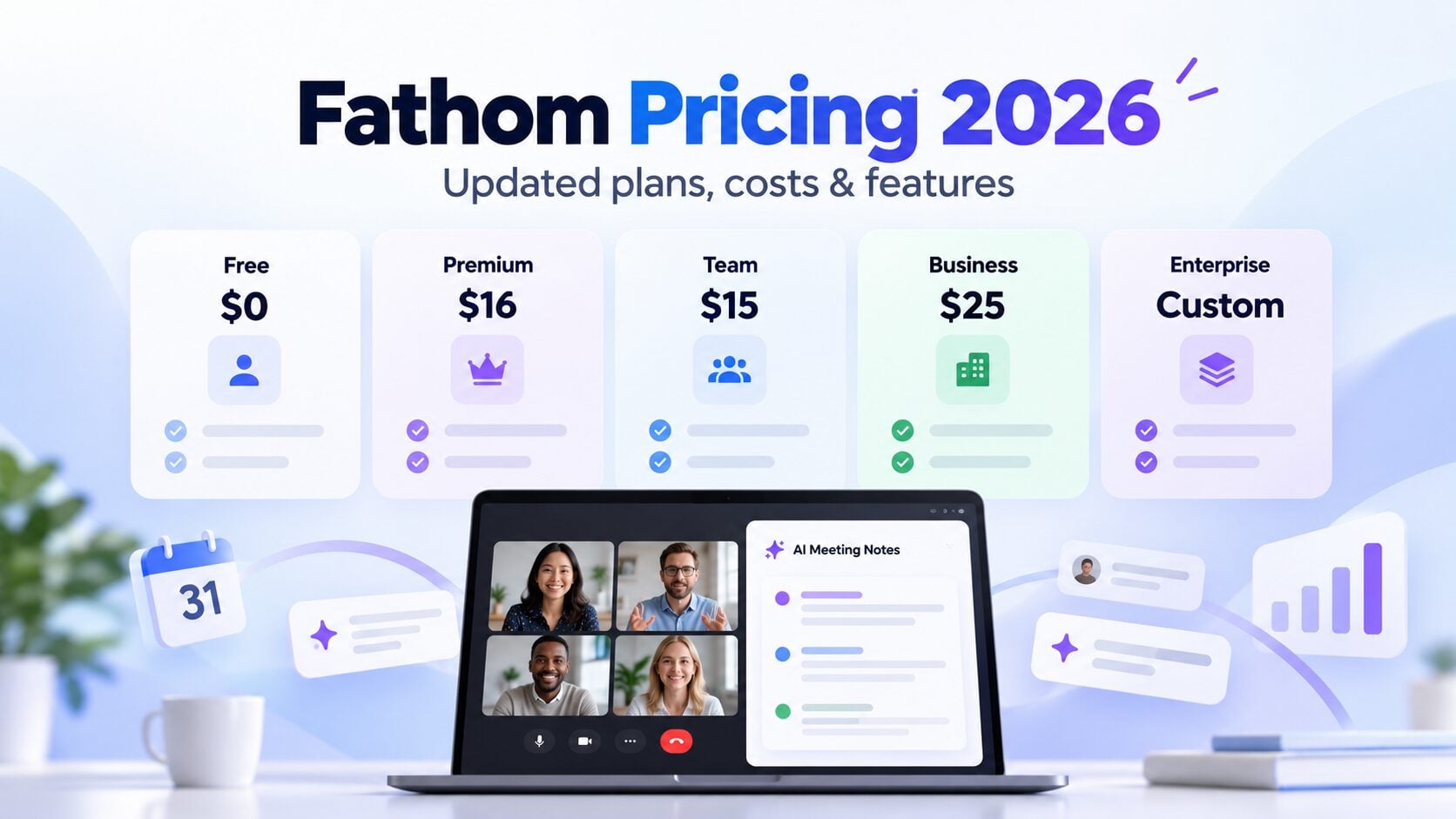
Cost can also make a difference. Fathom’s comparable paid team plans currently come in below tl;dv’s, so if that is a major factor, our Fathom pricing guide breaks down what you actually get at each level.
Verdict: tl;dv or Fathom?
If I were choosing for a team, I’d pick tl;dv.
The strongest reason is what it can do across a large number of meetings. You can set up recurring AI reports, track objections and customer themes, monitor sales playbooks, compare calls, and automatically send those insights into other tools. You don’t have to keep going back into your meeting library and running the same analysis yourself.
That makes tl;dv particularly useful for sales, customer success, research, and other teams that have hundreds of conversations and need to know what keeps coming up across them.
Its coaching tools are also more developed. You can monitor playbook adherence, use frameworks such as MEDDIC or SPICED, review objection handling, and look at performance across multiple calls rather than judging one meeting in isolation.
Fathom is still a very good alternative, particularly if price matters. Its Team and Business plans currently cost less, and Account-Wide Ask, Trackers, AI Scorecards, Deal View, and its new bot-free experience have closed a lot of the gaps that used to exist between the two products.
For a solo user or a smaller team that doesn’t need recurring reports, detailed playbook monitoring, or more advanced meeting automation, Fathom may be enough.
But if you’re choosing a tool for a team and want to keep using what you learn from meetings after the call is over, tl;dv is the stronger choice.
FAQs About tl;dv VS Fathom
Is tl;dv better than Fathom for sales teams?
For sales teams, tl;dv has the stronger coaching setup. It combines playbook tracking, objection handling, speaker insights, and recurring reports across multiple calls. Fathom also offers coaching through Behavioral Metrics and AI Scorecards, but its setup is more focused on scoring individual calls and reps.
Can tl;dv and Fathom record Slack Huddles?
Yes. Both can capture Slack Huddles without adding a meeting bot. In our testing, tl;dv detected the Huddle automatically and offered audio-only recording. Fathom also supports Slack Huddles through its bot-free desktop experience, although capture may need to be started manually or enabled separately.
Do tl;dv and Fathom work with ChatGPT and Claude?
Yes. Both support MCP connections that let tools such as ChatGPT and Claude work with meeting data. We tested Fathom with ChatGPT and were able to pull follow-up actions from several meetings into one response. tl;dv also offers an MCP server on paid plans.
Posso testar a tl;dv gratuitamente?
Sim, com certeza. A tl;dv oferece um plano gratuito muito generoso, que permite testar todos os recursos de forma ilimitada.
Com quais plataformas de reunião ele funciona?
A tl;dv é compatível com Google Meet, Zoom e Microsoft Teams.
Posso gravar reuniões no celular?
A tl;dv ainda não tem um aplicativo móvel nativo, mas você consegue gravar, transcrever e resumir reuniões das quais participa no celular com a gravação automática. Saiba mais sobre como gravar reuniões no celular.
Which is better for analysing multiple meetings: tl;dv or Fathom?
Both can now search across multiple meetings. Fathom has Account-Wide Ask and Trackers, while tl;dv adds recurring AI reports that can automatically run the same analysis as new meetings come in. If you regularly need to track patterns across calls rather than run one-off searches, tl;dv gives you more automation.