Ir al contenido






tl;dr on MCP Server Failures
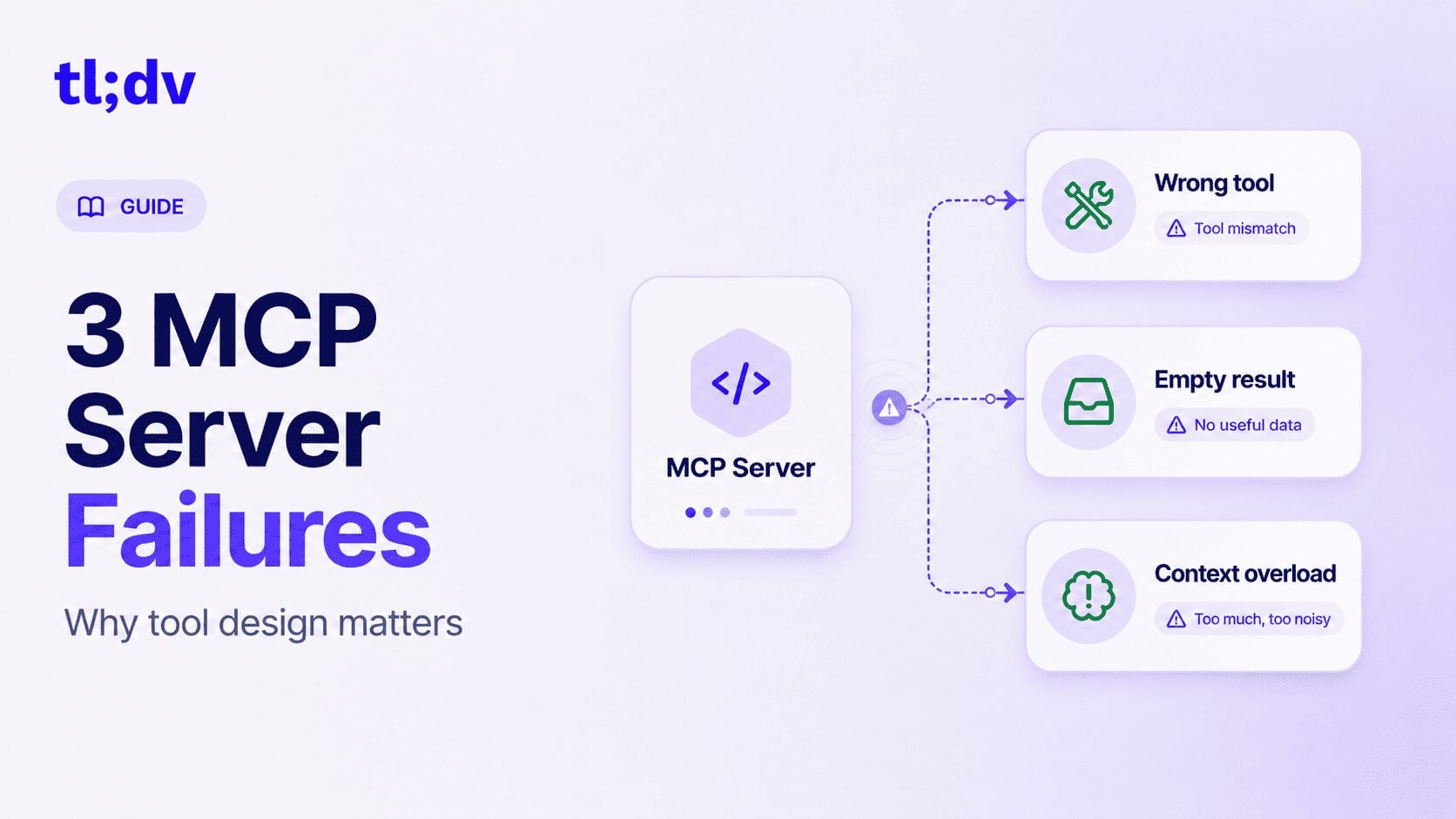
MCP servers usually fail in three ways.
- The model picks the wrong tool because your description never separated it from its siblings.
- The tool definitions and their returns eat the context window before anyone asks a question.
- The server fails for whatever reason, and nothing tells you.
The third is probably the worst, as the other two produce output that is clearly wrong, whereas the third will give you something legible.
And the thing is the three compound. Bloat degrades tool selection; degraded selection looks like a description problem; the fix applied makes descriptions longer, and longer descriptions worsen the bloat.
Published tool-count thresholds run from 10 to 128, and most of them predate the loading changes that shipped in 2026.
MCP server failures are really annoying. The beauty of an MCP server is that often it’s connected, and it just does what you need it to. But sometimes something happens behind the scenes, and you’re left thinking “why isn’t this working?”
Case in point, on the 14th March 2026, an issue was flagged with GitHub’s own agentic workflows project. The simplest way to describe what happens is that an agent can’t act directly, so anything that touches the outside world (think things like applying a label, posting something, assigning something) needs to go through another MCP server. The agent had a think about it, and while it was busy, the connection quietly closed. So when it turned to hand its work over, there was nothing to hand it to. No warning, nothing applied, nothing posted. It was still marked as successful.
I have got fairly in-depth with MCP this year, and as someone with a non-engineering background I like working out how things actually behave. So I pulled tool descriptions from live servers and ran queries against them to see where things break and how you would know.
If you’re new to MCP, we’ve written a guide on what it is. If you’re here because something has stopped working, here are the three.
Your Model Is Picking the Wrong Tool Because Your Description Told It To
The first thing to be aware of is that a tool description is not the documentation but the routing interface. When a model decides whether to call a tool, it sees three things: the name, the description, and the parameter descriptions. This doesn’t actually show what a tool can truly do, just the fields written by the person who built it.
In February 2026, a study with the rather amusing title of “MCP Tools Are Smelly!” was published by a collective from Queen’s University. The test pulled live metadata from 856 tools across 103 MCP servers, 23 official and 80 community-built. The results were that 97.1% of those tools had a minimum of one defect in their descriptions. The other finding was that in 56% of cases, the purpose was not clearly stated.
Through additional testing, they tried to fix what was wrong and then remeasured, in a systematic augmentation across a quality rubric, while adding in whatever the scan found was missing. The median task success increased by 5.85 percentage points. Sound good, right?
It wasn’t as cut and dry, though, and median execution steps went up 67.46%, which means more work. They also found that across about a sixth of runs, better descriptions actually made task success worse.
What actually fixes routing is differentiation. A description fails when it can’t tell its tool apart from the three siblings next to it on the same server. Length is not the variable.
For the non-technically minded, imagine you have five colleagues, and you’re handing out a job to one of them. All you get to see is a one-liner of what they do. You can’t speak to them, and you can’t check afterward if you chose the right person for the job. And three of their lines read really similarly.
That’s the model’s problem. It reads quick descriptions and has to commit, and when you add more words it just makes selecting trickier. You need to write in “Don’t ask me, ask her, she’s the one that has the dates”.
A great example of this I found while testing Fathom’s MCP. The server shows both sides of this. Its list_meetings description does the job properly. It says what the tool does not do: it does not scan meeting content, and then names the alternatives, find_person for a specific person and search_meetings for topics. A model reading that has been handed the boundaries.
Then search_meetings, on the same server, from the same team. The opening line says it searches meeting summaries and titles. Two sentences later, it says all the query words must appear somewhere in the meeting text. The parameter description says the words must appear in the meeting title or summary.
Three statements of scope, and the loosest one sits in the middle. “Somewhere in the meeting text” reads like transcript coverage. A model weighting that phrasing calls the tool for something that was said out loud, gets nothing back, and reports that the conversation never happened.
If you’re trying to work out what’s happening with an MCP server you’ve connected, unfortunately this isn’t something that you can fix yourself. Forewarned is forearmed though, so when you’ve connected your MCP up, ask Claude or your LLM of choice to list the tools and the descriptors. You’re looking for two that sound like they do the same thing, because that’s where it will pick wrong.
How Much Context Your Tools Eat Before Anyone Asks a Question
If the model keeps picking the wrong tool for what you need, or even completely ignores one you know is connected, the problem might be everything else you have connected.
Every server will load its full tool list into its context window before you start querying it, literally when you connect it. It’s usually a big load as well. Anthropic put this to the test by measuring five MCP servers with 58 tools between them taking up roughly 55,000 tokens, sitting there before the conversation starts.
That means for your simple query, the model needs to choose from a longer list than you think it’s got. The more MCPs connected, the more tools, the longer the list.
One thing you can do to save on this is by switching off MCP servers you aren’t using that day.
If you want the numbers behind that, they’re below, and they’re messier than you’d hope.
| Figure | Fuente | Date | What it is |
|---|---|---|---|
| Below ~30 candidates holds above 90% | Gan and Sun, RAG-MCP | 6 May 2025 | Research, selecting among servers not tools |
| 10+ tools, or 10K definition tokens | Anthropic | 24 Nov 2025 | Vendor recommendation |
| Degradation at 30 to 50 available tools | Anthropic docs | Retrieved 26 Aug 2026 | Vendor observation, page undated |
| 40 down to 20 tools improved selection on Qwen3-1.7B | Speakeasy | Undated | Vendor demo, called non-rigorous by its author |
| Haiku 4.5 drops below 90% between 10 and 15, Sonnet 4 at 30 | Rodrigues and Vas | 29 Jun 2026 | Observational, 200 production turns per bucket |
| 128 tools per request | VS Code docs | Retrieved 26 Aug 2026 | Hard client cap |
| 100 tools across all servers | JetBrains Junie docs | 25 Aug 2026 | Hard client cap |
Only the bottom two rows are limits, the ones your client enforces whether you like it or not. Everything above them is a recommendation, a demonstration, or a measurement of something adjacent. RAG-MCP in particular gets quoted as a per-server tool ceiling when what it measured was selection across candidate servers.
The other half of this is what tools hand back. Models don’t paginate unless the description tells them to, so a tool that returns a full transcript when you asked for a date has spent thousands of tokens answering a question worth forty. You can’t fix that from where you’re sitting, but it’s worth knowing which of your tools are expensive before you wonder where the context went.
The Failure That Lies to You
There is a term named “Silent Failure” which is actually a single name for four separate problems. They also require different ways of solving the problem. They don’t have agreed names, so these are mine.
False-positive connection state
The client says it’s connected, but it’s not. Whatever your client uses to show connection state is usually reporting from the last successful handshake rather than checking live, so it can sit there looking fine while nothing underneath is working. You find out when something tries to call a tool.
Idle drop
The connection dies halfway through, but the run continues. This is the same issue as the GitHub case I mentioned at the start.
Empty-success
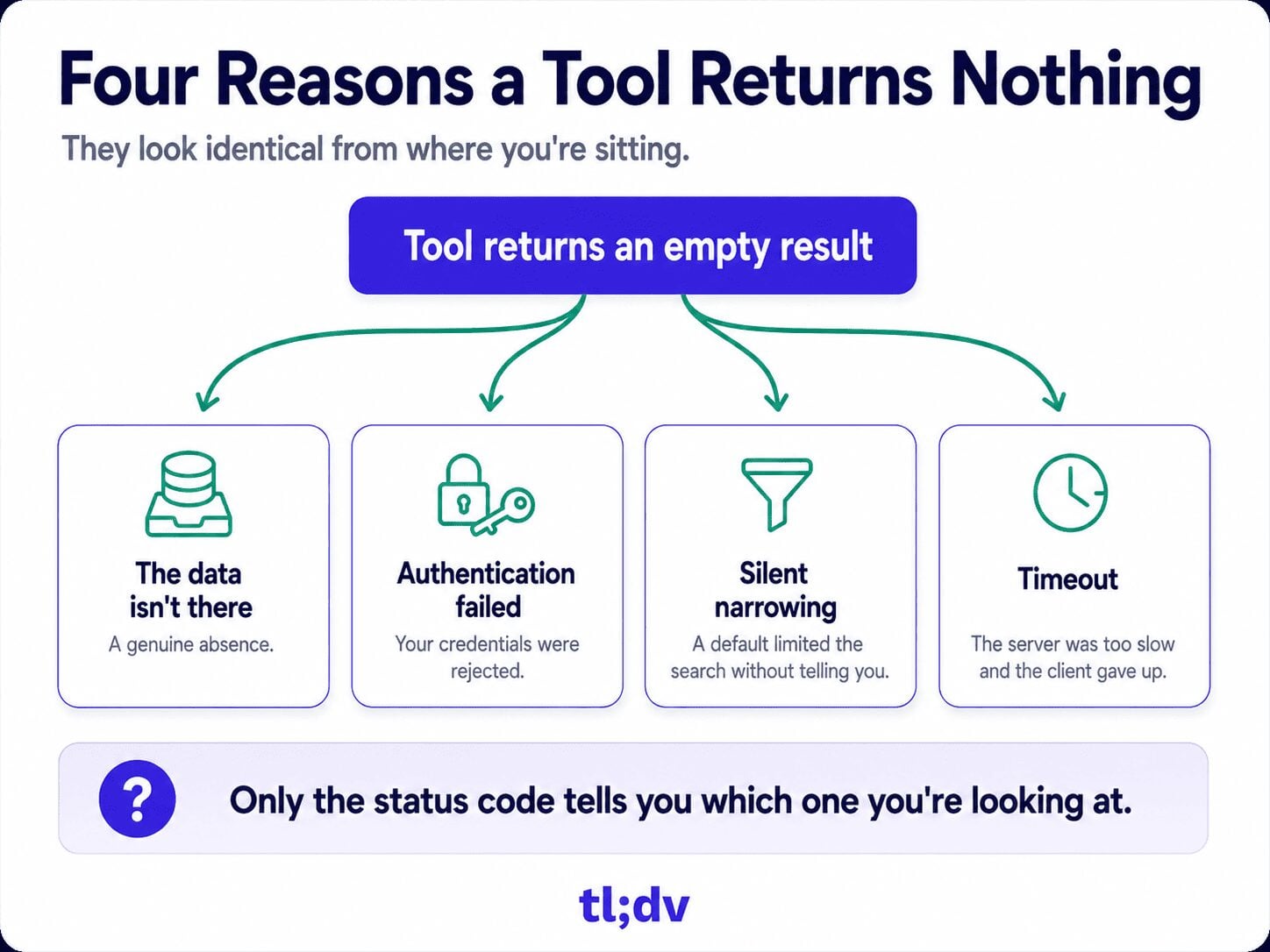
The tool gives you nothing back instead of giving you an error. So the model treats a failure as an absence and tells you the thing isn’t there. I couldn’t find a clean public example of this happening end to end, but I did find maintainers fixing it, which tells you it’s real.
Mid-session credential expiry
The login times out mid-conversation and doesn’t reconnect. Starting a fresh session tends to clear this.
Underneath all four sits what I’m calling phantom completion. The agent reports it did a thing, the thing never happened, and in a later turn it treats its own claim as proof. The error compounds instead of surfacing.
There are two things you can do if you come across it. If a tool comes back empty, don’t assume the data isn’t there. Check whether it actually failed first.
And stop treating “done” as evidence. If the model says it posted, sent, or updated something, go and look.
This is the worst of the three, because the other two produce output that is visibly wrong and this one produces output that reads like data.
The Three Failures Feed Each Other
The three failures are not a list but actually a loop, and that is why fixing one often makes another worse.
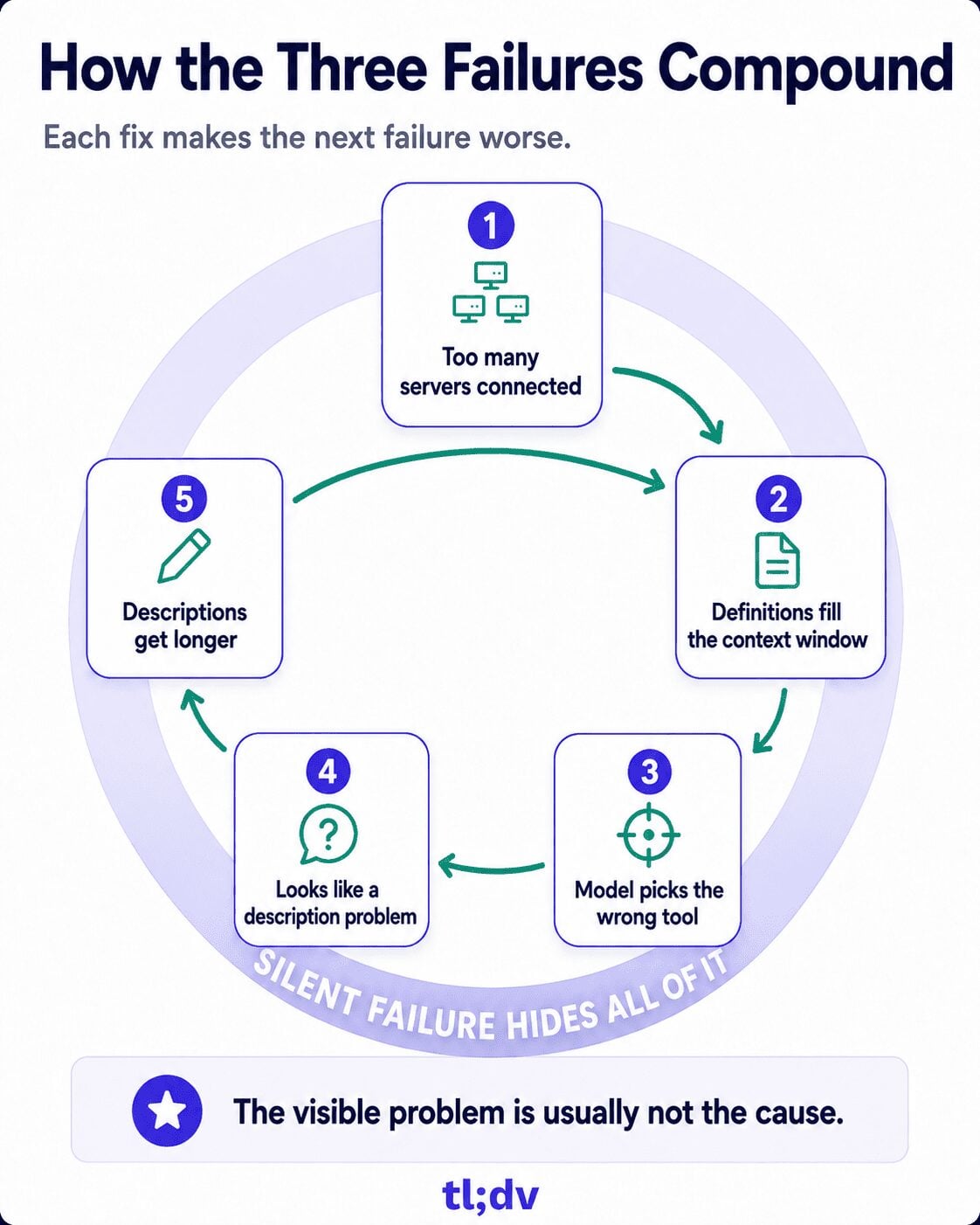
It runs like this. Too much connected means definitions fill the window before you ask anything, and the model gets worse at choosing between tools.
From there, poor choosing looks exactly like a description problem from the outside. The standard fix for a description problem is longer, more explicit descriptions.
Longer descriptions add tokens to every definition on every connected server, which fills the window faster and makes choosing worse. Silent failure then hides the whole cycle, because everything keeps reporting success.
Bloat degrades selection. Degraded selection looks like a description problem. The fix for a description problem is more words. More words worsen the bloat. And silent failure means nothing in your output tells you any of it is happening.
There is evidence the loop is real rather than theoretical. When researchers improved MCP tool descriptions against a quality rubric, median execution steps rose 67.46%, and task success got worse in roughly a sixth of runs. Writing more to solve a routing problem has a measurable cost, and sometimes that cost exceeds the gain.
The practical consequence is that the visible problem is usually not the cause. Whatever you look at first has been shaped by the two failures you cannot see.
Not One of the Three, but Still Worth Knowing
A couple more that came up during testing. Most are versions of the three rather than new categories, which is worth knowing so you can tell where to look.
Right tool, wrong question. The model picks the correct tool and then asks it for the wrong thing, usually a date in a format the tool won’t take or a field it guessed at. The parameter descriptions are part of what the model reads, so this is the first failure in different clothes. It almost always comes back as an empty result rather than an error, which is what makes it hard to spot.
Silent narrowing. Some tools default to a subset of your data and don’t mention it. Ask a question about your whole organization, get an answer covering only your own material, and nothing in the response tells you the difference. That’s the third failure arriving through a setting rather than a broken connection, and it’s the one I’d watch for, because the answer looks complete.
Four Things to Check Before You Connect Anything
Does it read or does it write? Some servers only read your data. Others can send, post, delete, or update on your behalf. A read-only server that gets something wrong gives you a bad answer. A server with write access that gets something wrong takes an action you didn’t ask for and then tells you it went fine.
How many tools does it add? Every one loads into your context window whether you use it or not. Ask your model to count them.
What does search actually search? Titles, summaries, or full text? This is the difference between “we never discussed that” and “that phrase wasn’t in a title.”
What happens when it finds nothing? Ask it for something that definitely doesn’t exist. A server that says it found nothing is behaving. A server that hands back an empty result with no explanation will do exactly the same thing when it’s broken, and you won’t be able to tell the difference.
What a Well-Designed MCP Server Does About All Three
A well-designed server doesn’t make these failures impossible, but it will make them visible. Since tl;dv is a client of mine, here’s what theirs does, and where it still relies on the same things everything else does.
tl;dv runs five read-only tools. Search meetings finds calls by keyword, date, type, or participation. Get meeting metadata returns the details of one call. Get meeting transcript pulls the full speaker transcript. Get meeting notes returns the AI notes, manual notes, and timestamped pins. Get user profile confirms which account is connected.
Five is below every figure in the table above. In the production study from June, Sonnet was still at 95% selection accuracy with ten tools available. This server has five. There is no tool search to configure and no progressive disclosure problem to solve, because the surface never got large enough to create one.
Returns are bounded. Search defaults to 50 results per page, caps at 100, and states its 10,000 ceiling along with what to do about it, which is refine the date range. Most servers hand back whatever they have.
On the third failure, read-only is the structural answer. There is no write path, so there is nothing for an agent to falsely claim it completed. I tested it on 26 August 2026, and a bad meeting ID returns an error rather than an empty result. A search for something that was never discussed reports the absence and widens its own search instead of filling the gap.
What it can’t do: create, edit, or manage anything. It reads.
If you want to try it, connect tl;dv to Claude and start with a search.
FAQs About MCP Server Failures
How many tools should an MCP server have?
There is no protocol limit. Published guidance clusters around 10 to 15 before selection accuracy starts slipping, and hard client caps sit at 100 for Junie and 128 per request in VS Code.
Why does Claude pick the wrong MCP tool?
Usually because two tools on the same server describe themselves in ways a model can’t tell apart. It reads the name, the description, and the parameters, so anything you didn’t write down is invisible.
Why does my MCP server return empty results?
Check the status code before assuming the data isn’t there. An auth failure, a silently narrowed default, and a genuinely empty result all look the same in the transcript. The 90% selection accuracy figure people cite as a threshold has three different origins, and none of them made it a standard.
Why does my MCP server work sometimes and not others?
Usually a dropped connection or expired credentials. Neither shows up as an error, and both clear on a restart, which is why the failure feels random.
How do I know if an MCP server is actually connected?
Don’t trust the badge. Connection indicators can show green while the client underneath is disconnected. Call something small and cheap and see if it comes back.
What is the difference between a protocol error and a tool execution error?
A protocol error happens at the transport, and the model never sees it. A tool execution error comes back in the result with isError: true, so the model can read it and try something else.
Can I fix a badly designed MCP server myself?
Not if you connected it rather than built it. What you can do is check the tool descriptions before you trust the results, turn off servers you aren’t using, and verify anything the model says it completed.