Ir al contenido






⚡ Veredicto rápido (TL;DR)
Qué es Notee: una aplicación de IA para tomar notas exclusiva para móviles (iOS + Android) que graba audio, genera transcripciones etiquetadas por hablante en más de 100 idiomas y produce resúmenes estructurados mediante IA. Calificada con 4,8/5 en más de 3100 reseñas de la App Store.
Para quién es adecuado: Estudiantes, periodistas, autónomos y profesionales independientes que desean pasar audio a notas sin problemas desde un teléfono, especialmente para reuniones presenciales o entrevistas en idiomas distintos del inglés.
Quién debería evitarlo: equipos de ingresos, remote en Zoom y cualquiera que necesite búsqueda entre reuniones, integración con CRM o documentación de cumplimiento fiable. Notee no tiene integración con bots, ni funciones para equipos, ni certificación GDPR/SOC 2/HIPAA publicada.
Lo único que debes saber antes de suscribirte: un error documentado en la grabación silenciosa hace que algunas grabaciones muestren un tamaño de archivo normal, pero no reproduzcan ningún audio. Varios usuarios han perdido contenido irreemplazable de reuniones. Mantén siempre un método de grabación de respaldo para cualquier cosa importante.
Valoración general: 3,8 / 5 — Sólido para uso individual ocasional. No apto para flujos de trabajo profesionales en equipo.
Índice de contenidos
Tu metodología de pruebas
Antes de entrar en los resultados: aquí tienes exactamente cómo evaluamos Notee para que puedas calibrar lo que sigue.
Pruebas prácticas: Descargamos y utilizamos Notee en iOS en marzo de 2026, grabando una reunión en directo de 6 minutos y 14 segundos con varios interlocutores (una reunión de equipo, con fecha y hora del 5 de marzo de 2026 a las 13:44). Probamos todo el flujo de trabajo de principio a fin: creación de una nueva nota, pantalla de grabación, proceso de procesamiento de IA, revisión del resumen estructurado, lectura de la transcripción sin editar etiquetada por los participantes y uso del menú para compartir/exportar. A lo largo de la reseña se incluyen capturas de pantalla de esta sesión.
Análisis de reseñas: Hemos cotejado más de 3100 reseñas de la App Store publicadas entre el lanzamiento (a principios de 2025) y marzo de 2026, incluidas las respuestas de los desarrolladores con reconocimientos oficiales de problemas conocidos. Hemos examinado cuatro versiones principales de la aplicación (1.0, 1.0.5, 1.2.0 y la versión actual de marzo de 2026) utilizando registros de cambios públicos y hilos de reseñas con marca de tiempo.
En cuanto a los problemas de grabación silenciosa y sincronización, los hemos verificado con múltiples informes independientes —no se trata de un caso aislado— y hemos confirmado las propias admisiones del desarrollador en hilos de respuesta oficiales (nombre de usuario del desarrollador: GM UniverseApps Limited, [email protected]).
También comparamos Notee con otras seis herramientas basándonos en las características documentadas públicamente, los precios y la fiabilidad señalada por los usuarios. Este análisis incluyó la experiencia de los usuarios de NotePin y sus comentarios, que señalaron varios aspectos que se pueden mejorar. Los usuarios destacaron especialmente la necesidad de una interfaz más intuitiva y de tiempos de respuesta más rápidos. En conjunto, esta información nos servirá de guía para los próximos pasos en la mejora de nuestra oferta de productos.
No hemos recibido compensación alguna por parte de Notee ni de ninguna otra alternativa mencionada en esta reseña.
⚠️ Importante: dos productos diferentes llamados «Notee»
Notee: AI Note Taker frente a Notee.ai (de escritura a mano a Notion)
Si has llegado aquí buscando «Notee» y algo no te cuadra, es posible que estés buscando otro producto.
Hay dos herramientas completamente distintas que comparten el mismo nombre:
| Notee: tomador de notas con IA | Notee.ai | |
|---|---|---|
|
Qué hace |
Graba audio, transcribe y resume reuniones. |
Convierte notas escritas a mano en páginas de Notion. |
|
Plataforma |
App Store de iOS, Google Play |
Aplicación web |
|
Desarrollador |
GM UniverseApps Limited |
Empresa independiente y sin relación alguna |
|
Página web |
noteeapp.com |
notee.ai |
|
Lo mejor para |
Grabación de voz y notas de reuniones |
Estudiantes y personas que escribís a mano |
Esta reseña trata sobre Notee: AI Note Taker (la aplicación móvil de GM UniverseApps Limited). Si estás buscando información sobre la herramienta de escritura a mano, dirígete directamente a notee.ai.
Vale la pena señalar esta confusión porque los resultados de Google para «Notee» a veces muestran ambos términos, y algunos agregadores de reseñas los mezclan.
¿Qué es Notee (tomador de notas con IA)?
Nota: AI Note Taker es una aplicación de grabación con IA pensada principalmente para móviles, desarrollada por GM UniverseApps Limited. Se lanzó a principios de 2025 y ya ha acumulado más de 3100 valoraciones en la App Store, con una media de 4,8/5, algo inusualmente alto para una aplicación en su primer año. Los usuarios sienten cada vez más curiosidad por la eficiencia de ClickUp AI Notetaker, ya que promete optimizar la productividad y la organización. Con funciones avanzadas que se adaptan a diversas necesidades de los usuarios, puede convertirse en un fuerte competidor en el creciente mercado de las herramientas impulsadas por IA. La capacidad de integrarse a la perfección con otras aplicaciones aumenta aún más su atractivo tanto para usuarios individuales como para equipos que buscan soluciones eficaces. El impacto de la creciente popularidad de las aplicaciones de toma de notas con IA en la privacidad se está convirtiendo en una preocupación importante para los usuarios. Muchas personas desconocen hasta qué punto estas aplicaciones pueden acceder a sus datos o utilizarlos. A medida que evoluciona la tecnología de IA, es fundamental que los desarrolladores den prioridad a la privacidad y la transparencia de los usuarios en sus productos.
El producto principal es muy sencillo: pulsa para grabar, deja que Notee capture tu reunión en segundo plano y vuelve para ver un resumen estructurado. Admite transcripción en más de 100 idiomas, identificación de hablantes y consultas con IA tras la grabación («Ask AI»). En el acelerado entorno laboral actual, utilizar las mejores herramientas de IA para reuniones disponibles puede mejorar drásticamente la productividad y la colaboración. Notee destaca entre estas opciones al agilizar el proceso de toma de notas, lo que permite a los usuarios centrarse en las conversaciones en lugar de en la documentación manual. Adoptar soluciones tan innovadoras garantiza que los equipos maximicen su eficiencia y se mantengan a la vanguardia en un panorama competitivo.
Datos de la aplicación:
- Desarrollador: GM UniverseApps Limited
- iOS: ID de la App Store 6745517667
- Android: Disponible en Google Play
- Valoración: 4,8 / 5 (más de 3100 opiniones, iOS, marzo de 2026)
- Idiomas: más de 100 (transcripción y resumen)
- Precio: Sin tarifa gratuita: 79,99 $ al año o 8,99 $ a la semana (7 días de prueba gratuita solo en el plan semanal).
- Compatibilidad con Apple Watch: Sí (añadido en la versión 1.2.0, octubre de 2025)
Cómo funciona Notee
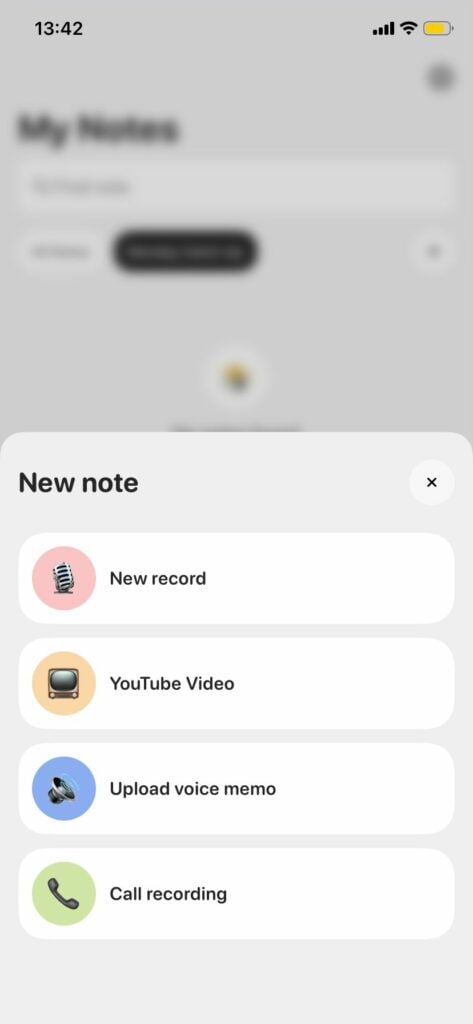
Al abrir la aplicación, al pulsar el botón «+» aparecen cuatro opciones de entrada: Nuevo registro, Vídeo de YouTube, Subir nota de voz y Grabación de llamada, lo que ofrece más flexibilidad de entrada de lo que parece a simple vista en la publicidad de la aplicación.
Para una nueva grabación estándar, el flujo de trabajo es el siguiente:
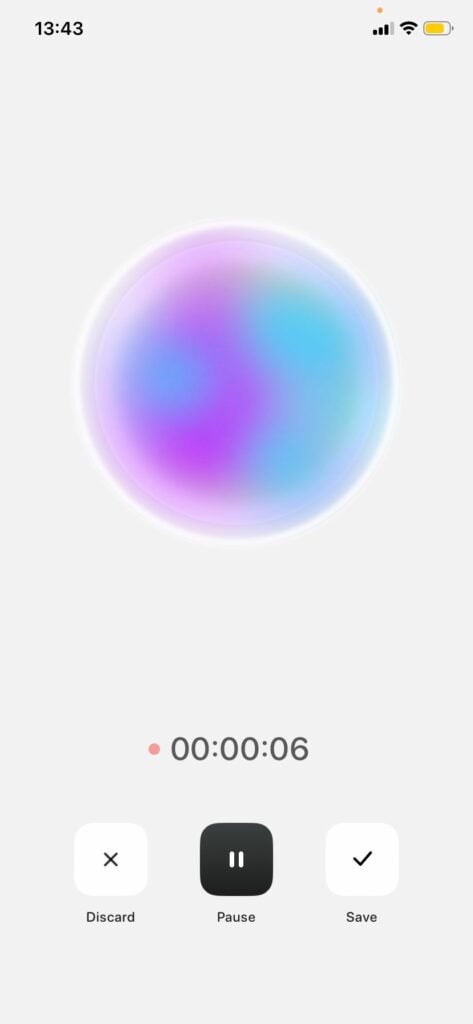
1. Grabación con un solo toque: una gran esfera animada con degradado llena la pantalla mientras la grabación está activa, con un temporizador en marcha y controles para descartar, pausar o guardar en la parte inferior. Interfaz de usuario minimalista, sin distracciones durante las reuniones. El punto naranja indicador de grabación aparece en la barra de estado de iOS para confirmar que el micrófono está activo.
2. Transcripción en directo: el texto aparece en tiempo real con etiquetas de color para identificar a los interlocutores a medida que avanza la conversación (puntos verdes, rojos y naranjas para cada interlocutor).
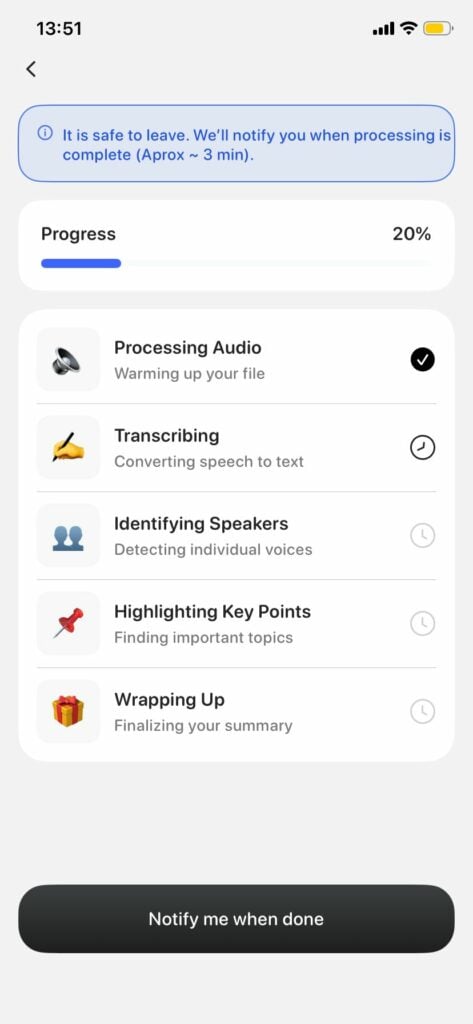
3. Proceso de procesamiento de IA: después de guardar, Notee pasa por cinco etapas visibles: Procesamiento de audio → Transcripción → Identificación de hablantes → Resaltado de puntos clave → Conclusión. En la parte superior aparece un banner que dice: «Puedes salir sin problema. Te avisaremos cuando el procesamiento haya finalizado (aproximadamente 3 minutos)». En nuestra prueba con una grabación de 6 minutos y 14 segundos, el procesamiento se completó en aproximadamente 3 minutos, tal y como se indicaba.
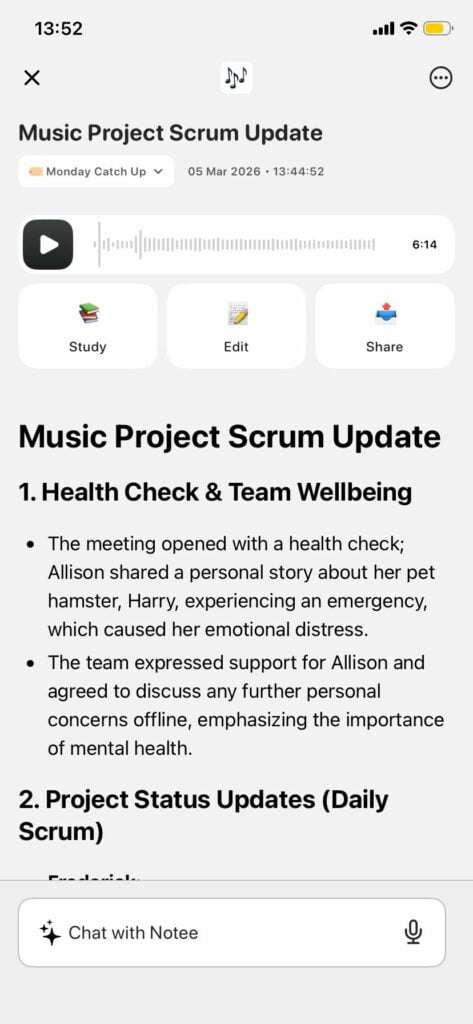
4. Resumen estructurado: la nota finalizada se titula automáticamente (en nuestra prueba: «Actualización del proyecto musical Scrum»), se etiqueta con una carpeta, se le añade una marca de tiempo y se divide en secciones numeradas con viñetas debajo de cada encabezado.
5. Pregunta a la IA: en la parte inferior de cada nota hay una barra llamada «Chatear con Notee» que permite realizar consultas en lenguaje natural. Nota: estas conversaciones con la IA no se guardan automáticamente (más información al respecto a continuación).
6. Exportar: el botón Compartir muestra cuatro opciones: Compartir texto, Compartir PDF, Compartir audio y Copiar texto. En nuestra prueba, no se pudo enviar directamente a Slack o Notion desde este menú; es posible que esas integraciones requieran una configuración en otra parte de la aplicación.
Características de Notee: lo que realmente funciona
Grabación en segundo plano con un solo toque
La grabación en segundo plano (capturar audio con la pantalla bloqueada) es una de las ventajas más evidentes de Notee. Esto es importante en las reuniones presenciales, en las que es habitual dejar el teléfono boca abajo o guardarlo en el bolsillo durante la sesión.
Para que esto funcione correctamente, es necesario configurar adecuadamente los permisos del micrófono en iOS. Algunas reseñas de la App Store mencionan problemas con la configuración, pero normalmente se resuelven siguiendo cuidadosamente las instrucciones de permisos que aparecen en la aplicación.
Transcripción en directo con diarización de hablantes
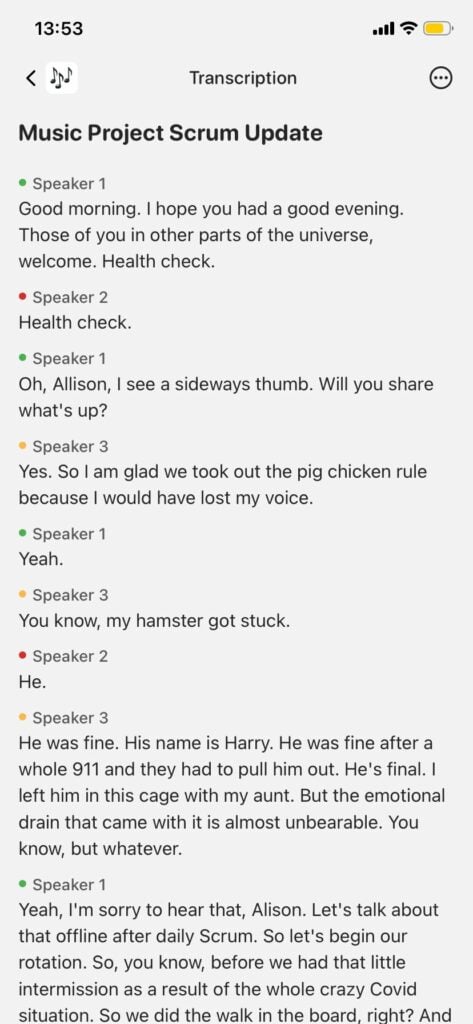
Notee separa las diferentes voces en la transcripción y les asigna etiquetas codificadas por colores. En nuestra grabación de prueba (3 hablantes, 6 minutos y 14 segundos), Notee identificó correctamente a tres hablantes distintos, mostrados como puntos verdes, rojos y naranjas, y mantuvo una atribución coherente durante toda la sesión. La separación de los hablantes funcionó bien para una reunión de grupo pequeño.
Sin embargo, la transcripción sin procesar reveló un problema característico de precisión. En un intercambio, un interlocutor dijo algo que se transcribió como «regla del cerdo y el pollo», lo que claramente era un error de comprensión de un término específico de la reunión. El contexto circundante permitía recuperar el significado en el resumen, pero la transcripción sin procesar contenía el error literalmente.
Esto coincide con lo que informan los revisores de la App Store: ChiTownMarcie (septiembre de 2025) señaló : «A veces hago pequeños ajustes cuando no escriben bien los nombres». En la práctica, los nombres propios, las siglas y el vocabulario específico de cada ámbito son los que más se ven afectados por la falta de precisión.
Coachcruz_lfg (febrero de 2026) probó la precisión con varios hablantes: «Sigue bastante bien a los hablantes: entre 3 y 5 es lo máximo que he capturado en una sola sesión de una hora y fue muy consistente».
Para sesiones con entre 2 y 5 interlocutores en un entorno razonablemente silencioso, el seguimiento de interlocutores de Notee funciona bien. Los grupos más grandes o las salas ruidosas reducen la precisión. Para obtener una precisión literal en terminología especializada, es recomendable editar la transcripción.
Resúmenes de IA y medidas a tomar
Los resúmenes estructurados posteriores a la grabación son, sin duda, la característica más elogiada en las reseñas, y nuestras pruebas prácticas confirman el motivo. A partir de una grabación de 6 minutos con 3 interlocutores, Notee generó un resumen estructurado con secciones numeradas (por ejemplo, «1. Control de salud y bienestar del equipo», «2. Actualizaciones del estado del proyecto (Daily Scrum)»), cada una con viñetas que recogen los puntos clave. El título generado automáticamente, «Actualización del scrum del proyecto musical», era preciso sin necesidad de indicaciones.
Es importante destacar que el resumen estaba más pulido que la transcripción sin editar. Mientras que la transcripción contenía errores como «pig chicken rule» (una interpretación errónea de un término específico de la reunión), el resumen interpretó correctamente el contexto y tradujo el significado de forma adecuada. Esta es una ventaja práctica: el resumen se puede compartir inmediatamente, mientras que la transcripción sin editar sirve como referencia de respaldo.
Limitación crítica oculta: las conversaciones con la IA iniciadas a través de la función «Preguntar a la IA» después de la grabación no se guardan. La información obtenida a partir de las consultas posteriores a la grabación se pierde al cerrar el hilo de chat, a menos que la copies manualmente. Coachcruz_lfg lo señaló explícitamente: «La aplicación no te avisa de que las conversaciones posteriores con el asistente sobre la reunión o la grabación no se guardan, por lo que cualquier información pertinente o importante que obtengas de esa conversación es absolutamente necesario copiarla y pegarla manualmente y guardarla en otro lugar».
Esto no aparece documentado en ninguna parte de la guía de inicio de la aplicación. Para los usuarios avanzados que utilizan Ask AI habitualmente para tomar decisiones, esto supone una grave deficiencia en el flujo de trabajo.
Transcripción y resumen en más de 100 idiomas
La versión 1.0.5 (julio de 2025) añadió resúmenes en varios idiomas: puedes grabar en un idioma y recibir tu resumen en otro diferente. Para equipos globales o profesionales multilingües, esto supone una auténtica ventaja competitiva, ya que la mayoría de las herramientas de reunión para ordenadores de sobremesa limitan la compatibilidad lingüística a entre 30 y 50 idiomas.
El rendimiento del acento regional varía según la calidad del modelo lingüístico y las condiciones de grabación. El inglés (EE. UU.) es el que mejor rendimiento ofrece; los acentos del inglés británico, australiano, irlandés y sudafricano también ofrecen un buen rendimiento. Según los informes de los usuarios, los idiomas distintos del inglés, como el francés, el español, el alemán y el portugués, ofrecen un rendimiento sólido, aunque la calidad de la transcripción se degrada en entornos más ruidosos para cualquier idioma.
Integración con Apple Watch
Disponible desde la versión 1.2.0 (octubre de 2025). Inicia y detén las grabaciones desde tu muñeca, y consulta resúmenes en tu iPhone. Una función menor pero útil que mejora la calidad de vida en los días ajetreados.
Exportar y compartir
El botón Compartir de cualquier nota completada muestra cuatro opciones en nuestra prueba: Compartir texto, Compartir PDF, Compartir audio y Copiar texto. Esto cubre las necesidades de exportación más comunes.
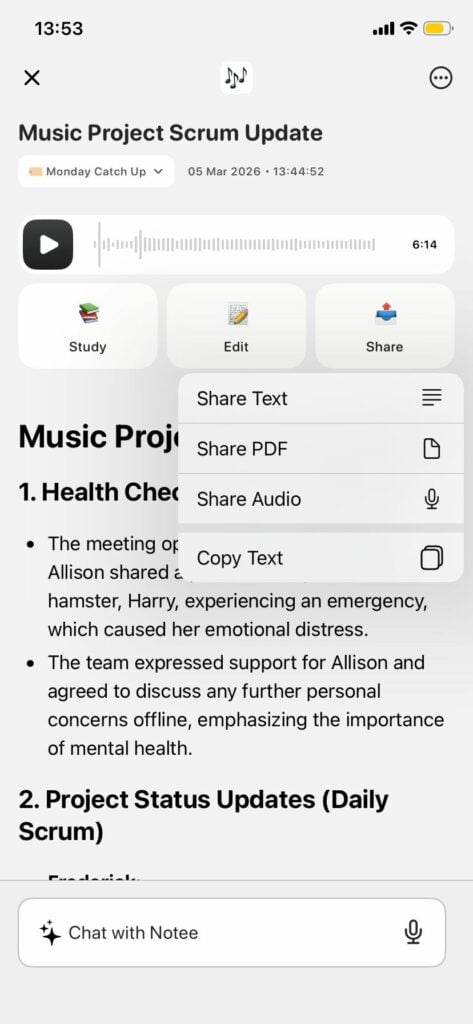
Cabe destacar que, aunque en la descripción comercial se mencionan las integraciones con Slack, Google Docs y Notion, en nuestras pruebas estas no aparecieron como destinos directos con un solo toque en la hoja para compartir, sino que era necesario utilizar la extensión para compartir de iOS o realizar un paso de configuración adicional. Las opciones «Compartir texto» y «Compartir PDF» funcionan a través de la hoja para compartir estándar de iOS, por lo que puedes enviarlos a cualquier aplicación instalada en tu teléfono, incluidas Slack y Notion, pero no se trata de una integración nativa directa.
Preguntar a la IA / Búsqueda semántica (solo por nota)
Las consultas en lenguaje natural de transcripciones individuales funcionan bien. La única limitación es que no se pueden buscar varias grabaciones al mismo tiempo. La búsqueda de Notee se limita a una nota cada vez.
Una reseña de diciembre de 2025 lo resumía así: «Me decepciona que solo se pueda buscar dentro de una nota. La aplicación no permite buscar en todas las notas al mismo tiempo. Es un verdadero inconveniente cuando buscas algo específico».
⚠️ Advertencia: El error de grabación silenciosa de Notee
Esto merece una sección aparte porque es el problema más grave de la aplicación y el que más probabilidades tiene de causar daños reales si utilizas Notee sin conocerlo.
¿Qué sucede?
Algunas grabaciones de Notee, que parecen completarse correctamente, no producen audio al reproducirlas. La sesión de grabación parece normal durante la captura. El análisis posterior a la grabación se ejecuta sin errores. El tamaño del archivo parece correcto. Pero cuando pulsas reproducir, no se oye nada.
Un usuario anónimo de la App Store documentó tu experiencia en detalle en diciembre de 2025: «Decidí confiar en ella para una reunión importante. Durante la reunión, la aplicación mostraba que estaba grabando y, después, completó el proceso de análisis. El archivo de audio parecía tener un tamaño normal, pero al reproducirlo, no se oía nada. Como este fallo se produjo durante una sesión crucial en la que perdí contenido valioso, le doy a esta aplicación una estrella».
Este no es un informe aislado. Varios revisores independientes describen un comportamiento idéntico en diferentes meses y versiones de iOS.
Cuando suele ocurrir
Según el análisis cruzado de los informes de los usuarios, el error de grabación silenciosa parece producirse con mayor frecuencia en las siguientes condiciones:
- Grabar durante una llamada telefónica (la sesión de audio de iOS puede entrar en conflicto)
- Grabación en segundo plano con determinados estados de permiso de iOS
- Después de una actualización de iOS sin la correspondiente actualización de la aplicación Notee
- En modelos antiguos de iPhone con RAM limitada que provocan interrupciones en las sesiones de audio.
Cómo reducir (no eliminar) el riesgo
Paso 1: Mantén Notee completamente actualizado y asegúrate de que tu versión de iOS sea la más reciente. La revisora @Chani confirmó que actualizar tanto la aplicación como iOS resolvió un problema similar que ella experimentó: «Creo que mi teléfono tenía la última versión de iOS, y era necesario actualizar la aplicación Notee, y ahora todo funciona bien».
Paso 2: Antes de grabar algo importante, haz una grabación de prueba de 30 segundos y comprueba inmediatamente la reproducción. Si la grabación de prueba se reproduce con audio, continúa. Si no es así, cierra y reinicia la aplicación.
Paso 3: Para cualquier reunión cuyo contenido sea irreemplazable, realiza una grabación paralela. Puedes utilizar la aplicación nativa de iOS Voice Memos, Whisper Recorder o cualquier otra aplicación de grabación secundaria. La configuración te llevará 10 segundos y te protegerá por completo.
Paso 4: No confíes en el indicador del tamaño del archivo como prueba de que la grabación se ha realizado correctamente. Puede parecer normal incluso cuando la pista de audio está en silencio.
A fecha de marzo de 2026, el desarrollador no ha emitido ninguna declaración oficial sobre la causa raíz ni ha confirmado ninguna solución para el problema de la grabación silenciosa. Se siguen lanzando actualizaciones y las versiones más recientes parecen haber reducido la frecuencia, pero el problema no se ha declarado públicamente resuelto.
Cómo solucionar problemas de sincronización entre dispositivos de Notee
La sincronización entre dispositivos no formaba parte del conjunto de funciones de Notee en el momento de su lanzamiento, lo que pilló por sorpresa a muchos usuarios de pago.
El crítico dpm57 (noviembre de 2025) describió la pérdida de grabaciones tras iniciar sesión en la aplicación en un segundo dispositivo: «Al día siguiente, revisé cada dispositivo y me di cuenta de que las grabaciones no se habían sincronizado entre ambos dispositivos, y que todas las grabaciones habían desaparecido de la tableta». El desarrollador lo confirmó en su respuesta: «La sincronización entre dispositivos no estaba disponible inicialmente».
Estado actual (marzo de 2026)
El desarrollador ha declarado que la sincronización se está desarrollando activamente. Según los registros de cambios de la versión reciente y los hilos de revisión, existe una funcionalidad de sincronización parcial en las versiones más recientes, pero no es totalmente fiable.
Qué hacer ahora mismo
- Trata cada dispositivo como independiente hasta que se confirme que la sincronización es estable en una nota oficial del registro de cambios.
- No des por sentado que las grabaciones del dispositivo A aparecerán en el dispositivo B. Exporta cualquier grabación que quieras conservar al almacenamiento en la nube (Google Drive, iCloud, Notion) inmediatamente después de capturarla.
- Si pierden tus grabaciones, ponte en contacto con el servicio de asistencia en [email protected]. El desarrollador ha recuperado los datos de algunos usuarios afectados.
Precios de Notee
No hay ningún plan gratuito disponible. A pesar de lo que afirman algunas reseñas de terceros, Notee no ofrece un plan gratuito permanente, tal y como se confirma en la pantalla de pago de la aplicación (marzo de 2026). Hay dos planes disponibles:
| Plan | Precio | Juicio |
|---|---|---|
|
Ilimitado anual ⭐ La mejor oferta |
79,99 $ al año (1,54 $ a la semana) |
Ninguno |
|
Semanal ilimitado |
8,99 $/semana |
7 días de prueba gratuita |
Ambos planes incluyen las mismas características: transcripciones de audio ilimitadas, grabaciones de cualquier duración, más de 100 idiomas y la posibilidad de subir archivos de audio, vídeo y mucho más.
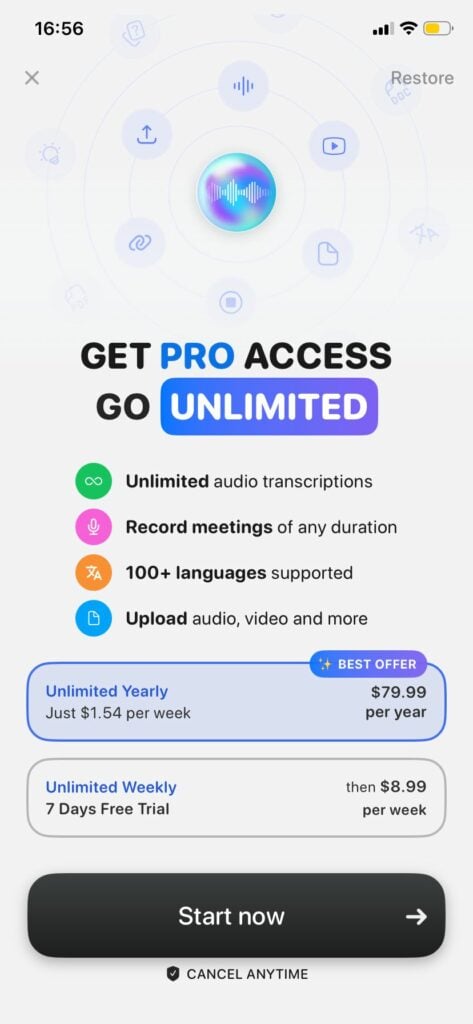
El plan anual cuesta aproximadamente 6,67 dólares al mes, lo que resulta competitivo para una herramienta de transcripción con IA individual. El plan semanal, que cuesta 8,99 dólares, resulta caro si se utiliza de forma continuada, ya que supone un gasto efectivo de 467 dólares al año, por lo que se ofrece principalmente como una opción de prueba con un compromiso mínimo.
La prueba gratuita de 7 días solo está disponible en el plan semanal, no en el anual. Si deseas probar Notee adecuadamente antes de comprometerte con el precio anual, comienza con la prueba semanal, pruébalo con varias grabaciones reales, incluyendo al menos una reunión importante (con una copia de seguridad en funcionamiento), y luego decide.
Un punto de comparación importante: tl;dv grabaciones y transcripciones ilimitadas en un plan gratuito permanente sin fecha de caducidad de la prueba, lo que hace que la apuesta de evaluación sea mayor en este caso. Te comprometes a pagar 79,99 $ por adelantado por Notee anual, frente a 0 $ para probar tl;dv .
¿Para quién es ideal Notee? (Por caso de uso)
Nota para estudiantes y educadores
Ajuste perfecto. El uso principal —grabar una clase, obtener un resumen claro y notas para estudiar— es exactamente para lo que está diseñado Notee. El crítico @Chani: «Lo que antes me llevaba una hora, ahora me lleva unos minutos obtener un documento que puedo estudiar y revisar». La compatibilidad con más de 100 idiomas ayuda a los hablantes no nativos que estudian en un segundo idioma. Las limitaciones de organización (solo por fecha, clasificación limitada por etiquetas) se convierten en un punto de fricción a medida que las bibliotecas de notas crecen a lo largo del semestre.
Nota para periodistas e investigadores
Buen ajuste con algunas salvedades. La precisión de la transcripción y la compatibilidad multilingüe hacen que Notee sea realmente útil para capturar entrevistas. La función Ask AI puede ayudar a encontrar citas rápidamente durante la redacción. Salvedades: el error de grabación silenciosa es un riesgo grave para las entrevistas que no se pueden volver a realizar. Utiliza siempre una grabadora de respaldo para cualquier entrevista original. La exportación de audio está disponible, lo cual es importante para fines de verificación.
Nota para psicólogos y terapeutas
No recomendado sin verificación. Notee no publica documentación sobre el cumplimiento de la HIPAA. Las grabaciones de sesiones psicológicas y terapéuticas son información sanitaria regulada por la HIPAA (EE. UU.) y marcos equivalentes en otras jurisdicciones. El uso de una aplicación no certificada por la HIPAA para grabar sesiones con pacientes supone un riesgo legal significativo. Hasta que Notee documente públicamente el cumplimiento de la HIPAA, los profesionales que trabajen en contextos regulados no deben utilizarla para grabaciones clínicas.
Nota para Remote en Zoom Google Meet
Mal ajuste. Notee no tiene integración con el calendario ni bot para reuniones. No puede unirse automáticamente a una Google Meet Zoom Google Meet . Para usar Notee en una videollamada, necesitarías que tu teléfono reprodujera el audio de la llamada en voz alta, lo cual no es práctico para remote . Para los equipos que realizan videoconferencias, tl;dv herramientas específicas como tl;dv , diseñadas específicamente para este flujo de trabajo.
Nota para los equipos de ventas
No es la herramienta adecuada. No tiene registro CRM, funciones de coaching de ventas, análisis cruzado de reuniones ni supervisión de marcos BANT o MEDDIC. Los profesionales de ventas que realizan llamadas de descubrimiento, demostraciones y QBR necesitan información sobre las reuniones que se introduzca automáticamente en su CRM. Notee requiere una exportación manual en cada paso.
Nota para equipos multilingües y profesionales internacionales
Auténtica potencia. La transcripción en más de 100 idiomas con resúmenes multilingües (introducida en la versión 1.0.5) convierte a Notee en una de las opciones móviles más potentes para uso internacional. Si tu equipo graba reuniones en francés, español, japonés o portugués y necesitas resúmenes en inglés (o viceversa), la amplitud lingüística de Notee es un verdadero factor diferenciador.
¿Es seguro Notee? Privacidad, RGPD e HIPAA
La política de privacidad de Notee (noteeapp.com/hub/legal/privacy-policy) establece que las grabaciones y transcripciones son privadas y no se comparten con terceros.
Lo que Notee no confirma públicamente:
- Cumplimiento del RGPD o residencia de datos en la UE
- Certificación SOC 2 Tipo II
- Certificación HIPAA
- Dónde se procesan y almacenan geográficamente los datos de audio y transcripciones
Para los usuarios de la UE: La falta de una declaración de cumplimiento del RGPD publicada por Notee o de una opción de residencia de datos en la UE crea incertidumbre en virtud de la legislación de protección de datos de la UE, especialmente cuando se graban conversaciones que incluyen datos personales sobre otras personas. Esto contrasta con herramientas como tl;dv, que se ha creado en Europa con un cumplimiento explícito del RGPD y opciones de residencia de datos en la UE.
Para los profesionales sanitarios de EE. UU.: La ausencia de documentación HIPAA significa que Notee no debe utilizarse para ningún registro que capture información sanitaria protegida (PHI).
Para la mayoría de los usuarios individuales: la política de privacidad de Notee es suficiente para el uso personal productivo. La preocupación se centra específicamente en los sectores regulados o las jurisdicciones con estrictos requisitos de localización de datos.
Ventajas y desventajas de Notee
✅ Ventajas
- Experiencia de grabación móvil limpia y sin fricciones
- Excelente calidad de los resúmenes de IA: elogiada de forma constante en más de 3100 reseñas.
- Compatibilidad con más de 100 idiomas con resúmenes en varios idiomas.
- Integración con Apple Watch (v1.2.0+)
- Cadencia de desarrollo activa: múltiples actualizaciones sustantivas en 2025.
- El desarrollador responde a las reseñas y reconoce los problemas públicamente.
- La grabación en segundo plano funciona de forma fiable cuando se configura correctamente.
❌ Contras
- Error de grabación silenciosa: las grabaciones pueden parecer correctas, pero no producen audio.
- La sincronización entre dispositivos no estará disponible en el momento del lanzamiento; aún está en fase de desarrollo.
- Búsqueda solo por nota, sin consultas entre bibliotecas.
- El historial de conversaciones con IA no se guarda después de la grabación.
- Sin integración con plataformas de reuniones (sin bot de Zoom)
- Sin funciones para equipos ni colaboración
- Sin integración CRM
- No se ha publicado documentación sobre el cumplimiento del RGPD/SOC 2/HIPAA.
- Precios no revelados públicamente.
- Los tiempos de respuesta del servicio de atención al cliente se consideran lentos (más de una semana).
- Organización de notas limitada (basada en la fecha; las etiquetas no se pueden ordenar)
Notee vs. tl;dv: ¿cuál es mejor para los equipos?
| Función | Nota | tl;dv | Lo mejor para |
|---|---|---|---|
| Plataforma | iOS / Android (solo para dispositivos móviles) | Zoom, Google Meet, Equipos | tl;dv remote |
| Unirse automáticamente a reuniones del calendario | ❌ | ✅ | tl;dv |
| Búsqueda cruzada con IA | ❌ Solo por nota | ✅ Biblioteca completa | tl;dv |
| Integración CRM | ❌ Manual | ✅ HubSpot, Salesforce | tl;dv |
| Formación en ventas (BANT/MEDDIC) | ❌ | ✅ | tl;dv |
| Informes automáticos recurrentes | ❌ | ✅ | tl;dv |
| RGPD / Residencia de datos en la UE | No publicado | ✅ SOC 2 + RGPD | tl;dv Equipos de la UE |
| Idiomas de transcripción | 100+ | 30+ | Notee — multilingüe |
| Identificación del orador | ✅ | ✅ | Empate |
| Resúmenes con IA | ✅ | ✅ | Empate |
| Sincronización entre dispositivos | ⚠️ Maduración | ✅ | tl;dv |
| Colaboración en equipo | ❌ | ✅ | tl;dv |
| Integraciones | Exportación limitada | Más de 6000 aplicaciones | tl;dv |
| Generosidad del plan gratuito | ❌ No hay nivel gratuito (solo prueba de 7 días) | Grabaciones ilimitadas + transcripciones | tl;dv |
| Grabación de reuniones presenciales | ✅ (micrófono del teléfono) | ❌ (solo videollamadas) | Nota: en persona |
| Transparencia en los precios | Solo en la aplicación | Página pública | tl;dv |
La forma más clara de explicar la diferencia: Notee es una capa de captura personal, ideal para que una persona grabe algo en su teléfono. tl;dv una capa de inteligencia de equipo: asiste automáticamente a las reuniones, crea una memoria consultable para toda la organización y envía señales a tu CRM y a tu pila de informes.
Los equipos que necesitan más que resúmenes de reuniones superan constantemente a Notee a las pocas semanas de uso real.
Las mejores alternativas a Notee
1. tl;dv ideal para equipos y organizaciones con fines lucrativos.
tl;dv Se conecta automáticamente Zoom, Google Meet y Teams, transcribe en más de 30 idiomas y ofrece análisis de IA entre reuniones, formación en ventas y registro automatizado de CRM. Creado en Europa y conforme con el RGPD y SOC 2. El plan gratuito incluye grabaciones y transcripciones ilimitadas, uno de los niveles gratuitos más generosos de la categoría. Consulta la comparación completa de asistentes de reuniones con IA y la guía gratuita de tomadores de notas con IA.
Ideal para: Remote , organizaciones de ventas, éxito de clientes, fundadores que realizan muchas llamadas semanales.
2. Otter.ai: ideal para sincronizar ordenadores de sobremesa y dispositivos móviles.
Otter una aplicación web y una aplicación móvil, una sincronización entre dispositivos mejor que la de Notee y un plan gratuito con 300 minutos mensuales. El desarrollo de funciones se ha ralentizado en comparación con los nuevos participantes, pero su fiabilidad está bien establecida.
Ideal para: personas que desean una opción estable y gratuita con acceso desde el escritorio.
3. Fireflies.ai: ideal para equipos centrados en CRM
Fireflies las reuniones y se integra perfectamente con HubSpot, Salesforce y Slack. Análisis sólidos. Algunos usuarios informan de un comportamiento agresivo de venta adicional y confusión en la facturación; vale la pena leer las reseñas recientes antes de suscribirse.
Ideal para: Equipos que priorizan la automatización de CRM y los resúmenes de Slack.
4. Granola la mejor opción para usuarios de Mac (sin bots)
Granola ganado un gran número de seguidores entre los fundadores independientes y las comunidades de Product Hunt por sus resúmenes claros y de alto nivel sin bots visibles en las reuniones. Solo para Mac a principios de 2026.
Ideal para: usuarios de Mac que desean realizar grabaciones privadas y sin bots con una configuración mínima.
5. Krisp: ideal para entornos ruidosos
Krisp añade la cancelación de ruido a la transcripción, eliminando el audio de fondo de ambos extremos de una llamada. Funciona en Zoom, Meet y Teams sin ningún bot visible.
Ideal para: oficinas abiertas, entornos domésticos ruidosos o cualquier situación en la que la calidad del audio sea importante.
Veredicto final
Notee es una aplicación móvil para tomar notas muy capaz y bien diseñada que realmente cumple su promesa fundamental para los usuarios individuales. La puntuación de 4,8 en la App Store es real y merecida. Los resúmenes de IA son buenos, la compatibilidad con idiomas es impresionante y el equipo de desarrollo es activo y honesto en sus respuestas.
Pero el error de grabación silenciosa no es un caso aislado sin importancia. Varios usuarios han perdido contenido importante de reuniones por este motivo, y el desarrollador no ha publicado una solución confirmada. Hasta que ese problema no se resuelva y documente formalmente, cualquier profesional que confíe en Notee como único método de grabación para reuniones importantes está corriendo un riesgo real.
Para estudiantes, periodistas, autónomos y personas que graban conversaciones en persona en varios idiomas: vale la pena probar Notee. Empieza con un plan semanal, comprueba la fiabilidad en tu dispositivo específico y mantén siempre una copia de seguridad activa para cualquier cosa que sea irremplazable.
Para equipos que realizan videoconferencias periódicas, equipos de ventas que necesitan integración CRM o cualquier organización en un sector regulado: Notee no está diseñado para vuestro caso de uso. tl;dv cubre todo el flujo de trabajo (conexión automática, inteligencia entre reuniones, registro CRM y documentación de cumplimiento) con grabaciones ilimitadas en un plan gratuito que puedes probar antes de comprometerte.
Preguntas frecuentes sobre Notee
Esta reseña se basa en opiniones verificadas de la App Store, hilos de respuestas de los desarrolladores, registros de cambios de versiones e informes independientes de la comunidad recopilados hasta marzo de 2026. Las funciones, los precios y los errores conocidos pueden cambiar; compruébalos en la ficha actual de la aplicación antes de suscribirte. Al analizar la eficacia real del producto Coconote en 2026, es fundamental tener en cuenta los comentarios de los usuarios y las valoraciones generales de satisfacción. Muchos usuarios han notado mejoras significativas con respecto a versiones anteriores, destacando una mejor funcionalidad y fiabilidad. Además, las actualizaciones continuas demuestran el compromiso del desarrollador por mejorar la experiencia del usuario y abordar cualquier problema que surja.