Pipedrive tl;dv와의 통합

Get your meeting notes logged automatically by connecting tl;dv to your Pipedrive account. Every call lands in the exact deal it belongs to, the moment a call ends. Wave goodbye to manual data entry.
Forever.

What Gets Synced to Pipedrive?

A synced call always shows up in Pipedrive as a completed Meeting activity, sitting under the person you spoke to or the deal you’re working, attendees matched automatically by email.

Don’t have a contact in your CRM? tl;dv can create one on the spot, so calls never vanish into thin air.


What tl;dv Sends Where It Appears in Pipedrive Setup
AI meeting notes & summary A Meeting or Note under the matched Person, or a Meeting on the Deal 자동
Full transcript (40+ languages) Linked from the logged meeting activity 자동
Timestamped recording links In the note — click to jump to the exact moment 자동
Action items & next steps Inside the summary pushed to the record 자동
Meeting highlights Synced to the matched Person or Deal 자동
Chosen note sections (e.g. budget, competitors) Standard or custom Pipedrive fields you map Field mapping
★★★★★

"the integration with my email and CRM system works great."

Jonathan G. — Mid-Market · verified review on G2
Rated 4.7 / 5 on G2 across 537 reviews · 2M+ users · GDPR & SOC 2

Fill In Deal Fields Without Logging Onto Pipedrive

Never input CRM data manually again. With field mapping, tl;dv reads your meeting notes and writes the answers into the exact Pipedrive fields you choose. Automatically. After every relevant call.

Let’s say a discovery call covers budget, timeline, and who signs off. Map those template sections once, and every future call populates them on the deal by itself.

Keep in mind that template sections pair with fields one to one, and you map a single object at a time (Persons or Deals), so pick where each answer belongs at the start.

★★★★★★★★★★

"Automating tasks like... data entry is a game-changer for productivity"

Giri S. — Associate Vice President of Sales & Business Development · verified review on G2
Rated 4.7 / 5 on G2 across 537 reviews · 2M+ users · GDPR & SOC 2

Connect tl;dv to Pipedrive in One Minute

tl;dv 연동
tl;dv records from calendar.
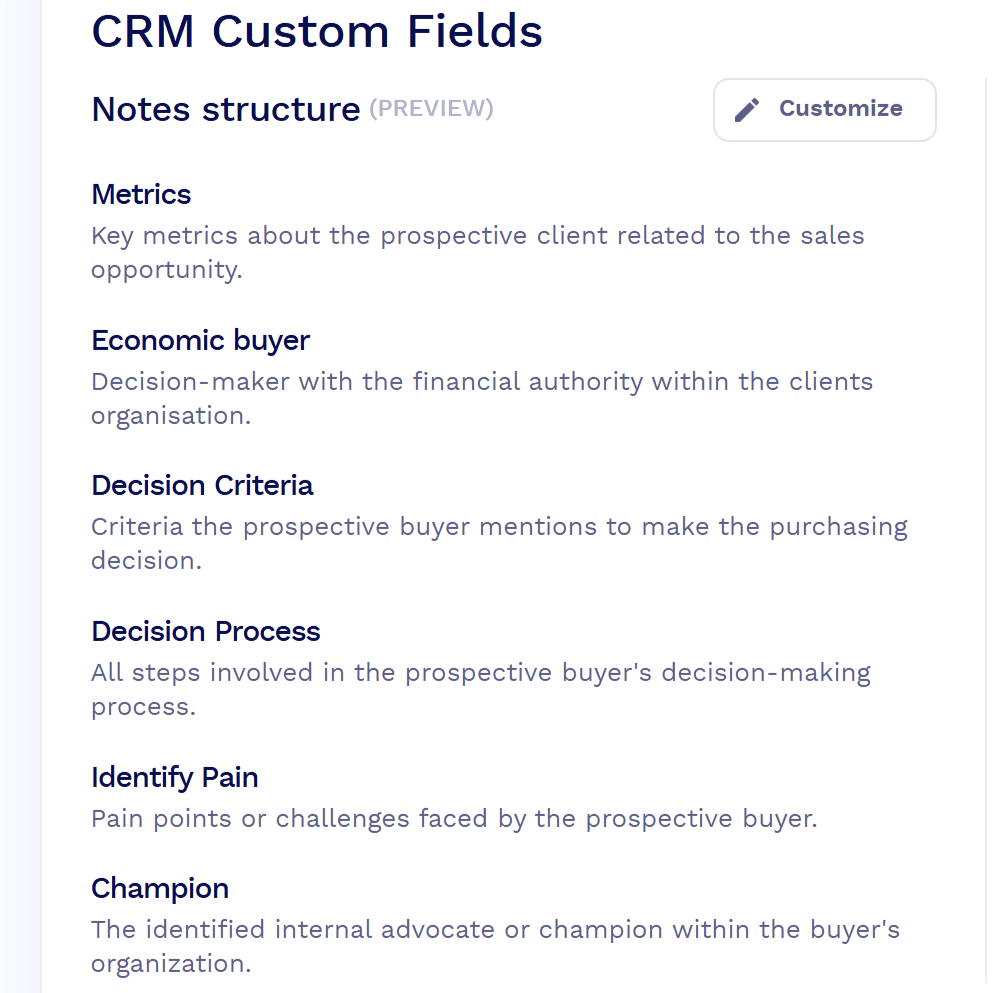
CRM custom fields in tl;dv

Connect Your Account.

Add tl;dv from the Pipedrive Marketplace, or open the Integrations page in tl;dv and connect Pipedrive with OAuth.

Set the rules.

Decide whether calls log to the contact or the deal, and which meetings tl;dv records off your calendar.

Map the fields you care about.

This is an optional step, but it’s important if you want the pipeline to run itself.

Native, Zapier, or API: Pick Your Setup

Most teams never need anything more than the native integration.

When your workflows get ambitious and you’re spinning up new deals from calls, firing multi-step automations, or wiring meeting data into something you built yourself, you have two more options.

Route Best For What It Handles Plan
Pipedrive integrationNative Most sales & CS teams Auto-logs notes, summaries & recording links to the matched Person or Deal; maps notes to Pipedrive fields Pro & up
Zapier
Add-on
Custom triggers without code 5,000+ app workflows, auto-create deals from recordings, multi-step automations Pro & up
API & MCP server Developer RevOps & custom builds Programmatic access to recordings, transcripts & notes; lets an AI assistant act in your CRM Pro & up

Pipedrive Integration FAQ

Yes. It’s a native integration listed in the Pipedrive Marketplace. Calls you record in tl;dv log automatically to the right contact or deal. CRM sync is on Pro, Business, and Enterprise.


Install it from the Pipedrive Marketplace or connect Pipedrive from the tl;dv Integrations page, then authorize with OAuth. Setup takes about a minute and you can do it on your own account.

The AI summary, meeting notes, action items, meeting highlights, a full transcript (40+ languages), and a timestamped link back to the recording — logged as a completed Meeting activity.

Your choice. Set calls to log as a Meeting or Note on the contact, or as a Meeting on the deal, in the configuration settings.

tl;dv matches attendees by email and can create the record for you if it doesn’t exist, based on the automations you switch on.

Yes. Field mapping writes notes from your meeting template into standard or custom Pipedrive fields, one object at a time, with sections matched to fields one to one.

One-way. tl;dv pushes meeting data into Pipedrive; it doesn’t pull Pipedrive data back.

Not for the core integration. That’s native. Zapier or the API cover extras like creating new deals from calls, updating stages, or custom automations.

CRM sync starts on Pro and is included on Business and Enterprise. Free covers recording and transcription.

Yes: OAuth connection (no password stored), encrypted data, GDPR-compliant and SOC 2.


Right after the meeting, once the recording is transcribed and summarized. It’s usually within a minute or two.


Yes, choose which meetings auto-record from your calendar, so internal or personal calls stay out of the CRM.


tl;dv 시작하기
Google Meet, Zoom 및 Microsoft Teams를 통해 녹화, 트랜스크립션 생성 및 편집

유사한 통합

tl;dv 회의에서 직접 발생한 버그나 할 일 목록을 기반으로 티켓을 자동 tl;dv 설정하세요.

유사한 작업 흐름

Microsoft Teams, Zoom, Google Meet Asana에 원활하게 통합하여 각 프로젝트 마일스톤이 팀 논의로 강화되도록 합니다.
저희 AI는 Microsoft Teams Zoho의 모듈 전반에 걸쳐 실행 가능한 데이터 포인트로 변환합니다.
Meet the team behind the AI that puts meetings to work. tl;dv was built in Germany by three founders tired of meetings that end and leave nothing behind. Learn about our history, our product, our people, and why we build the way we do.