Skip to content






TL;DR: How Much Does Claude Enterprise Actually Cost in 2026?
Claude Enterprise pricing starts at $20 per seat per month, billed annually, plus usage billed separately at standard API rates. There’s no included token allowance at all, so your real bill is the seat fee plus whatever your team burns through. The minimum is 20 seats, and you can buy it two ways: self-serve online, or sales-assisted for custom contracts, invoicing, and a HIPAA-ready option.
- Seat fee: $20/user/month, annual only. Covers access to Claude on web, desktop, and mobile, plus Claude Code and Cowork — not usage.
- Usage: metered at API rates (e.g., Opus 4.8 at $5/$25 per million input/output tokens).
- Minimum: 20 seats. Team runs 5–150 seats before you’d consider Enterprise.
- Real-world all-in: light users land near $25–30/mo; heavy Claude Code and research users can hit $150–$500+/mo. Third-party reports cluster total spend around $60–$250/user/mo.
Anthropic doesn’t hide the base figure the way most enterprise-AI vendors do. What it doesn’t splash across the pricing page is what a real deployment costs once your engineers point Claude Code at a monorepo. So this is the honest breakdown: how much is Claude Enterprise really going to cost you when you bundle the access fee and the usage fees together?
Jump straight to the Claude Enterprise pricing calculator if you want to skip to the important bit.
How Much Does Claude Enterprise Cost?
Claude Enterprise costs $20 per seat per month, billed annually, but that just gets you in the door. The seat fee covers access to Claude across web, desktop, and mobile, plus Claude Code and Cowork, and it includes exactly zero usage. Every token your team runs through the platform is billed separately on top, at standard API rates.
That’s the part the pricing page doesn’t make obvious. To Anthropic’s credit, it does publish the base figure — the Team & Enterprise page lists “$20/seat. Usage cost scales with model and task,” which already puts it ahead of the “Contact Sales” black boxes most enterprise-AI vendors hide behind. But the “+ usage” is vague at best.

Here’s what the seat fee gets you:
- Access across every surface — Claude on web, desktop, and mobile, plus Claude Code (terminal) and Cowork (desktop file and task work).
- The full Enterprise governance stack — SSO, SCIM, audit logs, role-based access, a Compliance API, custom data retention, network-level access control, and IP allowlisting. (More on those in the security section.)
- A 20-seat minimum, billed annually. There’s no month-to-month Enterprise option, and no way to buy fewer than 20 seats.
And here’s what it doesn’t:
- Any usage whatsoever. Chat, Claude Code, Cowork… all metered per token at API rates. There’s no included token budget to draw down and nothing capped per person. Your one cost-control lever is spend limits, which admins can set at both the organization and individual-user level.
If you’re already an Anthropic customer, older organizations on legacy seat types are on their way out. Those plans automatically transition to the single $20 Enterprise seat at your next contract renewal. If you’re on an older plan, the math below changes for you at renewal, not today.
Is Claude Enterprise Pricing Published or Custom?
Both. The $20 seat base is published and self-serve — you can buy it online without ever talking to a salesperson. What’s custom is everything afterwards: usage bills against your actual consumption, and contract terms (invoicing, multi-currency, committed-spend discounts, a HIPAA BAA) are negotiated on the sales-assisted path.
This is arguably better than ChatGPT’s Enterprise plan, where the per-seat number itself is unlisted and negotiable, but it’s still unclear exactly what your bill will be until you get it. Two companies with the same 60 seats can post wildly different invoices depending on whether they’re running light chat or vibe coding with Claude Code all day.
What Changed in Claude Enterprise Pricing in 2026?
If a rep quoted you Claude Enterprise in 2024 or 2025, throw that number out. In 2026, Anthropic decoupled tokens from seats. Bundled token allowances were stripped out of the Enterprise seat entirely and the price dropped toward a flat $20. The 10–15% API discounts that used to ride along with the old $40–$200 seats disappeared right alongside them.
The shift landed on renewals from late 2025 and became the default for new contracts by early 2026. Now, you’re paying less for the seat and more (with no built-in break) for the usage. The best way to approach Claude’s Enterprise pricing is to model your expected token consumption before you commit.
What’s Included in the Seat Price (and What Costs Extra)?
The $20 Claude Enterprise seat includes full platform access plus the entire enterprise security and admin stack. It’s a clean pricing system when you think of it as two separate buckets: seats and usage.
What the seat covers (no extra charge):
- Every Claude product: everything in the Team plan carries up to Enterprise, so Claude Code, Cowork, Design, and Science are all in the seat, alongside chat on web, desktop, and mobile.
- The governance and security stack: SSO, SCIM provisioning, role-based access, audit logs, a Compliance API, custom data retention, network-level access control, and IP allowlisting.
- Enterprise search and connectors: Claude pulls context from Google Drive, Gmail, Google Calendar, GitHub, Microsoft 365, and Slack without manual uploads, so it can answer from your existing documents, threads, and calendars.
- Central administration: org-wide billing, admin controls, usage analytics, and managed connectors.
What costs extra (usage, metered at API rates):
- Every token. Chat, Claude Code, and Cowork all draw on the same metered usage. There’s no included allowance and nothing capped per person. Spend limits at the org and user level are what keep it in check.
How Is Enterprise Usage Billed?
Usage is metered per token at standard API rates, and how you’re billed for it depends on your path. Self-serve plans draw down a prepaid, shared credit pool — everyone’s usage pulls from the same balance, and when the credits run out, usage stops until an owner tops up. Sales-assisted plans are invoiced monthly in arrears, billed against whatever your team actually consumed that period.
A few mechanics worth budgeting around:
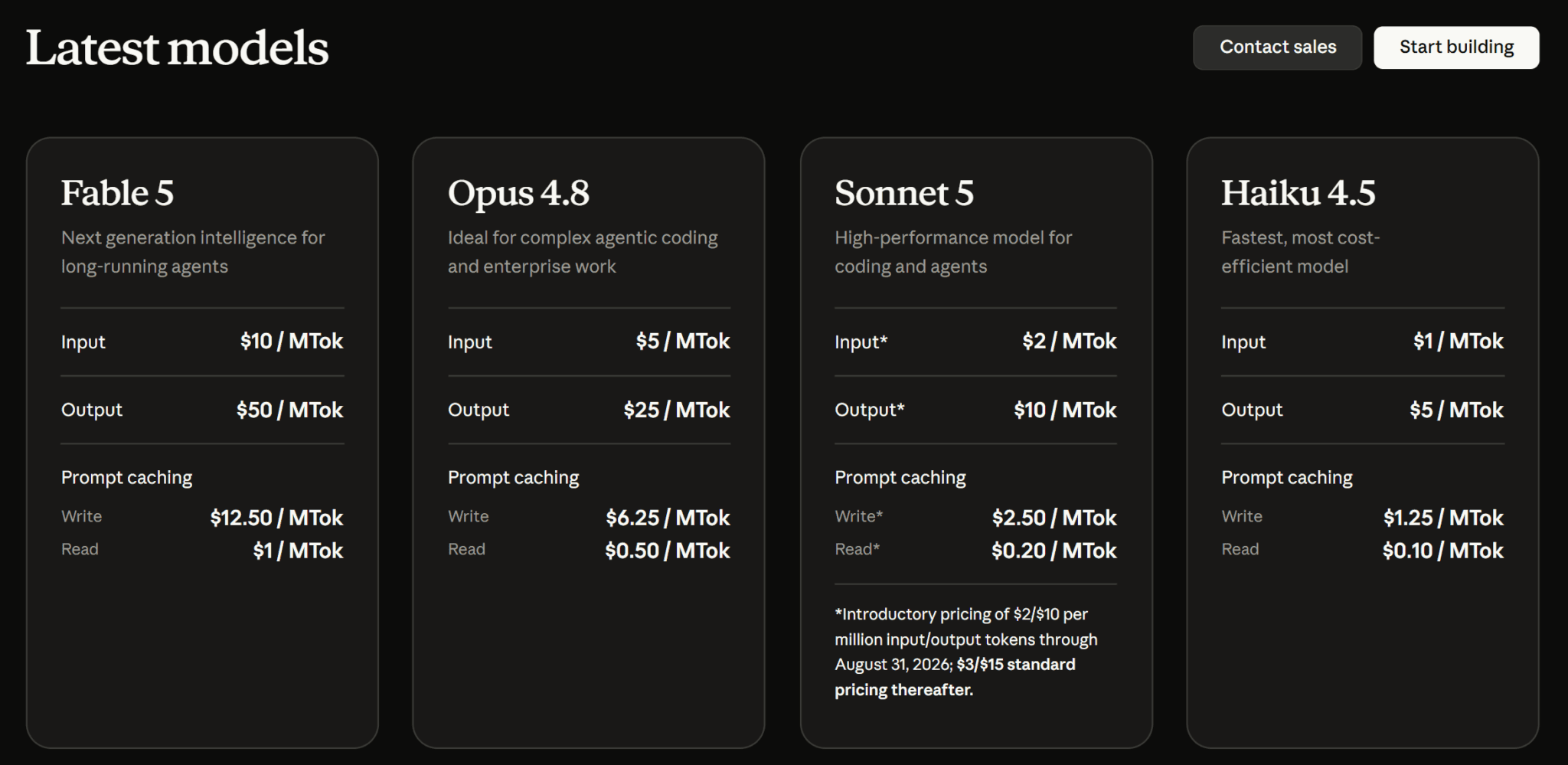
- The rates are the API rates. Which model your team reaches for is the single biggest cost driver. Here’s the current API pricing (verified 9 July 2026):
| Model | Input ($/MTok) | Output ($/MTok) |
|---|---|---|
| Opus 4.8 | $5 | $25 |
| Sonnet 5 | $2* | $10* |
| Haiku 4.5 | $1 | $5 |
| Fable 5 | $10 | $50 |
*Sonnet 5 is running introductory pricing through 31 August 2026, then moves to $3/$15.
- US-only inference costs a premium. If your org turns on US-only inference, usage bills at 1.1× standard rates on Opus 4.6, Sonnet 4.6, and later models.
- Output is the expensive half. Output tokens run roughly 5× input across the lineup, so verbose, high-generation workflows (long reports, agentic coding) cost disproportionately more than heavy reading tasks.
- Batch cuts it in half. Asynchronous workloads run through the Batch API bill at 50% of standard rates — worth knowing for anything that doesn’t need a real-time response.
- Big invoices go to the bank. Invoices of $50,000 or more can only be paid by ACH or wire; the card option disappears above that threshold.
So, How Much Does Claude Enterprise Actually Cost Per User?
Because usage is unbundled, the real per-user cost swings hard: light users land around $25–30 a month all-in, while heavy Claude Code and research users can run past $200.
How high your bill goes depends almost entirely on two things: which model your team reaches for, and how hard they lean on token-hungry workflows like agentic coding. Instead of guessing, run your own numbers on our calculator below.
Claude Enterprise Cost Calculator
Adjust assumptions
Based on 22 working days per month. These are illustrative defaults, not Anthropic figures — edit them to match your own telemetry. Editing switches the profile to “Custom.”
Estimate only. Your real bill depends on model choice, prompt length, and how hard your team leans on token-heavy workflows like agentic coding. Set org- and per-user spend limits before rollout to cap the downside.
Usage is just tokens — so stop making Claude re-read raw transcripts. tl;dv's MCP server feeds Claude clean meeting summaries on demand, so it spends a fraction of the input tokens per query.
Connect tl;dv to Claude via MCP →How to read it: the estimate splits your monthly cost into two bars — the fixed seat fee and the variable usage. On any real team, the usage bar is the one that matters, and switching the model from Sonnet to Opus is the fastest way to watch it jump. Treat the output as a starting point for a conversation with finance, not a quote. And whatever number you land on, set org- and per-user spend limits before rollout, not after the first invoice.
Because usage is just tokens, feeding Claude meeting summaries and notes instead of raw hour-long transcripts is a direct way to trim the input side of your bill. That’s exactly what tl;dv’s MCP server does.
What Do Companies Actually Report Paying for Claude Enterprise?
Companies report a wide range of different prices, depending on team size, model used, and actual usage requirements. There are plenty of generic estimates floating around, but I took to Reddit to find real people talking about their Enterprise plans.
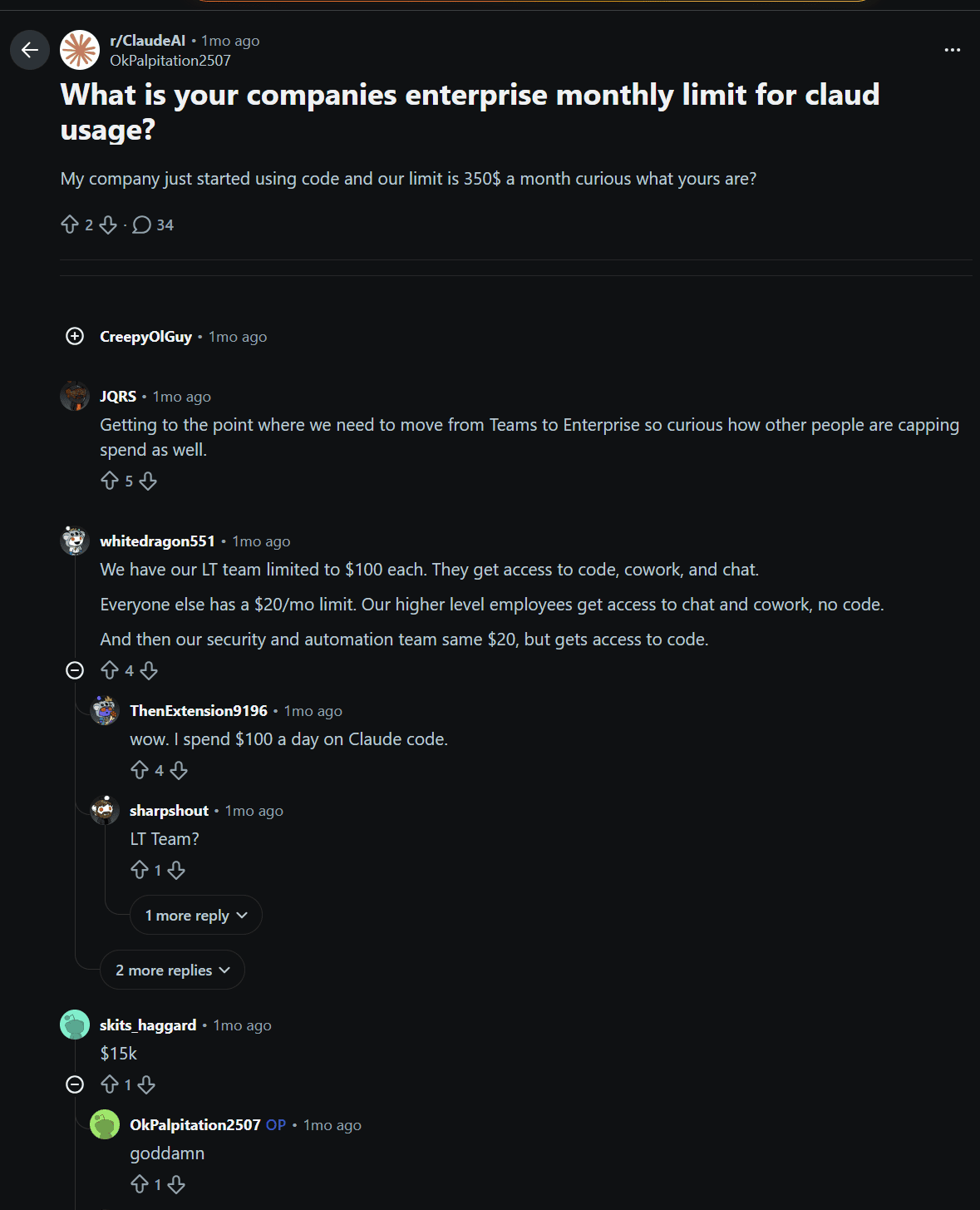
U/OkPalpitation2057 asked “What is your company’s enterprise monthly limit for Claude usage?” He clarified by stating that his limit is currently $350 per month.
The replies were mixed. It ranged from $100 – $15,000 per user! There were shocked comments at both ends of the spectrum, with one commenter saying, “I spend $100 a day on Claude code.”

Another user said “[I] blew through half my quote in the first day,” while a third said, “$5k per individual engineer, with the ability to ask for more if needed.”
While the actual prices varied depending on which team was using it, the scope of their work, and the size of the business, all agreed that it wasn’t cheap.
Here’s roughly where the reported numbers cluster in 2026:
- Light users: occasional chat and a bit of research and you’re looking at $30–40 a month all-in.
- A 100-seat team on light usage lands around $3,000–$5,500 a month all-in, or roughly $30–$55 per user.
- Coding, document analysis, and automation teams climb into the $100–$250+ per user range, especially on the pricier models or with large context windows.
- Heavy Claude Code and deep-research users can run past $500 a user, and mature deployments running several automated workflows push higher still.
The caveat here is: it depends. The Reddit thread shows that there’s an extremely broad range and it’s far from a one-size-fits-all kind of deal.
On Capterra, a financial-services user who rates Claude five stars still flags that it “consumes tokens very quickly,” with even a simple query depleting far more than expected. A separate reviewer, who otherwise lists no negatives, singles out the Enterprise tier as the one place costs climb.
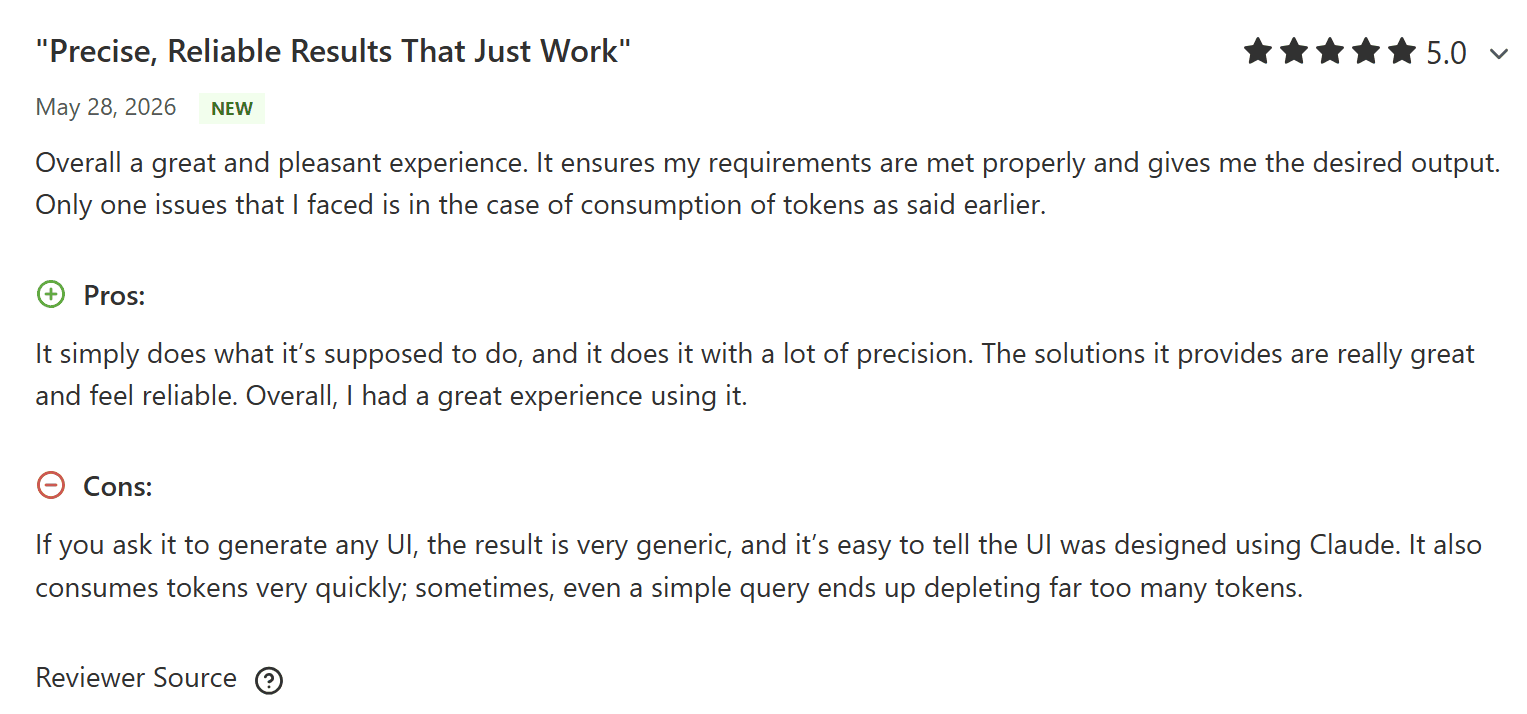
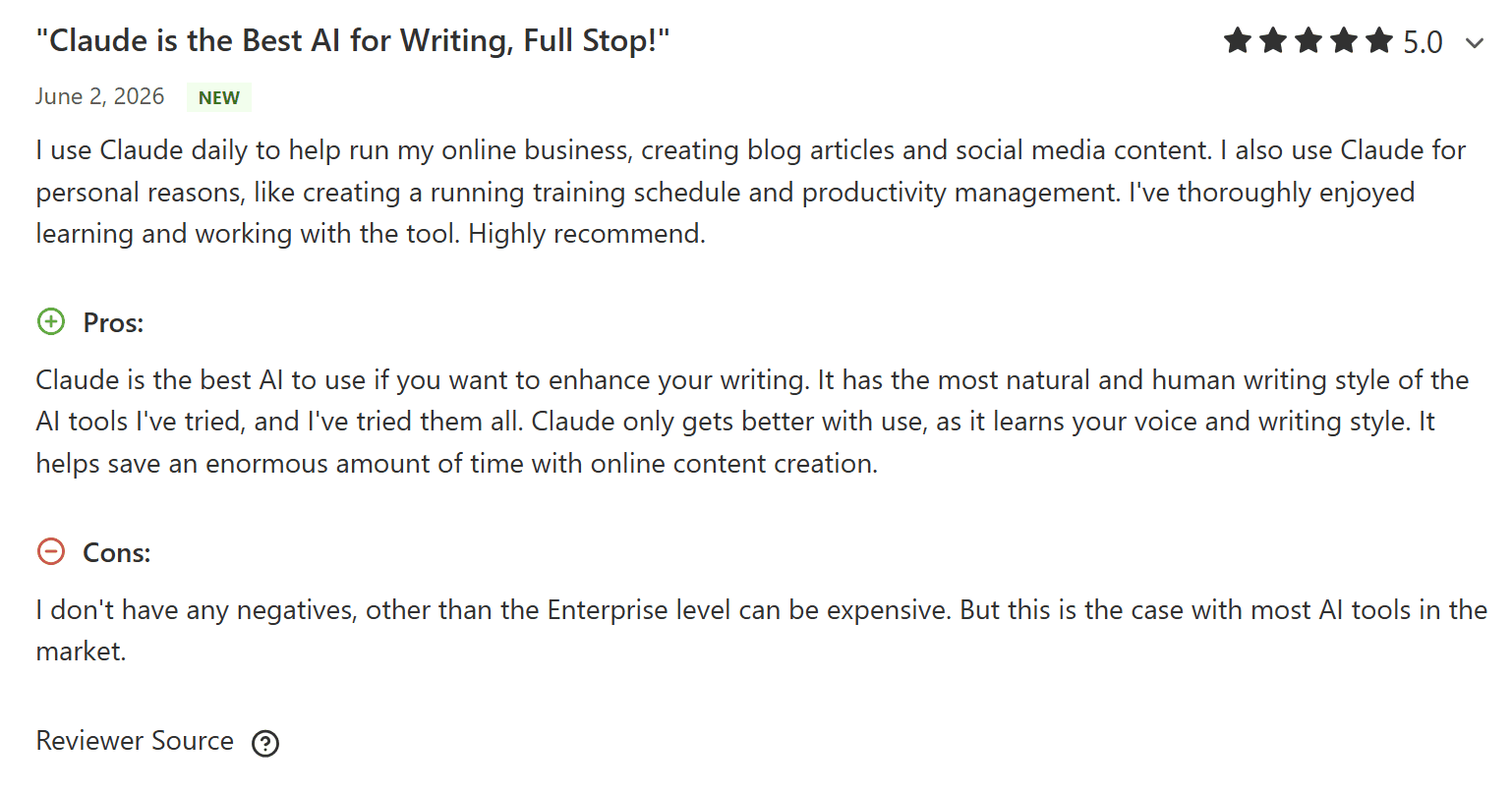
So the honest read on “what companies actually pay” is that there is no single number, and anyone quoting you one is guessing. The $20 seat is the floor everyone agrees on. Everything above it is usage, and usage is where the real budgeting work lives — which is exactly what the calculator above is for.
Claude Enterprise vs. Team, Pro, and Max
For most organizations under 150 people, Claude Team (Standard at $25/seat/month ($240 billed annually) and Premium at $125/seat/month ($1,200 billed annually)) is often the better home, because it bundles usage into a predictable seat fee. If you’re on Pro or Max instead, see how Claude usage limits work across the five-hour session and weekly caps.
When it comes to Claude Enterprise, it’s usually a governance decision, not a headcount one: you move up for SCIM, audit logs, the Compliance API, custom retention, and HIPAA readiness, and you accept metered usage-based billing in exchange.
In fact, that’s the only thing that separates Team and Enterprise: the compliance stack and the billing model.
Claude Enterprise vs. Team — When Is Each Cheaper?
Team caps at 150 seats and folds usage into the seat fee; Enterprise starts at 20 seats, has no cap, and unbundles usage entirely. On pure cost, Enterprise only wins when pooled, metered billing comes in under what you’d otherwise pay for Premium seats your team doesn’t fully use — and it wins on capability the moment you actually need the governance layer. Enterprise is usually only worth it once you have a confirmed compliance mandate. Short of that, Team tends to be more flexible and less expensive.
Claude Enterprise vs. Pro and Max
Pro ($20/month, or $204 billed annually) and Max ($100/month for 5× usage, $200 for 20×) are individual plans. They have no central billing, no SSO, no admin controls, so they aren’t real organizational alternatives to Enterprise.
The only real case for keeping someone on a flat individual plan is a genuinely heavy solo user for whom Max 20×’s predictable $200 beats metering them on Enterprise. It’s not common, but it can be a nice workaround.
| Plan | Price / seat / mo | Seats | Usage | Admin & security | Best for |
|---|---|---|---|---|---|
| Pro | $20$17 billed annually | 1 | Included allowance | Individual — none | Solo everyday use |
| Max | $100 – $2005× / 20× Pro · monthly only | 1 | Larger allowance + priority | Individual — none | Heavy solo users, all-day Claude Code |
| Team Standard | $25$20 billed annually | 5 – 150 | Bundled (~1.25× Pro) | SSO, central billing, admin | Orgs needing a shared workspace |
| Team Premium | $125$100 billed annually | 5 – 150 | Bundled (6.25× Pro) | SSO, central billing, admin | Developers & heavy Claude Code users |
| Enterprise | $20 + usageannual only | 20+ (no cap) | Metered at API rates | Full governance: SCIM, audit, HIPAA* | Governed AI at scale / compliance mandate |
Claude Enterprise vs. ChatGPT Enterprise, Copilot, and Gemini
On paper, Claude Enterprise looks like the cheapest of the four — a published $20 seat against ChatGPT Enterprise’s unpublished ~$60, Copilot’s $30 add-on, and Gemini’s Workspace bundle — but the four don’t price the same way, so the headline numbers don’t actually compare. Claude and (increasingly) ChatGPT charge a seat plus metered usage; Copilot layers a flat fee onto a mandatory Microsoft 365 base; and Gemini is nearly free if you already live in Google Workspace.
Here’s how each one actually bills in 2026:
- Claude Enterprise — $20/seat + usage. The seat price is public, usage meters at API rates, and there’s no included allowance. A 20-seat minimum, annual term, HIPAA available on the sales-assisted path.
- ChatGPT Enterprise — reported ~$60/seat, custom. OpenAI doesn’t publish an Enterprise price; third-party analyses put it in the $60+ range, typically at ~150-seat scale with annual commitments. Large deals reportedly land 40–60% discounts. Advanced features are increasingly metered through credit pools, and API usage is billed separately — so ChatGPT is drifting toward the same seat-plus-usage shape as Claude.
- Microsoft 365 Copilot — $30 add-on, but not standalone. The $30/user/month sits on top of a required M365 E3 or E5 license ($36–$57), for a true all-in of roughly $66–$90/user/month. Microsoft raised its M365 base prices by $3/user in July 2026, nudging that higher. Predictable and knowable before signing, but you’re paying the Microsoft ecosystem tax whether or not the AI gets used.
- Gemini — cheapest entry, if you’re already Google. Gemini is bundled into Google Workspace from around $14/seat, which is the lowest org-wide AI entry point of the four. The dedicated Gemini Enterprise add-on runs $30–36/seat, and the agentic Gemini Enterprise platform is usage-based, requiring a Google Cloud engagement before any number is knowable.
At the end of the day, the “cheapest base” is not “cheapest bill,” and the real cost of enterprise AI in 2026 has less to do with the sticker than with which ecosystem you already pay for. Copilot and Gemini are cheapest when you’re already buying the productivity suite underneath them — and you pay for every seat whether or not the AI gets touched, which matters when utilization of paid Copilot seats sits around 30% daily.
Claude and ChatGPT sit above your stack as platform-agnostic tools, stronger when the core job is writing, analysis, research, coding, or wiring AI into custom workflows. But you should also consider which tool is actually best for your needs. It’s not always what you think, as our Grok vs ChatGPT article exposed.
Security, Compliance, and Admin Controls in Claude Enterprise
The governance stack is the real reason most teams buy Enterprise, and all of it is included in the $20 seat. A HIPAA-ready configuration with a signed BAA is the one piece that sits behind the sales-assisted path.
It helps to separate what’s Enterprise-only from what you already get lower down. Team plans include the basics — SSO, domain verification, central billing, admin controls, usage analytics — so those aren’t reasons to upgrade. What Enterprise adds is the layer a security or compliance team actually asks for:
- SCIM provisioning: automated user lifecycle from your identity provider, so joiners and leavers sync instead of getting managed by hand.
- Role-based access control: fine-grained permissioning instead of everyone-gets-everything.
- Audit logs: a full record of activity your security team can review or export.
- Compliance API: programmatic observability that feeds your SIEM or monitoring stack.
- Custom data retention: set how long conversation data lives instead of accepting a default.
- Network-level access control and IP allowlisting: restrict access to known networks.
- Domain capture and managed MCP: auto-enroll users on your domains, and pin an approved set of MCP connectors across the device fleet so people can’t wire up whatever they like.
On data, Anthropic doesn’t train models on your content under its commercial terms by default. API inputs and outputs are auto-deleted within 30 days, and a zero-data-retention (ZDR) arrangement is available on the API through a security addendum for teams that need non-persistence.
Which Security Certifications Does Claude Enterprise Have?
Anthropic holds SOC 2 Type I and Type II, ISO 27001:2022, and ISO/IEC 42001:2023, plus a HIPAA-ready configuration with a BAA available. It was one of the first frontier AI labs to earn the ISO 42001 AI-management-systems certification, in January 2025. GDPR and CCPA are handled through Anthropic’s privacy program and a DPA (with standard contractual clauses) baked into the commercial terms, rather than as line-item certifications.
For your security review, the useful detail is what you can actually get your hands on: a SOC 3 summary report is public via Anthropic’s Trust Center, while the full SOC 2 Type II report is available to Enterprise customers under NDA. If a vendor questionnaire needs ISO certificates or the detailed SOC 2, the Trust Center is where you request them.
Is Claude Enterprise HIPAA Compliant?
Claude Enterprise can be HIPAA-ready, but only on the sales-assisted plan — self-serve Enterprise, Team, and the individual tiers don’t qualify for a BAA. Once you’ve signed the BAA, an admin activates HIPAA readiness in the Enterprise admin settings, and the organization then automatically blocks any feature that isn’t HIPAA-eligible. Anthropic enforces the boundary in code rather than trusting policy.
How to Buy Claude Enterprise (Self-Serve vs. Sales, Discounts, Contracts)
There are two ways to buy Claude Enterprise:
- Self-serve online, where you pay by card or ACH and can be live the same day
- Sales-assisted, where you get invoicing, multiple currencies, an MSA, purchase orders, committed-spend discounts, and the HIPAA BAA.
Both paths require the same 20-seat minimum and an annual term. The difference is how you pay and what contract terms you can negotiate.
Sales-assisted exists for everything procurement usually insists on: monthly invoicing in arrears, non-USD billing, an MSA and PO workflow, AWS Marketplace purchasing, tiered incentives on committed spend, and customer-success support above certain thresholds. If you need a BAA, non-standard terms, or a real trial, you’re on the sales-assisted path by definition.
Is There a Free Trial or Demo?
There’s no fully self-serve Enterprise free trial. The practical way to evaluate it is to run on Free, Pro, or Team first, then migrate up when you’re ready. Your memberships, projects, conversations, and any unused Team usage credits carry over.
On the sales-assisted path, trials and proofs of concept are available on request, which is the route to take if you need to pilot the governance features specifically before committing a budget.
Is Claude Enterprise Pricing Negotiable? Volume Discounts?
The $20 self-serve seat is fixed. Where pricing becomes negotiable is the sales-assisted path, which carries committed-spend incentives, multi-year terms, and non-standard commercial terms for larger deployments. There are also institution-wide Education plans for students, faculty, and staff; startup, nonprofit, and government pricing isn’t published, so that’s a conversation with sales rather than a listed rate.
The single most valuable thing to bring to a sales conversation is a defensible estimate of your monthly token consumption. Benchmark the quote against that, not against the seat count, and you’ll know whether a committed-spend discount is worth the commitment.
How Do Seats and Billing Work Once You’re On It?
Seats are billed annually and upfront. Adding seats mid-term is prorated and takes effect immediately; reducing seat count happens at renewal rather than mid-contract, so size the initial commitment with a little care. Payment follows the path you chose: card or ACH in USD on self-serve, invoicing and other currencies on sales-assisted.
Using Claude Enterprise with tl;dv for Meeting Intelligence
If your team runs on Claude Enterprise, your meetings shouldn’t sit in a silo Claude can’t see. tl;dv’s MCP server connects your meeting record — transcripts, summaries, and action items — to Claude as a live, queryable source, so a prompt like “what did the customer commit to on last week’s renewal call?” gets answered from the actual transcript instead of someone’s memory of it.
Once it’s connected, Claude can list and filter meetings, pull a full transcript by ID, and retrieve tl;dv’s AI highlights on demand. That turns a pile of recordings into something you can interrogate in plain language:
- “Summarize every meeting last week where I was the host.”
- “Pull the action items from yesterday’s roadmap review and draft the follow-up email.”
- “What did engineering flag as a blocker across our last three standups?”
Setup is straightforward and governable. The server is available with API access on tl;dv’s Pro plan and up ($18 per user/month billed annually); you add it to your Claude client with a tl;dv API key, and because it speaks the Model Context Protocol, an Enterprise admin can pin it across the device fleet through managed MCP, so meeting intelligence becomes an approved, org-wide connector rather than something each person wires up on their own.
Claude Enterprise’s pay-per-token makes input length a real line item. Feeding Claude a two-hour raw transcript so it can find one commitment burns tens of thousands of tokens for an answer that needed a few hundred. Letting Claude retrieve a tight, pre-structured summary or the single relevant highlight through tl;dv does the same job for a fraction of the input.
Is Claude Enterprise Worth It? (Verdict)
Claude Enterprise is worth it when you need governance at scale: SCIM, audit logs, a Compliance API, HIPAA readiness, and when usage-based billing genuinely fits how your team works. If you’re under 150 seats and compliance isn’t critical, Team is almost certainly the smarter buy. It folds usage into a predictable seat and costs less to run.
The clean way to decide is to ignore headcount and answer two questions. First: do you have a real security or compliance mandate that Team can’t satisfy? Second: does metered, pooled usage-based billing actually suit you better than fixed per-seat allowances? If both are yes, Enterprise fits. If either is no, Team wins on cost and simplicity.
Whatever you decide, model your token spend before you sign, set org and per-user spend limits on day one rather than after the first invoice, and treat the calculator above as your budgeting starting point.
FAQs About Claude Enterprise Pricing in 2026
Does Claude Enterprise include unlimited usage?
No. There’s no included token allowance and no per-seat cap. All usage is metered at standard API rates, and admins set spend limits at the org and user level to control it.
Is there a free trial of Claude Enterprise?
Not on the self-serve path. The practical way to evaluate it is to run on Free, Pro, or Team first and then upgrade. Sales-assisted deals can include a trial or proof of concept on request.
Can you switch from Claude Team to Enterprise?
Yes. You can migrate in place, and your memberships, conversations, projects, and any unused Team usage credits carry over. You’ll just need to meet the 20-seat Enterprise minimum.
Is Claude Enterprise cloud-only, or is VPC/private deployment available?
The first-party plan is a cloud service with no self-serve VPC or on-prem option. Teams needing private deployment or regional data residency typically run Claude through AWS Bedrock or Google Vertex AI instead, while regulated needs on the plan itself are covered by the sales-assisted HIPAA-ready offering, network-level access control, and IP allowlisting.
Does Claude Enterprise include a dedicated account manager and SLA?
On the sales-assisted plan, yes: dedicated support, customer success at certain spend thresholds, and negotiated SLAs are part of the package. Self-serve is deliberately built to run without a sales relationship, so it doesn’t include them.
Are there startup, education, or nonprofit discounts?
Anthropic offers institution-wide Education plans for students, faculty, and staff, and committed-volume and multi-year discounts on the sales-assisted Enterprise path. Startup, nonprofit, and government pricing isn’t published. You’ll need to talk with Sales.
Does Claude Enterprise offer data residency?
US-only inference is available, billed at 1.1× standard rates on Opus 4.6, Sonnet 4.6, and later models; broader residency guarantees are a sales-assisted conversation, or handled by deploying through Bedrock or Vertex AI. Verify current regions with Anthropic before committing.
Can Enterprise customers use the API?
Yes. Enterprise usage is billed at API rates. A separate API and Console account for programmatic building is billed independently of your seat subscription.
Is Claude Enterprise secure enough for confidential data?
It ships with SSO, SCIM, role-based access, audit logs, a Compliance API, custom retention, network controls, and no training on your content by default, backed by SOC 2 Type II, ISO 27001, and ISO 42001. HIPAA-ready plans with a signed BAA are available for regulated data on the sales-assisted path.
What's the minimum to buy Claude Enterprise?
20 seats, billed annually. Some negotiated or legacy deals are quoted with a 50-seat sales-assisted minimum, so confirm which path your quote is on.
How quickly can Claude Enterprise be deployed?
Self-serve can be live the same day, though paying by ACH adds up to about five business days; sales-assisted goes live on your contracted start date once the agreement is countersigned.
Does Claude Enterprise Include Claude Code, Cowork, and Design?
Yes. Claude Code, Cowork, Design, and Science are all included in the Enterprise seat, inherited straight from the Team plan, with no premium seat type to buy.