Skip to content





TL;DR: Is Fyxer AI Any Good in 2026?
After hands-on testing, Fyxer AI feels like an ambitious tool that’s trying to do too much too soon. Its idea — combining inbox management with meeting intelligence — sounds brilliant on paper, and since our original review in October 2025 it has matured: the dashboard is more stable, the product has shipped fast, and the $30M Series B signals real staying power. But in practice it’s still overpriced at the entry level, the email categorization requires more manual intervention than it should, and the meeting intelligence remains a secondary feature rather than a core strength.
Best for: High-volume email users like recruiters, real estate brokers, consultants, anyone whose inbox is a second job. who are willing to invest in the Professional plan and actually use Fyxer Chat, custom training, and cross-search.
Not great for: Professionals who need reliable meeting summaries, accurate context capture, or a seamless inbox experience on a budget. And if meetings are your primary pain point, Fyxer isn’t the tool for that job.
Verdict: A bold idea that’s growing into itself, but not there yet for everyone. Fyxer shows progress since we first tested it, but until the Starter plan offers genuine value and the meeting intelligence catches up with the email product, you’re better off pairing a dedicated meeting tool like tl;dv with whatever email workflow you already have.
Read on for the full review, or to get an idea of how much Fyxer costs, skip straight to our pricing calculator.
What Is Fyxer AI and What Problem Does It Solve?
Fyxer AI is an AI productivity assistant that organizes your email inbox, drafts replies in your writing style, and takes meeting notes — so you can stop living in your inbox and start doing actual work. It’s built for professionals drowning in high-volume email: real estate brokers, recruiters, consultants, and anyone whose inbox has become a second job.
To be able to write an honest Fyxer AI review, I created an account and started testing it, as I usually do. The only difference is, I usually test meeting recorders whereas Fyxer’s main focus is on email management. Having said that, they have branched into meeting intelligence too (I’m not quite sure why) but, more importantly, I actually wanted something to help me manage my inbox.
See, I have over 18,000 emails. I rarely delete them, but I also rarely open them. It’s a mess. Google is constantly sending me reminders that I’m going to run out of storage. I thought Fyxer might be able to solve my email problems and work as a decent meeting assistant at the same time. After testing it, I’m not so sure it’s any good for either of those tasks.
But before I get into the details, let me preface this by saying I’m a freelance writer for tl;dv, an AI meeting assistant. I frequently test these types of tools and have written honest reviews for a whole bunch, including Fireflies, Otter, Granola, and Transkriptor. This means I know what makes a quality meeting assistant, and I also know what’s pure trash…
I’ll let you decide which one Fyxer is based on my experience. I’ll also dive into real user reviews, Fyxer’s pricing, and give you my ultimate verdict: would I ever recommend it? Read on to find out.
How Smooth Was Fyxer.ai’s Onboarding?
It was super easy to get started. I just had to connect my email address and give it permission to group my emails into categories which I could check or uncheck. I ended up selecting all of the categories.
I also had to tell it what I wanted to use it for: sorting my inbox, taking meeting notes, scheduling meetings, and removing marketing emails.
Next, I had to choose which meetings Fyxer was allowed to join, and then came the kicker: I had to give it my debit card details and agree to pay $60 per month when my 14-day free trial ended (now a 7-day free trial as of June 2026).

Eagle-eyed readers will see that the annual plan is $37.50 per month while monthly is $50 per month. I said $60. Why’s that?
You tell me.
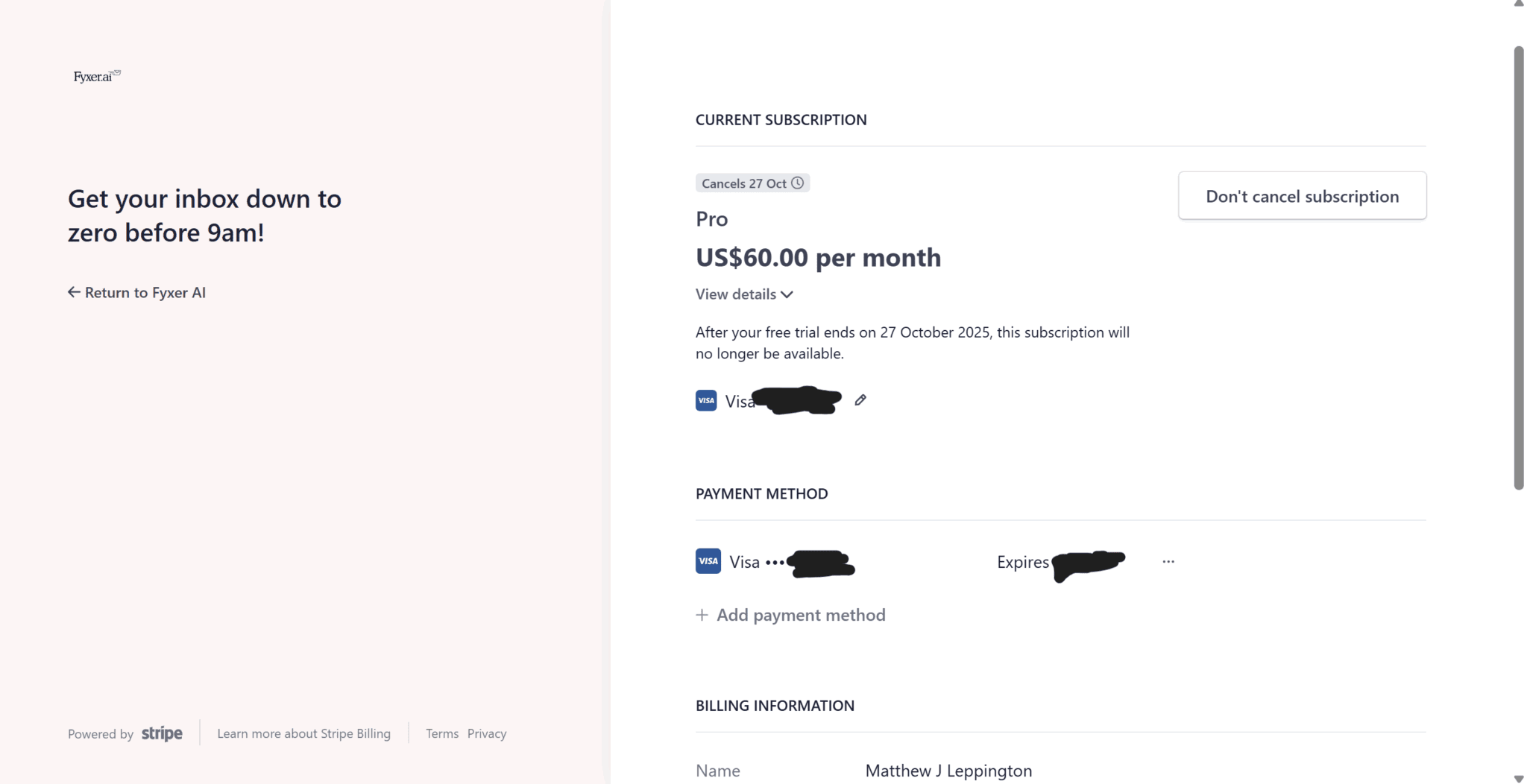
I signed up, gave my card details, and cancelled my subscription immediately. I was informed that if I shared Fyxer with friends, I could extend my free trial by 7 days for each one.
For reasons unclear, they wanted to charge me $60 when my trial ended as opposed to $50. Other than that, it was relatively stress-free.
Who Is Fyxer AI Designed For?
Fyxer markets itself at the 95% of workers outside tech roles: real estate brokers, recruiters, consultants, account managers — anyone for whom email is less a communication tool and more a full-time job within a job. It works for individuals and scales up to enterprise teams, with notable customers including AT&T, Knight Frank, eXp Realty, Starbucks, SoundCloud, and Celonis.
If your inbox volume is low and manageable, Fyxer is probably overkill. If you’re regularly staring down 200 unread emails before 9am, it starts to make a lot more sense.
How Does Fyxer AI Work? (Gmail, Outlook, and Beyond)
Fyxer integrates directly into your existing Gmail or Outlook inbox. There’s no new app to switch to or learn. One seat means one user, regardless of how many inboxes or calendars they connect. Setup takes a few minutes: connect your email, grant permissions, choose your categories, and Fyxer starts organizing from that point forward.
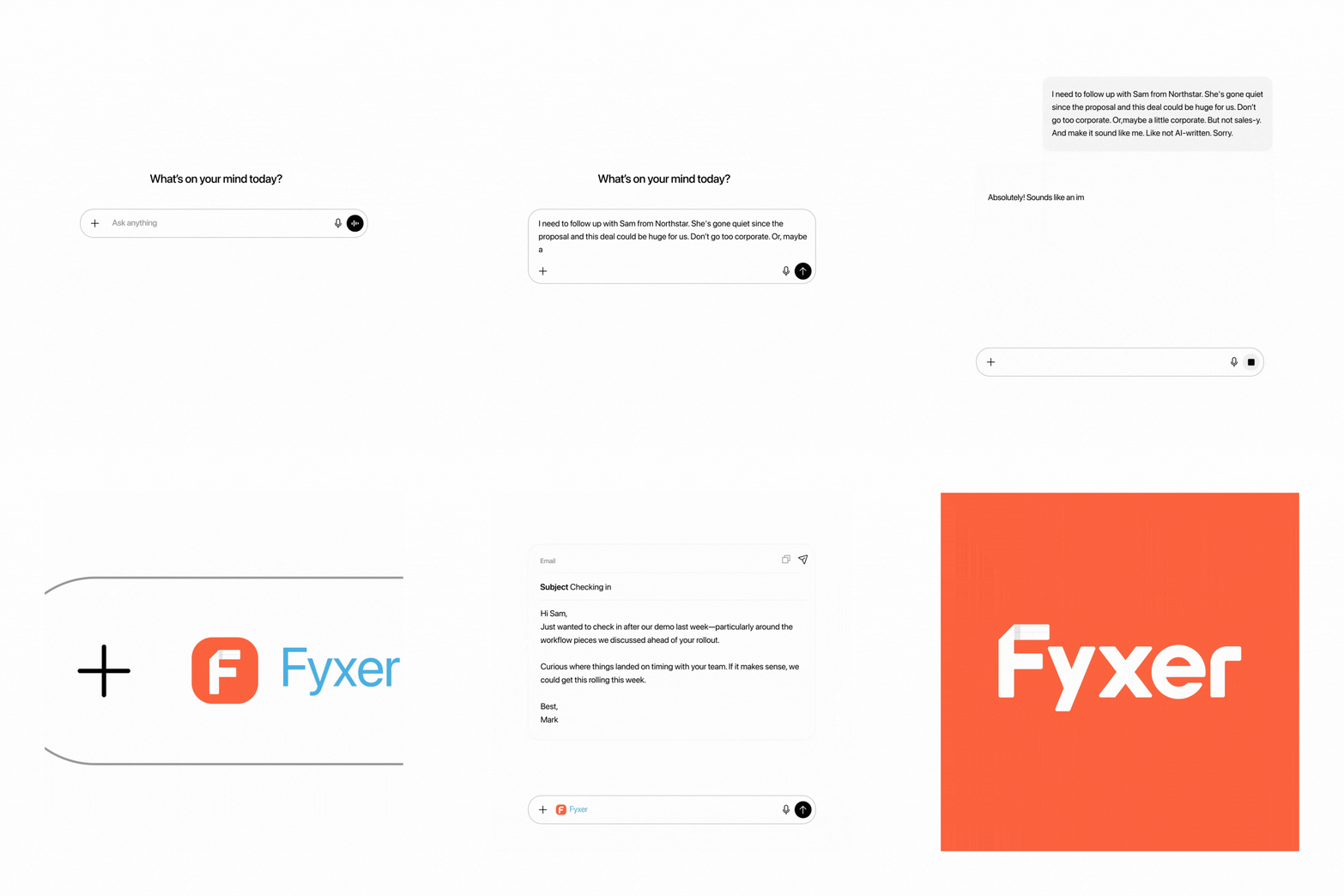
It also connects to your calendar for scheduling and joins meetings automatically to take notes. As of February 2026, it also integrates with ChatGPT, so you can draft new emails in your voice directly from ChatGPT.
Does Fyxer AI Support Mobile?
There’s no dedicated Fyxer mobile app. It works through your existing Gmail or Outlook mobile client, which means you get the inbox organization and drafts on mobile, but not the full Fyxer dashboard experience. If a native mobile app is non-negotiable for you, tl;dv has a free iOS app that covers the meeting intelligence side.
Fyxer AI Core Features: What Does It Actually Do?
Fyxer does four things: organizes your inbox, drafts email replies in your voice, takes meeting notes, and manages your calendar scheduling. It’s an ambitious combination, and whether or not it pulls it off really depends on which plan you’re on.
Smart Inbox Categorization: Does It Actually Work?
It was super easy to get started. I just had to connect my email address and give it permission to group my emails into categories which I could check or uncheck. I ended up selecting all of the categories.
I also had to tell it what I wanted to use it for: sorting my inbox, taking meeting notes, scheduling meetings, and removing marketing emails.
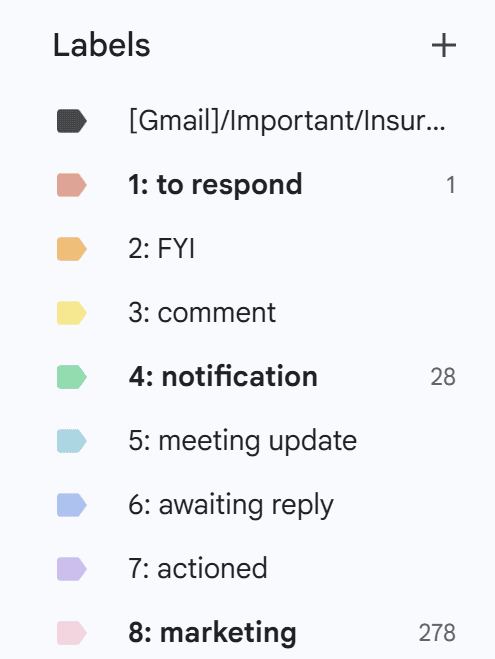
Once the categories were created, the emails found the “right” category fairly easily. It grouped my emails (from this point forward) into the following categories:
- to respond
- FYI
- comment
- notification
- meeting update
- awaiting reply
- actioned
- marketing
There were also options to move newsletters from “marketing” to “notification” for select addresses. I didn’t use that option, but wish I did.
That’s because most of the emails that I do open are newsletters for things I’ve opted to follow. For instance, I’m signed up to some writing competitions and I also subscribe to some bloggers’ and YouTubers’ mailing lists to keep up to date with recent posts or videos. However, all of these emails were sent to marketing, alongside crap from LinkedIn, Amazon, and a whole bunch of different airlines.
This made it much easier for me to miss my favorite emails as they got buried under all the actual marketing stuff. Like I said, Fyxer did give me the option to add addresses that I didn’t want to be sent to marketing, but this would be made a lot easier if there was a separate category for newsletters.
It’s not like I carry around a list of every single email address I want to hear from so it feels like a lot of effort to search through my emails manually and pick out the ones I’m most likely to want to read. Weirdly enough, that’s the exact kind of effort that Fyxer prides itself in helping you avoid. I was a bit disheartened by this because I’d really hoped Fyxer could be a bit more helpful in actually setting this up.
I guess, with a little more tinkering, it would be possible for me to organize them a little better. But even now, I’m having to whitelist addresses based on emails I’ve found in “marketing”. Essentially, it has to fail first for me to then catch it and manually fix it. It just left me wondering what Fyxer is doing if it isn’t fixing my emails for me.
One small quality-of-life upgrade worth noting: as of April 2026, Fyxer automatically archives threads after you reply. Now, your inbox only shows what still needs attention. It’s a small thing and it doesn’t fix the whitelisting process, but it does tighten the categorization system a little.
AI Email Drafts: Do They Sound Like You?
Fyxer’s email drafter can be prompted to sound more like you, but at the end of the day, it’s an AI and it has its tells. The default settings are pretty corporate and robotic, but they tend to cover the important information succinctly.
One of the things I did like about Fyxer was that it was quite simple. It does emails, drafts, meetings, and scheduling. You can also talk with the AI chatbot about your emails or your meetings (or both).
When I first signed up, I checked the AI chatbot out and it came pre-loaded with three questions about your emails. I selected one of them, which was about a rescheduled qigong class.
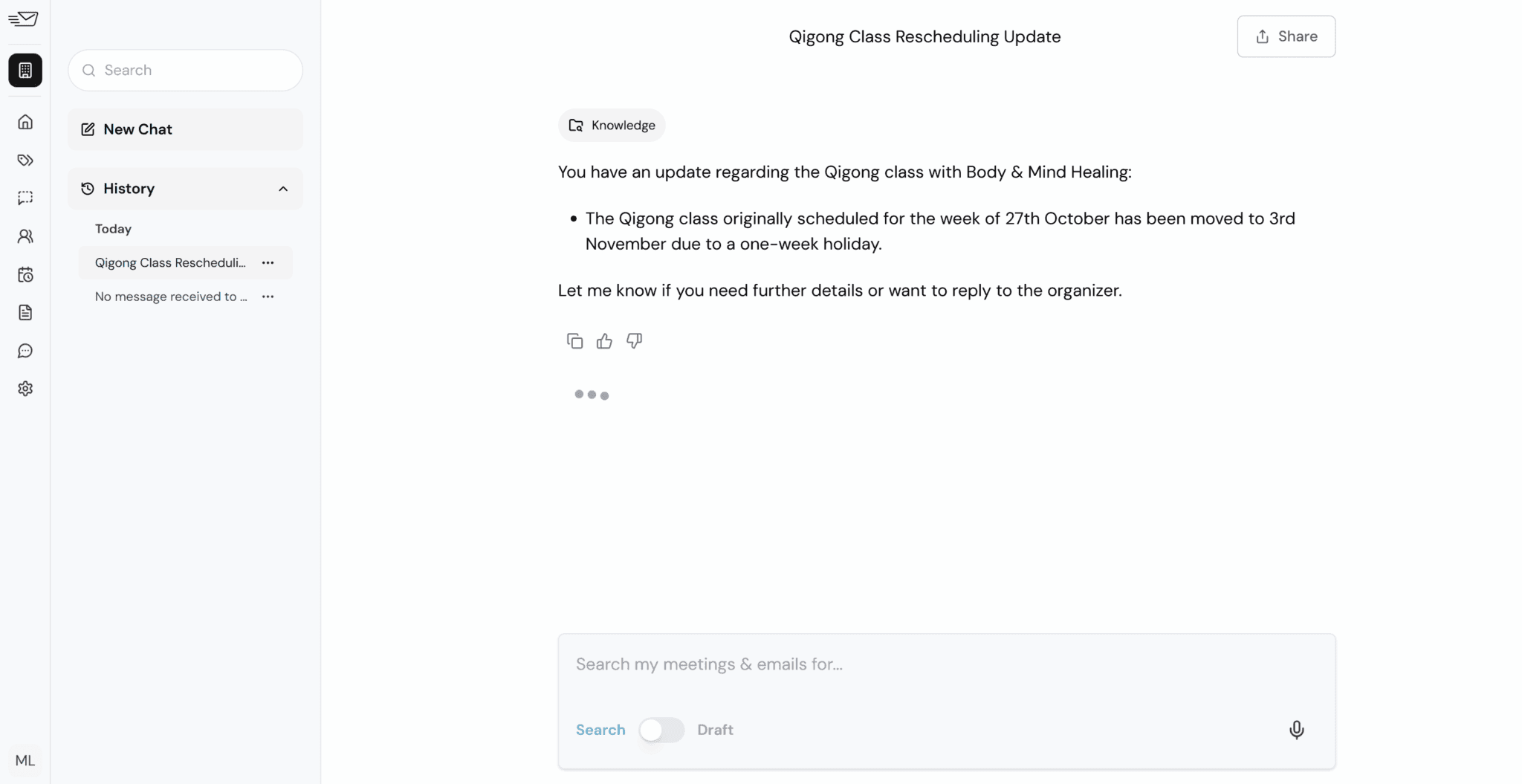
I’d already read the email so this information wasn’t new to me, but it was still pretty cool to see that it could pull data directly from my emails. Even ones that pre-date my Fyxer account.
I’ll be honest, email drafting isn’t a feature I tend to use on any tool. There are so many AI tools offering email drafting lately, but I just don’t write that many emails for me to automate it. However, after clicking on an email in FYI, I saw a draft already pre-written for me by Fyxer. This is what it had written.
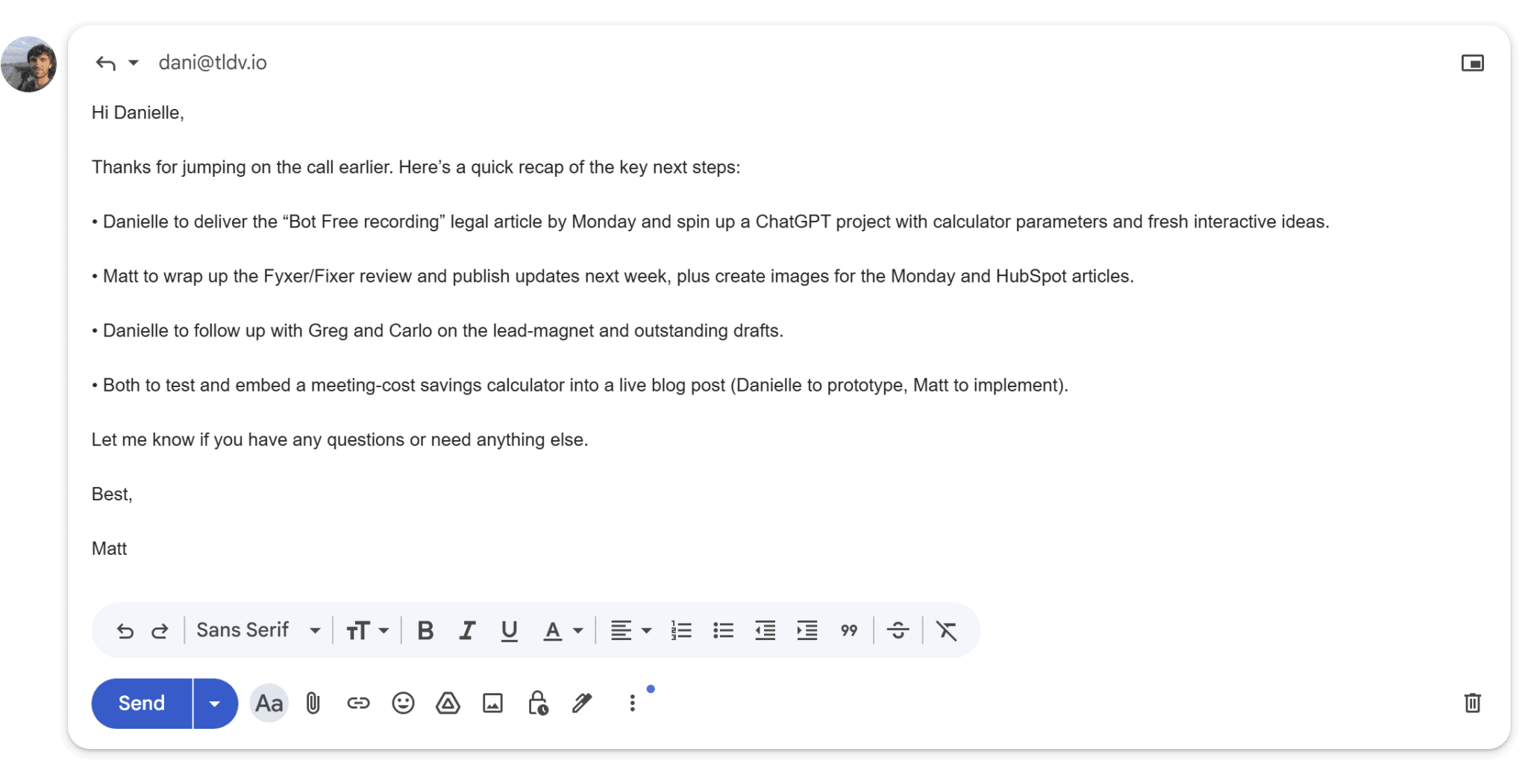
It’s a bit wooden, but it’s straightforward and gets the main points across quite clearly. This isn’t the particular tone of voice I’d use when writing to Dani, but there are options to change that in the Draft section of Fyxer’s app. I just hadn’t done it because I had no intention of properly using that feature.
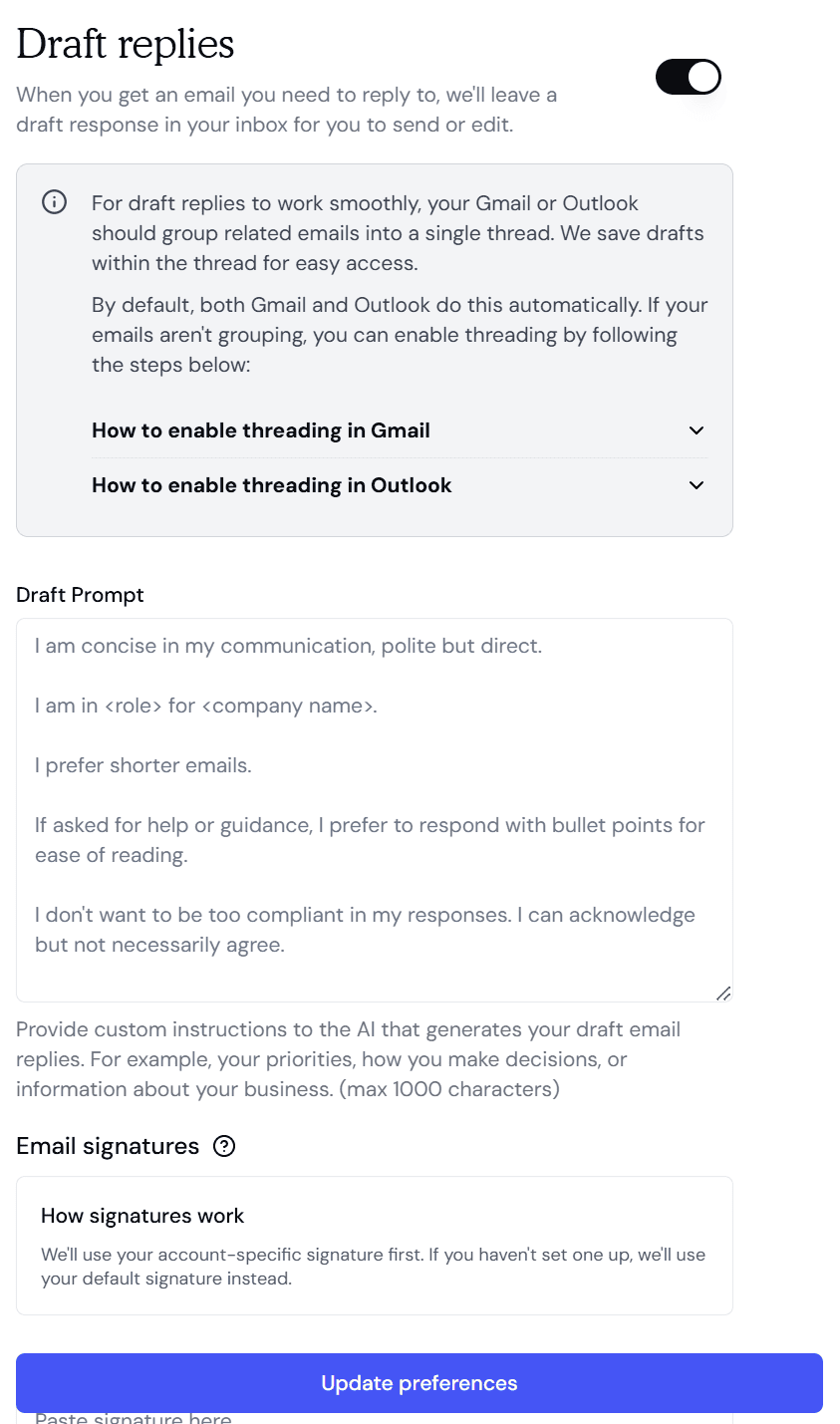
Here are the default settings for email drafting. As you can see, I can edit them as I see fit. This could be quite handy, especially for those that have to reply to dozens of emails every single day. You fill in your tone of voice, the style in which you want to respond, and let Fyxer do the rest. Reply drafting and campaign design are different jobs. For campaign work, Postcards by Designmodo offers an AI email builder that generates on-brand templates from a prompt and audits the template’s design before export
With Fyxer, though, there’s a word of warning: the AI uses the same logic from the meeting summaries. We’ll get to those soon, but they can be faulty, so it’s always best to double-check before you click send.
Does Fyxer AI Learn and Improve Over Time? Can You Train It?
Fyxer’s style mirroring is the headline feature. When you sign up, Fyxer scans the 300 most recent emails in your inbox and sent items to start learning your patterns. This is both for categorization and for mirroring the way you write in drafts. The longer you use it, the closer the drafts get to sounding genuinely like you. At least, in theory.
Fyxer claims that every draft you edit and send feeds back into the model, making it sound more and more like you every time. In theory, the more you correct it, the less you’ll need to. In practice, results are mixed: some users report drafts improving meaningfully after a few weeks, while others — including reviewers quoted later in this article — found they never stopped requiring heavy edits. Your mileage will vary.
Beyond passive learning, Professional plan users can actively train Fyxer by uploading custom documents, including company style guides, tone-of-voice briefs, product FAQs. Whatever context it needs to draft with real specificity. As of April 2026, file uploads now support documents up to 50MB. This can potentially help users get the AI up to speed without waiting months.
Fyxer Chat: Ask Questions About Your Inbox and Meetings
Fyxer Chat is the conversational layer that sits across all your data: emails, meeting notes, and uploaded files. It lets you query it in plain English, and is available on the Professional plan and above.
Since October 2025, you can search across emails, meetings, and uploaded files simultaneously in Chat. Since November 2025, you can create brand new emails directly in Chat rather than navigating to a draft, and ask questions about your emails and meetings using your voice rather than typing. Taken together, these updates move Fyxer Chat from a novelty into something closer to a genuine inbox command centre.
What worries me here though is giving an AI access to my entire inbox. For Fyxer to work in general, you need to give it permission to draft, send, and delete emails which makes me a bit uncomfortable. For example, with those permissions, it could theoretically send an email and delete it from my sent box so I wouldn’t even know it had been sent.
Now, I understand that these permissions are required on paper and that my consent is still needed to authorize such emails. In fact, Fyxer is explicit about this — it can’t send emails on your behalf. It only ever drafts them. You always hit send. While that does address my core concern somewhat, I still feel uncomfortable giving an AI, or a business, or anyone other than me, access or rights over my email inbox. It’s not just about sending an email, but also reading them.
Meeting Notetaker: Does Fyxer AI Take Good Meeting Notes?
When I tested Fyxer’s meeting recording capabilities, my opinion of it became a whole lot lower.
First things first, let me say that I tested Fyxer on a one hour call with Dani. It joined on time and produced notes around five minutes after the call ended.
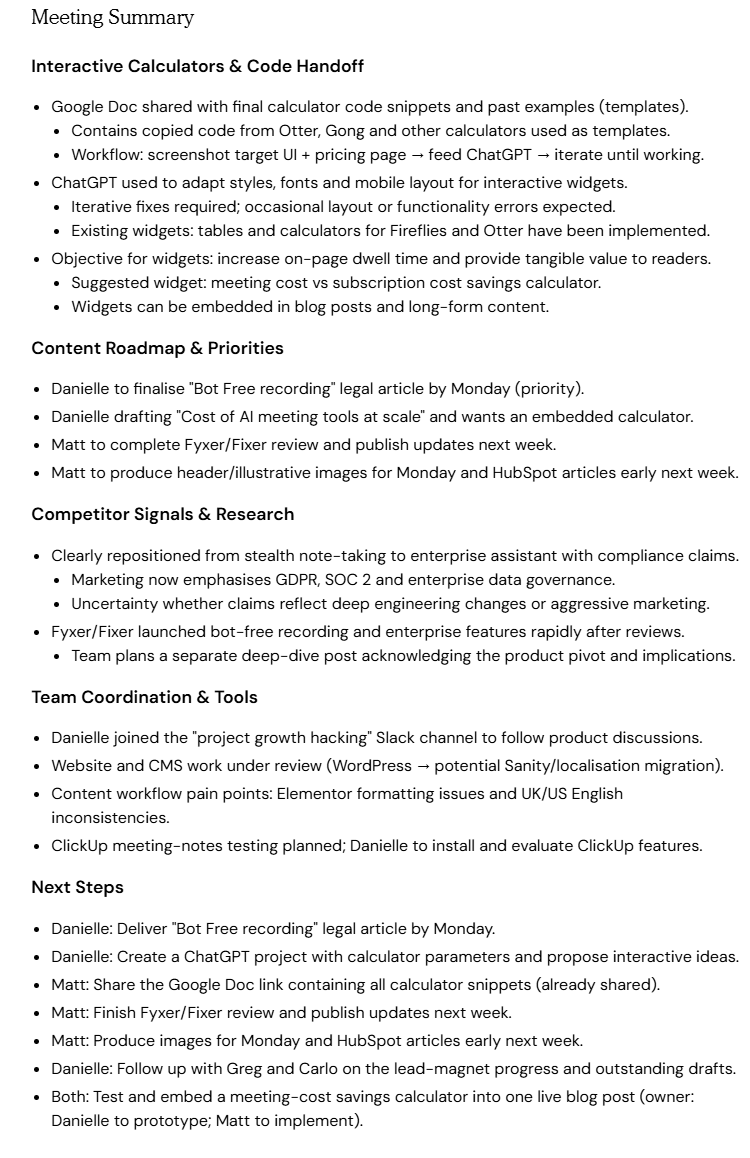
At first glance, this meeting summary seems quite good. It’s fairly detailed, relatively easy to skim, and covers the gist of the conversation.
There are a few mistakes in there though. For instance, the part about competitor signals and research, we were mostly talking about Cluely. It says “Clearly repositioned from stealth note-taking to enterprise assistant with compliance claims.” For someone briefly reading this summary, like you, you’d have no idea what we were actually discussing. Fyxer misses out on key context here.
It also says “Fyxer/Fixer launched bot-free recording and enterprise features rapidly after reviews.” I have no idea what this is referring to. Fyxer definitely has a bot that joins calls. It is not a bot-free experience, unlike tl;dv where the bot is entirely optional. I believe this may also be referring to Cluely, in which case Fyxer’s AI is getting itself muddled up. The “separate deep-dive post” was also about Cluely but Fyxer has it listed as a sub-bullet point underneath the Fyxer comment.
Here’s where the real trouble starts though. When trying to review the meeting, I was simply unable to. The website would freeze, I couldn’t click on anything, and it repeatedly came up saying, “not responding.”
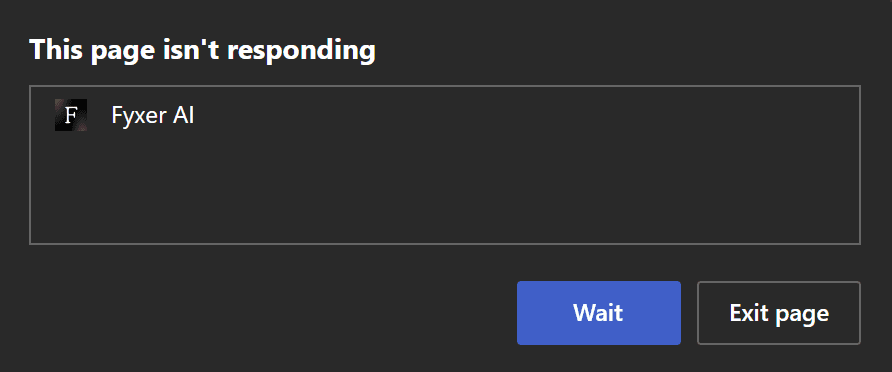
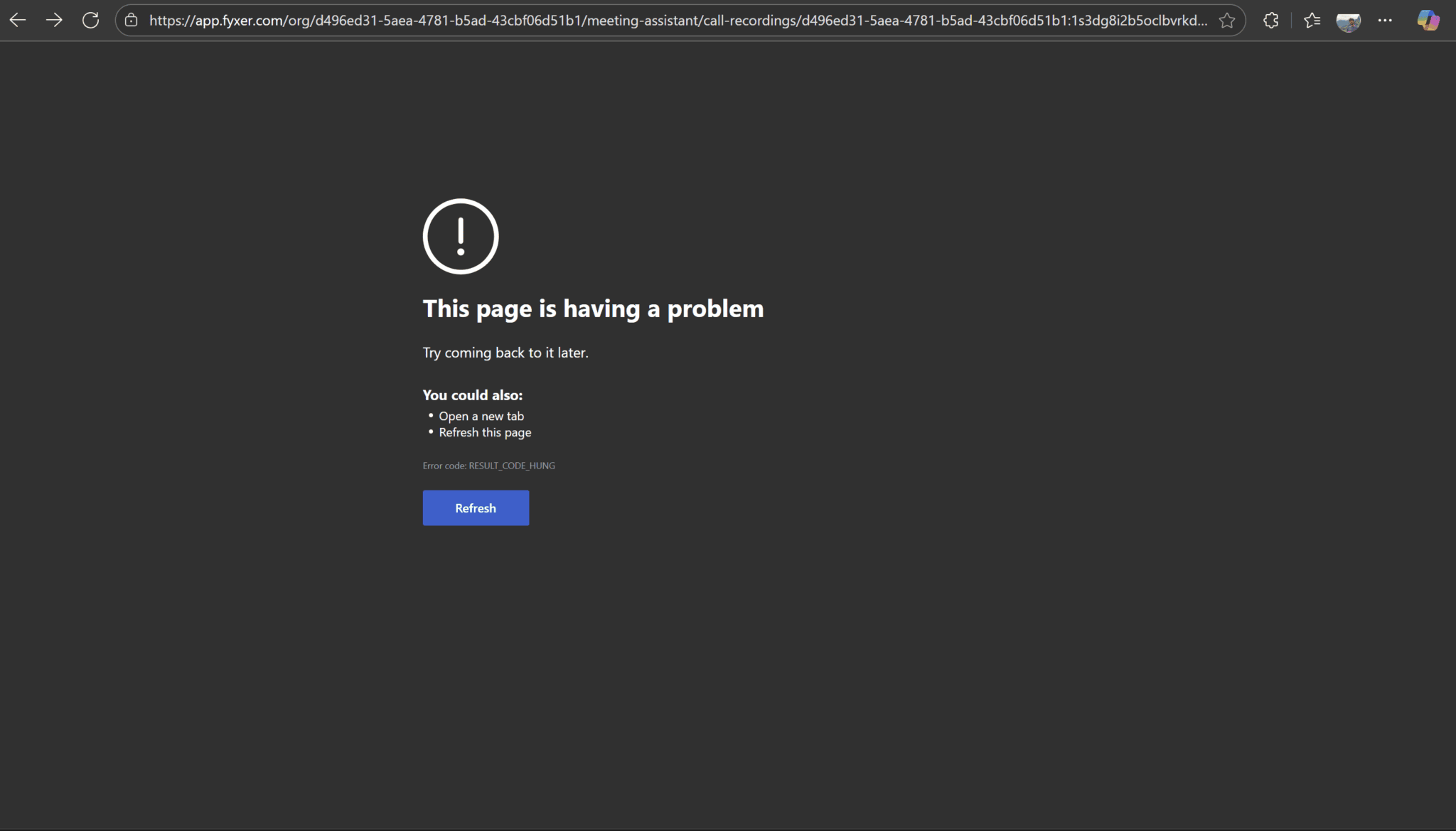
Now, full disclosure: this happened on the 21st October 2025, one day after the huge AWS outage that affected multiple apps and websites. I gave it the benefit of the doubt. I assumed that it must have been due to the AWS outage.
However, it’s worth noting that Granola and Jamie both emailed me to inform me that they had been affected by the AWS outage. Fyxer did not. It’s also worth noting that on 22nd October, I tried to review the meeting notes a second time. Again, I was met with a completely unresponsive dashboard.
The meeting would load, the AI chat would be seemingly available on the right-hand side, and the option to view the video and transcript would appear, but then nothing I clicked would work. It would just freeze. My mouse cursor changed to the finger point as if it was hovering over something clickable, but then it would just remain as that cursor forevermore until I got off the page entirely.
During these two days, I was able to ask the AI one question about the conversation. This was on my very first attempt. Everything after that was doomed. And the answer it gave me wasn’t even correct. It was in trying to access the timestamps of this incorrect data that the glitch first appeared.
Even a full week after the AWS outage, the meeting summary was still incredibly slow. I was finally able to access the timestamp, but it took the better part of a minute to load. That’s simply not acceptable at any level of business. The transcript and notes become almost unusable when waiting times are so high. It’s hardly going to save you time when you have to sit around waiting, reclicking, wondering if it’s even acknowledged your request…
Also, the transcript had accurately recorded our conversation, but the AI failed to interpret it correctly. We talked about two different people in quick succession and the AI confused them. That’s not a good sign for action items which Fyxer’s AI could also easily confuse.
After a few simple tests, I already knew that Fyxer AI wasn’t the tool for me. Its sluggishness on three completely separate days was the nail in the coffin.
Editor’s note: The above was written in October 2025. As of June 2026, I have gone back to review the same meeting.
First thing to note is that it actually loads this time, though it’s still slow. I asked Fyxer’s AI some questions about the meeting and was pretty disappointed by the results.
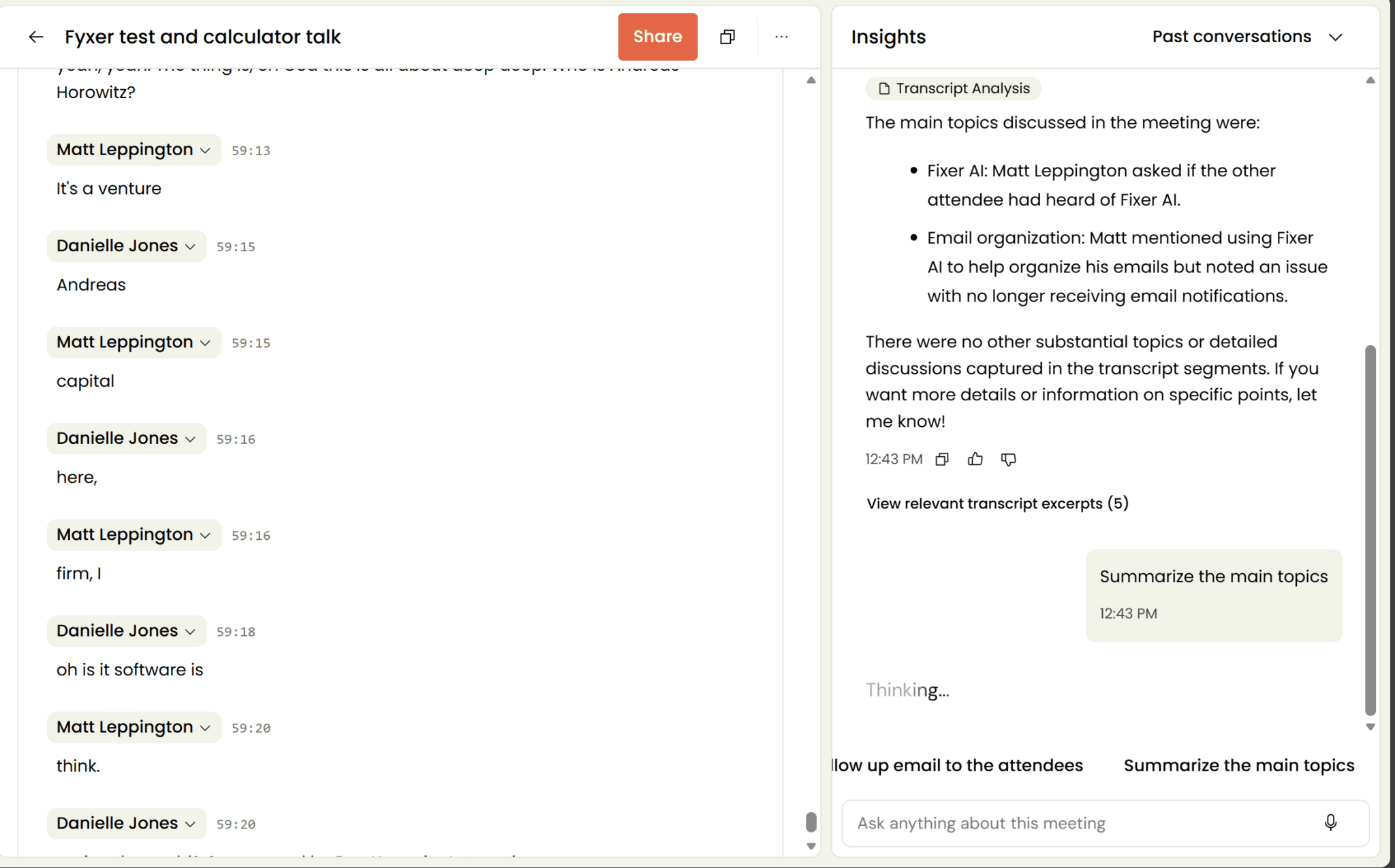
There are a few problems with the screenshot above. Firstly, note the timestamps on the transcript. This was a meeting that went on for an hour (it actually cut off because our Google Meet free plan ends after 60 minutes). However, when I asked Fyxer AI to summarize the main topics, it thought for thirty seconds and came back with just two bullet points from an hour-long meeting, both of which were things that we discussed in the first five minutes.
Secondly, the formatting is all over the place. You send a message to Fyxer AI on the right-hand side, then it comes up below your question that it’s “Thinking…”. This can take a while (around 30 seconds per question), but then the answer appears above the question, making it awkward to scroll back up and check the previous parts of the conversation.
Additionally, it still shows it as “Thinking…” even once it’s answered your question.
All in all, I came back in June 2026, hoping for some kind of improvement. I’m left feeling pretty much the same as I was last year.
On the product side, Fyxer has shipped some notetaker improvements since then: shared meeting notes (so teams can annotate together during a call), meeting summary translation into your language of choice, and a customizable notetaker for Professional users. Whether they fix the underlying accuracy issues I experienced is something that would require a fresh full test to answer fairly.
Scheduling Assistant and Calendar Management
The scheduling features sit on the Professional plan and above. Beyond the basic calendar sync available to all users, Professional unlocks the ability to schedule meetings across teams and time zones. As of June 2026, you can distribute calls across your team and share group availability, which is genuinely useful for coordinating client calls or demos across a sales or CS team without the usual back-and-forth.
Fyxer AI Raised $30M — What Does That Mean for Users?
In September 2025, Fyxer closed a $30M Series B led by Madrona, with Lakestar Capital and Salesforce founder Marc Benioff as existing investors. This brings Fyxer’s total funding to $43M. More importantly for potential users: they went from $1M to $17M ARR in under eight months, which tells you demand is real.
Madrona’s managing director Karan Mehandru joined the board as part of the deal, and Marc Benioff’s involvement is a credibility signal worth noting. He built the defining enterprise software company of the last 25 years, so his backing carries weight in that space. Enterprise customers including Knight Frank, eXp Realty, AT&T, and Starbucks are already using the platform, and Fyxer reports a 90% three-month retention rate, which is a harder number to fake than ARR.
The funding is going toward US expansion, deeper product development, and what Fyxer describes as context-rich tools that can “predict your next email.” Venture capitalist Harry Stebbings posted about the raise on X, calling out the ARR growth curve as one of the more impressive he’d seen.

The honest take: funding validates demand, it doesn’t fix bugs. The stability issues I experienced in October 2025 happened when Fyxer already had serious investor backing. What the Series B does signal is that Fyxer isn’t going anywhere, and that it has the budget to ship new features fast (see below). For anyone nervous about adopting a tool that might fold in 18 months, that’s a legitimate reassurance.
What’s New in Fyxer AI? (2025-2026 Product Updates)
Fyxer has shipped fast since its Series B. Here’s what’s changed since we first tested it, pulled straight from the official changelog:
Oct 30, 2025 — Search across emails, meetings, and uploaded files simultaneously in Chat.
Nov 4, 2025 — Create brand new emails directly in Chat, without navigating to your drafts.
Nov 21, 2025 — Ask questions about your emails and meetings using your voice.
Jan 5, 2026 — Distribute calls across your team and share group availability — useful for sales and CS teams coordinating client-facing schedules.
Feb 17, 2026 — Fyxer app for ChatGPT, so you can draft emails in your voice from inside ChatGPT.
Mar 10, 2026 — Draft retention controls, letting you decide how long unused drafts stay in your inbox.
Apr 13, 2026 — Threads are automatically archived after you reply, so your inbox only shows what still needs attention.
Apr 14, 2026 — Meeting summaries can now be translated into your language of choice.
Apr 20, 2026 — Shared meeting notes, so teams can annotate together during a call.
Apr 28, 2026 — File uploads increased to 50MB, giving you more room for training documents.
Jun 2026 — Enterprise admin controls: managed settings, member connection status, auto-connect onboarding, and stronger protections against accidental account deletions.
They’ve shipped a decent amount in eight months — particularly on the Chat and notetaker side, which were the weakest parts of the product when I first tested it in October 2025.
Fyxer AI Pricing: How Much Does It Cost in 2026?
Fyxer has a relatively simple pricing structure consisting of three plans:
- Starter ($30 per user per month, or $270 per user per year)
- Professional ($50 per user per month, or $450 per user per year)
- Enterprise (contact sales)
Please note, when I signed up, it wanted to charge me $60 for the month-to-month pricing as evidenced by the screenshot in my review. This is probably due to VAT but it wasn’t stated anywhere on the pricing page.
There’s no free plan, but a 7-day free trial gives you a taste before you commit. It’s worth noting that when I first tested Fyxer, that trial was 14 days. A small but notable step backwards in generosity.
Use our Fyxer.ai pricing calculator below to work out exactly how much you’ll need to spend based on your team size and the specific plan you choose (scroll down for plan details).
Fyxer.ai Pricing Calculator
Also need meeting intelligence?
Fyxer handles your inbox. tl;dv handles what happens in the room — transcribing in 40+ languages, surfacing insights across multiple meetings, running sales playbooks, and delivering recurring AI reports. No meeting bot required by default. GDPR & SOC2 certified. Free forever.
So what do you actually get for each of these plans? Let’s take a look.
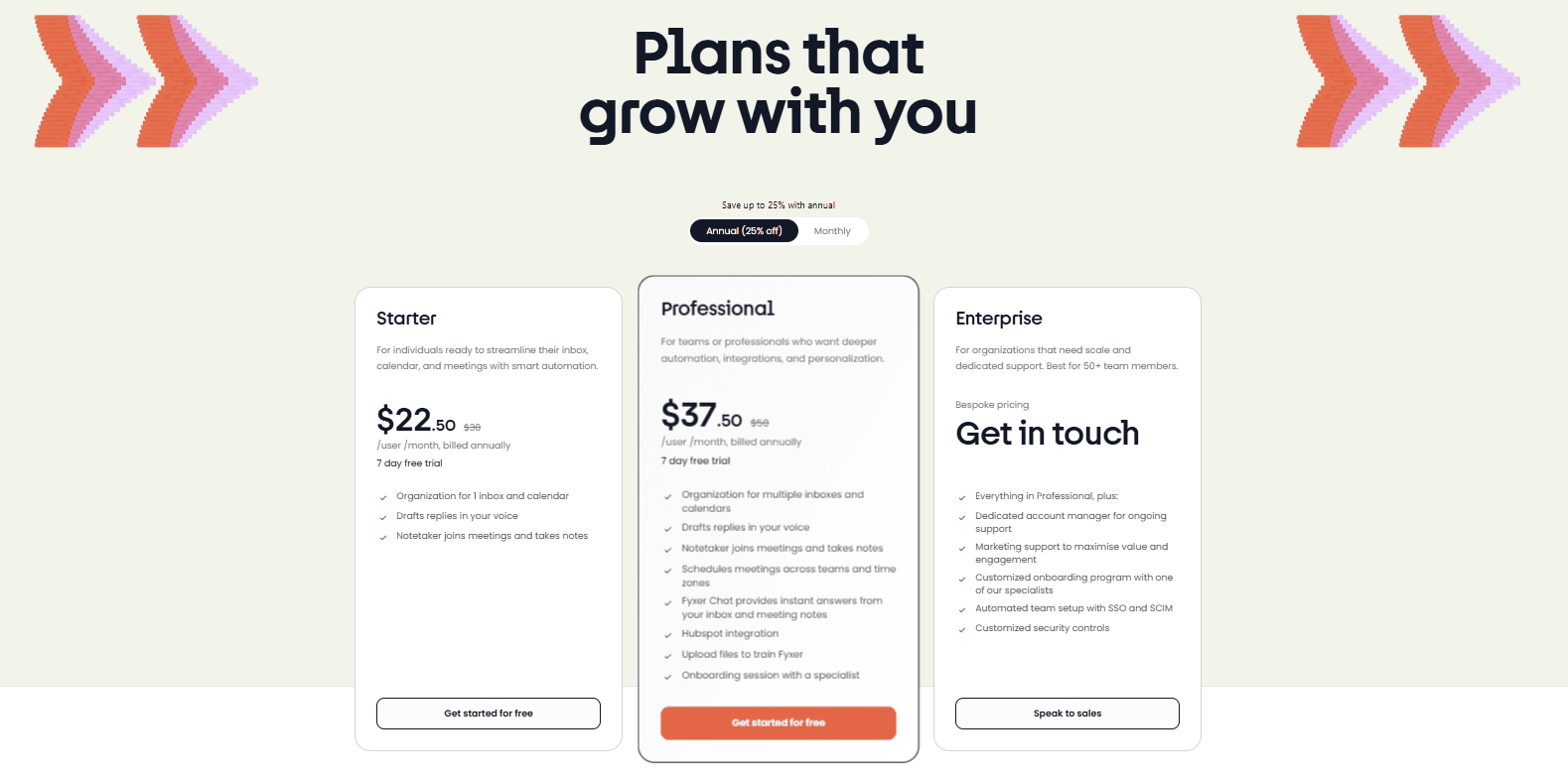
Fyxer’s Starter Plan ($22.50)
- Organization for 1 inbox and calendar
- Drafts replies in your voice
- Notetaker joins meetings and takes notes
The Starter plan has taken a hit as of 2026. It used to be that you could get chat support at this level (just a few months ago), but it has been unceremoniously removed.
It was already on the pricey side, but now it’s verging on extortion. Comparing it to other meeting intelligence platforms, it’s not only expensive but lacking in key features and integrations. It seems as though it was an email management platform first that has since branched into conversational intelligence.
After testing it personally, it is not worth the money, especially considering competitors like tl;dv offer this basic level of functionality (with an actual responsive app) for free. If you want more advanced features like multi-meeting intelligence, recurring reports, sales coaching, and deep CRM integrations, tl;dv offers paid plans that work too.
So, Fyxer’s Starter plan then is best used by those who want email inbox management and reply drafting services. For those with busy inboxes, this can be a very useful feature, especially if tailored right from the get-go with your personal voice for responses. However, whether it’s worth the price tag varies on a case-to-case basis. It’s still on the pricey side.
Fyxer’s Professional Plan ($37.50)
Fyxer’s Professional plan bumps the price up even more, but is it worth it? Let’s see what you get:
- Everything in the Starter plan, plus:
- Organization for multiple inboxes and calendars
- Schedules meetings across teams and time zones
- Fyxer Chat — instant answers from your inbox and meeting notes, including voice questions and cross-search across emails, meetings, and uploaded files
- HubSpot integration
- Upload files to train Fyxer (up to 50MB)
- Customizable notetaker
- Shared meeting notes
- Onboarding session with a specialist
This is also the tier where the custom document training unlocks, meaning you can feed Fyxer your company style guides, product briefs, or client context documents to make drafts more specific and accurate. For professionals with specialized communication needs, that’s a big step up from passive style mirroring alone.
As you can see, Pro offers a lot more functionality than Starter, but even this plan has been trimmed recently. Standout features like the ability to read and summarize email attachments have been removed. Integrations with all your CRMs has been replaced with just HubSpot. This plan still offers time-saving features, but it was already costly for what you get. Now, it’s the same price but with less to offer.
At the end of the day, it all comes down to trust. Do you trust Fyxer’s AI to rummage through your emails before you do yourself, especially considering sensitive data they may contain. Additionally, do you trust it to accurately portray what it was with context? After my 14-day trial, I don’t think I would trust Fyxer’s AI to do that. For me, it would require a lot of manual double-checking which would make it almost not worth it. However, everybody’s trust level is different. If you can sleep easy knowing it’s got your back, then you go ahead.
Having said that, $37.50 per user per month when billed annually is still a big chunk of cash. With multiple users, that can very quickly reach 5 figures per year. You’ll also notice that the meeting intelligence receives no extra love at this stage. HubSpot integration is available but there’s no real information about how deep the integration goes or how easy it is to sync your meeting notes to their corresponding CRM fields. It’s all well and good having that connection but unless you’re able to actually use it to save time then it’s irrelevant.
Fyxer’s Enterprise Plan (Contact Sales)
The Enterprise plan is best suited for organizations of 50 or more, and doesn’t have transparent pricing. Like most SaaS platforms at this level, you’ll need to reach out to Fyxer’s sales team for a quote.
However, you can expect to get everything in Pro, plus:
- Dedicated account manager for ongoing support
- Marketing support to maximize engagement
- Customized onboarding program with one of Fyxer’s specialists
- Automated team setup with SSO & SCIM
- Customized security controls
- Enterprise admin controls: managed settings, member connection status, and auto-connect onboarding (June 2026)
- Stronger protections against accidental account and organization deletions (June 2026)
In short, it’s useful for enterprises that need more stringent data access controls and security. That usefulness will come at a price though.
Is Fyxer AI Worth the Money? How Many Hours Do You Need to Save to Break Even?
The math isn’t complicated. At $22.50/month on the annual Starter plan, you need to save roughly 1.5 hours a month to break even, assuming you value your time at $15/hr. At $37.50/month on Professional, that’s closer to 2.5 hours. Sounds easy, right?
The catch is that those numbers assume Fyxer works reliably for you from day one. If you’re spending time correcting mislabeled emails, editing wooden drafts, or waiting for a slow dashboard to load, the clock is running in the wrong direction. Several reviewers found that the overhead of managing Fyxer’s mistakes ate into the time it was supposedly saving.
If Fyxer clicks for your inbox volume and communication style, the ROI case is straightforward. The question, as with most AI tools at this price point, isn’t whether the math works in theory. It’s whether the product works in practice.
How Does Fyxer AI Handle Your Data? Is It Secure?
Fyxer requires broad inbox permissions: read, draft, and (in theory) delete. This makes data security a legitimate concern. The short answer: it’s well-certified, but you’re still handing an AI the keys to your professional inbox.
One important clarification that Fyxer is explicit about: it can’t send emails on your behalf. It only ever drafts them. You always hit send. That addresses the most obvious worry, that it could fire off an email without your knowledge, but it doesn’t change the fact that you’re granting a third-party platform access to potentially years of sensitive professional correspondence.
Here is what Fyxer.ai has to say about how they use your data:
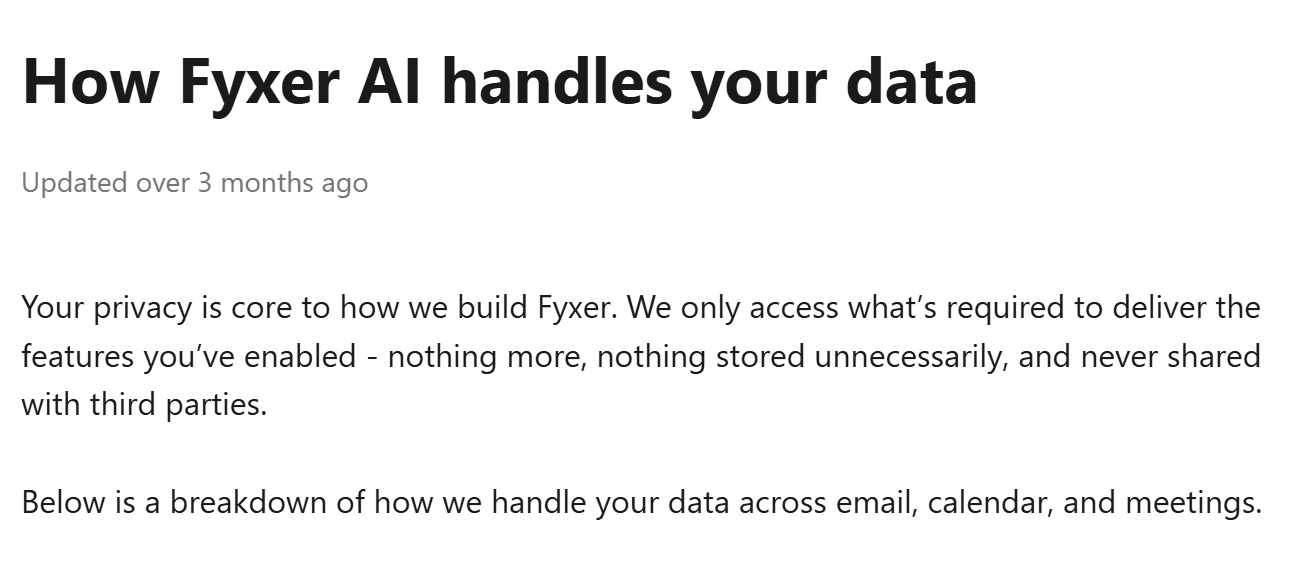
Fyxer claims to never share your data with third parties, and only uses what is absolutely necessary to provide the features you’ve enabled. Everything is encrypted at every stage, and nothing is shared with third parties or used to train outside models. You can also customize privacy settings to restrict AI learning from certain email addresses — useful for keeping HR threads or confidential conversations out of the training pool.
It goes into more detail for your emails, calendar, and meeting recordings on their data handling page.
It’s also worth noting that Fyxer.ai is:
- SOC 2 Type II certified
- ISO/IEC 27001 certified
- Fully GDPR compliant for all users
- HIPAA compliant for eligible enterprise customers
The certification stack is solid. This isn’t a scrappy startup with vague privacy promises (cough, Cluely, cough). But certifications and trust are different things. Whether you’re comfortable with an AI reading, categorizing, and drafting from your inbox is ultimately a personal call, and one worth making consciously before you connect your account.
What Do Real Users Think of Fyxer AI? (Reviews from G2, Trustpilot, Reddit)
I’ve said what I think about Fyxer.ai, but I only tested the free trial. What do actual everyday users think? As always, I scoured G2, ProductHunt, Trustpilot, Capterra, Reddit, YouTube, and more to find what real people are saying about Fyxer.ai. Surprisingly, there aren’t that many reviews out there on the ordinary sites (ProductHunt and Capterra don’t feature Fyxer.ai at all, for example, while on G2 it only has 20 reviews!)
Having said that, Fyxer now claims 100,000+ users and 350,000+ inboxes organized. Numbers that have grown substantially but reviews seem to be lagging behind.
Let’s see what they said at least.
- Fyxer scores 4.1/5 on G2 from an underwhelming 20 reviews.
- On Trustpilot, Fyxer scores 4.1/5 from 683 reviews.
And that’s it from traditional third-party review sites. Not much, but at least it’s a relatively decent score. What’s striking about Fyxer’s reviews isn’t the average score though, it’s how split they are. The enthusiastic five-star users and the frustrated one-star users seem to describe almost completely different products
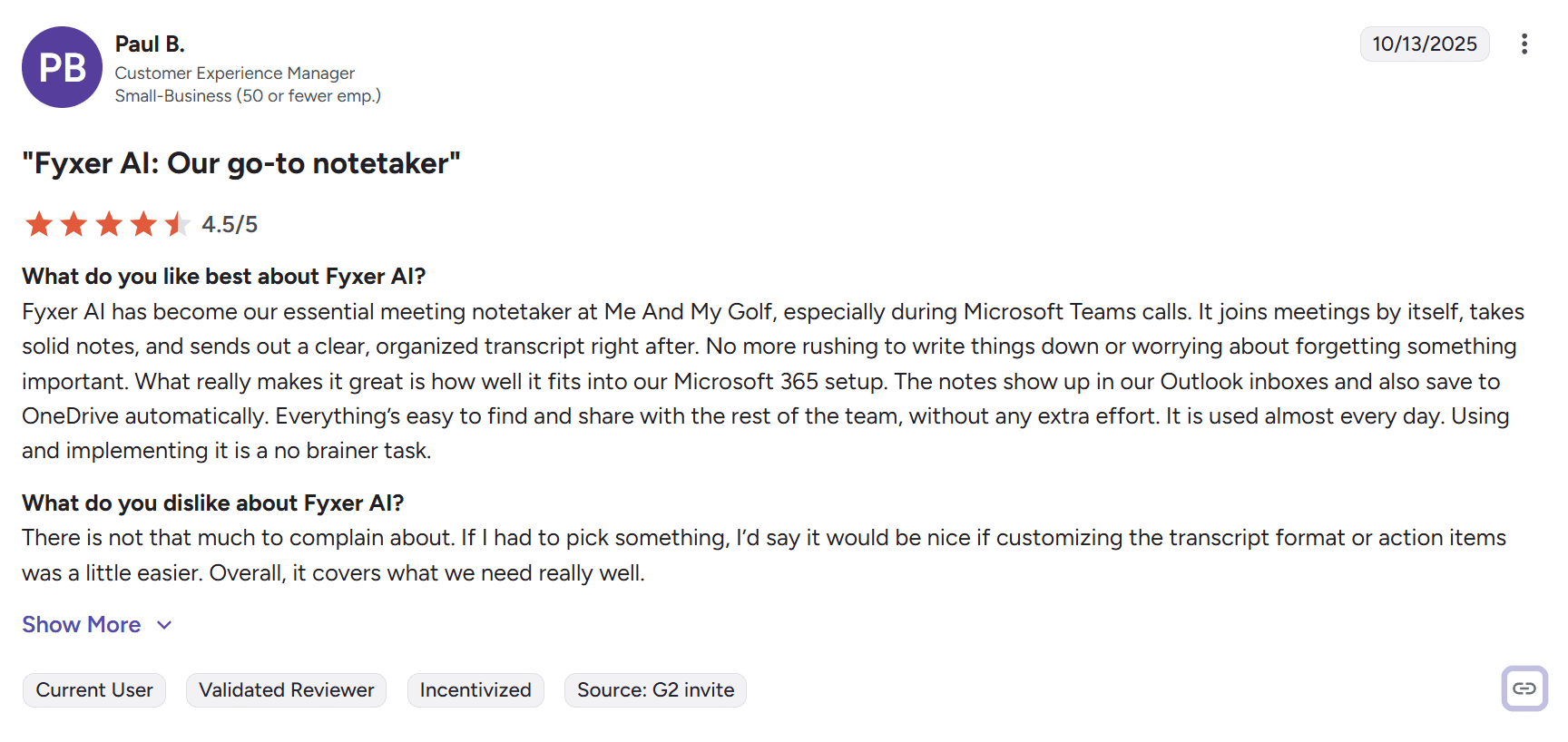
Let’s kick this off with a review by Paul B. on G2 in which he rates Fyxer.ai 4.5/5, calling it “our go-to notetaker.”
He goes on to say that “it joins meetings by itself, takes solid notes, and sends out a clear, organized transcript right after.” It’s saved him and his team a lot of time, and fits right into his Microsoft 365 setup. What’s interesting is that Paul solely comments on the meeting intelligence feature, seemingly ignoring the email management altogether. This is particularly bizarre as the meeting assistant lacks standout features to compare with alternatives like tl;dv and Fireflies, yet it costs more than both of those tools (because of its email management features).
Ron, on the other hand, is the complete opposite. In April 2026, he reviewed Fyxer on G2, rating it 5/5 and saying “Fyxer gave me my day back…“

Ron explains that Fyxer “truly prioritizes” his emails so he only sees the important messages during his busy work days. During breaks or at night, he can read the second-tier emails and clear out the marketing messages. Furthermore, he says “there’s nothing to dislike” and “it works exactly as described.”
Over on Trustpilot, Ennio rates it just 2/5, asking “Is this app vibe-coded?” He says that “it would explain why their main feature doesn’t even work.”
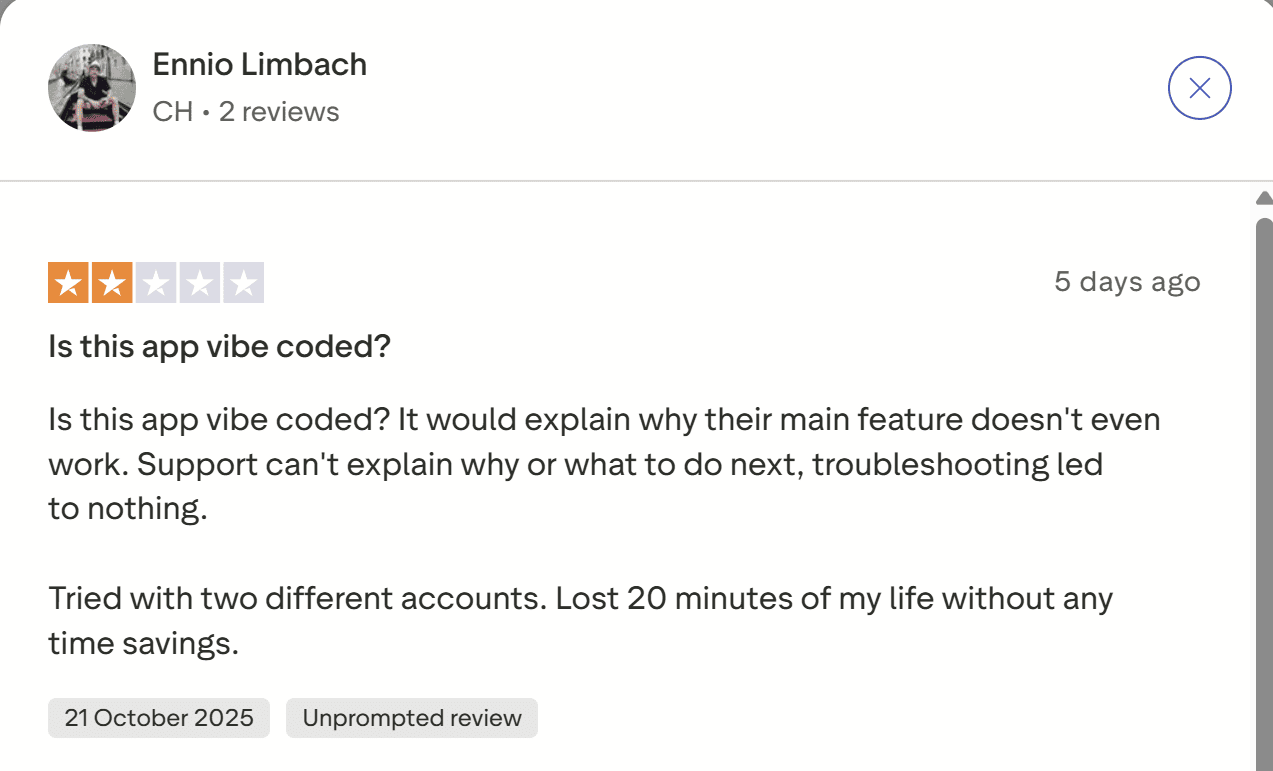
Funnily enough, Ennio commented on the 21st October which was the exact same day that I could not access my meeting notes too. Fyxer did reply to his comment, but they made no mention of the app being down or the problem having anything to do with AWS as I had previously suspected.
Another negative reviewer by the name of Martin said, “Don’t believe the hype. This requires SO much work to be worth the money.”

Martin’s review, which was only published on October 22nd 2025, is brutal. He says that even after booking several support calls, “the Fyxer team seemingly do not know how their own system works”.
They were promised the AI would learn and evolve but “after months of wasted time & money,” it still failed. It constantly misflagged emails (which I experienced too), but this highlights the downsides from a business perspective. Emails that needed to be responded to were simply being left in FYI rather than moved to “to respond.”
He went as far as to say it would be better to just use ChatGPT instead.
Another reviewer, DL, called it a “very average product. At best.” He criticized the drafts and stated they never improved over time, as promised. He also said, it “makes lots of outright errors that are embarrassingly simple to detect.”
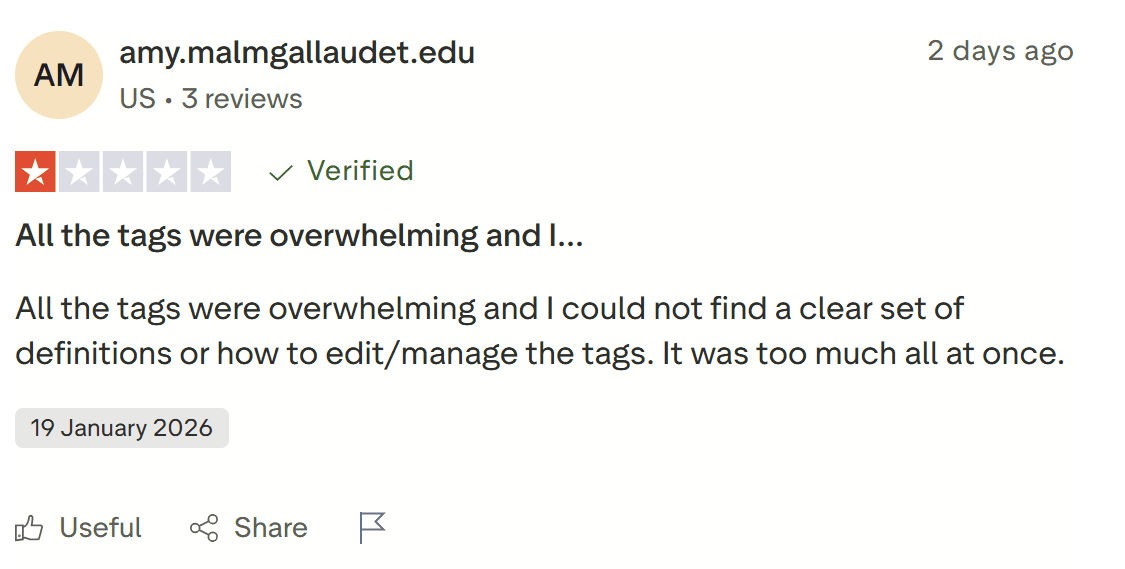
Another G2 reviewer, Amy, found the whole thing “overwhelming.”
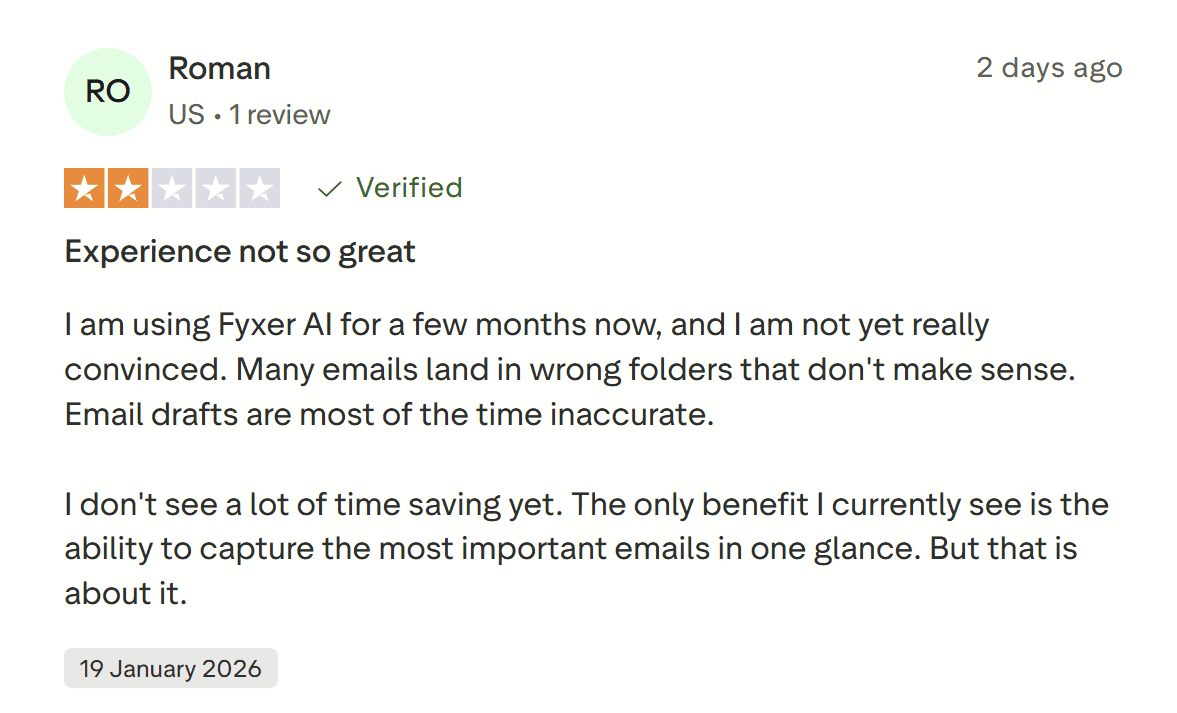
Roman reviewed Fyxer AI on the same day as Amy (January 19th 2026) to say something very similar: “Many emails land in wrong folders that don’t make sense.” He also goes on to say that “I don’t see a lot of time saving yet.” I’d have to agree with him. It’s a good concept, poorly executed, that is not remotely worth the hype.
Henry Weldon, on the other hand, rates it 5/5 and said it saves him approximately 8 hours of admin work each week, while Matthew Elliot boldly proclaims that Fyxer.ai is “the greatest productivity tool of its generation.”

The graph is impressive, and the funding doesn’t just come out of nowhere. Clearly Fyxer is attracting buyers. It has potential. This is why I was sold on the idea too. If it could sort out my inbox and arrange everything into neat little folders for me, I’d have loved it. Instead, it kind of added unnecessary manual effort. I was no longer receiving notifications to my phone when I had emails that I actually wanted to read.
For me, that’s an inconvenience. For a business, that can be deadly.
In short, while it clearly has potential, I don’t think it’s ready yet. And there’s a lot of reviewers that agree with me.
In r/AIForSmallBusiness, there was a post searching for an email filter or organizer like Fyxer.ai. The reason for the switch?
"Fyxer has stopped being enjoyable for me to use. The sorting winds up being more confusing than helpful and the ai drafts no longer sound 'right'."
The comments range from agreeing that the price is too steep to highlighting the vast number of flaws and glitches in Fyxer’s features.
Over on r/fyxerai, a user claims that Fyxer broke his Gmail account.
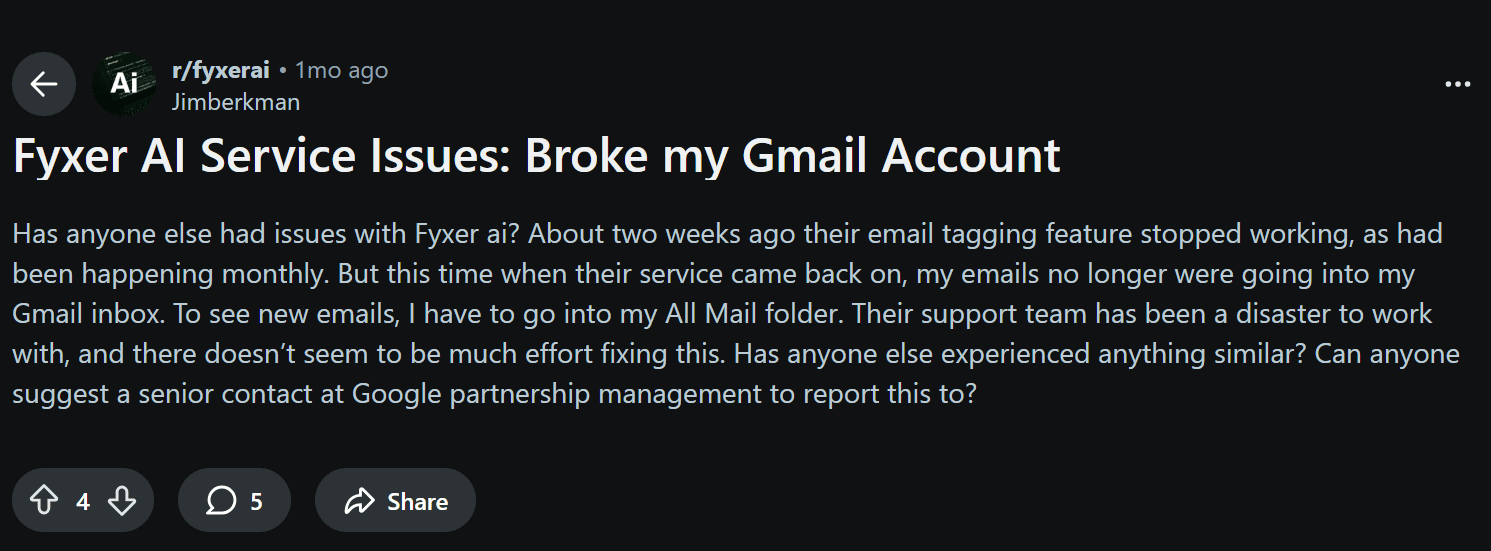
This user’s issue had made me concerned during my trial. A few people commented that the user could disconnect the integration from the Fyxer app. I ended up doing this after my initial review was complete and thankfully experienced no problems. I got my messy inbox back, but at least I knew what was where.
Fyxer AI vs. tl;dv: Two Different Tools for Two Different Jobs
Fyxer and tl;dv aren’t really competing for the same job. Fyxer is your async communication OS — it handles what happens in your inbox before and after the meeting. tl;dv is your meeting intelligence layer, capturing, transcribing, analyzing, and acting on what happens during the meeting itself.
The overlap is real but thin: Fyxer does take meeting notes, and tl;dv does help with post-meeting follow-up. But their centers of gravity are completely different, and understanding that distinction will save you from buying the wrong tool. Or assuming you only need one.
Where Fyxer Wins: Email Organization
If your biggest problem is your inbox, Fyxer is the more relevant tool. It groups and labels incoming emails, drafts replies in your voice, schedules meetings across time zones, and lets you query everything through Fyxer Chat. tl;dv doesn’t touch any of that. If you’re a recruiter sending 60 emails a day, or a real estate broker whose entire client relationship lives in their inbox, Fyxer is solving a problem tl;dv wasn’t built for.
Where tl;dv Wins: Meeting Intelligence
If your biggest problem is what happens in meetings: capturing it accurately, making sense of it at scale, and turning it into action, then tl;dv is the stronger tool. And it’s not particularly close.
Bot-free by default. tl;dv records audio-only without sending a bot into the meeting, which means no awkward “X is recording this call” notification, no participant joining as a mysterious guest, and no friction with clients who don’t want a robot in the room. Best thing: it automatically includes consent flows for GDPR compliance. If you do want the full video recording, the bot is available as an option, but it’s opt-in, not the default. Fyxer’s notetaker is bot-only.
40+ languages with automatic detection. tl;dv transcribes in over 40 languages and automatically detects which language is being spoken. No manual setup required. Fyxer is English-first. If you work across international teams or run client calls in multiple languages, this is a practical difference that compounds fast.
Custom vocabulary. tl;dv lets you feed it custom vocabulary. Things like product names, company names, and industry terms can be recognized accurately in the AI-generated transcript so that it reflects what was actually said. This directly addresses the kind of error we saw in Fyxer’s meeting notes, where “Cluely” was transcribed as “Clearly” and then misattributed entirely. When the AI is working from a corrupted transcript, the summary is corrupted too. Custom vocabulary prevents that at the source.
Speaker recognition without a bot. Even in audio-only mode, tl;dv identifies and labels individual speakers, so the transcript reads as a real conversation rather than an undifferentiated wall of text. You know who said what, which matters enormously for action items and CRM notes.
Multi-meeting AI insights. This is where tl;dv pulls furthest ahead of Fyxer on the meeting side. Rather than treating each call in isolation, tl;dv can analyze patterns across many meetings at once. It can surface recurring objections, track topic trends, identify coaching opportunities across a sales team’s calls and more. Fyxer gives you notes from a single meeting. tl;dv gives you intelligence across all your meetings.
Recurring reports and scheduled AI summaries. tl;dv can automatically generate and send multi-meeting reports on a schedule. Want a weekly sales summary of all your sales reps’ calls? Easy. Monthly customer feedback digest? Done. No manual compiling needed. Fyxer has no equivalent.
Sales playbooks and coaching. tl;dv includes built-in sales playbook tracking and rep coaching features. It scores calls against your methodology, flags missed questions, and gives managers visibility into how their team is actually performing on calls. This is a fundamentally different category of feature from anything Fyxer offers.
CRM auto-sync. tl;dv pushes meeting notes, summaries, and action items directly into HubSpot, Salesforce, Pipedrive natively, as well as 5,000+ other tools via Zapier. This means you can automatically populate the right fields without manual data entry. Fyxer’s HubSpot integration exists at the Professional tier, but the depth of native CRM sync isn’t in the same league.
MCP integration. tl;dv supports Model Context Protocol, meaning your meeting data can be surfaced and acted on by AI agents across your stack. It’s an infrastructure-level feature that positions tl;dv as part of an AI-native workflow rather than a standalone note-taking app.
Mobile app. tl;dv has a free iOS mobile app. Fyxer has no dedicated mobile app.
GDPR and SOC2 certified. Both tools take security seriously, but tl;dv is GDPR and SOC2 verified, and also compliant with the EU AI Act. This is important for European teams or any organization with data residency requirements.
Free forever. tl;dv’s free plan includes unlimited recordings. You can use it indefinitely without hitting a paywall for core functionality. Fyxer’s free tier doesn’t exist. You’re on a 7-day trial and then paying (a high rate) from day one.
My Honest Take on Fyxer’s Meeting Notes
Fyxer has supposedly improved its meeting features since I last properly tested it. Shared notes, meeting summary translation, voice questions about meetings via Chat, and a customizable notetaker have all shipped since October 2025.
But the experience I had in testing still sticks with me. Fyxer’s AI confused “Cluely” with “Clearly,” misattributed quotes between two different people, and produced a one-hour meeting summary with two bullet points — both from the first five minutes. The dashboard froze repeatedly. It was fundamentally unusable.
The honest framing is this: Fyxer is an email organization platform that has a simple notetaker feature. tl;dv is a meeting intelligence layer. A notetaker joins your call and produces a summary. An intelligence layer transcribes accurately with custom vocabulary and speaker recognition, analyzes patterns across dozens of calls, auto-syncs to your CRM with the right data in the right fields, coaches your sales reps, and sends your manager a recurring report every Friday. Those are different products at different levels of ambition.
If meeting intelligence matters to you at all — not just a record that a meeting happened, but actual insight into what’s being said across your calls — tl;dv is the purpose-built tool. Fyxer’s meeting features are a useful bonus for existing Fyxer users. They’re not a reason to choose Fyxer.
Fyxer AI vs. tl;dv: Feature Comparison
They're not competing for the same job. Fyxer owns your inbox, tl;dv owns your meetings. Here's how the features stack up across both.
← Scroll to compare →
| tl;dv | Fyxer AI | |
|---|---|---|
| Pricing | ||
| Free plan | ✓ Free forever, unlimited recordings Winner |
✗ 7-day trial only |
| Starting price | $0 — free forever Winner |
$22.50/seat/mo (annual) |
| Primary use case | Meeting intelligence | Email organization & async communication |
| Recording & Transcription | ||
| Bot-free recording | ✓ Default on all plans — bot optional for video Winner |
✗ Bot only |
| Transcription accuracy | 97%+ Winner |
~88–90% |
| Languages supported | 40+ with auto-detection Winner |
English-first |
| Auto language detection | ✓ Winner |
✗ |
| Custom vocabulary | ✓ Add product names, competitors, terms Winner |
✗ |
| Speaker recognition | ✓ Even without bot | ~ With bot only |
| Privacy & Compliance | ||
| GDPR & SOC2 certified | ✓ Both verified | ✓ Both verified |
| ISO 27001 & HIPAA | ~ SOC2 covers enterprise compliance | ✓ ISO 27001 + HIPAA (enterprise) |
| AI & Meeting Intelligence | ||
| Multi-meeting AI insights | ✓ Patterns across all your calls Winner |
✗ |
| Recurring AI reports | ✓ Scheduled, automated Winner |
✗ |
| Sales playbooks & call coaching | ✓ Playbook monitoring, call scoring, rep insights Winner |
✗ |
| Meeting notes & summaries | ✓ | ✓ |
| Shared meeting notes | ✓ | ✓ Added Apr 2026 |
| Meeting summary translation | ✓ | ✓ Added Apr 2026 |
| Integrations | ||
| CRM integrations | Native HubSpot, Salesforce, Pipedrive + 5,000 via Zapier Winner |
HubSpot only (Professional tier) |
| MCP integration | ✓ Winner |
✗ |
| Email & Async Communication | ||
| Email triage & inbox organization | ✗ | ✓ Primary feature Winner |
| AI email drafting in your voice | ~ Basic follow-up drafts | ✓ Core feature, learns from ~300 emails Winner |
| Calendar scheduling assistant | ✗ | ✓ Pro tier Winner |
| AI chat across email + meetings | ~ Meetings only | ✓ Email + meetings + files (Pro) Winner |
| Platform | ||
| Mobile app | ✓ Free iOS app Winner |
✗ No dedicated mobile app |
| Works inside Gmail / Outlook | ✗ | ✓ No new app needed Winner |
Need meeting intelligence on top of Fyxer?
tl;dv gives you unlimited recordings, 40+ language transcription with auto-detection, AI sales playbooks, multi-meeting insights, and CRM auto-sync — all bot-free by default. GDPR & SOC2 verified. Free forever.
Pricing and features verified June 2026 from each tool's official pricing page and changelog. tl;dv: Free, Pro $18/seat/mo, Business $29/seat/mo (annual). Fyxer AI: Starter $22.50/seat/mo, Professional $37.50/seat/mo (annual), Enterprise bespoke. ~ = partial or plan-limited. ✓ = native support. ✗ = not available. All prices USD.
Fyxer AI vs. Alternatives: Which Tool Should You Choose?
Fyxer splits itself across two niches, mastering neither of them completely. But depending on what you actually need, there may be a more focused tool that does the specific job better. Here are the most relevant comparisons.
Fyxer vs. Gmail Gemini / Outlook Copilot
This is the comparison Fyxer probably least wants you to make, because it’s the hardest one to win. Gmail Gemini and Outlook Copilot are baked directly into the email clients most people already use, which means zero setup friction, no third-party inbox permissions, and no additional monthly cost if you’re already on Google Workspace or Microsoft 365.
Both offer AI email drafting, summarization of long threads, and some degree of scheduling assistance. For casual users who get around 30 emails a day and occasionally want help drafting a reply, that’s probably enough.
Where Fyxer pulls ahead is cross-platform context. Gemini knows your Gmail. Copilot knows your Outlook. Neither knows your meeting notes, your uploaded documents, your calendar across multiple accounts, or your communication patterns across both email platforms simultaneously. Fyxer Chat is built to query all of that in one place, though I have reservations about how well it actually works in practice.
Nevertheless, if you’re a Professional plan user who’s fed Fyxer your company style guides, your meeting history, and your multi-inbox context, you’re working with an AI that has a much richer picture of your working life than anything native to a single platform.
My honest thoughts: if you’re a light email user on a single platform, try Gemini or Copilot first. They’re already there and they’re free. If you’re a heavy email user, work across Gmail and Outlook, or want the meeting-plus-email context layer, Fyxer might justify the additional cost.
Fyxer vs. Superhuman
Superhuman is an email productivity app built around speed. Its core value is getting you to Inbox Zero faster through split inboxes, keyboard-driven sorting, and workflow features designed for people who treat email like a sport.
The key distinction: Superhuman is human-centred and fast; Fyxer is AI-centred and automated. Superhuman puts you in control of every decision but makes those decisions faster. Fyxer tries to make decisions for you. Which one you want depends on how much you trust AI to handle your inbox without supervision. I found fyxer’s AI to be a bit of a bumbling wreck, but many users do get what they want from it.
Superhuman also doesn’t touch meetings at all, which means if you want meeting notes alongside your inbox management, you’d need to pair it with a separate tool. Fyxer at least attempts both in one place, even if the meeting side is the weaker half.
Pricing is also a factor: Superhuman starts at $30/month, putting it on par with Fyxer’s monthly Starter plan, but Superhuman has a longer track record of reliability and a more devoted user base.
Fyxer vs. SaneBox / Missive / Shortwave
These three often come up in the same breath as Fyxer, but they’re solving meaningfully different problems.
SaneBox is email filtering, full stop. It learns which emails matter to you and moves the rest out of your inbox into folders like SaneLater or SaneBlackHole. No AI drafting, no meeting notes, no scheduling. If inbox noise is your only problem and you don’t want AI drafting your replies, SaneBox is simpler and cheaper. If you want the full package, it’s not in the same category.
Missive is a shared team inbox, built for customer support and sales teams that handle email collaboratively. It’s not primarily AI-driven and it’s not built for personal inbox management. The use case is fundamentally different: Missive is for teams that own a shared address, not individuals trying to tame their own inbox.
Shortwave is Gmail-only and leans heavily into AI summarization and threading. It’s a reimagined Gmail client rather than a layer on top of your existing one, which means it’s more opinionated about your workflow. AI drafting exists but is less voice-trained than Fyxer’s. No meeting layer, no cross-platform support, no Outlook.
Fyxer is the most ambitious of this group. It’s attempting email triage, voice-trained drafting, calendar management, and meeting notes in one product. Whether “most ambitious” translates to “best” is the question this entire review exists to answer.
Fyxer vs. Kai
Kai is an AI executive assistant that works on top of your existing Gmail or Outlook. On email it does what Fyxer does: as mail arrives it sorts each thread into buckets like “needs a reply” and “waiting on someone else”, writes matching colour-coded labels into your real inbox, and drafts replies in your voice by matching how you’ve written to that person before. It then goes further than Fyxer, pulling your Google and Outlook calendars into one timeline and keeping a single AI-ranked task list that your email and meetings can feed into.
Fyxer stays focused on the inbox. Kai wraps email, calendar, and tasks into one workflow, so an email can become a “Handle:” task and a task can drop onto your calendar as a real focus block. Kai also never auto-sends: it puts an editable draft in front of you and waits for you to hit Send, leaving [BRACKET] placeholders wherever it won’t guess a fact.
That human-in-the-loop design is the opposite of the fire-and-forget behaviour that made me wary of Fyxer’s AI. The trade-offs are honest: Kai only connects to Gmail and Outlook, its task list doesn’t sync with outside apps like Todoist or Notion, and it’s still in open beta.
Fyxer vs. Fireflies
Like tl;dv, Fireflies is simple to set up across Zoom, Google Meet, and Teams. It autojoins meetings, transcribes in real-time, generates summaries, and offers collaborative transcript features. It’s a pragmatic option for teams that want cheap, dependable transcription and fast summaries without a heavy focus on multi-meeting analytics.
The comparison with Fyxer is straightforward: Fireflies does meeting intelligence better than Fyxer, Fyxer does email better than Fireflies. If you’re primarily buying Fyxer for its notetaker, Fireflies is worth a look. It’s more focused, more reliable, and cheaper for that specific job.
Check out our tl;dv vs Fireflies article for a deeper exploration of how they face off against each other.
Fyxer vs. Otter
Otter combines reliable real-time transcripts with strong transcription accuracy and conversational AI features. If you want top transcripts with a solid AI assistant, Otter is worth considering, particularly for individual users who don’t need the sales coaching and multi-meeting intelligence that tl;dv offers.
Again, like Fireflies, the comparison with Fyxer is about specialization vs. combination. Otter does transcription well. Fyxer does email well. Neither does the other’s job particularly well.
Dive into our tl;dv vs Otter article for a comprehensive comparison, or check out Otter’s pricing instead.
Fyxer AI vs. the Alternatives
Fyxer tries to do email and meetings in one tool. Here's how it stacks up against the specialists — and the native AI already in your inbox.
← Scroll to compare →
| Fyxer AI | tl;dv | Fireflies | Otter | Superhuman | Gemini / Copilot | |
|---|---|---|---|---|---|---|
| Pricing | ||||||
| Free plan | ✗ 7-day trial only | ✓ Free forever, unlimited recordings | ✓ Unlimited transcripts, limited AI | ~ 300 mins/mo | ✗ No free plan | ✓ Included in Workspace / 365 |
| Starting price | $22.50/seat/mo (annual) | $0 — free forever | $0 — free tier available | $0 — limited free tier | $30/mo | Included in Workspace / 365 |
| Recording & Transcription | ||||||
| Bot-free recording | ✗ Bot only | ✓ Default (desktop app) — bot optional for video | ~ Desktop app — no speaker recognition | ✓ Desktop app | ✗ N/A | ~ Gemini only, limited |
| Languages supported | English-first | 40+ with auto-detection | 100+ | Limited (EN, ES, FR, DE, ZH) | N/A | English-first |
| Custom vocabulary | ✗ | ✓ Product names, terms, competitors | ~ Limited | ~ Limited | ✗ N/A | ✗ |
| Speaker recognition | ~ With bot only | ✓ Even without bot | ✓ Bot only (not in bot-free mode) | ✓ | ✗ N/A | ✗ |
| AI & Meeting Intelligence | ||||||
| Multi-meeting AI insights | ✗ | ✓ Patterns across all calls | ~ Team analytics (Business+) | ✗ | ✗ | ✗ |
| Recurring AI reports | ✗ | ✓ Scheduled & automated | ✗ | ✗ | ✗ | ✗ |
| Sales playbooks & coaching | ✗ | ✓ Call scoring, rep insights | ~ Business plan | ✗ | ✗ | ✗ |
| Meeting notes & summaries | ✓ Improved since 2025 | ✓ | ✓ | ✓ | ✗ N/A | ~ Gemini only |
| Integrations | ||||||
| CRM integrations | ~ HubSpot only (Pro tier) | HubSpot, Salesforce, Pipedrive + 5,000 via Zapier | Salesforce, HubSpot (Pro+) | Salesforce, HubSpot (Pro+) | ~ Some | ~ Basic, siloed |
| MCP integration | ✗ | ✓ | ✗ | ~ Basic MCP server | ✗ | ✗ |
| Email & Async Communication | ||||||
| Email triage & inbox organization | ✓ Primary feature | ✗ | ✗ | ✗ | ✓ Split inbox, fast triage | ~ Basic, single platform |
| AI email drafting in your voice | ✓ Learns from ~300 emails | ~ Follow-up drafts only | ~ Basic | ~ | ~ Templates & snippets | ~ Generic, not voice-trained |
| Cross-platform context (email + meetings + docs) | ✓ Pro tier | ~ Meetings only | ✗ | ✗ | ✗ | ✗ Siloed per platform |
| Calendar scheduling assistant | ✓ Pro tier | ✗ | ✗ | ✗ | ~ Limited | ~ Basic |
| Privacy & Platform | ||||||
| GDPR & SOC2 certified | ✓ | ✓ | ✓ | ✓ | ✓ | ✓ |
| Mobile app | ✗ No dedicated app | ✓ | ✓ | ✓ | ✓ | ✓ |
| UX / reliability | ⚠ Improving but patchy | ✓ Reliable | ✓ Reliable | ✓ Reliable | ✓ Excellent | ✓ Native, stable |
Want the meeting intelligence Fyxer can't quite deliver?
tl;dv is free forever, bot-free by default, transcribes in 40+ languages with auto-detection, and includes AI sales playbooks, multi-meeting insights, CRM auto-sync, and a free iOS app. GDPR & SOC2 verified.
Pricing and features verified June 2026 from each tool's official pricing page. tl;dv: Free, Pro $18/seat/mo, Business $29/seat/mo (annual). Fyxer AI: Starter $22.50/seat/mo, Professional $37.50/seat/mo (annual). Fireflies: Free, Pro $10/seat/mo (annual). Otter: Free, Pro $8.33/user/mo (annual). Superhuman: $30/user/mo. Gemini/Copilot: included in Google Workspace / Microsoft 365 plans. ~ = partial or plan-limited. ✓ = native support. ✗ = not available. All prices USD.
Fyxer AI Pros and Cons: My Honest Summary
Fyxer has real strengths and real weaknesses, and at this price point you deserve to see them side by side before you decide.
Pros:
- Inbox Management. Solves inbox overload for high-volume email users if you set it up right
- Mimics You. Style mirroring draws on your last 300 emails and makes drafts that actually sound like you, not a LinkedIn post written by a bot
- Good UX. Clean, intuitive UI with a low learning curve
- Secure. Enterprise-grade security: SOC 2 Type II, ISO 27001, GDPR, and HIPAA for enterprise customers
- Well-Funded. $43M total funding and 100,000+ users suggest this isn’t going anywhere
Cons:
- Mislabels Emails. Mislabeled emails remain the most consistent complaint across user reviews, including my own testing
- Poor Notetaker. Meeting intelligence is clearly secondary: don’t buy Fyxer primarily for its notetaker
- Pay Walls. Custom document training is locked to Professional tier; Starter users get passive style mirroring only
- Short Trial. Trial cut from 14 days to 7: less runway to evaluate before you’re paying
- No Free Plan. You start paying as soon as your trial ends (tl;dv is free forever by comparison)
- Not for Mobile. No dedicated mobile app
- Can Be Unreliable. Reliability issues documented in October 2025. Supposedly improved since, but still cited in recent reviews
- Pricey. Starter pricing is hard to justify at $22.50–$30/seat when more focused tools do the specific job for less
Who Should Buy Fyxer AI, and Who Should Skip It?
Judging by real user reviews, Fyxer is a genuinely useful tool for a specific kind of professional. But it’s far from the right call for everyone.
Buy it if:
- Email is genuinely your biggest time drain and you’re dealing with high daily volume
- You’re on the Professional plan and will actually use Fyxer Chat, the cross-search, and custom document training — that’s where the value compounds
- You work in a high-volume communication industry: real estate, recruiting, legal, finance, or anything where your inbox is essentially a second job
Skip it if:
- Your main need is meeting intelligence. Just use tl;dv instead, which is free, more accurate, and purpose-built for that job
- Your email volume is manageable and you’re looking at Fyxer for the notetaker alone
- You want a free tier to properly evaluate before committing
- You need a mobile app as part of your workflow
Can Fyxer AI Replace a Human Executive Assistant?
Not yet. If you set it up right, Fyxer handles the predictable, repetitive parts of inbox management well. What it can’t do is exercise judgment: knowing when a client relationship needs a personal touch instead of a drafted reply, navigating a sensitive thread, or managing the kind of multi-system, context-heavy coordination that a good human assistant handles intuitively.
The gap is narrowing, but for now, think of Fyxer as an executive assistant’s best tool rather than their replacement.
The Verdict: Is Fyxer AI Worth It in 2026?
Since I first tested Fyxer in October 2025, it has matured. The dashboard loads. The changelog is real. The $30M Series B and the shipping cadence that followed are genuine signals that this is a company executing, not coasting. The 100,000+ user base and 90% three-month retention rate suggest that for the right person, it clicks.
But the fundamental question hasn’t changed: is it worth $30–50 per seat per month?
The answer is still it depends. And it depends almost entirely on two things: how bad your inbox problem actually is, and whether you’re on Professional and genuinely using Fyxer Chat, custom document training, and the cross-search. If both are true, the ROI math works and the tool has grown into something worth paying for. If you’re on Starter and primarily wanted a notetaker, you’re overpaying for an incomplete solution.
I’d wager, at this point in time, the verdict is maybe — for the right person.
If you’re looking for an AI meeting assistant with state-of-the-art conversational intelligence, multi-meeting memory, deep CRM integrations, recurring reports, sales coaching features, and more, I’d recommend trying tl;dv. The free plan is enough for most users to get a good feel for the product: it includes unlimited recordings (and they actually work).
FAQs About Fyxer.ai in 2026
What is Fyxer.ai?
Fyxer.ai is an AI-powered productivity platform that combines email management, meeting recording, and calendar organisation in one app. It sorts and labels your inbox automatically, drafts replies in your tone, and joins meetings to take notes.
Is Fyxer.ai free to use?
No. Fyxer offers a 7-day free trial, but you must enter your card details to activate it. After the trial, you’ll be billed unless you cancel. The Starter plan begins at $22.50 per user per month (annual) or $30 monthly, though some users (myself included) have reported discrepancies during signup.
How much does Fyxer.ai cost?
Starter: $22.50 per user/month (annual)
Professional: $37.50 per user/month (annual)
Enterprise: Custom pricing (contact sales)
If billed monthly, prices rise to $30 and $50 respectively.
What are the main features of Fyxer.ai?
Smart email labelling and sorting
AI-generated email drafts in your voice
Calendar syncing and meeting scheduling
Automatic meeting recording and transcription
AI summaries and chat-based insights
Does Fyxer.ai integrate with CRMs?
Yes. The Professional and Enterprise plans allow CRM integrations, though Fyxer hasn’t clarified how deep or reliable those integrations are. Early tests suggest setup can be clunky compared to competitors.
How does Fyxer.ai handle data privacy?
Fyxer.ai states that it never shares user data with third parties and only uses necessary permissions to deliver features. It holds SOC 2 Type II, ISO 27001, and GDPR certifications, with HIPAA compliance for enterprise users.
Who is Fyxer.ai best for?
It’s designed for professionals or teams drowning in emails who also want meeting summaries. However, if your focus is mainly meeting intelligence, alternatives like tl;dv might be more reliable (and cheaper).
What are the main downsides of Fyxer.ai?
Glitches and freezing issues during meetings
Mislabelled emails and context errors
High pricing for limited reliability
Requires full inbox access, which may concern some users
What are the best Fyxer.ai alternatives?
tl;dv – Best for meeting notes, summaries, multi-meeting memory, and CRM syncs (free plan available)
Otter.ai – Strong meeting recording and transcription accuracy
Fireflies.ai – Great team collaboration and searchable transcripts
Superhuman – Purely for email speed and organisation (no meetings)
Is Fyxer.ai worth it in 2026?
Not yet. The concept is strong, but the platform still suffers from instability, accuracy issues, and poor onboarding. Until performance improves, it’s hard to justify the price.
How does Fyxer AI learn my writing style?
When you sign up, Fyxer scans the 300 most recent emails in your inbox and sent items to build an initial model of how you write. From there, it learns from every draft you edit and send. Theoretically, the more you use it, the closer the output gets to sounding like you.
Results vary: some users report drafts improving significantly within a few weeks, while others find they still require consistent editing. Passive style mirroring is available on all plans; active training via custom document uploads (up to 50MB) is locked to Professional and above.
Can Fyxer AI send emails on my behalf?
No. Fyxer drafts emails and places them in your inbox ready to review, but it never sends anything without you hitting send yourself. You stay in full control of what goes out.
Will my inbox go back to normal if I cancel?
Yes. If you delete your Fyxer account, your inbox reverts to exactly how it was before you connected it.
I can verify this first-hand.
Does Fyxer AI work on mobile?
There’s no dedicated Fyxer mobile app. It works through your existing Gmail or Outlook mobile client. You’ll see the inbox organization and drafts on mobile, but not the full Fyxer dashboard. If a native mobile app matters to you, tl;dv has a free iOS app for the meeting intelligence side.
How does Fyxer categorize emails?
Fyxer sorts incoming emails into eight fixed categories: To Respond, FYI, Comment, Notification, Meeting Update, Awaiting Reply, Actioned, and Marketing. The categories themselves aren’t fully customizable, but you can create rules to control how specific senders or email types are handled, and you can whitelist addresses you don’t want landing in Marketing.
What is the minimum team size for Fyxer Enterprise?
The Enterprise plan is best suited for organizations of 50 or more. For smaller teams, the Professional plan covers most use cases. Enterprise pricing is bespoke. You need to contact Fyxer’s sales team for a quote.
What's the difference between Fyxer Starter and Professional?
Starter covers one inbox and calendar, AI drafts, and the meeting notetaker. Professional unlocks everything else: multiple inboxes, Fyxer Chat (including voice questions and cross-search across emails, meetings, and uploaded files), HubSpot integration, custom document training, scheduling across teams and time zones, shared meeting notes, and an onboarding session with a specialist.
If the features that make Fyxer genuinely powerful are in Professional, Starter is best thought of as a trial tier with a price tag.