Skip to content






TL;DR: Zoom Pricing At a Glance
- Zoom’s free plan caps you at 40 minutes per meeting and 100 participants. Generous, until the call dies mid-sentence.
- Zoom Pro costs $14.16/user/month billed annually (or $16.99 billed monthly) and unlocks 30-hour meetings, 10GB cloud recording, and, new for 2026, unlimited AI note-taking.
- Zoom Business runs $18.33/user/month annually ($21.99 monthly) and adds 300 participants, SSO, and unlimited whiteboards. Enterprise is a “talk to sales” affair.
- Paying monthly instead of annually costs roughly 17% more for the exact same product.
- The base plan is just the cover charge: Zoom Phone, Webinars, Rooms, and AI add-ons are where invoices balloon.
- Want AI meeting notes without upgrading to Pro at all? tl;dv’s free plan works on Zoom, Google Meet, MS Teams, and every other platform you can think of, no bot needed. Just saying.
Here’s an uncomfortable truth before we talk about Zoom pricing: the software is the cheap part. According to Asana’s 2024 State of Work Innovation report, the average individual contributor now torches 3.7 hours a week in unproductive meetings, up 118% since 2019, and workers report a “meeting hangover” after more than a quarter of their calls. You’re already paying a fortune in salaries for people to sit in little rectangles. The least you can do is not overpay for the rectangles themselves.
That’s harder than it sounds in 2026. Zoom’s pricing page has quietly sprawled into twenty-odd separately priced products, including Workplace, Phone, ZoomMate, My Notes, Webinars, and even something called Bonsai. They each have their own monthly-vs-annual maths and fine print.
So I did the unglamorous work for you: every plan, every add-on, every hidden cost, what real users actually think, and a calculator that tells you what your team would pay. Let’s get into it.
Want the numbers fast? Jump to the calculator or the plan comparison. Rather get started with Zoom right away, check out how to run a Zoom test call.
How Does Zoom Pricing Work in 2026?
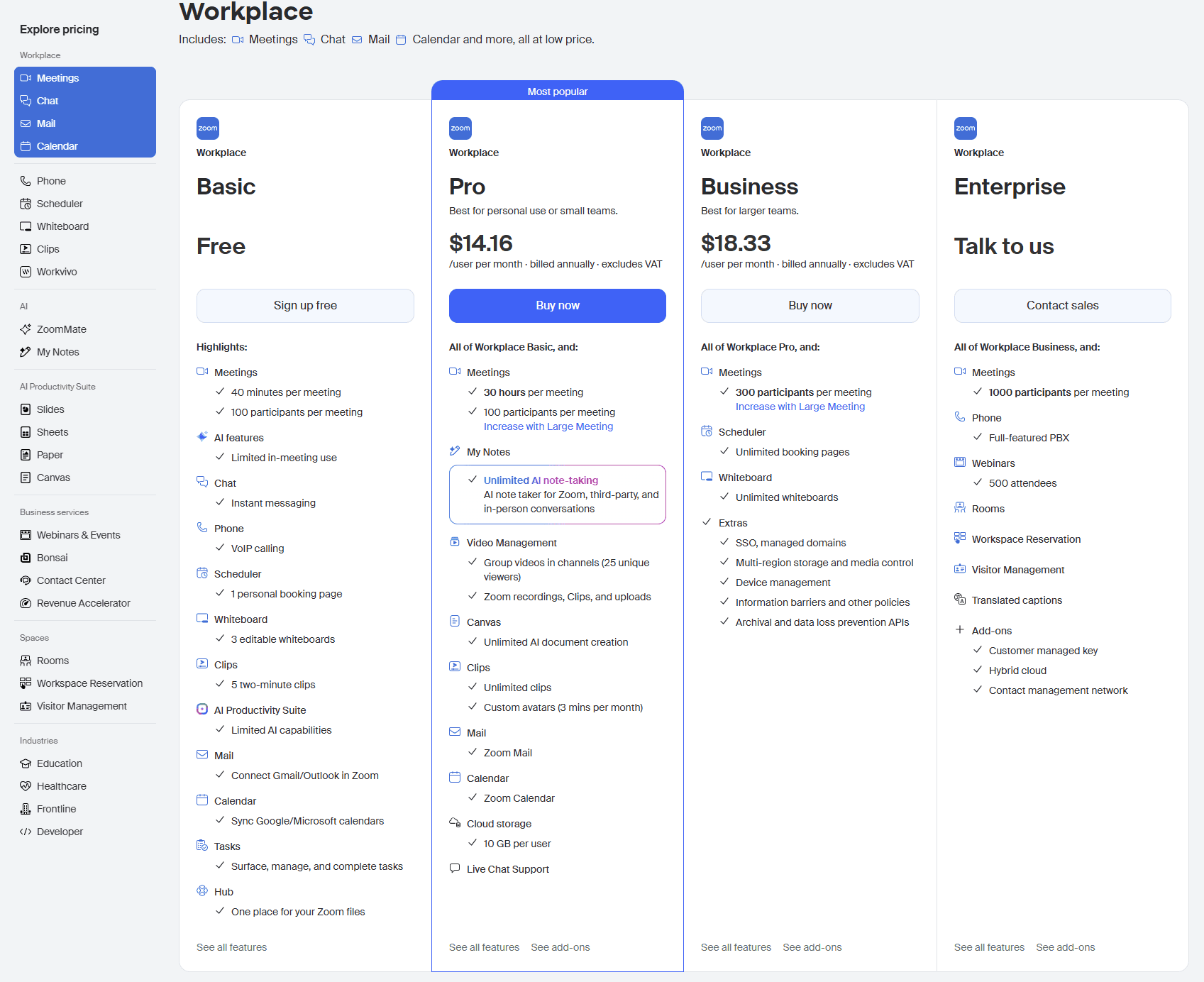
Zoom pricing works on a per-user, per-month model: you pick a plan (Basic, Pro, Business, Business Plus, or Enterprise), multiply by the number of hosts who need a paid licence, and choose whether to pay annually or monthly. Annual billing is cheaper, monthly is more flexible, and almost everything beyond the core video plan — Phone, Webinars, Rooms, extra AI — is a separate add-on stacked on top.
That’s the clean version. The reality is that Zoom now sells more separately priced products than your local supermarket has cereal, so before I lay out the plans one by one, here’s how the money actually flows.
Per-User, Per-Month, And the Annual vs Monthly Gap
Every paid Zoom plan is priced per host, per month. A “host” is anyone who needs to start meetings on a paid plan. Your attendees join for free, so you only buy licences for the people running the calls. (More on that host-vs-participant distinction in the FAQ, because it trips up roughly everyone.)
The lever most people miss is the billing cycle. Take Pro: it’s $14.16/user/month if you pay for the year up front, or $16.99/user/month if you pay month to month. That’s about a 17% premium for the privilege of staying flexible, or Zoom’s “Save up to 16%” toggle, viewed from another perspective. Across a 10-person team that gap is roughly $340 a year for the identical product. Worth it if you’re scaling fast and want to bail anytime; pure waste if you’re going to renew anyway.
One more bit of fine print before anyone screenshots a price and emails it to me: every figure on Zoom’s pricing page excludes VAT and local taxes, so your real invoice might land a little higher depending on where you’re billing from.
Zoom Workplace, ZoomMate, My Notes: Decoding the 2026 Naming Soup
If you last bought Zoom a couple of years ago and came back to a wall of unfamiliar names, you’re not losing it. “Zoom Meetings” is now folded into Zoom Workplace, the umbrella brand for the core video plans (Basic/Pro/Business/etc.). Bolted around it you’ll find My Notes and ZoomMate, the two AI tiers; Zoom Phone, the cloud calling product; plus Scheduler, Whiteboard, Clips, Webinars, Events, Rooms, Contact Center and a few more. Same company, far more checkboxes.
The practical takeaway: when someone says “Zoom costs $X,” ask which Zoom. The base Workplace licence is just the entry fee. The naming sprawl exists precisely because each of those pieces is its own line on the invoice.
The Full Zoom Product Family at a Glance
Here's everything Zoom will happily sell you. Starting prices, billed annually (per user/month unless noted).
| Product | Starting price | What it's for |
|---|---|---|
| Zoom Workplace (Basic) | Free | Core video meetings, 40-min cap |
| Zoom Workplace (Pro) | $14.16/user/mo | Longer meetings, cloud recording, AI notes |
| Zoom Workplace (Business) | $18.33/user/mo | Bigger meetings, SSO, admin controls |
| Zoom Workplace (Enterprise) | Custom | Large orgs, full PBX, biggest limits |
| Zoom Phone | $16/user/mo | Cloud calling; also bundled into Pro Plus & Business Plus |
| Zoom Webinars | $83.33/mo per license | One-to-many broadcasts (from 500 attendees) |
| Zoom Events | $415.83/mo per license | Multi-session virtual events |
| Zoom Rooms | $41.58/room/mo | Conference-room hardware software |
| My Notes (AI) | $8.33/user/mo | AI meeting notes add-on |
| ZoomMate (AI) | $16.67/user/mo | Fuller AI assistant, credit-based |
| Zoom Scheduler | $4.99/user/mo | Booking/scheduling tool |
| Zoom Whiteboard Plus | $5.83/user/mo | Standalone whiteboard upgrade |
| Zoom Clips Plus | $5.83/user/mo | Async video messaging |
| Zoom Contact Center | $69–149/agent/mo | Customer-facing call center |
For context on why Zoom can keep adding new plans and still keep customers, it helps to know the pond it’s swimming in: the global video conferencing market was worth $11.65 billion in 2024 and is forecast to more than double to $24.46 billion by 2033, according to Grand View Research.
When the market’s growing that fast, “add another product line” is just good business. Who cares if it makes the pricing page read like a restaurant menu with no prices and twelve pages? Besides the customer, of course.
Zoom Workplace Pricing Plans Compared (2026)
Zoom Workplace comes in four flavors: Basic (free), Pro, Business, and Enterprise. The prices climb as the limits loosen: longer meetings, more participants, more storage, more admin control. The trick is working out which ceiling you’ll actually hit before you start paying to raise it. Here’s every plan, what it really gets you, and the small print I’d want flagged before handing over a card.
Quick orientation: every price below is per user, per month. I’ve listed the annual rate first (the one Zoom advertises) and the monthly rate second, because the gap between them is its own little tax (more on that later). All figures exclude VAT, and you can model your exact spend with the Zoom Pricing Calculator further down.
Zoom Basic (Free): What You Actually Get
The headline limit everyone knows: 40 minutes per meeting, 100 participants. But “free” is more generous than the reputation suggests. You get unlimited meetings (just capped at 40 minutes each), local recording, automated captions, team chat, mail, calendar, three whiteboards, and five Clips. For one-to-one calls, the 40-minute wall doesn’t even apply! You can also record your meetings for free (local storage only).
What you don’t get: cloud recording (it’s local-only, so recordings live on your device), the AI Companion features the paid tiers enjoy, and any real admin muscle. For a freelancer or a tiny team running short internal syncs, Basic is perfectly fine. For anything client-facing, the countdown timer will eventually embarrass you.
The 40-Minute Wall: What Actually Happens
At the 40-minute mark, your meeting ends. Everyone gets booted, and the host can immediately spin up a new link. This is the cause of the infamous “right, see you all back in meeting room two” shuffle. There’s no grace period and no way around it on the free plan except restarting. It’s deliberate friction, and it’s the single biggest reason teams talk themselves into Pro.
Zoom Pro: $14.16/user/mo annual ($16.99 monthly)
Pro is the “we do real meetings now” tier. It lifts the meeting cap from 40 minutes to a frankly absurd 30 hours, adds 10GB of cloud recording per license, unlocks the full AI note-taking suite, and turns on cloud storage. If the 40-minute wall is your problem, Pro is the fix.
The gotcha worth knowing: Pro keeps the 100-participant cap, which is exactly the same as the free plan. Pro buys you longer meetings, not bigger ones. If you need more than 100 people in a room, you’re either adding the paid Large Meeting add-on or jumping to Business. Worth saying out loud, because plenty of people upgrade to Pro expecting a bigger room and get the same one with a longer lease.
Zoom Business: $18.33/user/mo annual ($21.99 monthly)
Business is where Zoom starts behaving like company infrastructure. The participant cap triples to 300, whiteboards and Clips go unlimited, and you get the things IT actually cares about: single sign-on (SSO), managed domains, company branding, and fuller admin controls. Cloud recording stays at 10GB per user.
This is the plan most growing companies land on, and it’s the one the “zoom premium cost” searchers are usually pricing up. The honest test: if you don’t need SSO or 300-person meetings, you’re paying roughly $4/user/month extra for headroom you won’t touch. If you do, it’s the obvious pick.
Zoom Enterprise: “Contact Us for Pricing” Decoded
Enterprise is the “talk to sales” tier, aimed at orgs buying 250+ licenses. There’s no public price, it’s all negotiated. But there’s a lot on the table: participant capacity jumps to 500+, cloud storage goes unlimited, and a pile of things bundled in that everyone else pays extra for: Zoom Webinars 500, Rooms, Workspace Reservation, Visitor Management, translated captions, and advanced security.
If you’re heading into that conversation, two pointers: the list price is a starting position, not a fixed rate, and bundled add-ons (Webinars, Phone, Rooms) are exactly where there’s room to negotiate. Go in knowing which ones you’ll actually use.
Zoom Pricing Calculator
Pick a plan, set your seats, add the extras — and see what Zoom will actually cost your team per year.
Build your plan
Your estimate
Estimates in USD, exclude VAT. Per-seat prices shown per month; totals annualized. Verified June 2026 against zoom.us/pricing. Actual cost varies by add-ons, region and negotiation.
Paying Zoom for AI notes? You don't have to.
Zoom Add-On Pricing: Where the Bill Actually Grows
Here’s the thing about your Workplace plan: it’s the cover charge, not the bar tab. The most frequently cited Zoom pricing only covers meetings, chat, mail and calendar. You want Phone, Webinars, AI and more? Buckle up. Each has its own price and its own billing quirks. This is where a tidy “$14 a seat” quietly becomes something with a comma in it. Let me walk you through the extras, cheapest surprises first.
One rule to bookmark before we start: almost every add-on requires a paid Workplace plan underneath it. You can’t bolt Webinars onto a free account. More on that gotcha in the hidden costs section. For now, just know the meter starts at Pro.
Zoom Phone Pricing
Zoom Phone turns Zoom into your business phone system: real numbers, calls, texts and voicemail. It comes in two standalone plans and two bundles. The following are US & Canada plans, per seat.
| Phone plan | Annual | Monthly | Best for |
|---|---|---|---|
| US & CA Metered | $10.50/seat/mo | $12/seat/mo | Light or occasional callers — you pay per minute |
| US & CA Unlimited | $16/seat/mo | $18/seat/mo | Regular domestic callers |
| Pro Plus | $20.50/seat/mo | $24/seat/mo | Workplace Pro + unlimited US/CA calling |
| Business Plus | $24.50/seat/mo | $29/seat/mo | Workplace Business + unlimited US/CA calling |
The bundles (Pro Plus, Business Plus) are just Workplace + Phone sold together. This is often a few dollars cheaper than buying them apart, which is exactly why Zoom dangles them. All tiers include a domestic number, SMS/MMS, online fax, call recording, and integrations with Salesforce, Slack, Microsoft and Google.
There’s also a Virtual Agent Receptionist, an AI that answers calls for you, with a free 100-minute trial baked into every Phone plan. Calling abroad? Metered international rates apply, or Zoom Phone Global Select offers one flat per-user price across 40+ countries.
Zoom Webinars & Events Pricing
When you need to broadcast to an audience rather than meet with a team, you leave Meetings and enter Webinars-and-Events territory. The prices jump accordingly:
- Zoom Webinars starts at $83.33/license/mo (billed annually) for a 500-attendee audience, scaling up as your audience grows.
- Zoom Webinars Plus will set you back $290.83/license/mo and allows you to pre-record webinars and play them like they’re live among other things.
- Zoom Events, which is Zoom’s multi-session, full virtual-event platform, starts at $415.83/license/mo.
Three things worth mentioning here:
- These are priced per license, flat (not per seat in your org).
- The number of attendees is locked at 100 when billing monthly and it’s adjustable in batches of a few hundred in annual billing, with the price changing depending on how many you want.
- They require a paid Workplace plan to sit on. So a webinar program isn’t $83 — it’s $83 plus your underlying Workplace seats.
AI Add-On Pricing: My Notes, AI Productivity Suite & ZoomMate
This is the section that's changed most in 2026, and the one most likely to trip you up:
| AI add-on | Annual | Monthly | What you get |
|---|---|---|---|
| My Notes | $8.33/seat/mo | $10/seat/mo | Unlimited AI note-taking and summaries |
| AI Productivity Suite | $8.33/seat/mo | $10/seat/mo | AI for Slides, Sheets, Paper & Canvas docs — 1,000 credits/mo |
| ZoomMate | $16.67/seat/mo | $20/seat/mo | Fuller AI assistant — 2,200 credits/mo (up to 11,500) |
Here’s the catch worth knowing before you pay for either: Zoom Pro and above already include unlimited AI note-taking. So My Notes really only earns its keep for people sitting on the free Basic plan. And to be honest, you’d be much better off by pairing Zoom’s Basic plan with tl;dv’s bot-free AI notetaker. Even when you already pay for Zoom, tl;dv’s free plan often offers stronger AI features.
ZoomMate is the heavier tool out of the three. It bundles a pool of AI credits each month, and once you burn through them, you’re into metered territory (the new frontier of “wait, why is my AI bill variable?”). I’ll dig into the credit model in the hidden costs section.
Zoom's à la carte add-ons
Zoom will also sell you a small army of single-purpose add-ons, most of them per-seat and mercifully cheap:
| Add-on | Starting price | What it's for |
|---|---|---|
| Scheduler | $4.99/seat/mo | Booking & scheduling pages (free on Business) |
| Whiteboard | $2.08/seat/mo | Online whiteboard upgrade |
| Whiteboard Plus | $5.83/seat/mo | Advanced whiteboard: integrations, templates, export |
| Clips Plus | $5.83/seat/mo | Async video messaging |
| Rooms | $41.58/room/mo | Software for conference-room hardware |
| Workspace Reservation | $1.25/space/mo | Desk & space booking |
| Visitor Management | $1.67/user/mo | Guest check-in & badge printing |
| Contact Center | $69–149/agent/mo | Customer-facing omnichannel call center |
Individually, none of these will break you. Collectively, ticking four or five of them is how a “cheap” Zoom plan balloons.
Industry & Business-Services Plans
Two industries get their own pricing. Education runs cheaper than standard Workplace but with strings attached:
Zoom for Education Pricing
For schools and universities. Paid tiers require a 20-license minimum.
| Plan | Price | What you get |
|---|---|---|
| School and Campus | $10/user/mo | 30-hour meetings, 300 participants, full Workplace suite |
| School and Campus Plus | $15/user/mo | Adds Zoom Phone (US & CA Unlimited) and 10 GB cloud storage |
| Enterprise | Custom | 500 participants, Webinars 500, Rooms and unlimited cloud |
Healthcare is simpler to state: the Pro plan is the standard $14.16/seat/mo annual ($16.99 monthly), while Business, Business Plus and Enterprise are all “talk to sales.” The catch that matters is compliance. If you want to use Zoom in a HIPAA-regulated setting, you need a paid plan plus a signed Business Associate Agreement (BAA). The free plan won’t cut it. There’s also a custom-priced Clinical Notes add-on that does AI clinical documentation.
Finally, two business products that aren’t really “meeting” add-ons but show up on the same pricing menu: Bonsai ($29/seat/mo) is a client-management/CRM suite for service businesses, and Revenue Accelerator (custom-priced) is Zoom’s sales conversation-intelligence tool. This is the closest thing in Zoom’s lineup to a notetaker-style product, though it’s enterprise-only and built for sales coaching rather than everyday meetings. Where Revenue Accelerator analyzes sales conversations, an inbound AI SDR works earlier in the funnel by identifying and qualifying website visitors, answering buying questions, and routing qualified leads or booking meetings.
The Hidden Costs of Zoom Nobody Mentions
When most websites review Zoom’s pricing, the post stops at the plan tables. That’s convenient, because the plan tables are the part Zoom wants you looking at. The real cost of Zoom lives in the gaps between them: the billing quirks, the compounding add-ons, the metered AI, and the single most expensive line item that never appears on any invoice. Let me total up the stuff nobody warns you about.
The Monthly-Billing Tax (~16–20%)
Zoom’s pricing page wears a cheerful “Save up to 16%” badge on the annual toggle. Flip that framing around and it reads less cheerfully: paying month-to-month costs you roughly 20% more for the identical product. While this is industry-standard nowadays, it doesn’t prevent it from compounding.
Pro is $14.16/seat annually but $16.99 monthly. Business is $18.33 versus $21.99. Across a 20-person team on Business, choosing monthly flexibility costs about $880 a year. And you get nothing extra. Sometimes that flexibility is worth it (you’re scaling fast, you might bail). Often it’s just inertia with a price tag.
“All Add-Ons Require a Paid Base Plan”
This sentence appears, in the fine print, all across Zoom’s pricing pages. Want Zoom Webinars? That’s $83.33/license plus a paid Workplace plan underneath it. Want Phone bundled with Business? You’re on Business Plus. Want the AI Productivity Suite? Base plan first.
None of these are scams. They just stack in a way that turns “we pay for Zoom Business” into a number with several moving parts. The trap isn’t any single add-on; it’s that the page is designed to be assembled, and the total only reveals itself at checkout (which is exactly why I built you a calculator that does the math up front).
AI Credits: The New Metered Frontier
Here’s the 2026 wrinkle that’ll catch people out. Zoom’s heavier AI tools don’t run on flat pricing like everything else. They run on credits. ZoomMate includes 2,200 AI credits per seat each month; the AI Productivity Suite includes 1,000. Every AI action and “agentic” task draws down that balance, and credits “can only be used on products included in your license.”
In other words, your AI bill is a meter, and a heavy-using team can drain the allowance before month’s end. We’ve all seen how “usage-based AI pricing” trends over time, and it rarely trends down. Budget for the meter, not just the sticker.
The Most Expensive Line Item Isn’t on The Invoice
Now the big one. This is the cost that dwarfs every figure above, and the reason this whole article exists. The priciest thing about any Zoom plan isn’t the license. It’s the salaries of the people sitting in the meetings.
According to Asana’s 2024 State of Work Innovation report, the average individual contributor now loses 3.7 hours a week to unproductive meetings, up a staggering 118% since 2019, while managers waste 5.8 hours, and workers report a “meeting hangover” of lingering brain fog after 28% of their meetings.
Put a salary against those hours and your Zoom subscription rounds to a rounding error. You could be on the most expensive Enterprise plan Zoom sells and still be wasting ten times the cost in human time.
The best money-saving tactic you can employ isn’t downgrading your Zoom plan, it’s needing fewer people in the room. Record the meeting, let an AI summarize it, and let half the invite list skip the live call and catch up on the parts that matter in five minutes. That’s the whole reason tools like tl;dv exist.
Is Zoom Worth Paying For? What Real Users Say
The honest answer is: it depends entirely on who you ask and what they’re rating. Pull up Zoom’s scores across the big review sites and you get what looks like a contradiction.
What the Review Sites Actually Say
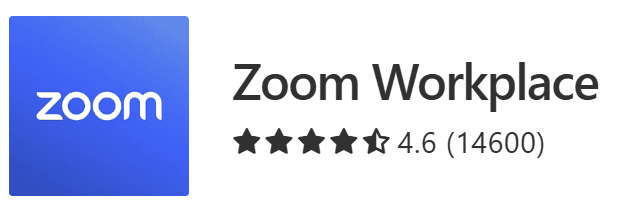
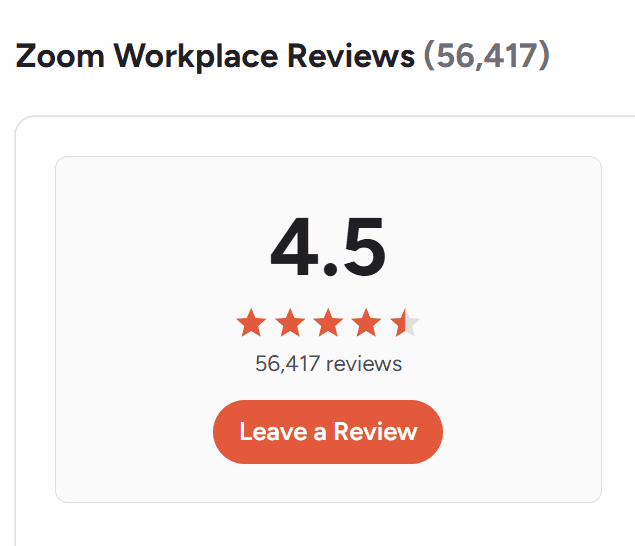
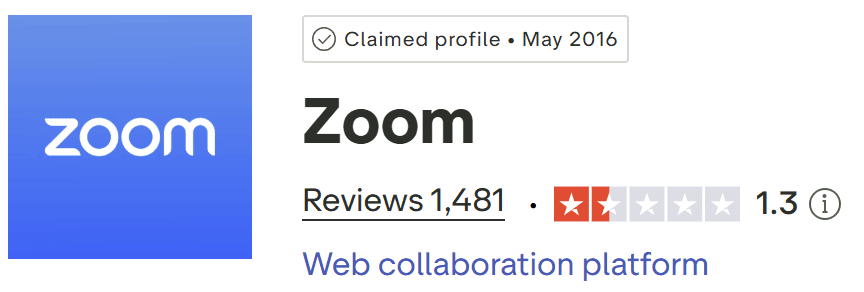
On G2, Zoom Workplace sits at 4.5 out of 5 across 56,418 reviews. On Capterra, it’s 4.6 from 14,600. Then you check Trustpilot and find 1.3 out of 5 from 1,481 reviews.
That’s a big tell. People review different things on different sites. G2 and Capterra skew toward the people who use the software daily, and they rate the product: reliable, familiar, easy to start. Trustpilot skews toward people who came to vent about a billing, renewal, or support experience. So the famous question “is Zoom good?” quietly splits into two: the product? Broadly, yes. The buying experience? Hotly contested. Keep that split in mind for everything below.
Why People Pay for Zoom
The product reputation is earned. Even Zoom’s critics tend to concede the basics: one G2 reviewer (Maria U., a consultant, 3/5) dings Zoom on value yet still calls it easy to use and download.

Most people already have Zoom installed and it seems to work even when the internet is flaky. It’s no wonder it’s so popular.
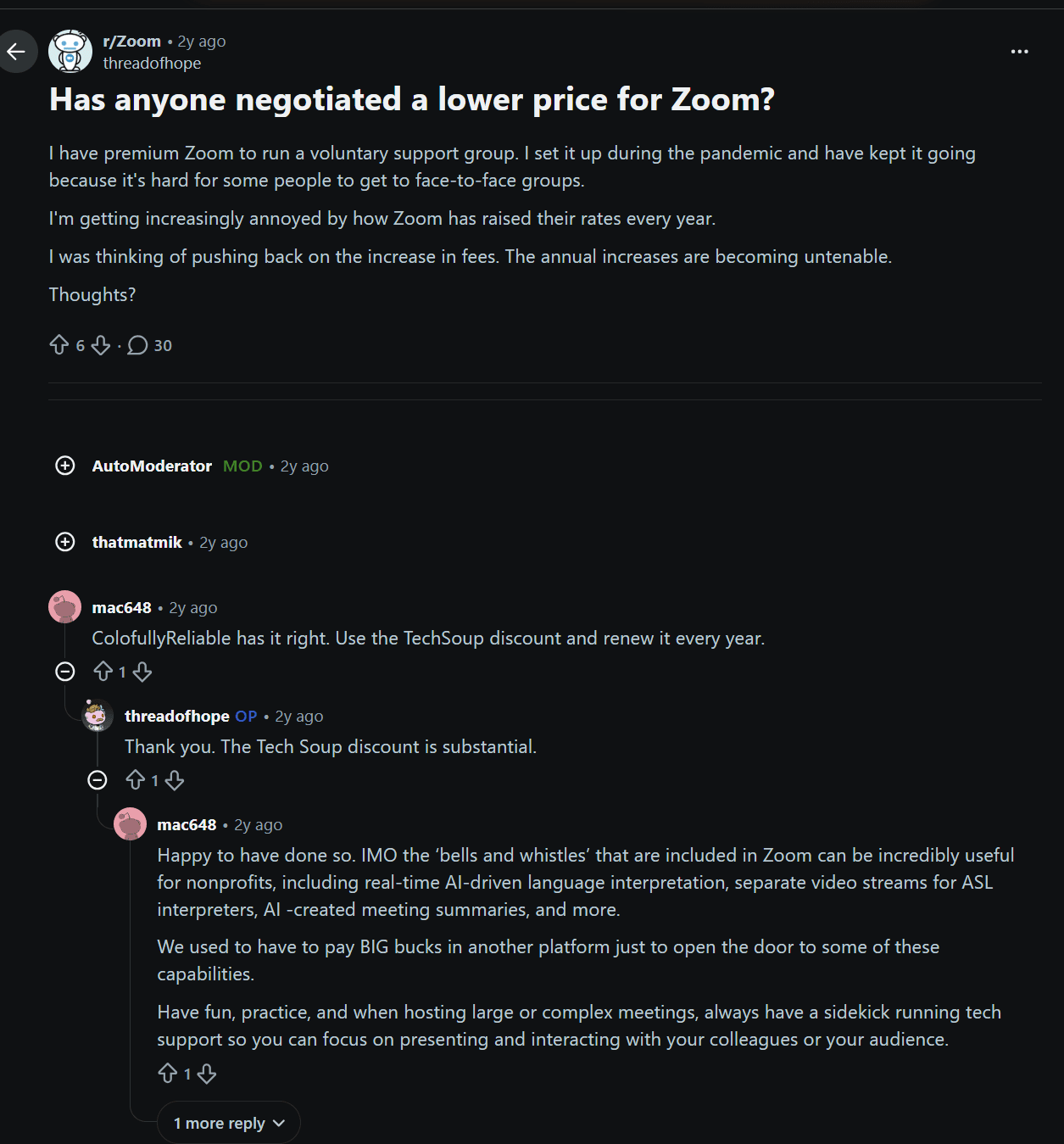
There’s also a real case for the premium features. In one r/Zoom thread, a nonprofit organizer pushes back on the price grumbling to point out that Zoom’s “bells and whistles” (real-time AI language interpretation, separate ASL interpreter streams, AI meeting summaries) genuinely earn their keep, noting they used to pay big money on another platform for the same capabilities.
And the data backs the stickiness: per Okta’s Businesses at Work report, 45% of Okta’s Microsoft 365 customers also deploy Zoom. That means that nearly half of companies that already have Teams included in their subscription pay for Zoom on top. That’s about as strong a “people think it’s worth it” signal as exists.
The Common Gripes
Now the other column of the ledger, because this is where the trust is built.
The loudest complaint is price creep. In the r/Zoom thread screenshotted above, the poster describes annual rate increases becoming “untenable” for a small support group. It’s a recurring refrain: the renewal quote is rarely lower than last year’s.
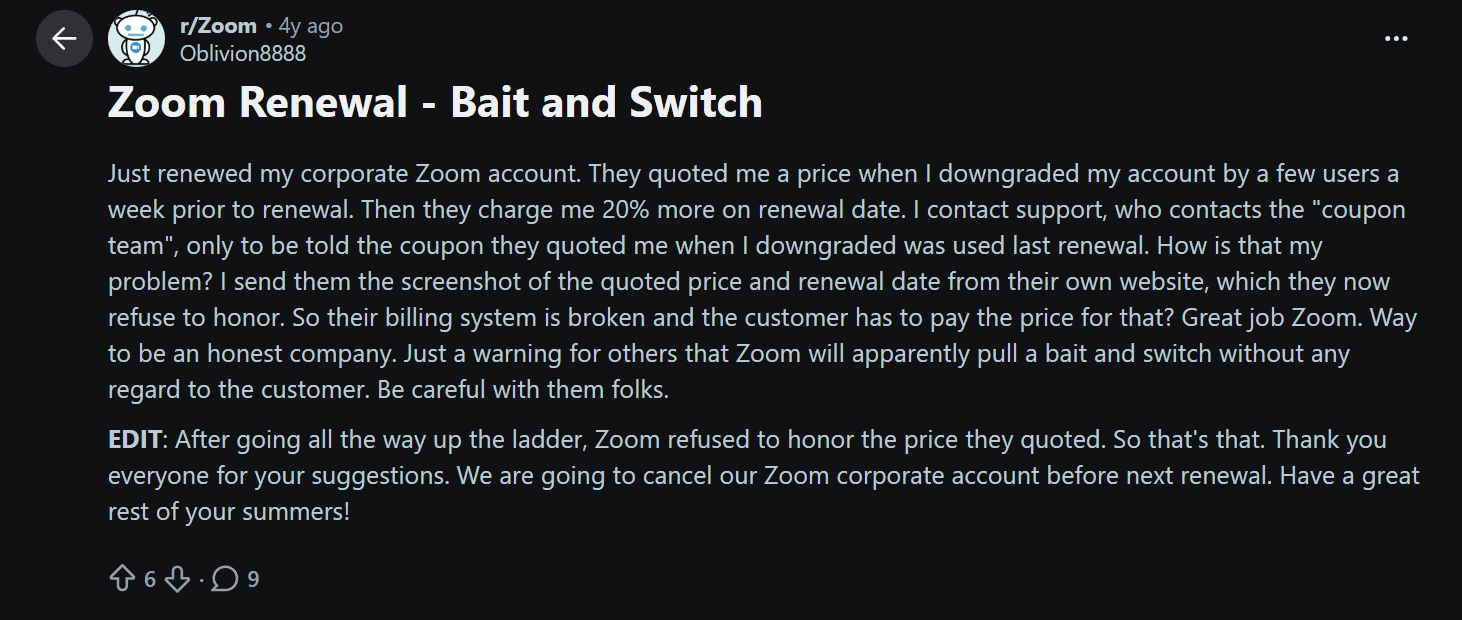
Then there are the renewal practices. A r/Zoom post titled “Bait and Switch” describes being quoted one price at downgrade, then charged about 20% more on the renewal date. Support declined to honor the quoted figure.
Trustpilot is full of similar billing and auto-renewal frustrations, which is most of why that 1.3 score exists.
Finally, value versus the alternatives. Maria U.’s G2 review lands the blow plainly: she finds Google Meet easier and feels “the value is not there” when cheaper, simpler platforms exist. And from the IT side, a r/sysadmin thread asks the question outright: “Is Zoom worth the extra cost?” After all, why would a Microsoft shop with E3 licenses and working Teams pay extra for Zoom?
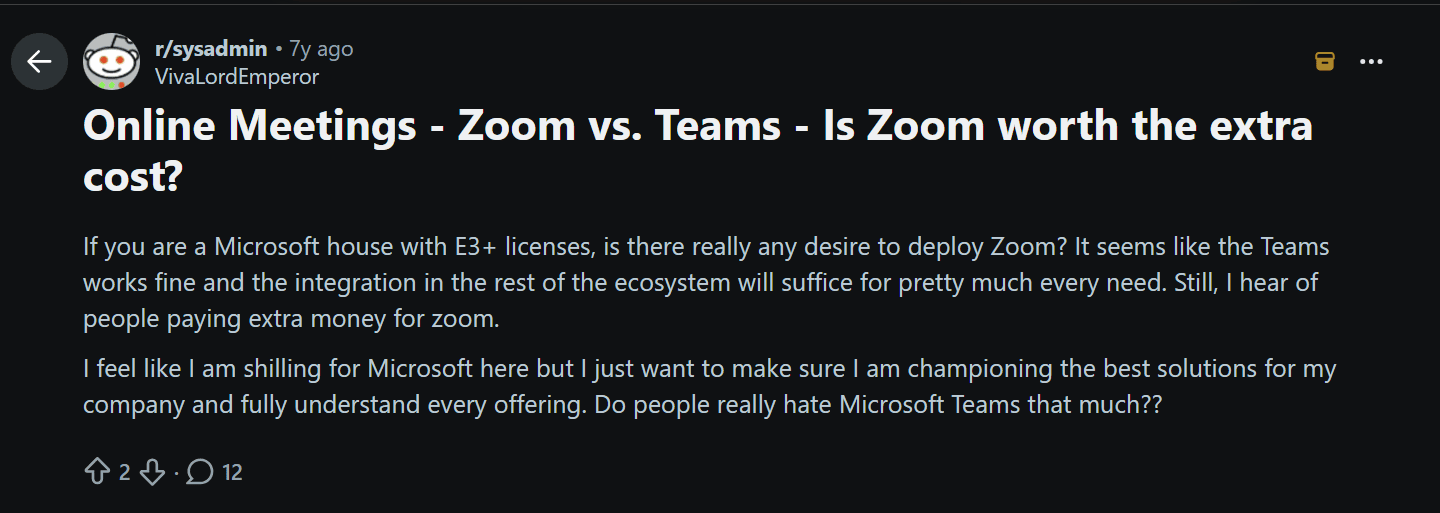
As the Okta report already revealed, millions do pay extra for Zoom. But it’s a fair question to ask.
So Who Should Actually Pay for Zoom?
Stripping out the noise, here’s my honest read by situation:
- Solo / freelancer: Free or Pro. You rarely hit the limits that justify more, and the 40-minute wall is the only real nudge upward.
- Small team: Pro, with a careful eye on add-ons. You don’t want the bill to creep.
- Mid-size company: Business makes sense for SSO and admin control. Push on renewal pricing; people who ask, save.
- Enterprise / Microsoft house: Genuinely interrogate whether you need Zoom on top of Teams. Many pay anyway for the smoother meeting experience, but make sure it earns its keep.
- Nonprofit / education: Don’t pay list price. TechSoup discounts and Zoom’s Education plans exist for a reason.
If the main reason you’re eyeing an upgrade is AI notes and recording, that’s the one upgrade you can sidestep entirely. tl;dv works with any Zoom plan (including free), not to mention you can use it for meetings on other platforms too.
Zoom Pricing vs Google Meet, Teams & Webex
Zoom is rarely the cheapest option on this list. What it’s selling is the meeting, and whether that premium is worth it depends entirely on what you’re comparing it against.
Zoom vs Google Meet, Teams & Webex
Entry paid plans, billed annually per seat. Free tiers shown for comparison.
| Platform | Free tier | Entry paid plan | What you also get |
|---|---|---|---|
| Zoom | 40 min · 100 people | $14.16/seat/mo (Pro) | Pure meetings, AI notes, 10 GB cloud recording |
| Google Meet | 60 min · 100 people | $7/seat/mo (Starter) | Bundled with Gmail, Drive, Docs & 30 GB storage |
| Microsoft Teams | 60 min · 100 people | $6/seat/mo (Business Basic) | Bundled with Office web apps & 1 TB OneDrive |
| Webex | 40 min · 100 people | $12/seat/mo (Meet) | Meetings, transcription & 10 GB cloud recording |
When it comes to price, Zoom doesn’t look that appealing compared to MS Teams. It also has a hard time competing with Google Meet. Zoom Pro ($14.16/seat) looks expensive next to Microsoft 365 Business Basic ($6) and Google Workspace Business Starter ($7). But that comparison is rigged, and not in Zoom’s favor. Google and Microsoft aren’t selling you a meeting tool. They’re selling you an entire productivity suite (email, documents, cloud storage, the lot) that happens to include Meet or Teams. Zoom, by contrast, sells you the meeting and little else.
If you already pay for Microsoft 365 or Google Workspace, you already own a perfectly capable video platform in addition to dozens of other platforms. Zoom is the tool you pay for on top, purely because you’ve decided the meeting experience is worth a second subscription. Webex sits in the middle: priced like Zoom, bundled like neither.
When Zoom Earns its Premium
Plenty of companies decide it’s worth it, and they’re not necessarily wrong either. Zoom remains the category leader; it’s the platform people already have installed, the one that holds up on bad Wi-Fi, the default that “just works” when you send a link to a client who’s never heard of your stack. Market-share estimates vary by methodology (one widely-cited Statista figure puts Zoom around 55.9%; other breakdowns place it nearer 28%, still ahead of Teams and Meet), but every credible source agrees on the direction: Zoom leads.
The strongest evidence is behavioral, not statistical. Per Okta’s Businesses at Work report, 45% of Microsoft 365 customers also deploy Zoom. When that many people pay twice, the premium is buying something real: reliability, the webinar and breakout ecosystem, and a meeting experience that’s still the one to beat.
When Free Meet or Teams (Plus a Notetaker) Wins
Here’s the case for the other side. If your team already lives in Google Workspace or Microsoft 365, the thriftiest move is often the obvious one: use the Meet or Teams you’re already paying for, and stop buying Zoom out of habit.
More often than not, people choose Zoom because they prefer its AI capabilities to Meet and Teams’ native ones. However, these thoughts don’t even need to enter the equation. tl;dv can be partnered with all of these video conferencing platforms (WebEx included!) and many more, without requiring a bot to join. Not only that, but tl;dv is a specialized AI meeting assistant. It’s not a tacked-on feature. It’s the entire product. That means you get a ton of features that Zoom and the rest haven’t even thought about adding yet.
Squeeze More From Whatever Zoom Plan You Pick
Whether you picked Basic, Pro, Business, or you’re still deciding, the biggest savings on this whole page don’t come from picking a cheaper plan. They come from getting more out of the meetings themselves. Here’s how to do that no matter which tier you’re on.
Get AI Notes and Recording Without Upgrading a Tier
Zoom bundles AI note-taking into Pro and above. That’s handy if you’re already paying for Pro, but it’s not something you should rush to upgrade for. If you’re on the free Basic plan, or you’ve decided you’d rather not pay Zoom for AI at all, you don’t have to go without. A dedicated notetaker like tl;dv adds AI summaries, full transcripts and recording to your calls on a free plan, without needing a bot to join your call. The experience for everyone in the room is identical to a normal call; you just walk away with notes in your inbox.
The bigger win is that it isn’t locked to Zoom. As tl;dv is bot-free, it records device audio across any platform: Zoom, Google Meet and Microsoft Teams included. One notetaker covers every meeting, whoever hosted it on whatever platform. If half your calls are on someone else’s platform, this is an even bigger advantage.
Attend Less, Know More
Remember the most expensive line item from earlier: the salaries in the room? This is where you claw that money back. Asana’s research found the average individual contributor loses 3.7 hours a week to unproductive meetings. The fix for that isn’t a billing toggle; it’s fewer people sitting through calls they didn’t need to attend live.
Recording and summarizing makes that possible. The people who genuinely need to be in the meeting show up; everyone else gets the AI summary, the searchable transcript and the timestamped highlights, and catches up on the two minutes that actually concerned them. Additionally, tl;dv is no longer just about recording and transcribing. That’s 2020 calling. You can now create custom note templates, schedule recurring reports about topics you want to stay on top of, or even prompt Claude to surface specific insights from your calls using tl;dv’s MCP.
Do that across a team and the saving dwarfs whatever you’re paying Zoom by an order of magnitude.
When It’s Worth Paying for More
The free setup covers most people: unlimited notes, transcripts, recording, across every platform. If you’re running a bigger or more meeting-heavy operation, tl;dv’s paid plans add the things Zoom’s AI doesn’t really do: multi-meeting AI insights (spotting patterns across dozens of calls, not just summarizing one), scheduled AI reports, custom note templates, playbook coaching and CRM integrations. That’s meeting intelligence rather than meeting notes, incredibly useful if your calls are where revenue or decisions actually happen.
Either way, the principle holds: whatever you decide to pay Zoom, make the meetings earn it.
The Bottom Line on Zoom Pricing
So, is Zoom expensive? The Workplace plans themselves are refreshingly simple: Basic is free, Pro is $14.16 a seat, Business is $18.33, and Enterprise is a phone call. If that were the whole story, this would be a short article. The catch is everything stacked around those plans: the roughly 20% you pay for the privilege of monthly billing, the Phone and Webinars and AI add-ons that each need a paid base plan underneath them, and the new world of AI credits that turns part of your bill into a meter.
My honest read, by who you are: solo users and small teams rarely need more than Free or Pro; growing companies land on Business for SSO and admin control, and should always push on the renewal quote; and Microsoft shops should make Zoom genuinely earn its place on top of the Teams license they already own. Whatever tier you choose, pay annually if you’re staying, and add up the add-ons before you commit. The calculator above will do that math for you in about ten seconds.
But the figure worth remembering isn’t on any pricing page. The most expensive part of any Zoom plan is the salaries of the people sitting in the meetings. And that’s the cost you have the most power to cut. Record the calls, summarize them, and let the people who don’t need to be there skip the live hour and catch up in five minutes. Tools like tl;dv do exactly that, free, across Zoom, Meet and Teams, with no bot in the call. Pick whichever Zoom plan fits, then use tl;dv to get the insights.
FAQs About Zoom Pricing in 2026
How much is Zoom per month?
Zoom’s free Basic plan costs nothing. Paid plans, billed annually, run $14.16/user/month for Pro, $18.33 for Business, and $24.50 for the Business Plus phone bundle; Enterprise is custom-quoted. Paying month-to-month costs roughly 20% more ($16.99 for Pro, $21.99 for Business). All prices exclude tax.
Is Zoom free for 1 hour?
No. This is the most common Zoom myth. The free plan caps group meetings at 40 minutes, not an hour. One-on-one calls are unlimited, but the moment a third person joins, the 40-minute countdown begins. After that the meeting ends and the host has to start a new one.
What does the Zoom free plan include?
The free Basic plan gives you unlimited meetings (capped at 40 minutes each), up to 100 participants, local recording, team chat, mail and calendar, three whiteboards, and five Clips. What it leaves out is cloud recording, the AI Companion features, and admin controls; those start at Pro.
How much is Zoom Pro vs Business?
Pro is $14.16/user/month and Business is $18.33 (both billed annually). Pro lifts meetings to 30 hours and adds 10GB of cloud recording plus unlimited AI notes, but keeps the 100-participant cap. Business raises that to 300 participants and adds SSO, unlimited whiteboards and fuller admin controls.
Does Zoom charge per host or per participant?
Per host. You only buy licenses for the people who start meetings. Attendees join for free. So a 5-person team that runs all its own calls needs 5 licenses, but inviting 200 external guests to those meetings costs nothing extra (up to your plan’s participant cap).
Can I pay for Zoom monthly?
Yes, every paid plan offers monthly billing, but it costs about 20% more than paying annually for the identical product. Zoom frames it as “save up to 16%” with annual billing. Flipped around, monthly is a roughly 20% premium for the flexibility to cancel anytime.
Does Zoom Pro include AI note-taking now?
Yes. As of 2026, Zoom Pro and above include unlimited AI note-taking via My Notes. The free Basic plan doesn’t, so AI notes are one of the main reasons people upgrade. (Worth knowing: a free notetaker like tl;dv adds the same on Basic — as well as on Meet and Teams.)