Skip to content






TL;DR: Is NoteGPT Worth It in 2026?
NoteGPT is a capable free tool for quick YouTube summaries and multi-format content digestion, but don’t pay for it. The “Unlimited” plan is misleadingly named, the UI is a mess, features don’t connect, and there’s no memory or learning across sessions. Fake reviews on G2 and TrustPilot don’t help its case.
For serious studying, RemNote beats it hands down. For meetings, use tl;dv. Simple YouTube summaries? Eightify is cleaner and faster. Stick to the free tier if you’re curious, but your money is better spent elsewhere.
Best for: those that want simple YouTube summarization and nothing more.
Avoid if: you value good design and company ethics, as well as AI memory and ongoing intelligence.
The Verdict: NoteGPT has the bones to be great, but doesn’t really excel in any one area. It’s cluttered, ugly, and not worth the price.
Table of Contents
What Is NoteGPT?
NoteGPT is an AI-powered note-taking and learning assistant designed to turn lectures, YouTube videos, PDFs, audio files, and pretty much any long-form content into clean, structured study materials in seconds.
At its core, it captures audio or video with high-accuracy transcription, then instantly generates summaries, flashcards, mind maps, quizzes, infographics, and even podcast-style audio versions of your notes. It doesn’t stop at transcription — it adds an AI chat layer so you can ask questions about the content, get writing feedback, translate PDFs, or turn raw ideas into polished slides and visuals. Think of it as a one-stop shop that handles summarizing, learning, research, and writing all in one place.
It’s built for students, learners, educators, researchers, and creators who want to work 10× faster instead of spending hours manually note-taking or rereading dense material. Whether you’re cramming for exams, prepping a lecture, summarizing research papers, or turning a meeting into actionable notes, NoteGPT focuses on turning passive content into active, retainable knowledge.
Having been around since 2023, NoteGPT has grown extremely quickly. It now claims over 80 million users worldwide and is used across 12,000+ schools and teams. In short, if you’re tired of drowning in content and want an AI that actually helps you learn smarter, NoteGPT is built for exactly that.
But does it actually work as well as its marketing? I started using it to find out.
NoteGPT Pros & Cons
The quick version: NoteGPT is a capable content summarizer that punches above its weight for students and solo learners, but it has big gaps if you’re a business user or need meeting-specific features.
| ✅ Pros | |
|---|---|
| Easy YouTube summarization | Handles videos with or without subtitles (up to 120 min); chat with the video directly for follow-up questions |
| Versatile content inputs | Summarizes YouTube, PDFs, images, PPTs, articles, and audio/video files up to 2GB |
| Good content repurposing | Turns notes into mind maps, slides, or podcasts — useful for educators and content creators |
| Decent language support | Text-to-speech with 100+ voices in 40+ languages; good for multilingual workflows, though results vary |
| Lightweight Chrome extension | Frictionless 1-click summarization while browsing; consistently praised for ease of use |
| Accessible free tier | 15 Basic Quotas/month, no card required; summarization up to 10,000 words costs just 1 credit |
| ❌ Cons | |
| Misleading quota system | "Unlimited" plan caps Premium Credits at 2,800/month; users report hitting quota errors immediately after upgrading |
| Billing transparency issues | Quotas deducted without output; refunds only within 24 hours of first payment; promo purchases non-refundable |
| Not built for professional meetings | No live transcription, no call recording, no speaker ID, no GDPR compliance — won't join your Zoom calls |
| Oversimplifies complex content | Technical documents and data-heavy reports can come out too surface-level |
| Competitive pressure from Gemini | Google's native YouTube integration (Oct 2025) cuts into NoteGPT's core use case without needing an extension |
| Poor UI and design | Dark mode is barely readable; chat area can't be resized; inconsistent design language across different sections of the app |
| Buggy features and broken integrations | Audio transcription fails silently on the free plan; book PDFs can freeze without explanation; Quizlet integration is broken with dead example links |
| Credibility concerns | G2 reviews appear to be fake and AI-generated; TrustPilot shows suspicious duplicate 5-star reviews; overall score of 3.67/5 across independent platforms |
NoteGPT Pros
Excellent YouTube summarization. This is where NoteGPT genuinely shines, and it was the feature that I used the most. You can process videos with or without subtitles; if subtitles exist, it supports unlimited length, and without them it handles up to 120 minutes. The ability to chat with a video after summarizing it is a standout for anyone doing research or studying lectures.
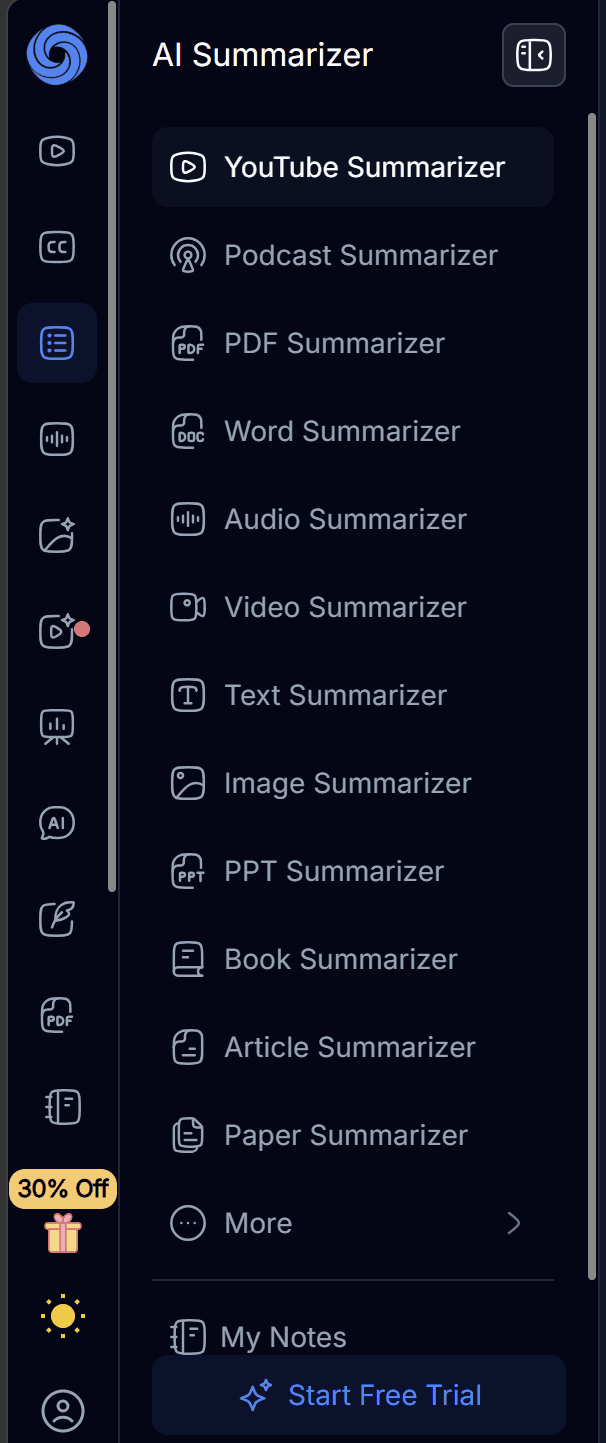
Versatile content inputs. It’s not just YouTube. NoteGPT has dozens of options for summarization. You can generate summaries from PDFs, podcasts, images, PPTs, books, and more. It can also generate mind maps, transcripts, and notes. That multi-format support sets it apart from more narrowly focused tools. These are just the summarize options:
Good content repurposing. One of NoteGPT’s standout features is its ability to repurpose notes into mind maps, slides, or even podcasts. For educators or content creators who want to get more mileage from source material, this is genuinely useful.
Broad language support. NoteGPT supports text-to-speech with 100+ voices in 40+ languages, making it one of the more accessible tools for non-English speakers or multilingual workflows.
Lightweight Chrome extension. Most reviews are highly positive, highlighting that NoteGPT is easy to use, accurate, and speeds up learning, with the extension being praised for making summarization frictionless directly in the browser.
Accessible free tier. Casual users can get real value without paying. The free plan unlocks 15 Basic Quotas per month to use on any feature (summarization up to 10,000 words costs just 1 credit). You don’t need to give your card details for this plan either, so you don’t have to worry about being charged. This is super useful for students on a budget who only need occasional summaries.
NoteGPT Cons
Confusing and potentially misleading quota system. This is the most consistent complaint from everyday users. The “Unlimited” plan name is potentially misleading. While it offers unlimited Basic Quotas for standard summarization, it limits Premium Credits to 2,800 per month. Some users report paying for an “Unlimited” plan and almost immediately getting hit with an “Insufficient Basic Quota” error.
Billing transparency issues. In addition to the misleading plans mentioned above, some reviewers report quotas being deducted without generating output. NoteGPT’s refund window is typically limited to within 24 hours of the first payment, with promotional purchases being non-refundable, which makes trying a paid plan feel risky.
Not built for professional meetings. NoteGPT shows clear limitations for professional meetings. It can summarize almost any type of file, but it offers no live transcription, no meeting recording, no speaker identification, and no GDPR compliance. It processes content only after you’ve recorded it separately. Don’t expect it to join your Zoom calls.
Summaries can oversimplify complex content. With technical documents or data-heavy reports, the summaries sometimes feel too simplified. If you rely on highly detailed context, you may need a more advanced alternative.
Competitive pressure from native integrations. Google’s Gemini launched native YouTube integration in October 2025, eliminating the need for a third-party extension. While YouTube isn’t the only thing NoteGPT summarizes, as we’ve already mentioned, it’s a big part of its utility.
Poor UI and design. NoteGPT’s interface feels unfinished in places. The dark mode is particularly rough: it’s dark grey on darker grey, making conversations genuinely hard to read. The chat area can’t be resized, and different sections of the app use noticeably different design languages, giving the whole thing an inconsistent, cobbled-together feel.
Buggy features and broken integrations. Several features simply don’t work as advertised. Audio transcription fails silently on the free plan without explaining why. Large book PDFs can freeze mid-load with no clear error. The Quizlet integration is broken — NoteGPT’s own example link returns a 404, and a tutorial button redirects to an unrelated page. The more you dig, the more rough edges you find.
Credibility concerns. NoteGPT scores a mediocre 3.67/5 across independent review platforms, but even that number is hard to trust. The G2 reviews show obvious signs of being AI-generated fakes: six posted on the same day, all following an identical structure with clear signs they were all generated from the same prompt. TrustPilot has suspicious duplicate 5-star reviews alongside a wave of early 1-star complaints. It’s not a good look.
My Honest NoteGPT Review
I quite like NoteGPT, especially as I could summarize a lot of content on the free plan. However, I did find it a bit overwhelming at first and it feels more like a standalone tool to work with one file at a time, rather than a knowledge base that learns and grows and becomes a study partner.
But let me back up for a sec. I’m a freelance copywriter for tl;dv. There is a little crossover between tl;dv and NoteGPT, but not nearly enough to suggest any real bias. tl;dv summarizes your live meetings and turns them into actionable workflows. NoteGPT explicitly does not do this, opting to focus more on summarizing, transcribing, or generating from saved files.
I wanted to use NoteGPT for a number of reasons, but primarily for the summarization feature.
Firstly, I’m a bit of a nerd. There are some topics that I’m interested in but want to get an overview before diving into the deep ends of thick tomes or documentary-length YouTube videos.
Secondly, I’m learning Russian and I get lots of PDFs that I want to understand on a deeper level. NoteGPT fell a little flat here. It wasn’t as useful as some other tools like Remnote or StudyFetch.
How Easy Was NoteGPT's Onboarding?
One of the things I loved most about NoteGPT was that I didn’t even need to onboard to get started. You can use some of its core features without even creating an account.
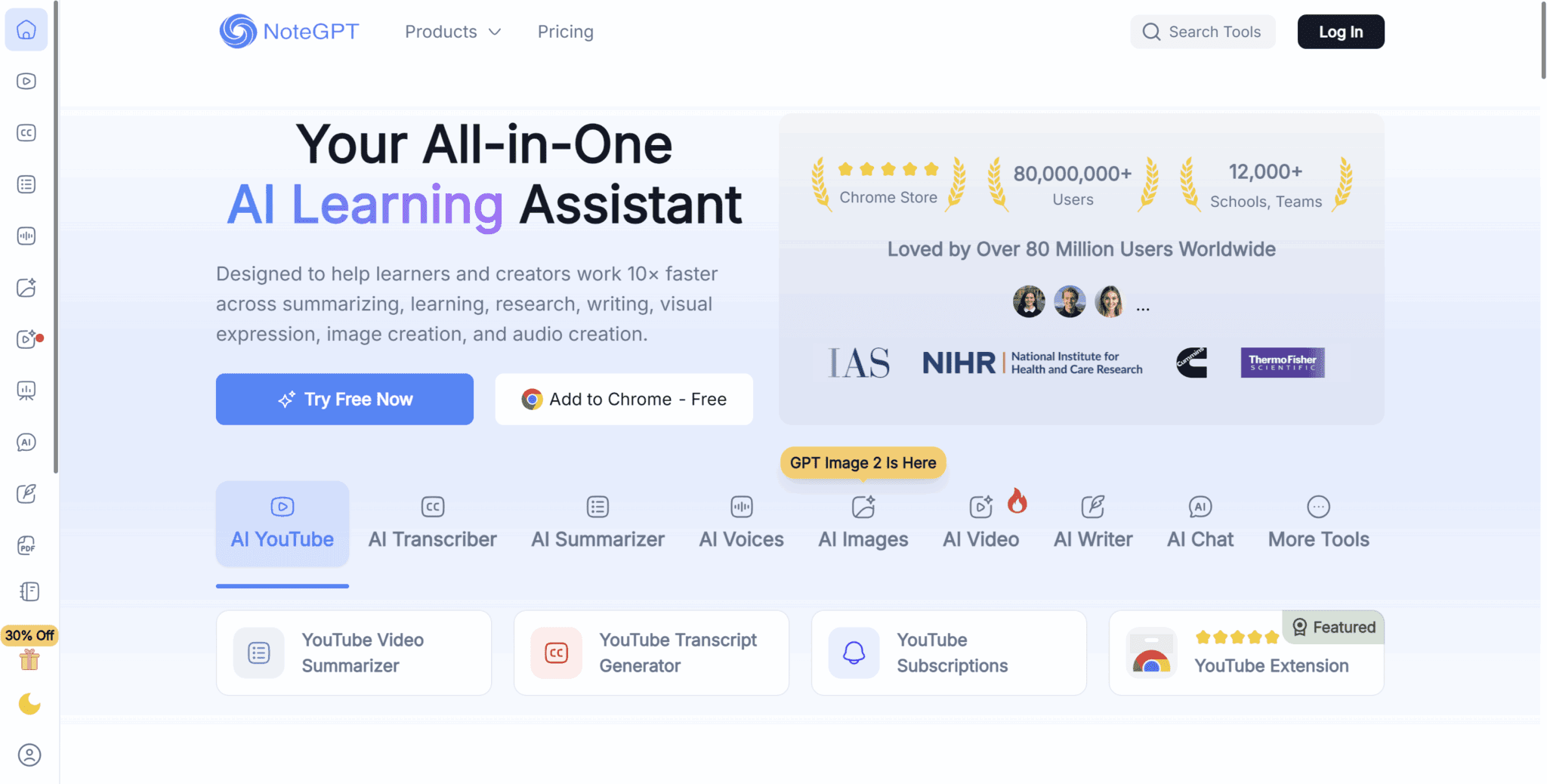
If you want to start without an account, head over to the YouTube summarizer on the left-hand side of the homepage and paste your YouTube video link of choice. It’ll take a few moments but then it will be summarized, broken into chapters with timestamps. It reminds me of one of those websites that were popular in the pre-Spotify days that converted YouTube videos into MP3 files.
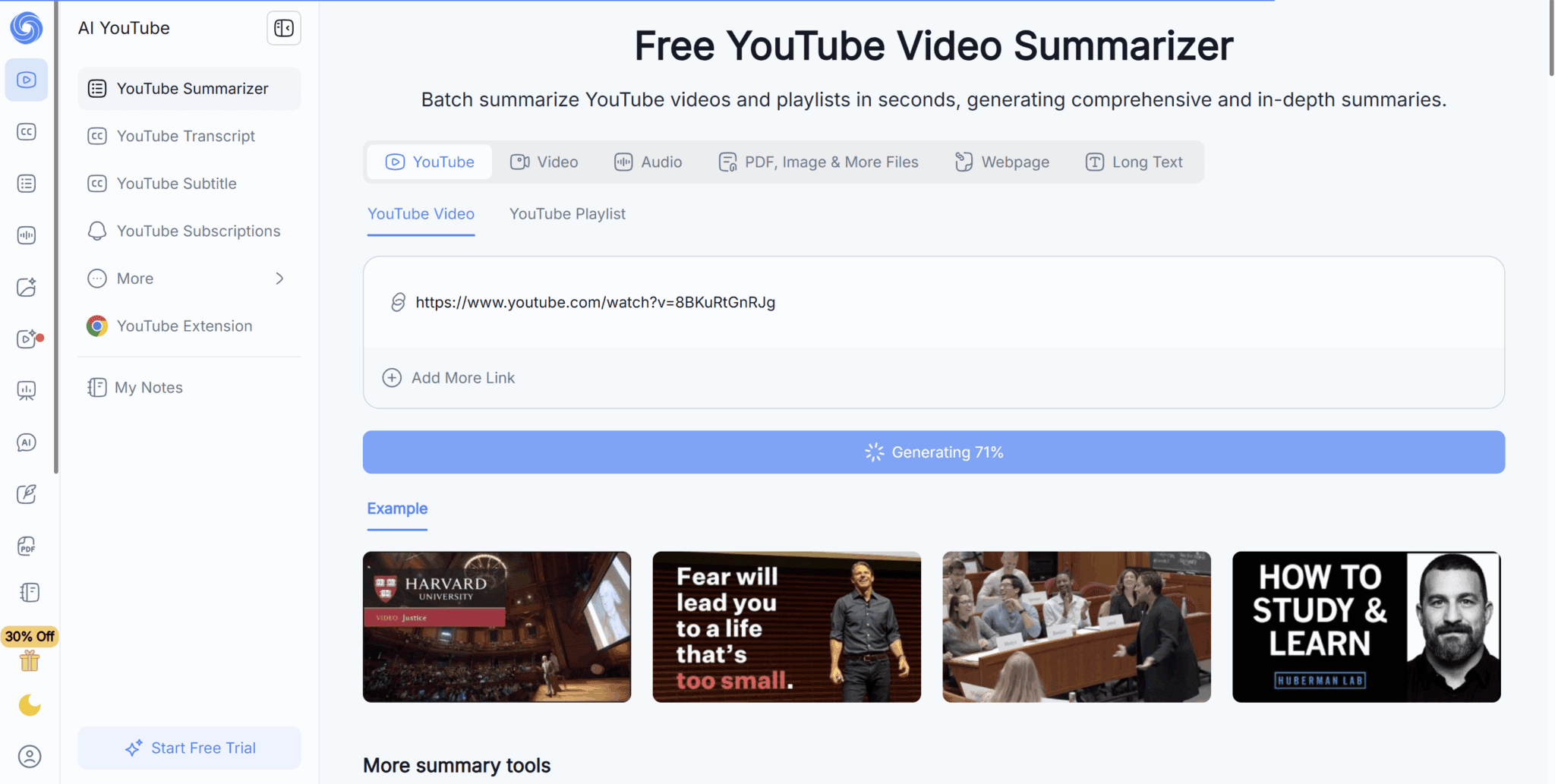
I quickly found a YouTube video just to test the no-account mode and it worked perfectly.
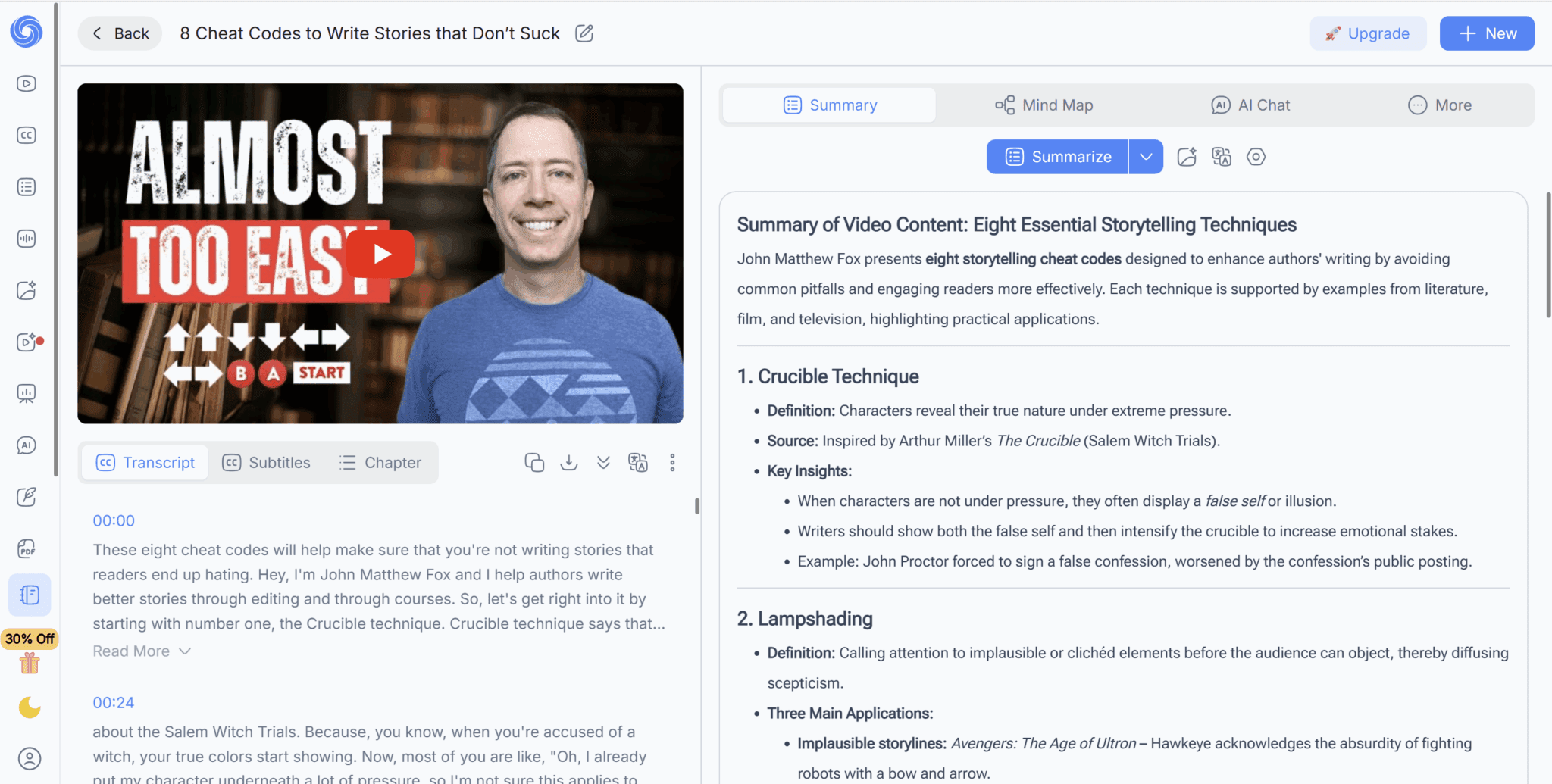
I love the fact that I don’t even need an account for this, though it’s worth noting that Google Gemini is now doing something similar with built-in summarization (which is probably why NoteGPT offers it for free).
The summary is easy to follow. It breaks everything down into chapters and bullet points with bold text to make it easy to skim. There’s also a transcript and timestamps so you can jump straight to the relevant part of the video. This is even more useful for very long videos where you only need to watch a specific part.
Eventually, the no-account usage does hit limits and you’ll be asked to make an account. It doesn’t take long and you don’t need to add your card details to get access to 15 credits per month.
What Are NoteGPT's Core Features Like?
The core features include:
- Image, audio, or video to text
- YouTube summarization, transcription, and subtitling
- Text summarizer (PDF, book, presentation, etc.)
- AI voice generation
- AI image generation and editing
- AI video generation
- AI presentation
- AI chat
- AI writer
- AI PDF generator
- AI study (flashcards, quizzes, worksheets, and more)
In short, almost anything you can think of when it comes to AI condensing information into bite-sized summaries and/or generation like text, image, video, or even voice.
The one thing it can’t do — which is odd considering all its other features — is transcribe and summarize live calls with bot-free recording. This makes it relatively useless for organizations looking to automate workflows and extract conversational intelligence like you can with tl;dv.
However, its feature list is pretty impressive. I went through many of this list to see how NoteGPT actually performed with real tasks. I was fairly happy with the YouTube summaries. They didn’t blow me away, but they did the job efficiently.
But how did it work with long texts?
How Good Was NoteGPT at Summarizing Long Texts Like Books?
I found a few random PDFs of books and decided to upload one of them to NoteGPT to see what it would produce. Turns out, it froze while loading. I thought it could’ve been an internet problem, but I had no trouble watching videos at the same time as waiting for it to load.
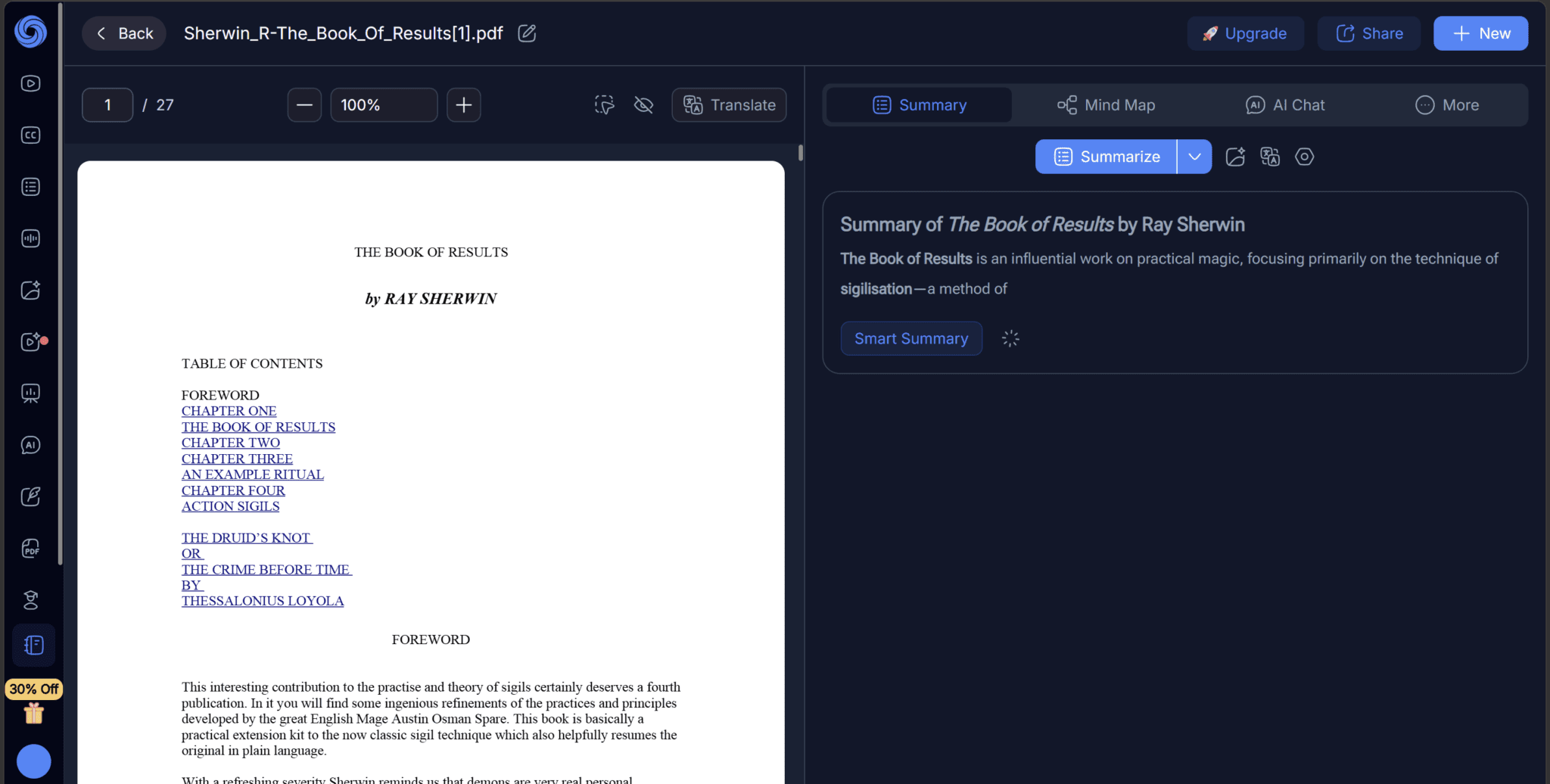
Maybe ten minutes later, I tried to click the blue “Summarize” button, thinking that maybe I could get it to restart the process and provide me with the summary. Instead, I got this error.
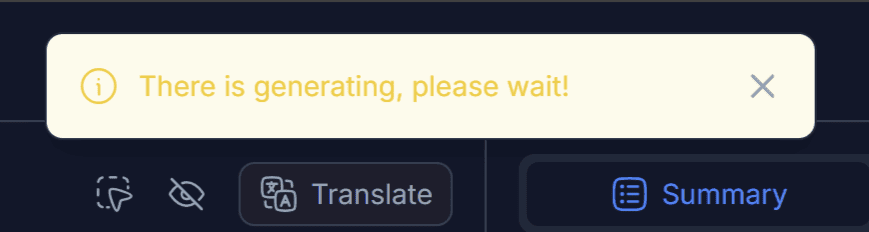
The error is written in broken English, and no matter how long I waited, nothing happened.
Back to the drawing board. I wanted to give NoteGPT the benefit of the doubt, so I uploaded a different book. This time it was one I’d actually read anyway so I would be able to assess the accuracy of the summary first-hand (if it produced one).
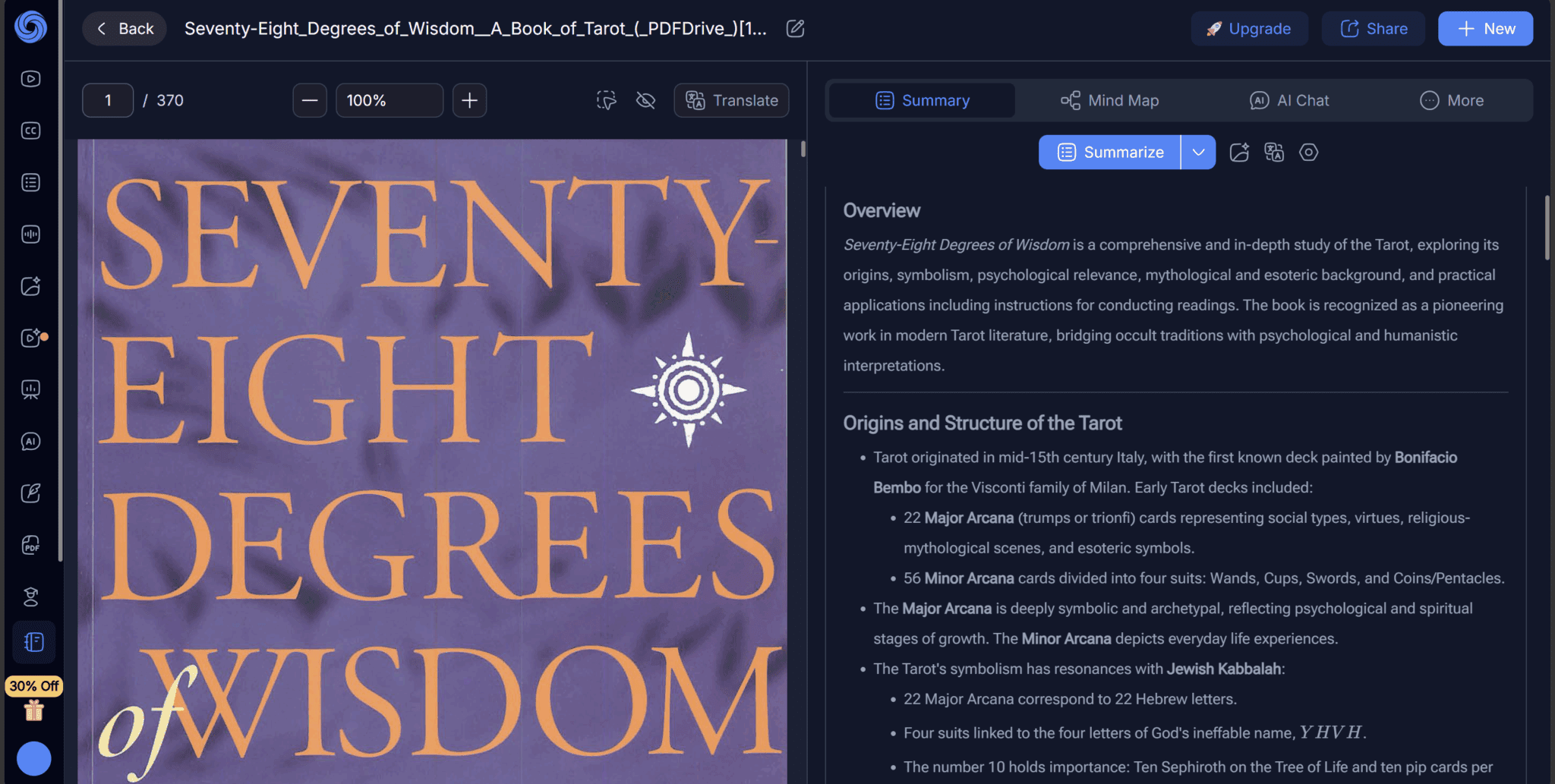
The second book I attempted to upload, Seventy-Eight Degrees of Wisdom, uploaded straight away. No problems. Not sure exactly what was wrong with the first one, but the summary here was pretty good. It covered the general gist of what the book says (a guide to the 78 tarot cards), without going overboard with details.
There were tables in the summary too which helped me digest the information. At the bottom, I saw a juicy-looking button that said “Infographic”. Of course, I clicked it, filling out my preferences, getting ready to see the tarot cards laid out visually with little descriptions under each one.
But no.
That was too much for NoteGPT to give me for free, despite the image generation engine actually stating that I get 2 free images per day.
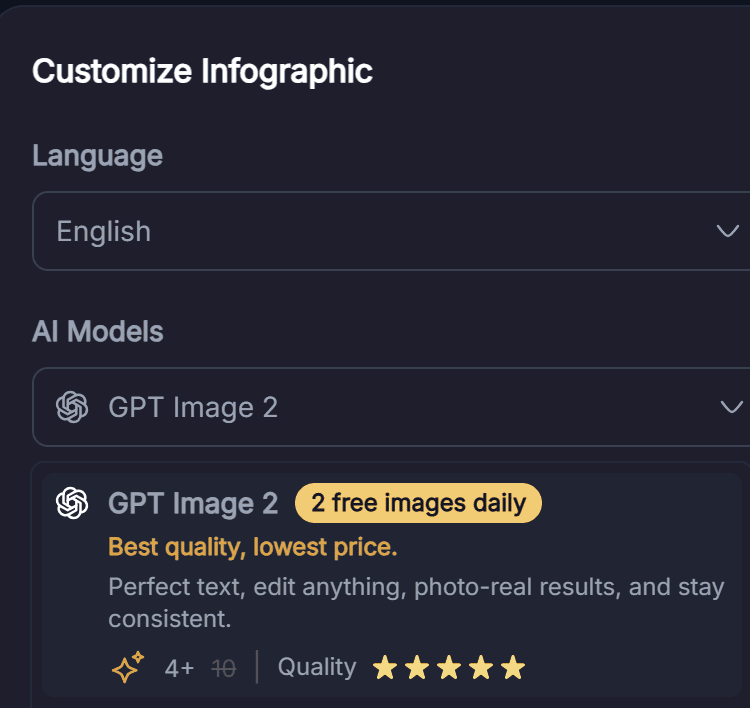
Not sure why it bothered to show me that if it wasn’t true.
Instead, I opted to chat with the AI about the text. The answers were quick and fairly useful. It can clearly digest the text and understand it, but I’m not sure how much additional clarity I’m getting from NoteGPT compared to, say, Grok or ChatGPT. The types of responses it was giving were not something extraordinarily different from what I’d receive by asking a general LLM about the book, without even needing to upload it.
I feel like the power with an LLM that digests specific material only really becomes useful if you give it multiple sources to work from. tl;dv is a prime example of this, learning from each meeting and getting more useful as it goes. NoteGPT doesn’t allow for memory over multiple sources, so it feels stunted.
A Note on NoteGPT’s UI
NoteGPT’s UI is grotesque. The dark mode in particular makes it extremely difficult to even read the conversation with AI. It’s dark grey on darker grey.
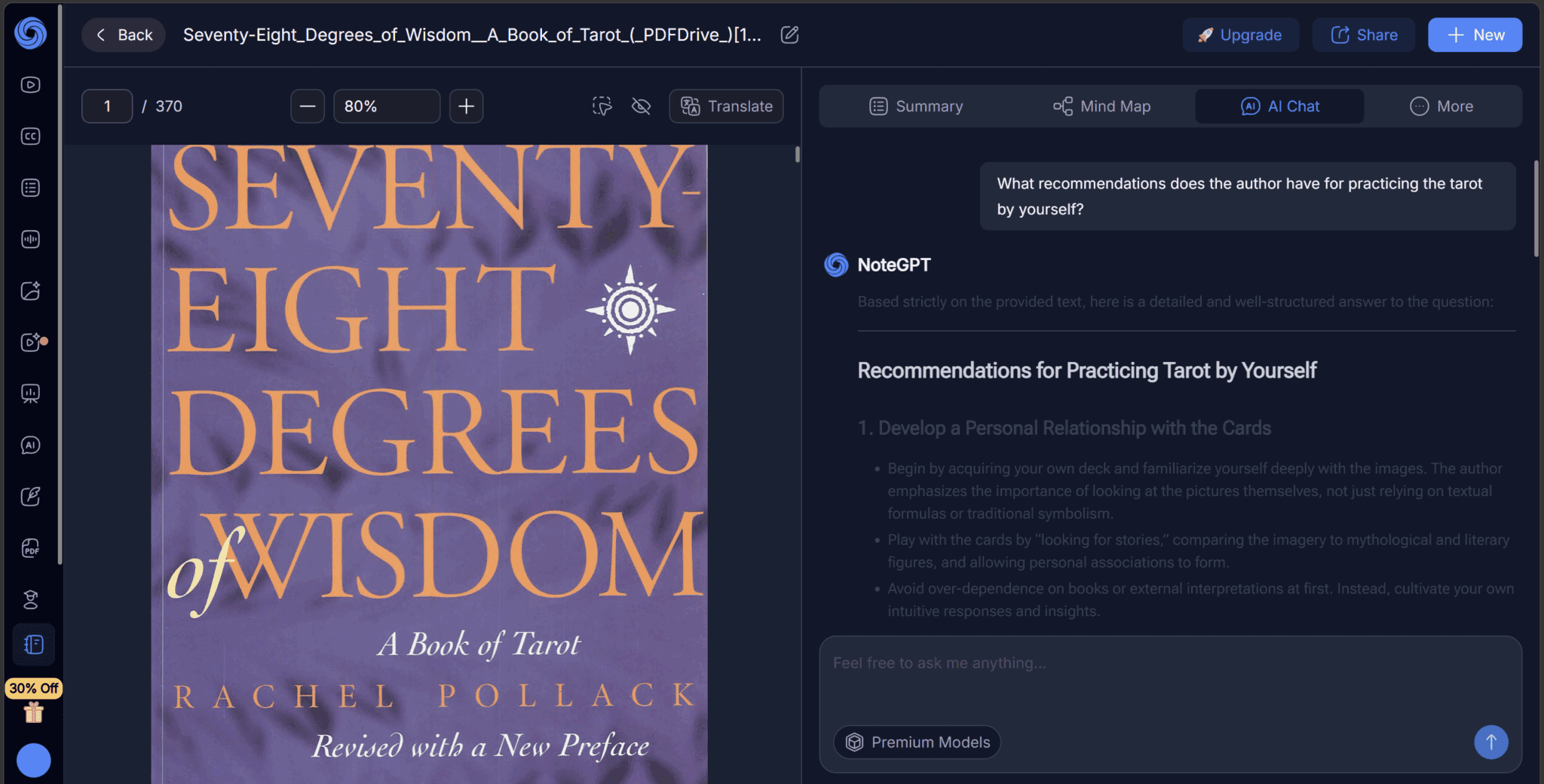
Another thing that immediately struck me as frustrating was that I couldn’t resize the chat area. I have this humongous area of the screen that’s taken up by the pages of the book rather than the actual summary and conversation. I tried clicking the middle to see if there was a way to expand it, but no luck.
Is NoteGPT Good At Summarizing PowerPoints?
I fed NoteGPT a powerpoint I had on my laptop about Bitcoin and blockchain technologies to see how well it would digest the slides. Turns out, it understood what the slides were talking about and was able to tell me about it. However, the actual summary itself was a huge block of text that was actually more of a chore to read than the powerpoint itself (which has images and colours, etc.).
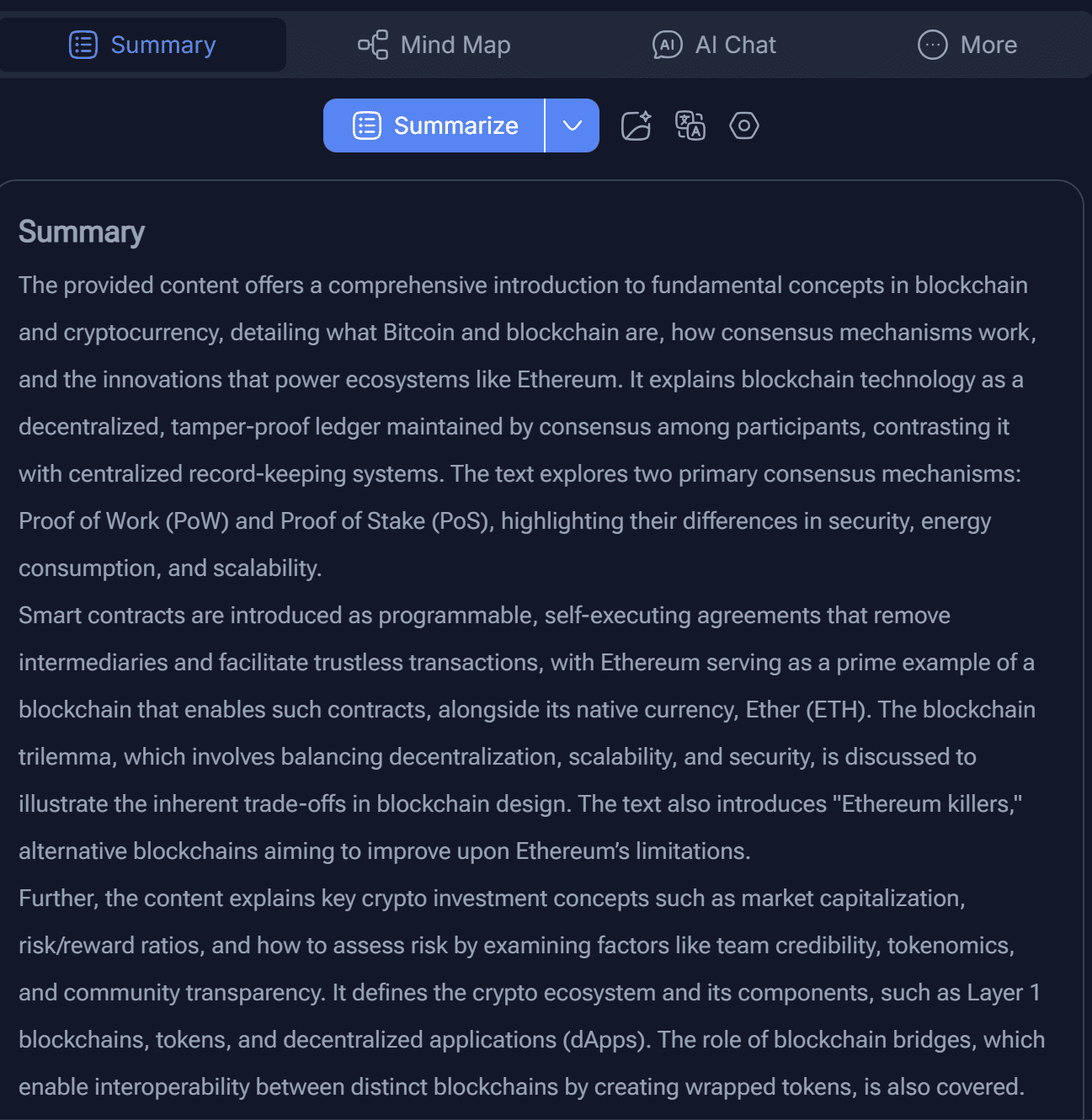
Scrolling down, the summary did have a few different sections, including one that had bullet points and emojis that were a lot easier to digest. But why is that not at the top? The Summary above was daunting to me.
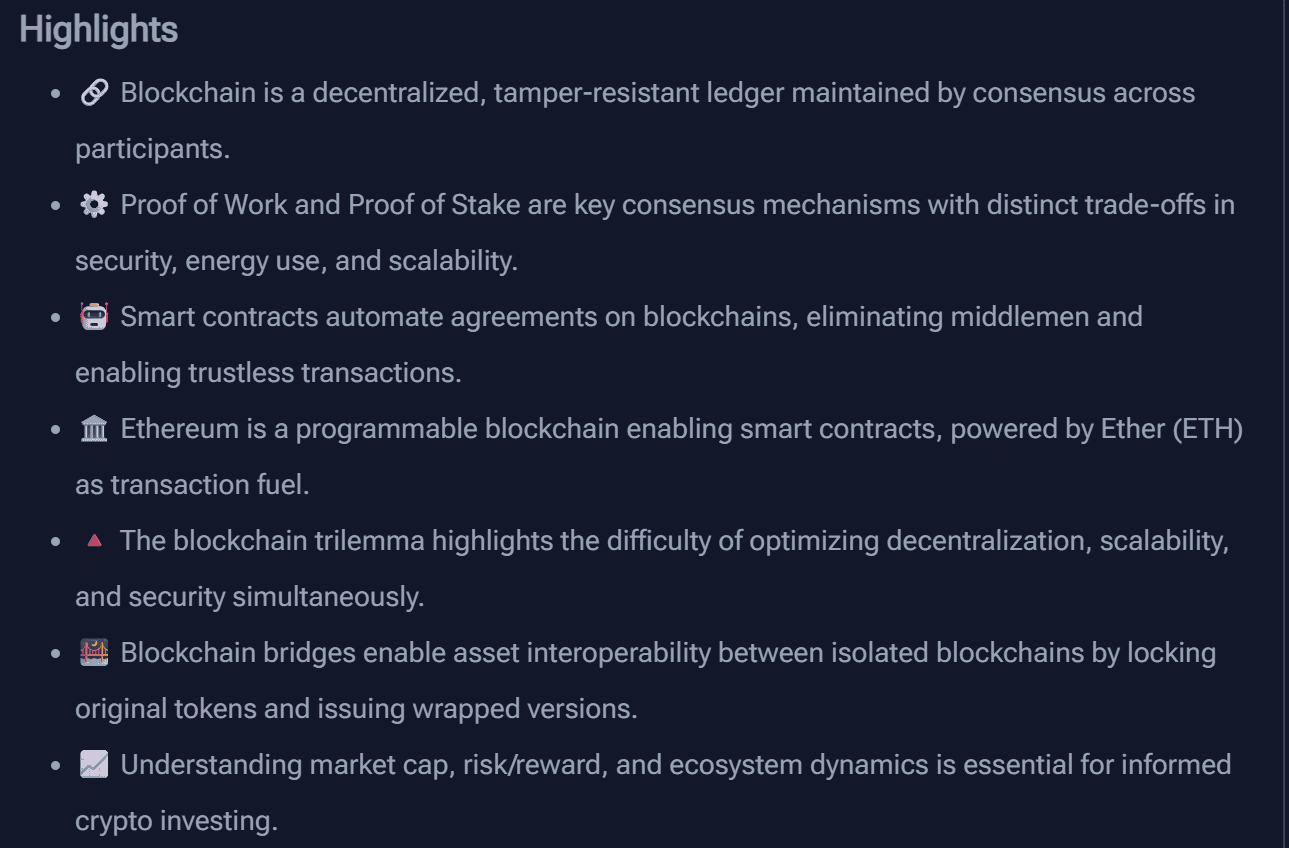
Overall, it did cover the information that was in 50+ slides quite well, but it didn’t display it in the nicest way.
How Reliable Is the Transcription Accuracy?
If I knew how good NoteGPT was at transcribing, I’d tell you. The truth is, I tried to upload an audio file for transcription and… it simply didn’t work. In a very roundabout way, it told me that uploading an audio file exceeded my free plan. I still had 12 credits left, but it turns out those credits aren’t to be used on transcription. This wasn’t made clear anywhere, even when trying to upload the audio.
To make matters worse, NoteGPT doesn’t have live transcription for online meetings so I couldn’t test transcription that way either. For that, I just stuck with tl;dv which learns as it transcribes more meetings.
What Integrations Does NoteGPT Support?
NoteGPT has several basic integrations. With the Chrome extension, for example, you can summarize YouTube directly from the video itself. Similarly, there are different integrations with course providers like Udemy and Coursera.
The strange thing with this is that NoteGPT requires you to download a separate extension for each usecase. It feels a bit redundant after a while.
There is also apparent support for Quizlet, allowing you to upload Quizlet flashcards to NoteGPT. I have Quizlet personally and I practice Russian vocabulary on there with flashcards, but the idea of uploading those to NoteGPT hadn’t really occurred to me. I mean, what was I to gain by having them on NoteGPT? Instead of asking rhetorical questions, I decided to put it to the test.
The reviews on the Chrome store show 3.6/5 from just 6 reviews. I wasn’t holding my breath.
Once installed, I signed in and it prompted me to go to Quizlet and open the extension there. I did what it asked and when I opened the extension, it acted as if nothing had changed. It still told me to go to Quizlet and open the extension there.
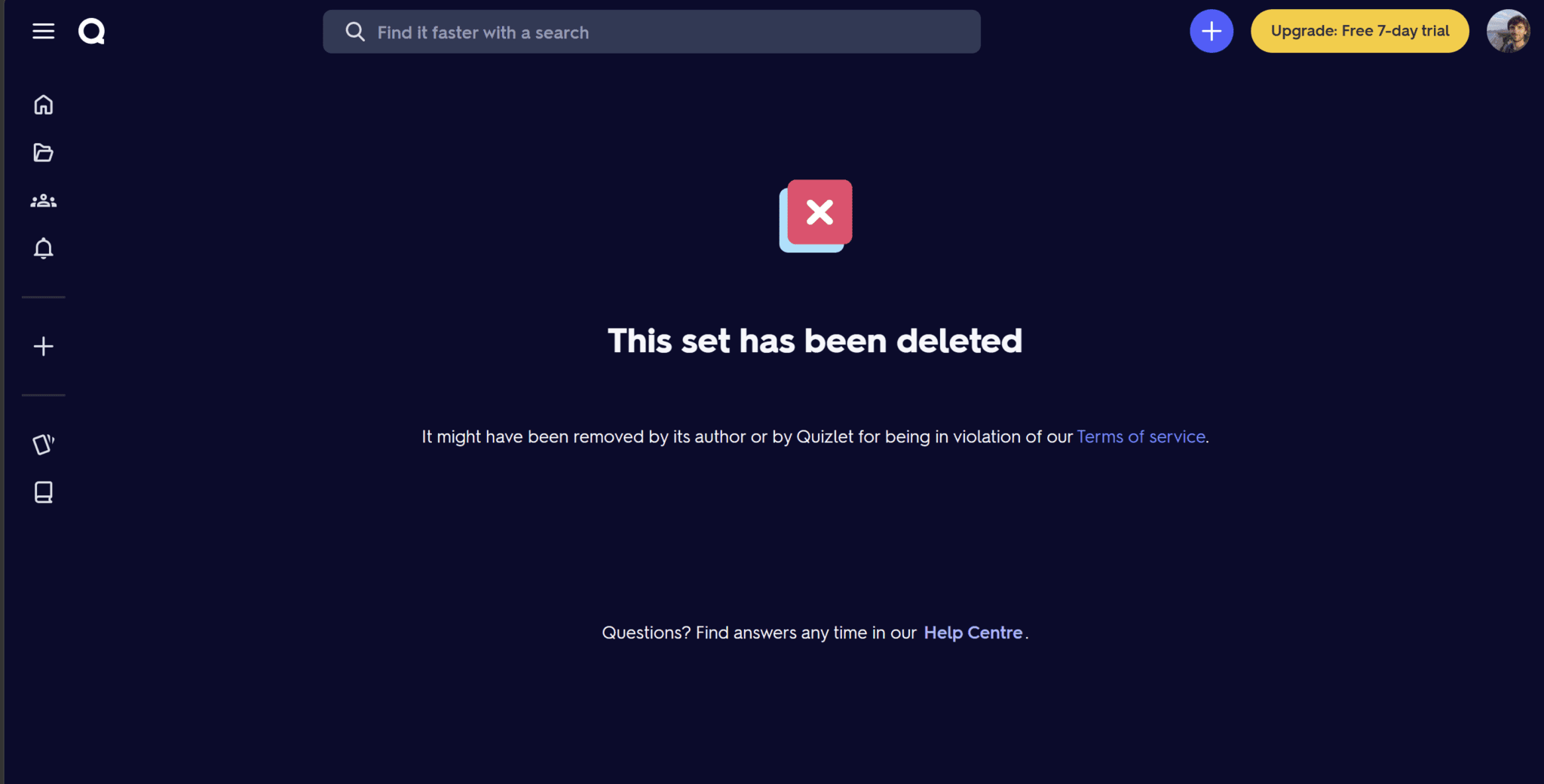
There was an example provided of a Quizlet flashcard selection. I clicked that to see if maybe I was doing something wrong. However, the link was old and just led me to a flashcard set that was no longer available.
After a little bit more fiddling around, the extension identified my Quizlet flashcards on its own. I needed to flick through a few of them for the set to be detected.
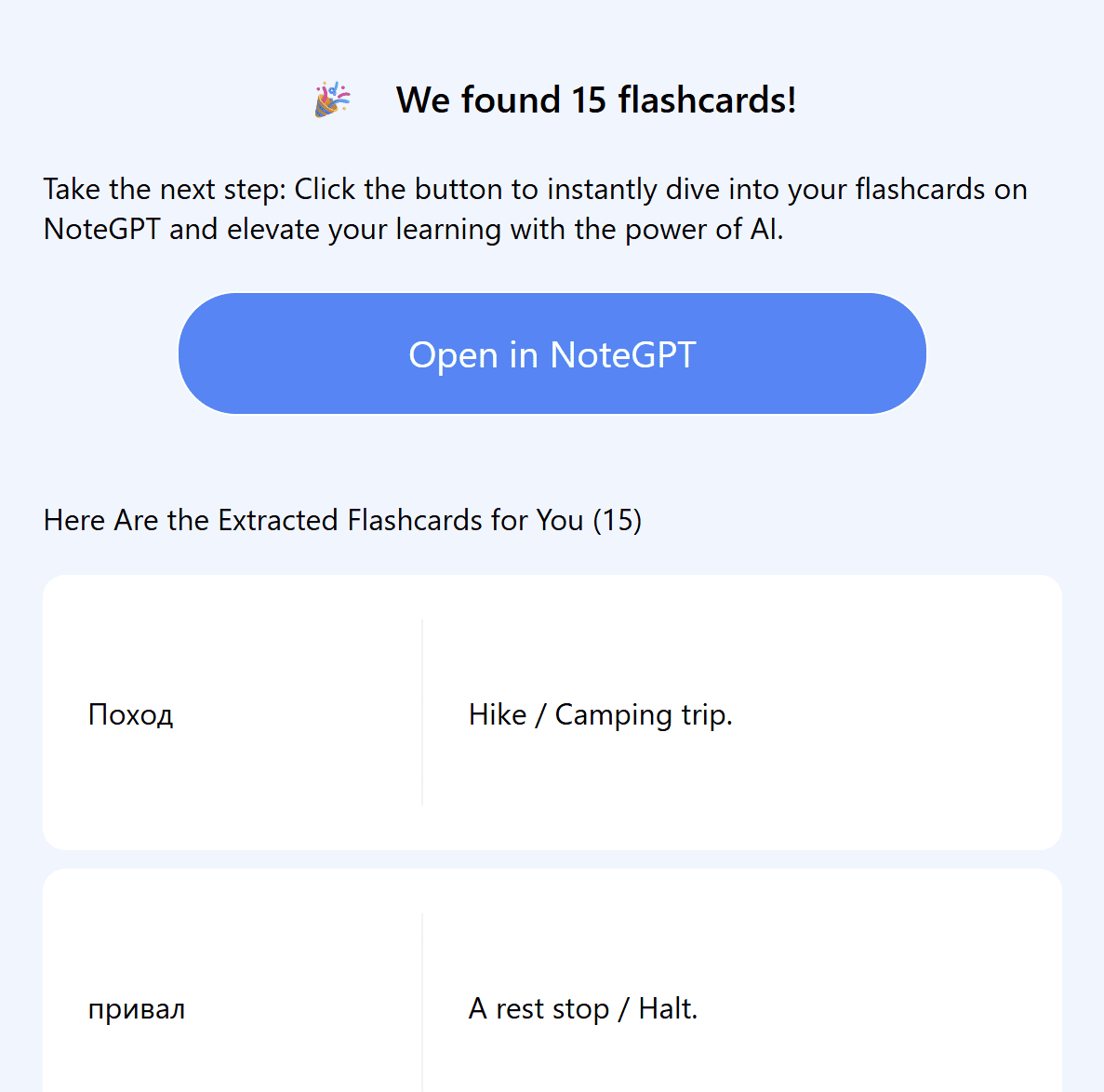
It found my flashcards. They were all there so I hit “Open in NoteGPT.”
At first, it was literally the same thing: choose a tick or cross depending on whether or not I remembered the vocabulary, then turn over the flashcard to see the translation. I could already do this on Quizlet without the extra steps.

I went through some of the cards, quickly realized there was nothing unique about this feature whatsoever, and then clicked the back button. This is where things got a bit more confusing.
As if NoteGPT’s UI wasn’t ugly enough, I was taken to the AI flashcard screen where they seem to use a completely different design to the entire rest of the website.
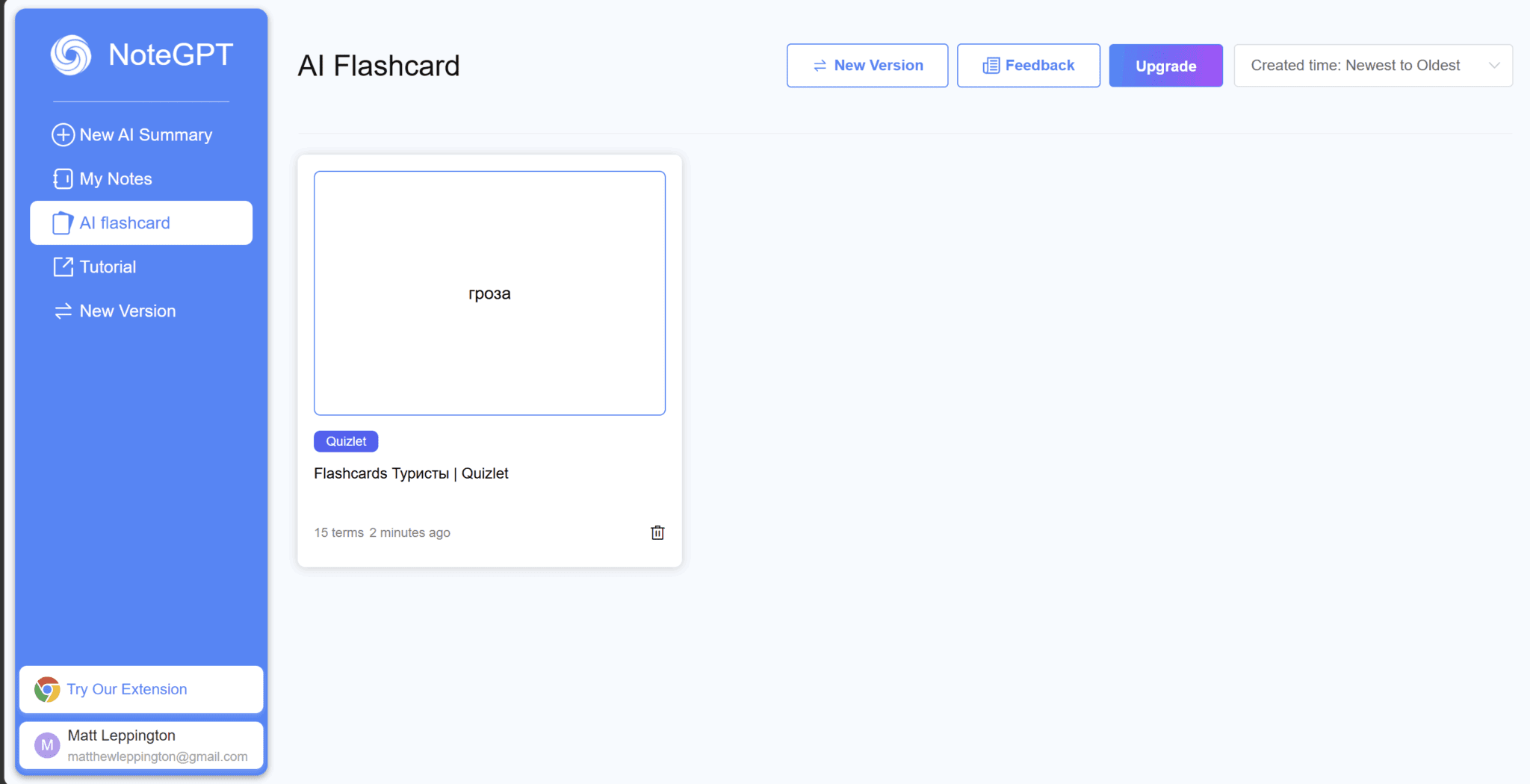
The colour scheme is the same as the light version, but here there’s no dark mode and the menu is blue with white buttons instead of white with blue buttons. It sounds subtle but it’s strikingly different. In fact, it actually looks way better like this. The inconsistency is another minor insight into NoteGPT’s problem with design and UI.
To go back to the initial problem, there’s nothing I can actually do with these flashcards that I couldn’t already do for free on Quizlet. I kept expecting to find something. Maybe I’d be able to speak with AI about them or get it to explain something to me, but there’s nothing. In fact, it has less functionality than Quizlet itself. On Quizlet, at least it would tell me how many flashcards I’ve remembered, let me practice the ones I’m forgetting, and transform them into other learning materials.
I clicked on the “Tutorial” button in a last-ditch attempt to educate myself on NoteGPT’s unnecessarily complex layout. I naively thought it might provide some information about how to use these flashcards now that I’ve gone out of my way to import them here. How silly of me. Instead, it took me to a URL for how to summarize YouTube videos — and even that had a “404 not found” error.
The more I dig, the more I want to stop using NoteGPT altogether. It’s a hot mess.
I uninstalled the useless extension quickly afterwards.
NoteGPT Pricing: How Much Does It Cost in 2026?
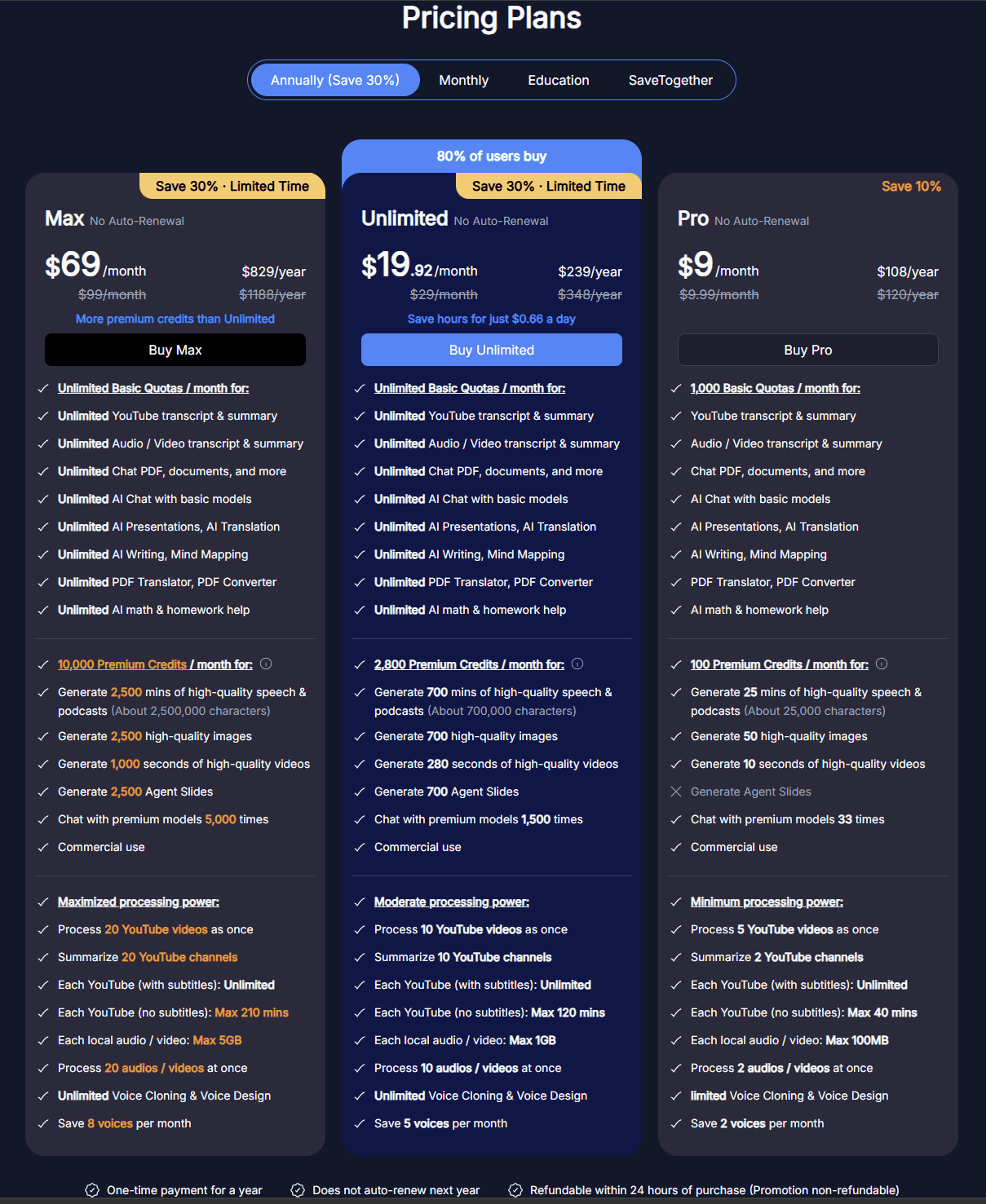
NoteGPT has 3 plans:
- Pro: $9/month when billed annually (or $9.99 per month)
- Unlimited: $19.92/month when billed annually (or $29 per month)
- Max: $69/month when billed annually (or $99 per month)
The Pro plan will set you back $9 per month when billed annually (or a little jump to $9.99 to pay on a month-to-month basis). It unlocks 1,000 basic quotas that include YouTube transcripts and summaries, audio and video transcripts, PDF uploads, documents AI Chat, Presentations, Translations, Writing, Mind Mapping, and more. This plan also provides 100 premium credits which can be used for generating podcasts, high-quality images, 10-second video clips, and up to 33 premium model Chats.
The Unlimited Plan gives you unlimited basic quotas for $19.92 per month when billed annually (or $29 per month). This plan also provides 2,800 premium credits and unlocks more processing power. With this, you can process 10 YouTube videos at once, summarize 10 YouTube channels, and clone or design unlimited voices (saving 5 of them per month).
The Max plan is a whopping $69 per month when billed annually (or $99 per month when billed monthly). This has all the perks of Unlimited but with 10,000 premium credits and more or less double the processing power (20 simultaneous videos at once instead of 10).
Unfortunately, these plans offer more processing power rather than more intelligence, memory, or actual useful AI features. Unless for some unknown reason you’re planning to summarize YouTube in bulk, these plans are largely not worth it in my opinion.
What Do Real Everyday Users Think of NoteGPT?
Everyday users have mixed feelings about NoteGPT. Some praise it as revolutionary, while others dismiss it as lacking the most basic of features (like the ability to edit a transcript). In general, the reviews skew negative.
I dived into multiple third-party review platforms, as well as scoured the depths of social media to find honest, real-talking users talk about NoteGPT.
It’s worth noting that Capterra and ProductHunt both feature NoteGPT pages but have 0 reviews. Instead, I went to G2, TrustPilot, and JustUseApp. Between these three, NoteGPT scores a pitiful 3.67/5 from a grand total of 62 reviews.
However, I also checked out the Chrome Store and there it has a thriving fanbase, scoring 4.9/5 from 7,300 reviews. However, it’s worth noting that this is specifically for the Chrome Extension that performs YouTube summaries and chats with AI assistants. It seems to get 3-4 5-star reviews every day there, with all the last 10 reviews being 5 stars and within the past 3 days.
But first, let’s get the other review platforms out the way.
What Do JustUseApp Users Think?
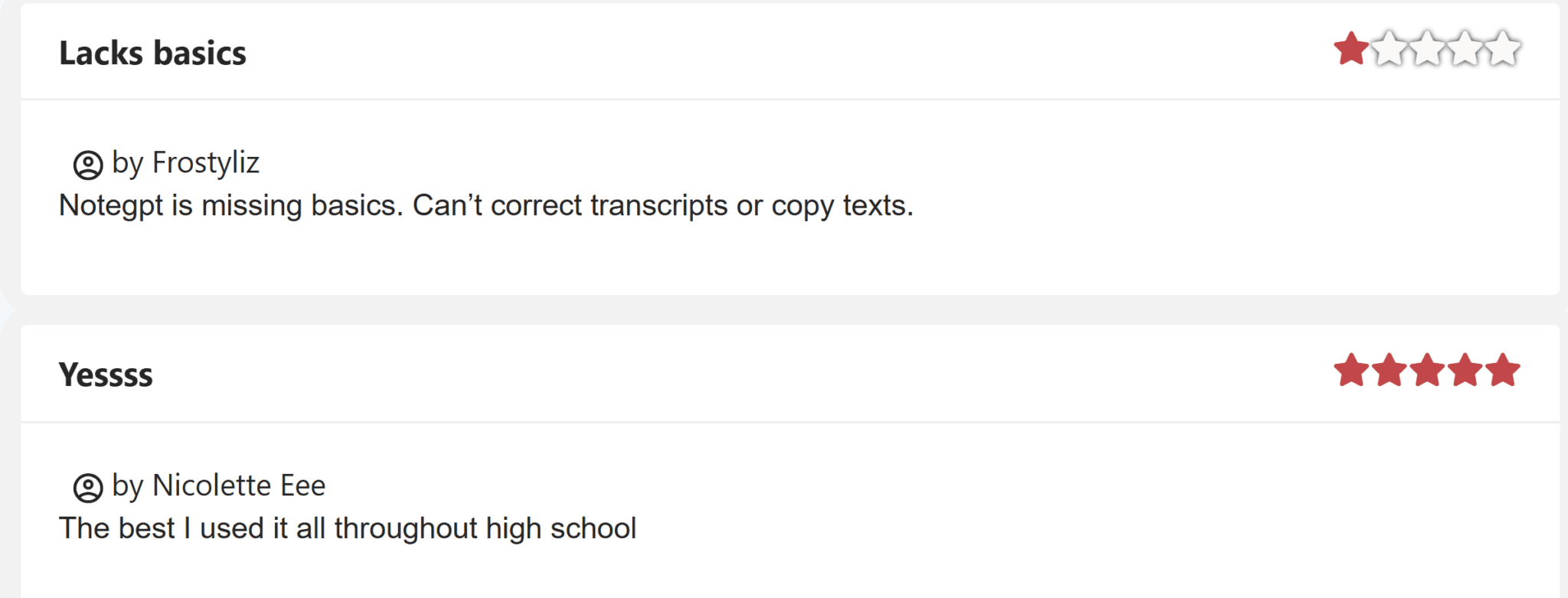
JustUseApp only has two reviews: one 5-star and one 1-star. The bad review highlights that NoteGPT is missing the most basic of basics: the ability to edit transcripts or copy texts.
The good review, on the other hand, claims to have used it “all throughout high school” despite NoteGPT only being three years old.
Do G2 Users Like NoteGPT?
Over on G2, the reviews are all positive: 5/5 from 25 reviews. However, you only need to read the first three to understand they’re fake and they’re not even trying to hide it. Check these out and see if you can see what gave it away: I’ve given you six just to make it even clearer.
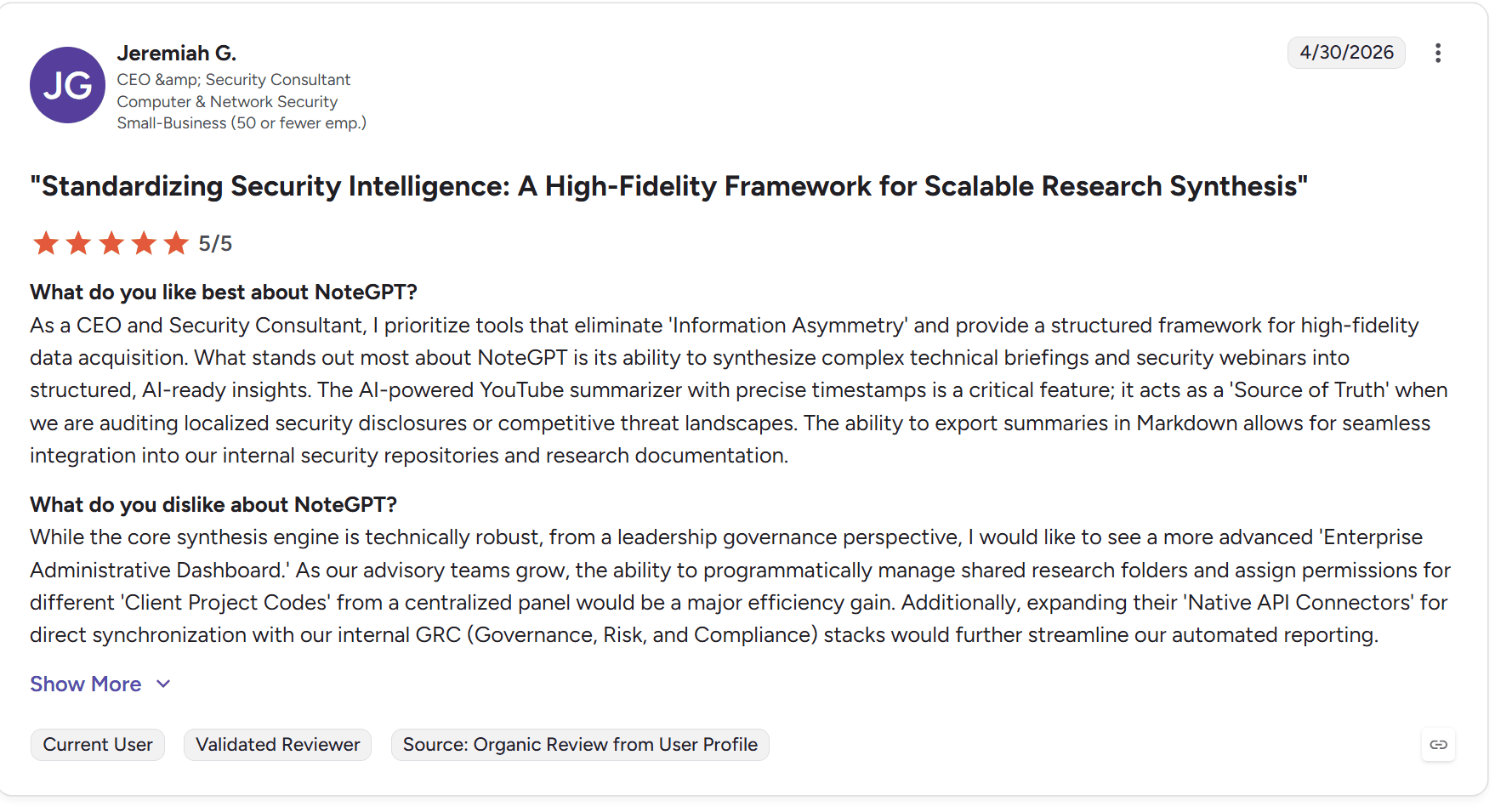
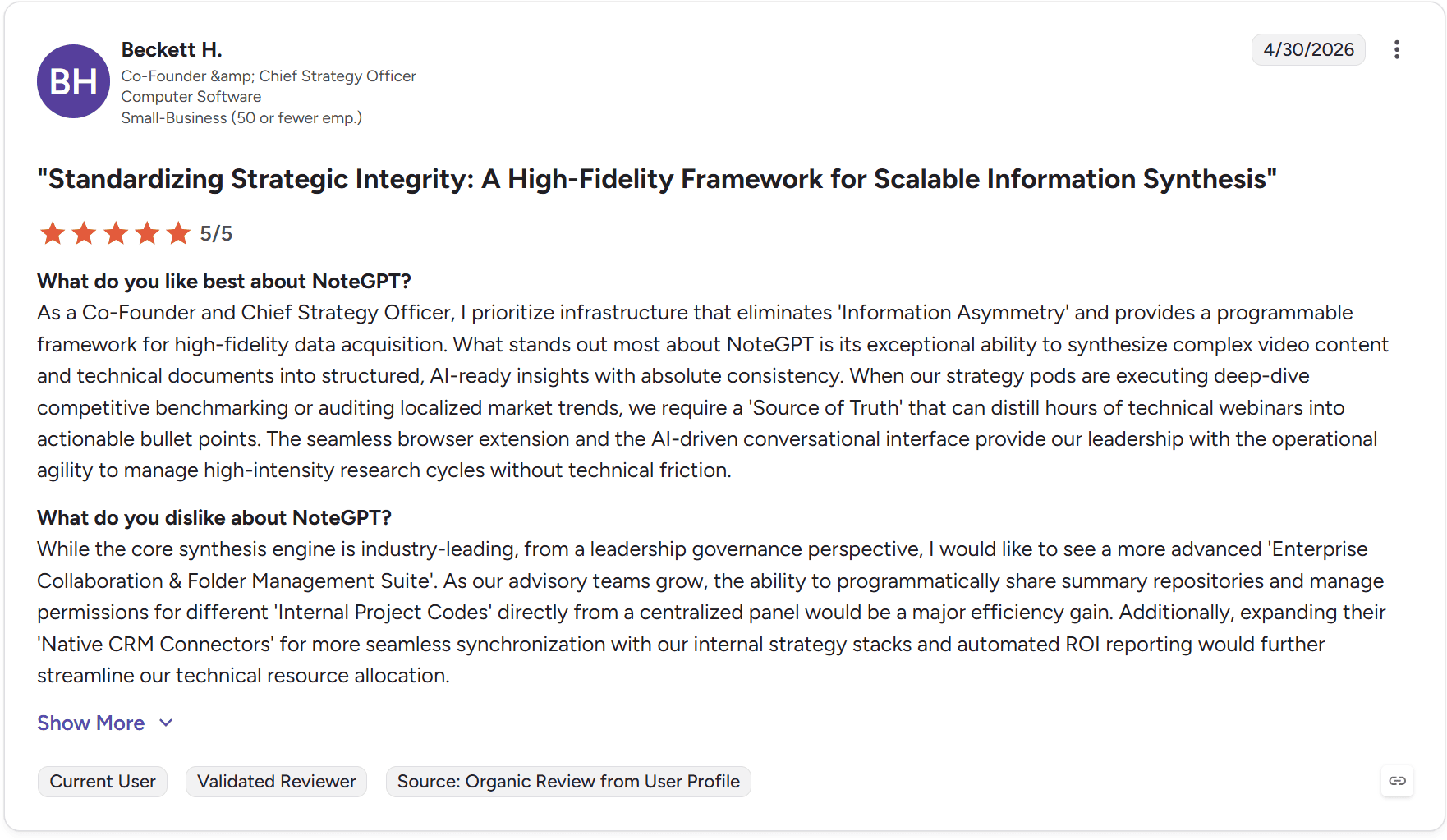
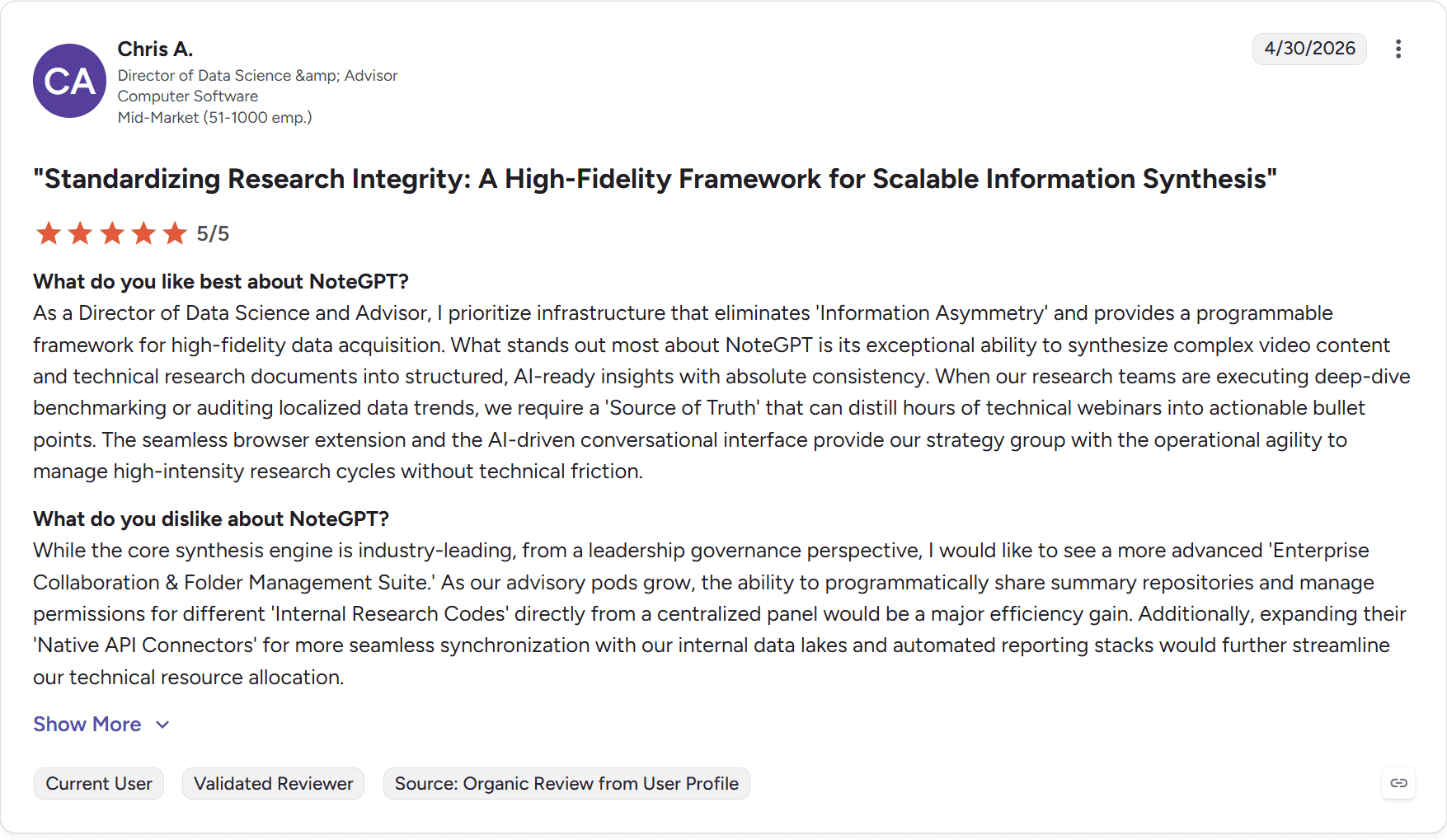
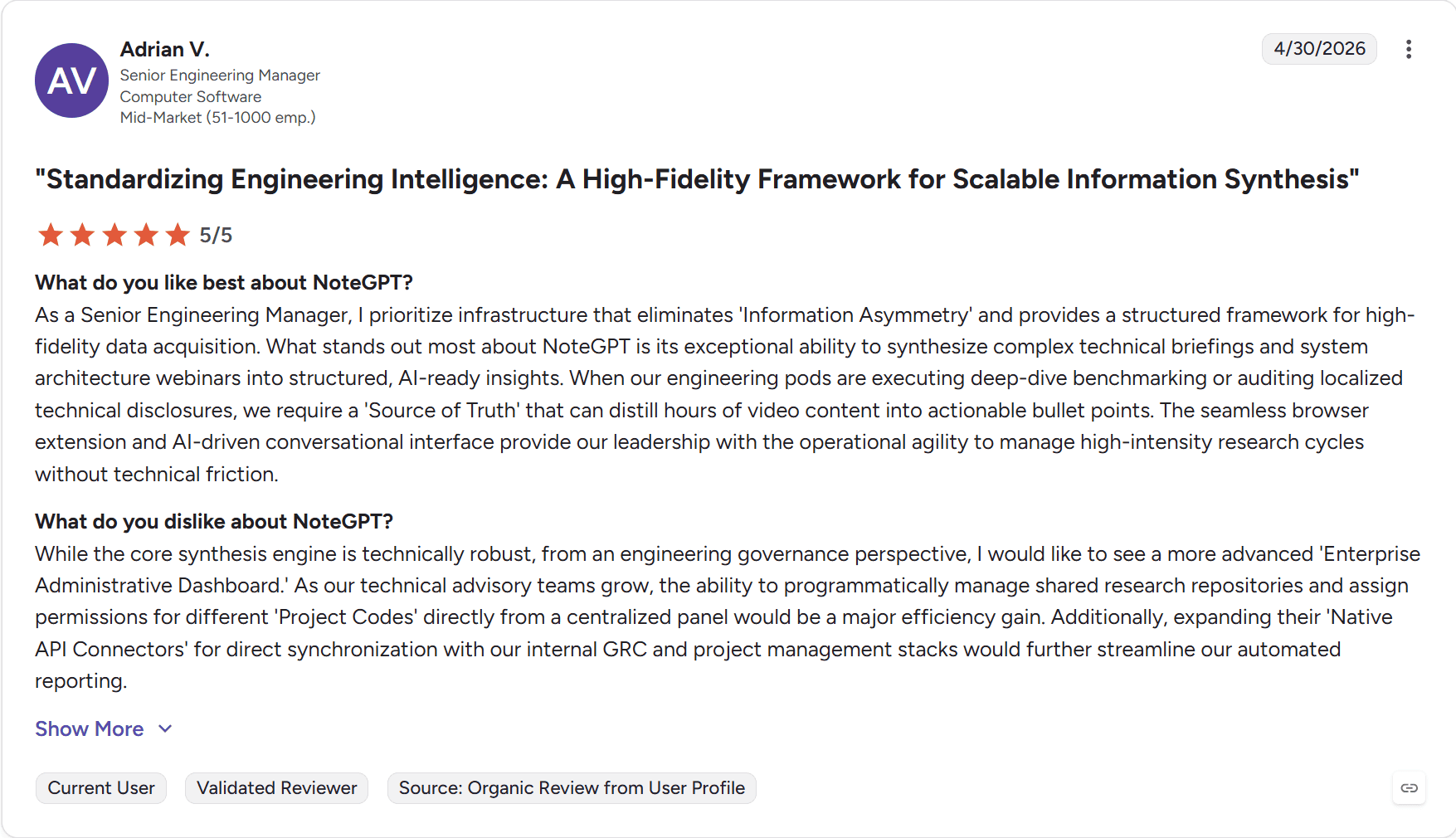
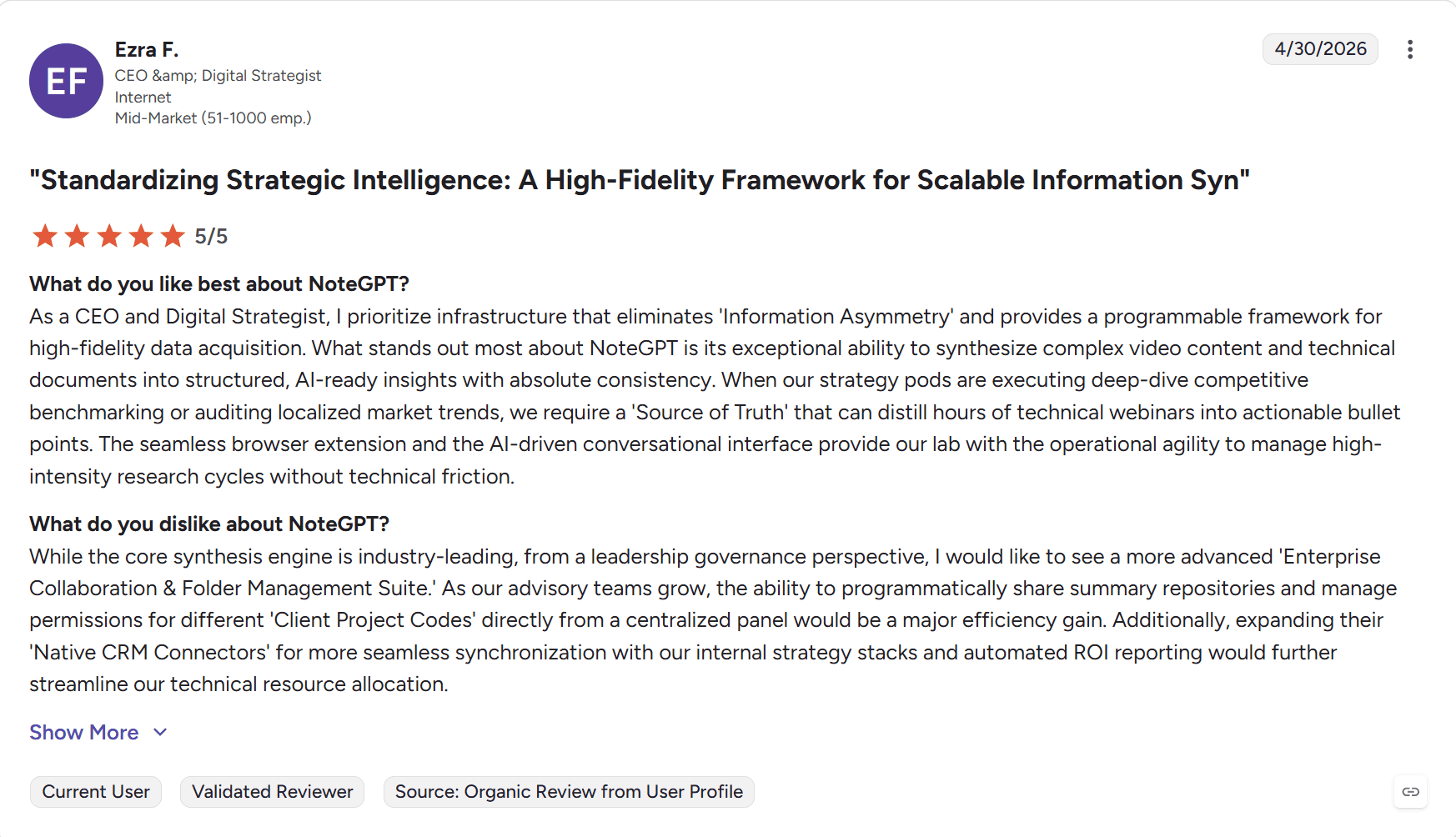
NoteGPT’s attempt to game the system is embarrassing. If this is any demonstration of its AI writing talents, it should be all you need to know to laugh it out of the question. It’s also a shameful dent in G2’s credibility to keep these reviews up after over a month.
Just in case you can’t see these laughable reviews, I’ll sum them up:
- All six were released on the same day: 4/30/2026
- All six follow the exact same title structure: “Standardizing X: A High-Fidelity Framework for Scalable Information Synthesis”
- Each one starts its review with “As a…” and then anything from CEO to co-founder, Director of Data Science to Senior Engineering Manager…
- The dislike sections all begin with some variation of this line: “While the core synthesis engine is industry-leading…”
I could go on, but you have the images yourself and you can find the rest of the shammy reviews over on G2.
How About TrustPilot Reviewers?
TrustPilot feels more reliable with its 3/5 from 35 reviews. The reviewers here feel more authentic, with one advising users to “stay away at all costs!“
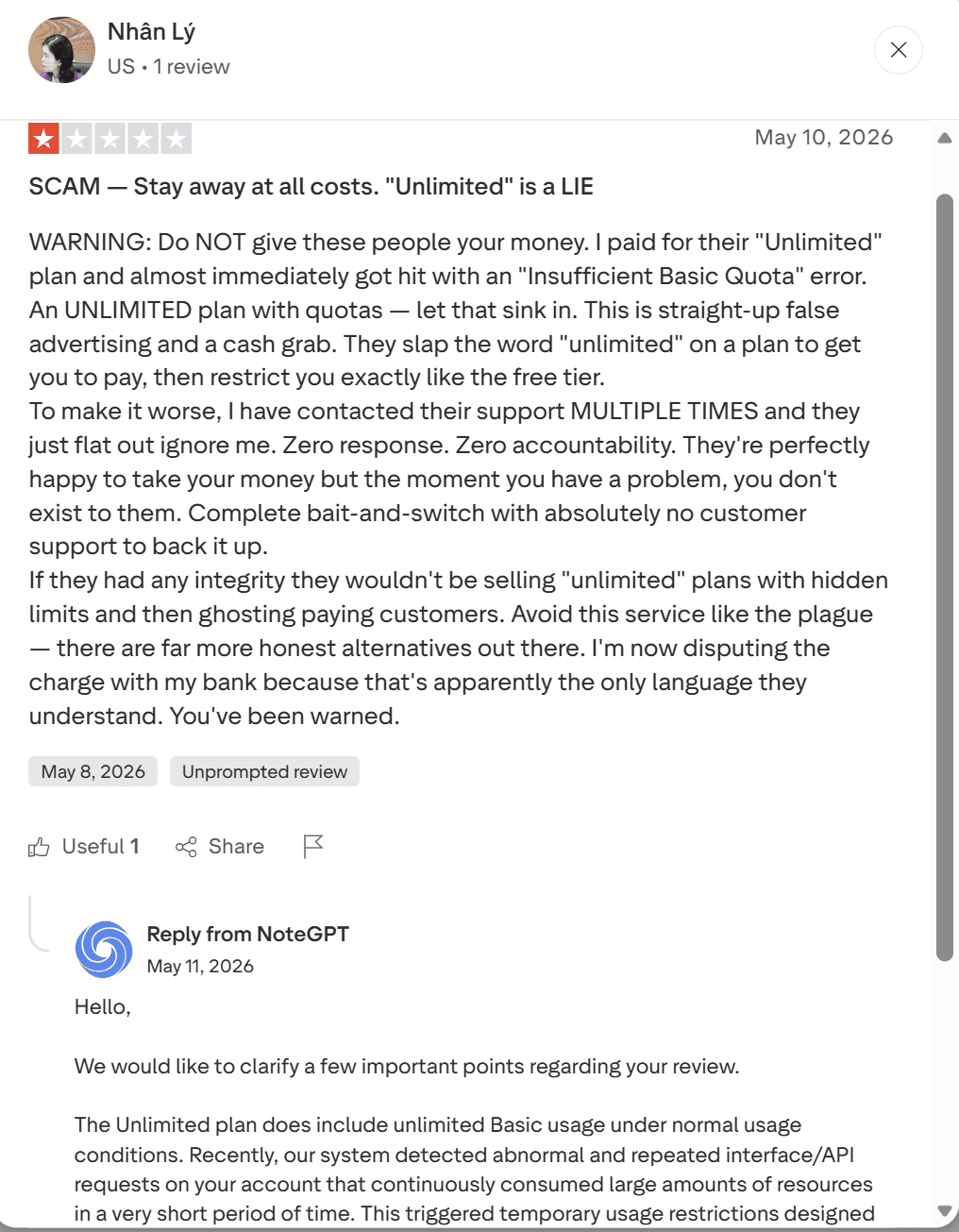
Nhan Ly claims that she paid for the “Unlimited” plan and was then “almost immediately hit with an “Insufficient Basic Quota” error.” She said that support ignored her after multiple attempts to contact them, suggesting there was “zero response” and “zero accountability.”
To be fair to NoteGPT, they did respond to her complaint, which was made on May 8th 2026, to “clarify a few important points”. They offered no sympathy, no apologies, no attempt to make things right; instead they held their ground, told the user that they were at fault for “continuously consuming large amounts of resources in a very short period of time.”
It turns into a game of he said, she said, but it’s not a welcoming look for newcomers. Their robotic response seemed more defensive and deflective than comforting.
I continued reading some other reviews, hoping to find a few positive ones to balance it out. But look what I found… Two 5 star reviews on the exact same day (25th April) that have the exact same title, but only one of them actually continues on from the title text.
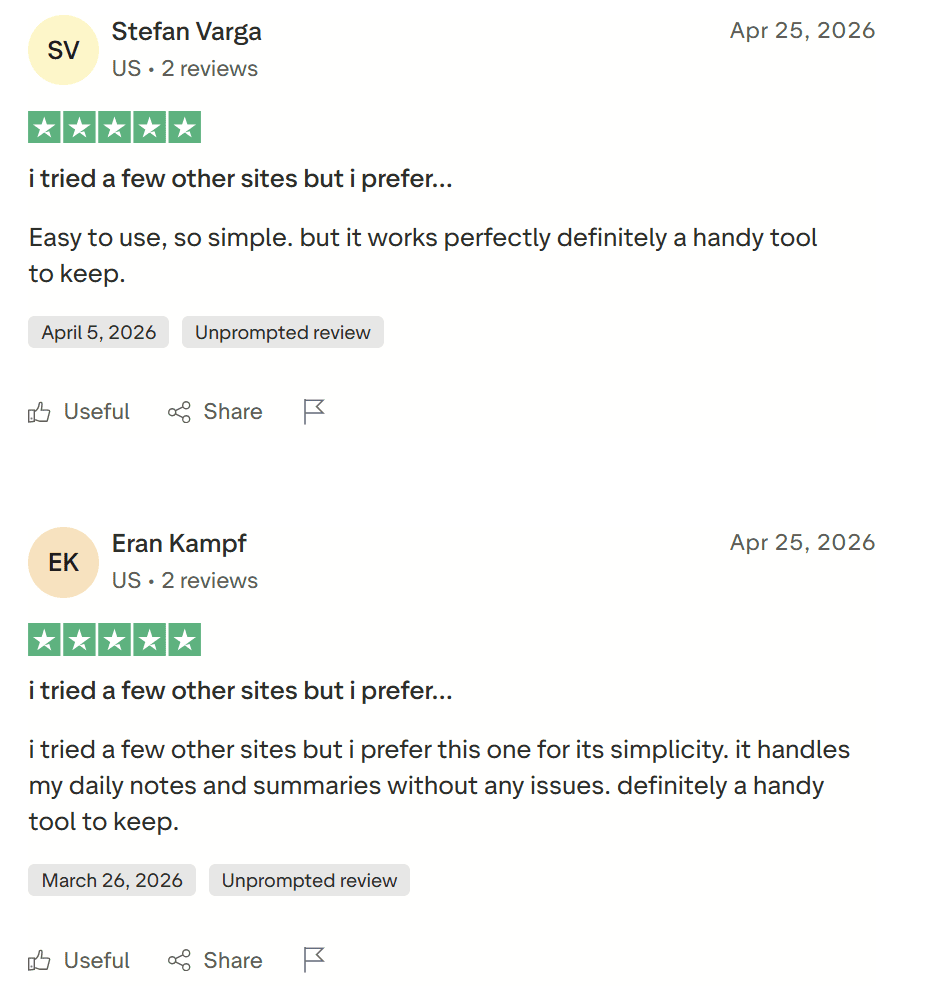
For a second, I thought I was imagining things and perhaps overreacting due to the brazen in-your-face-ness of the G2 reviews. But then I realised it wasn’t only the title that’s the same, but also the last line: “definitely a handy tool to keep.”
This looks to me like the same user making two reviews and forgetting to change things around a bit. It doesn’t appear to be AI done like the G2 ones that were all versions of the same prompt. This is just a weak attempt to rig the system.
Scrolling back further through TrustPilot, it’s clear that the early reviews were ruthless 1-stars, many of which called NoteGPT out to be misleading (to put it lightly). To make this clearer: 15 out of the first 19 TrustPilot reviews were 1/5. One was 2/5. The rest were 5/5. Then, out of nowhere, a sudden wave of 5/5 reviews come that balance the scales a bit.
How Well Does It Score On the Chrome Store?
After reading the NoteGPT reviews on G2 and TrustPilot, I’m dreading diving into the Chrome Store ones.

It’s much harder to tell whether the Chrome Store reviews follow the same pattern as other platforms. However, what is evident from a quick scroll over the most recent reviews (June 2026), they’re all low-effort and rarely say anything specific. Even if they are all genuine, it doesn’t provide much insight into what works well, what doesn’t, which use case they had it for, etc.
What Do Reddit Users Think About NoteGPT?
Over on Reddit, NoteGPT has a few mentions here and there but there’s nobody shouting from the rooftops about it. This is about as close to Reddit fame as NoteGPT gets:
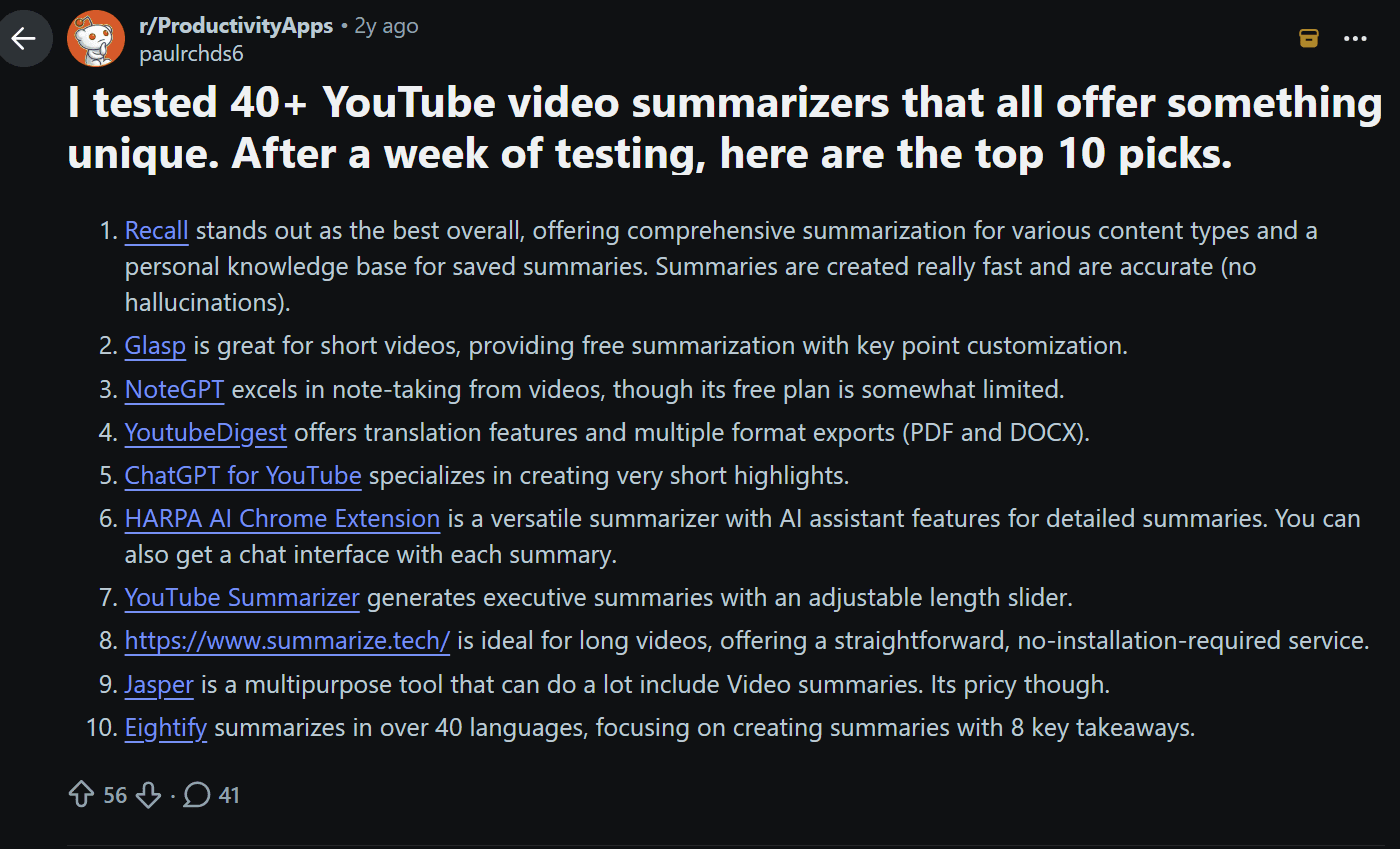
This Reddit Post ranks NoteGPT as the third best YouTube video summarizer after a week of testing 40+ different ones. However, it was also 2 years ago. NoteGPT is highlighted as being great for note-taking from videos but its free plan is “somewhat limited.”
The fact it hasn’t appeared in more posts or comments since then is revealing all on its own.
What About Users on X or Other Social Media Platforms?
To be honest, they’re ghost towns when it comes to NoteGPT. There are a few posts talking about it. One is from a developer that worked on their site, but his post only has 8 views and one of them was me. It does give a human insight to NoteGPT however, as he’s clearly proud of it and its 840k users, saying, “When the product is great, your job is just to not get in its way.”
Besides that post, it’s mostly tumbleweed.
NoteGPT Alternatives: Which Tool is Best for Video Notes & Summaries in 2026?
Long-form content is becoming more popular in 2026. Despite the downsides discussed above, NoteGPT is a decent choice for turning videos (and PDFs/audio) into quick summaries, transcripts, mind maps, and study aids. It’s fast, student-friendly, and handles multiple formats without much fuss. But like any tool, it has limits — especially with very long or visually dense content, accuracy on nuanced topics, and deeper interaction.
So which alternatives are actually worth your time? It depends on whether you want dead-simple YouTube summaries, rich interactive notes, visual mind maps, or something that doubles as a meeting notetaker. I’ve included tl;dv to highlight how meeting intelligence tools differ from pure video/lecture summarizers too.
| Tool | Core Idea | Best For | Outputs | Interaction Level | Strength | Weakness | Use Case |
|---|---|---|---|---|---|---|---|
| NoteGPT | Video-to-notes converter | Students & quick learners from YouTube/lectures | Transcripts, summaries, mind maps, flashcards | High | Fast multi-format input (YT, PDF, audio), study tools | Accuracy varies on complex/visual content, limits on free tier | Quick revision & note generation |
| Eightify | YouTube-first summarizer | Busy learners watching tutorials & long videos | Key ideas, timestamps, TL;DR, comment insights | Medium-High | Super fast Chrome extension, seamless on YouTube, multilingual | Limited to surface-level summaries, less depth for study | Quick consumption & deciding what to watch |
| Glasp | Social highlighter + summarizer | Researchers & highlight collectors | Summaries, transcripts, highlights, AI chat | High | Free tier is generous, great for web/PDF/YouTube, community aspect | Can feel scattered for heavy structured study | Building a personal knowledge base from videos & articles |
| BibiGPT | Multi-platform AI video brain | Power users across YouTube, podcasts, Bilibili etc. | Timestamped summaries, mind maps, AI chat, transcripts | Very High | Broad platform support, deep mind maps, grounded chat | Steeper learning curve, stronger in certain regions/languages | Comprehensive digestion & long-term knowledge |
| RemNote | AI Study Partner | Serious students & researchers | Structured notes, Q&A, accurate summaries | High | Great chat option to understand topics deeply, study-ready outputs, and quality study materials | Pricing for heavy use | In-depth lecture & research analysis |
| StudyFetch | AI Study-Partner for Lectures | University students & passive capturers | Notes, quizzes, flashcards, podcasts | High | Excellent structured output from lectures, gamified elements | Less ideal for pure YouTube scrolling | Turning lectures into active recall tools |
| tl;dv | Meeting intelligence | Calls, team discussions & recorded meetings | Transcripts, summaries, action items, search | Medium | Collaboration-focused, excellent search & sharing | Not built for educational video/lecture depth | Work meetings & team knowledge |
Full disclosure: As of mid-2026, I’ve personally tested NoteGPT, RemNote, StudyFetch and tl;dv extensively for my own workflows. I’m still exploring BibiGPT, Glasp, and Memories.ai more deeply, but the patterns are clear from real usage and community feedback.
Most offer free trials, generous free tiers, or Chrome extensions so you can test them yourself. Some shine on pure YouTube (Eightify/Glasp), others on turning content into full study systems (RemNote/StudyFetch), and a few go broader with mind maps or multi-source chat. If audio recording or live meetings matter, tl;dv is your best bet. Don’t forget to always check language support and video length limits meet your needs.
NoteGPT Alternatives: Summary
- Best overall video summarizer: Eightify for pure speed
- Best free/quick YouTube tool: Glasp or Eightify
- Best for deep study & mind maps: BibiGPT or StudyFetch
- Best all-rounder for lectures: RemNote or StudyFetch
- Best for long-term knowledge building: RemNote
- Best for hard/complex content: RemNote or StudyFetch
- Best for work meetings & collaboration: tl;dv
Is NoteGPT Worth Your Money in 2026?
Honestly? I’d say No. It’s a decent enough tool and the free plan is worth trying out if you’re interested. However, when it gets to more advanced features, more doesn’t mean better. It has so many features that it’s overwhelming, but none of them are connected, you need different extensions for different use cases, and the tutorials, UI, and reviews are all over the place.
Most critically, there’s no memory. NoteGPT doesn’t learn from your workflows. It doesn’t help you concentrate knowledge. That’s why I kept thinking of it as one of those YouTube to MP3 downloaders. It feels like they’ve mastered one thing (summaries), and then pumped that single thing out in as many different forms as they could. But from my own experience, even their summaries aren’t always the best.
After reading the reviews, I would be hesitant to put my money anywhere near NoteGPT. There are plenty of better tools available, depending on the exact use case you need it for. I’d 100%, no hesitation, recommend RemNote for studying over NoteGPT. tl;dv is the obvious choice for anything meeting or workflow related, while if you’re just looking for a simple YouTube summarizer, Eightify is probably best.
FAQs About NoteGPT in 2026
Is NoteGPT free to use?
Yes. You get 15 Basic Quotas per month with no card required, and you can even try the YouTube summarizer without creating an account.
For casual use, the free plan is enough. Just be aware that audio transcription and some other features aren’t included in those free credits, which isn’t made clear upfront.
How much does NoteGPT cost?
There are three paid plans: Pro at $9/month, Unlimited at $19.92/month, and Max at $69/month (all billed annually — monthly billing is significantly more expensive). That said, the paid plans mainly offer more processing power rather than smarter AI features, making them hard to justify for most users.
Is the NoteGPT "Unlimited" plan actually unlimited?
Not really. Basic summarization quotas are unlimited, but Premium Credits — needed for podcast generation, high-quality images, and advanced AI chat — are capped at 2,800 per month. Multiple users report hitting quota errors almost immediately after upgrading, so treat the “Unlimited” label with caution.
Can NoteGPT record or transcribe meetings?
No. NoteGPT has no live transcription, no meeting bot, no speaker identification, and no GDPR compliance. It can only process content you’ve already recorded separately. If you need a tool that joins your Zoom or Google Meet calls and turns them into actionable notes, you’ll need something like tl;dv instead.
How good is NoteGPT at summarizing YouTube videos?
This is NoteGPT’s strongest feature. It handles videos with or without subtitles, breaks them into chapters with timestamps, and lets you chat with the content directly. The main caveat: Google’s Gemini now does something very similar natively, without needing an extension.
It also can’t be used to talk about multiple videos at once, or to discuss multiple different sources in one chat.
Can NoteGPT summarize PDFs and books?
In theory, yes. For shorter documents, it works fine, but large or complex PDFs can freeze or fail without a clear error message. Summaries of dense content tend to come out oversimplified. For serious document analysis, tools like RemNote or StudyFetch are more reliable.
Is NoteGPT worth paying for in 2026?
Probably not. The free plan is worth a try — especially for YouTube summaries — but the paid plans are overpriced for what you get. Features feel disconnected, the UI is clunky, and there’s no memory or learning across sessions. The misleading plan names, questionable reviews, and limited refund window make handing over money feel risky. Most users will find better value elsewhere.