Skip to content






This is a guide on how to cancel your ChatGPT subscription, from someone doing it this very week.
I used the free version of ChatGPT for a long old while before I finally caved and went straight to Pro at £200 a month. (No gentle Plus on-ramp, straight to the top tier, which tells you something about either the mood I was in or the marketing.) I’ve been on Pro ever since, which is long enough to form a proper opinion and short enough to still remember why I signed up.
It’s bittersweet. I’d been thinking about it for months, and then the brief for this article landed in my content calendar, which felt like one of those “okay, universe, message received” moments. So here we are, OpenAI. It’s not me, it’s you.
If you’re somewhere on the same journey, this guide covers how to actually cancel on desktop and mobile, what happens to your chat history and custom GPTs, whether you’ll see a refund (spoiler, depends where you live), and how to come crawling back if you change your mind.
Table of Contents
Why I’m cancelling ChatGPT after three years
A few reasons lined up at once.
I’m using it less. Genuinely. When I first subscribed, I used ChatGPT for first-pass research, to help me structure thinking, and for the slightly embarrassing thing that a lot of people use it for and don’t talk about, validation. “Is this email okay?” “Is this pitch okay?” “Is this paragraph okay?” I got a lot of yeses, and some of those yeses were useful, and some were sycophancy dressed up as feedback. Somewhere in the last year, either I got more confident or ChatGPT rewired my brain into thinking I was more confident, and I’m genuinely not sure which. I don’t think I care which. The result is the same: I don’t need the reassurance anymore. I’ve grown. It hasn’t.
The output quality for creative work has also stopped impressing me. I’d ask for help with featured images for articles and it would send me on wild goose chases that ended, every single time, with me opening a stock photo library and picking one myself. After a while, you notice you’re paying £200 a month for a tool that keeps losing to Unsplash.
And then there’s the OpenAI politics, which I’ll leave at “tetchy” and let you form your own view. It’s not the main reason, but it’s a reason for me.
The final flag: even on the top tier, ChatGPT would forget things mid-conversation, re-ask questions it had just been answered, and sycophantically agree with me when I tested it by deliberately saying something wrong. £200 a month for a yes-man with memory issues is not the value proposition I signed up for.
If any of that sounds familiar, the steps below are for you.
How to cancel ChatGPT Plus, Go or Pro on desktop
Desktop cancellation is the cleanest route if you subscribed on the OpenAI website in the first place. If you subscribed via the iOS or Android app, skip to the mobile section, because the cancel button you’re looking for isn’t going to appear in your web settings. Apple and Google own that billing relationship, not OpenAI.
For everyone who subscribed on chatgpt.com directly:
- Go to chatgpt.com and sign in with the account tied to your subscription. Double-check the email. If you’ve ever logged in with both Google and a work email, you might have two accounts.
- Click your profile icon in the bottom-left corner of the sidebar.
- Select Settings.
- Go to My Plan, or Account, depending on how OpenAI has reshuffled the menu this week.
- Click Manage my subscription. This opens a Stripe-hosted billing page in a new tab.
- Find Cancel Plan and confirm.
- Check your inbox. OpenAI sends a confirmation email with your end-of-access date.
Here’s where I owe you a warning about step 6. Cancel Plan is not a big, obvious button anymore. It’s a small grey link near the bottom of the Stripe billing pop-up, and it’s the single biggest reason people post “I can’t find the cancel button” on the OpenAI community forum. Scroll down. Squint. It’s there. Expect a retention screen asking if you’d like to pause or reconsider. You can ignore it.
A sanity check I’d recommend: go back into Settings, My Plan, and make sure your subscription now shows an end date instead of a renewal date. If it still says renewing, something didn’t save and you need to go again.
If you’re on the Team plan, the cancel button lives somewhere different. Click your name in the sidebar, Workspace settings, then Billing, then Manage Plan. Only the workspace owner can cancel; individual team members can’t.
Timing matters. To avoid being charged for another month, cancel at least 24 hours before your next billing date. Your access continues until the end of the current cycle, and cancelling early doesn’t cut you off.
How to cancel ChatGPT on mobile (iPhone and Android)
This is the one that catches people out. If you subscribed inside the ChatGPT iOS or Android app, Apple or Google is handling your billing, not OpenAI. Opening the ChatGPT app and hunting for a cancel button will waste your time. Deleting the app will waste more of it, because uninstalling does nothing to stop the charges.
I subscribed via the Apple App Store, so I’ll walk you through the iPhone flow I actually used.
Cancelling on iPhone:
- Open Settings on your iPhone, not the ChatGPT app.
- Tap your name at the top (the Apple ID banner).
- Tap Subscriptions.
- Find ChatGPT in the list and tap it.
- Tap Cancel Subscription at the bottom.
- Confirm. Apple will show you the exact date your access ends; screenshot it if you want the peace of mind.
It took me about 40 seconds. The only reason I’m making this a whole article is that the rest of the process, what happens afterwards, the refund situation, and the bits nobody tells you about custom GPTs, gets messier than the cancel itself.
Cancelling on Android:
- Open the Google Play Store app.
- Check you’re signed into the Google account you originally subscribed with.
- Tap your profile icon, top-right.
- Tap Payments & subscriptions, then Subscriptions.
- Select ChatGPT.
- Tap Cancel subscription, pick a reason when Google asks, and confirm.
One thing to note if you subscribed via an app store: you’re probably paying slightly more than the web price. Apple and Google round their pricing tiers up, so an EU user paying via the App Store often sees €24.99 where the web price would’ve been €22.99. If you’re planning to resubscribe later, doing it on web saves you a couple of quid (or your own legal tender) a month.
Wait, did my ChatGPT cancellation actually work?
Here’s a fun one that caught me out. I cancelled my ChatGPT Pro in the App Store, tapped confirm, got the red “You have cancelled your subscription” banner in Apple’s Subscriptions page, and thought I was done.
Then I opened the actual ChatGPT app to check, and it was still telling me, “Your plan auto-renews on May 5, 2026. Thanks for subscribing to ChatGPT Pro!”
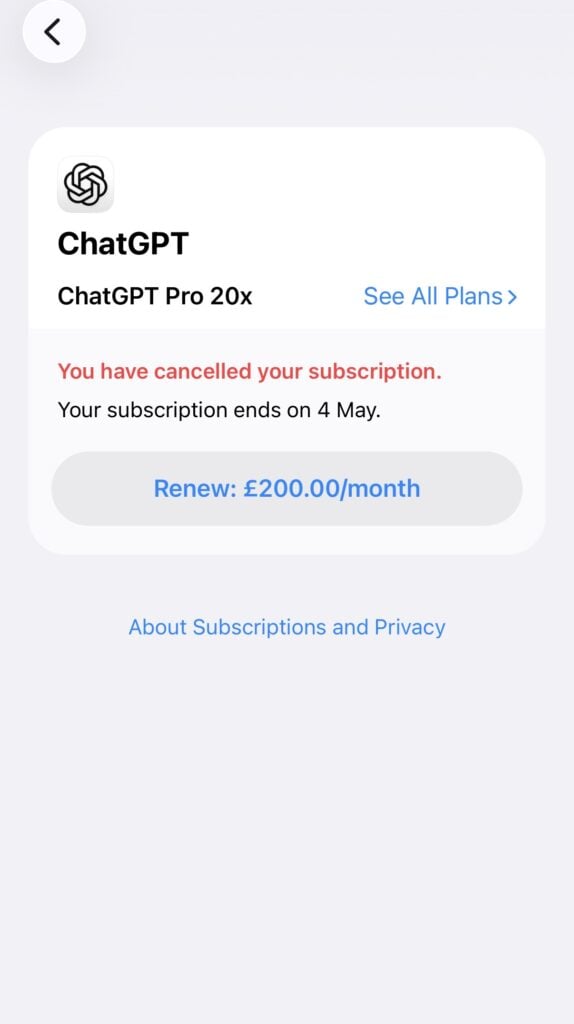

They can’t both be right. Which one is?
Apple is right. The ChatGPT app is lagging.
Here’s why this happens. When you cancel an Apple-billed subscription, Apple processes it immediately on their end and updates the App Store screen straight away. OpenAI’s backend, which controls what the ChatGPT app shows you, syncs with Apple on a delay. That sync can take anywhere from a few hours to a few days, especially around billing-cycle boundaries. Until it catches up, the ChatGPT app will keep merrily telling you everything’s fine.
The dates also don’t match, because of course they don’t. Apple says my subscription ends 4 May. OpenAI says it auto-renews 5 May. Same event, different framing. Apple counts the last day of paid access, OpenAI counts the day a new charge would have gone through. Don’t panic about this either.
How to know for sure, depending on where you subscribed:
If you subscribed through the iOS App Store (like I did):
- Open Settings, tap your Apple ID, tap Subscriptions.
- Find ChatGPT. If it shows “Expires [date]” or says “You have cancelled your subscription”, you’re done.
- Ignore what the ChatGPT app itself says. It’s not the source of truth for Apple subscriptions, and it can lag for days before catching up.
If you subscribed on chatgpt.com:
- Your subscription won’t appear in Apple’s Subscriptions list at all, so don’t panic when it’s not there.
- Check chatgpt.com instead. Go to Settings, My Plan. If it shows an end date rather than a renewal date, you’re done.
- The iOS app might still say “auto-renews” for a bit. Same sync lag, same reason, ignore it.
If you subscribed through Google Play:
- Open the Play Store, profile icon, Payments and subscriptions, Subscriptions.
- If ChatGPT is marked as “Cancelled” or shows an end date, you’re done.
- The ChatGPT app on your phone will catch up eventually.
Bottom line: the billing platform is always the source of truth. The ChatGPT app is always the last to know.
What happens after you cancel ChatGPT?
This is the part I was genuinely nervous about, because three years of chat history is a lot to walk away from. Here’s what actually happens.
You keep access until the end of your billing period. If you cancel on the 5th and your renewal date is the 28th, you get the full 23 days of Plus or Pro features. No instant cut-off. No grace period debate. This is the same across web, iOS and Android.
Your account doesn’t disappear. Your chat history stays. Your saved memories stay. Your projects and folders stay. You’re just downgraded to the free tier, which in 2026 is actually pretty generous: GPT-5.3 access, limited messages, limited image generation, and as of February 2026, ads in the US.
Custom GPTs go into a read-only holding pattern. You can still see any GPTs you built, but you can’t edit or publish them, and the GPT Builder becomes inaccessible. OpenAI doesn’t delete them, they’re tied to your account, and if you resubscribe later everything comes back. If you’d built a custom GPT you use commercially and now you’re leaving for good, export what you can before you go.
Memory and chat export. Do this before you cancel. Go to Settings, Data Controls, Export Data. You’ll get a zip file emailed to you within a few days; the download link expires after 24 hours so don’t ignore the email. If you have custom GPTs or Projects, each one stores its own history separately, so export within each. Future-you, sat at 11pm looking for that one prompt you wrote in 2024, will thank you.
What you actually lose at the end of the billing cycle:
- Access to advanced reasoning models (GPT-5.4 Thinking on Plus, GPT-5.4 Pro on Pro)
- Higher message limits (so more “please try again later” screens during busy hours)
- Codex, Agent Mode, Record Mode and Tasks on the paid tiers
- The ability to edit or publish custom GPTs
If the reason you’re cancelling is, like me, that you’ve outgrown the validation loop and you’re not really using the heavy features, the free tier genuinely covers most casual use. If you’re a coder or researcher who lives in Deep Research and Codex, the drop is going to be more noticeable.
One thing to double-check before you close this tab: if you’ve ever subscribed on both web and mobile (some people accidentally do this when they can’t find the cancel button), you might have two active subscriptions. Check both. I’ve seen users post on the OpenAI forum about being charged months after they “cancelled”, only to find they’d cancelled the web subscription and forgotten about the Apple one, or vice versa. Check your bank statement for anything from “OPENAI”, “APPLE.COM/BILL” or “GOOGLE PLAY” and trace each one.
Can you pause ChatGPT instead of cancelling?
No. OpenAI doesn’t offer a pause option for any tier: Go, Plus, Pro or the new $100 Pro. Your only choices are keep paying or cancel entirely.
The workaround, if you’re cancelling because you’re going travelling or want a month off rather than leave forever, is to just cancel and resubscribe when you’re back. There’s no penalty for returning, no reactivation fee, no “new customer” tier lock-out. Your chat history and custom GPTs will be waiting for you.
If you’re specifically looking to cut costs rather than leave, consider downgrading instead of cancelling. From Pro you can drop to Plus or Go. OpenAI doesn’t offer a one-click downgrade, so you’ll need to cancel the higher tier, wait for it to expire, and then resubscribe at the lower one. And if you were using ChatGPT for meeting notes, the free tier isn’t going to cut it; the paid features are exactly the ones that made the meeting workflow work in the first place. Here’s the honest review of what actually happens when you try to use ChatGPT as a meeting assistant.
Will you get a ChatGPT refund?
Short answer: probably not, unless you live in the UK, EU or Turkey.
OpenAI’s standard policy is that subscription fees are non-refundable. No prorated refunds for partial months. If you cancel on day 3 of your billing cycle, you keep access for the remaining 27-odd days, but you don’t see any money back.
The exception: if you’re in the UK, EU or Turkey, consumer protection law gives you a 14-day cooling-off right. Cancel within 14 days of your initial purchase and you’re entitled to a prorated refund. This is a legal right, not a goodwill gesture. OpenAI’s help documentation confirms it.
To claim it, go to help.openai.com, sign in with the account that was charged, and use the chat widget in the bottom-right. The system runs an eligibility check automatically before connecting you to an agent. Refunds, when approved, process within about 10 business days.
If you subscribed via Apple, refunds have to come from Apple, not OpenAI. Go to reportaproblem.apple.com, sign in, find the ChatGPT charge, and request a refund there. Same logic for Google Play, request through the Play Store. Apple and Google tend to process faster than OpenAI (3-5 business days) and are sometimes more flexible for accidental charges.
Accidental purchases are also generally refundable within 14 days of the charge regardless of region, if you contact support quickly and haven’t used the service. “Accidental” here really does mean accidental: you clicked through the upgrade flow by mistake, a family member bought it on a shared device, that kind of thing. “I tried it and didn’t like it” doesn’t qualify outside the UK/EU/Turkey window.
How to resubscribe to ChatGPT if you change your mind
If you change your mind, the resubscribe flow is almost insultingly easy. Sign back in at chatgpt.com, click Upgrade Plan on your profile, pick your tier, checkout. Your chat history, custom GPTs and saved memories all reappear within a minute or two, like you never left. No penalty, no reactivation fee, no three-day waiting period while OpenAI “processes” your return. They want you back, obviously.
One bit of unsolicited advice: if you’re resubscribing, go direct on the web rather than through the App Store. The cancellation flow is cleaner and you’ll get proper VAT invoices, which matters if you’re claiming it as a business expense.
The bit where I tell you what I’m actually doing instead
So here’s where I’m landing after three years. For three years I used ChatGPT to tell me my work was okay. Somewhere along the way either I got more confident or my brain got rewired into thinking I was, and I’m genuinely not sure which. Either way, I don’t need the reassurance anymore.
Claude, Gemini, Perplexity, they’re all a browser tab away. I haven’t decided which, if any, is replacing ChatGPT for me yet, and that’s kind of the point.
The thing I actually need AI for now is meetings. The conversations I have with clients and collaborators are where the real work happens.
tl;dv solves that for me independently of whatever chatbot I use next. It records, transcribes and summarises Zoom, Google Meet and Microsoft Teams calls, pulls out action items, and stores everything in its own workspace, so my meeting history doesn’t disappear the day my ChatGPT access does. And since they launched the desktop app, I can record any meeting on any platform (as long as I remember to ask for permission!), which has quietly become the feature I use most. If you’re cancelling ChatGPT and you’re worried about losing all the meeting context you’d been feeding it, that’s literally what tl;dv does.
The rest of the AI world can wait. I’m seeing who’s out there.
FAQs on how to cancel ChatGPT subscriptions
Will I lose my chat history if I cancel ChatGPT?
No. Your chat history stays on your account and remains accessible on the free tier. Cancelling doesn’t delete anything. Custom GPTs go read-only: you can view them but can’t edit or publish, and they come back in full if you resubscribe. The only way to lose your data is to delete your OpenAI account entirely, which permanently removes everything within 30 days.
I cancelled ChatGPT but I'm still being charged. What do I do?
Three likely causes. First, you might have two subscriptions, one on web and one on mobile. Check your bank statement for both “OPENAI” and “APPLE.COM/BILL” or “GOOGLE PLAY” charges. Second, you might have cancelled after the renewal date, in which case you were charged for one final cycle but won’t be charged again. Third, the cancellation might not have saved, so log back in and check that your account shows an end date rather than a renewal date.
Why can't I find the Cancel Plan button?
Most likely you subscribed via an app store and are looking in the wrong place; cancel in iPhone Settings or the Google Play Store instead. If you definitely subscribed on web, the Cancel Plan link is a small grey link at the bottom of the Stripe billing popup, not a big button. Scroll down inside the popup. If it’s still not there, try logging out and back in with a different authentication method; you might have more than one OpenAI account.
Do I get a refund if I cancel ChatGPT mid-cycle?
Not unless you live in the UK, EU or Turkey and cancel within 14 days of your initial purchase. Those regions have a legal cooling-off right that entitles you to a prorated refund. Outside that window, OpenAI’s standard policy is no refunds for unused time; you keep access until the end of the billing cycle you’ve already paid for. Apple and Google handle refunds for mobile subscriptions separately via reportaproblem.apple.com and Google Play respectively.