Skip to content




People spend up to a third of their week in meetings, so by Friday your notes can feel like a maze of half-finished actions. That’s why so many teams end up comparing tl;dv vs Otter.ai, two of the most popular AI meeting assistants around.
The short answer: Otter is the cheaper pick for live, real-time transcription, with Pro from $8.33 a month billed annually, and it now transcribes in six languages. tl;dv suits teams that want the full video recording, transcription in 30+ languages, CRM automation and sales coaching, with the option to record with or without a bot. Otter leads on price and live transcripts, while tl;dv leads on recordings, languages and what you can do with a meeting afterward.
This article compares tl;dv and Otter side by side, covering features, capabilities and user satisfaction. From transcription accuracy and language support to security and conversational intelligence, each category gets its own scored table.
As you read, think about which parts of your meetings would benefit most from AI assistance. Is it transcription in more than one language, deeper insights across meetings, or how easily the tool fits into the software you already use?
Disclosure: this is tl;dv’s blog. We’ve scored both tools on the same criteria and noted where Otter comes out ahead.
Google Meet users: please read (updated September 2026)
Since March 2026, Google Meet has flagged third-party AI notetaker bots as a “potential risk” and denies them entry by default, so the host has to admit them manually. This affects every bot-based tool, including Otter’s bot and tl;dv’s. Microsoft Teams has introduced a similar check. If this causes friction for your meetings, both tools now offer bot-free recording through their desktop apps, which capture audio from your device without a bot joining the call.
tl;dr
| tl;dv | Otter | |
|---|---|---|
| Transcription | 20 🟢 | 18 |
| Recording | 18 🟢 | 11 |
| Conversational Intelligence | 12 🟢 | 9 |
| Automation & Integrations | 12 🟢 | 7 |
| Note-taking | 11 | 12 🟢 |
| Security | 23 🟢 | 15 |
| Coaching | 8 🟢 | 2 |
| Admin | 8 🟢 | 4 |
| Organizational | 12 🟢 | 11 |
| Support | 4 🟢 | 2 |
| Revenue Intelligence | 0 | 0 |
| Other | 6 🟢 | 3 |
| Total | 134 🟢 | 94 |
In the comparison between tl;dv and Otter, tl;dv is the more complete AI meeting assistant, particularly for SMB sales teams, with more features across transcription, video recording, conversational intelligence and coaching.
tl;dv leads on language support, security and organizing meeting content across a team. It keeps full video recordings, records with or without a bot, doesn’t train AI on your meetings, and adds CRM automation and sales coaching on top.
Otter is the simpler, cheaper option. It’s a good fit if you mainly want live transcripts and audio playback and don’t need video, with Pro starting at $8.33 a month billed annually.
Otter edges ahead on note-taking, thanks to task assignment and team comments. Both tools let you ask AI questions about a single meeting or several at once, though tl;dv goes further with recurring reports and insights across meetings.
Overall, tl;dv is the better choice for teams that need recordings, more languages and sales workflows. Otter makes more sense for individuals who want low-cost live transcription.
tl;dv vs Otter: The 12 things you need to consider while choosing the best AI Notetaker
How do we rank?
- We give 2 points to a platform once it is the clear winner or when the capability is equally met by the other.
- We give 1 point when the capability is present, but it’s not a winner.
- We give 0 points when the capability is not present.
Transcription capabilities
| tl;dv (20) | Otter (18) | |
|---|---|---|
| Unlimited transcriptions | 🟢 | 🟠 Limited on free: 300 min/month, 30 min per conversation |
| Real-time transcriptions | 🔴 | 🟢 |
| Multi-Language support | 🟢 30+ | 🟠 6 (English, Spanish, French, German, Japanese, Chinese) |
| Dialects supported | 🟢 | 🔴 |
| Filler word removal | 🔴 | 🟢 |
| Speaker recognition | 🟢 | 🟢 |
| Speaker names | 🟢 | 🟠 (doesn’t auto name new speakers) |
| Transcribe video/audio uploads | 🟢 | 🟠 3 lifetime imports on free plan |
| Export transcripts | 🟢 | 🟢 |
| Clips from transcript | 🟢 | 🔴 |
| Custom vocabulary | 🔴 | 🟢 (paid plans) |
| Full-Transcript search | 🟢 | 🟢 |
| Edit transcription | 🟢 | 🟢 |
Unlimited Transcriptions
tl;dv offers unlimited transcriptions on every plan, including free. Otter’s free plan is capped at 300 minutes a month and 30 minutes per conversation, so an hour-long meeting gets cut off. Paid Otter plans raise those limits, with Pro allowing 1,200 minutes a month and up to 90 minutes per conversation.Real-time Transcriptions
Otter transcribes live, so you can read along and follow the conversation as it happens. tl;dv doesn’t offer real-time transcription and produces the transcript after the meeting instead.Multi-Language Support
tl;dv supports transcription in 30+ languages, which suits global and multilingual teams. Otter has expanded beyond English and now transcribes in six languages: English, Spanish, French, German, Japanese and Chinese. That covers many teams, but tl;dv still supports far more.Speaker Names
Both platforms show speaker names. tl;dv labels speakers automatically, while Otter needs you to tell it who’s who first so it can recognize those speakers in future conversations.Dialects Supported
tl;dv recognizes different dialects and accents, which helps transcription accuracy for speakers with regional accents. We couldn’t find equivalent dialect support in Otter.Transcribe Video/Audio Uploads
Both tools let you upload recordings to transcribe, and both limit this on their free plans. Otter’s free plan allows 3 imports for the lifetime of the account, Pro allows 10 a month, and only Business is unlimited. tl;dv’s free plan includes more uploads, and paid plans remove the limit.Clips from Transcript
tl;dv lets you create video clips straight from the transcript, so you can share a specific moment from a meeting. Otter doesn’t offer clips from transcripts.Filler Word Removal and Custom Vocabulary
Otter wins both. It removes filler words like “um” and “uh” automatically, and paid plans let you add custom vocabulary so names and industry terms are spelled correctly. tl;dv doesn’t currently offer either feature.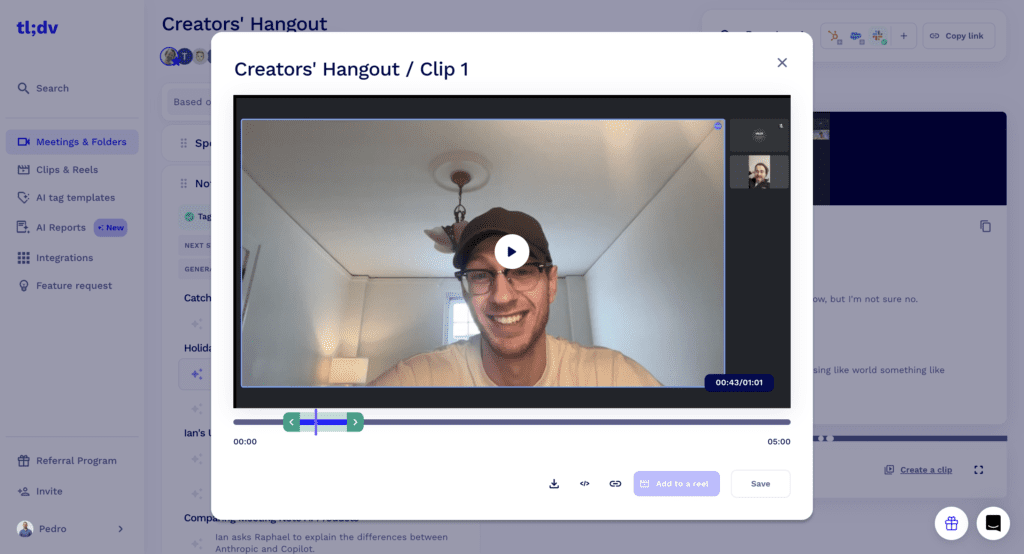
Recording capabilities
| Recording Capabilities | tl;dv (18) | Otter (11) |
|---|---|---|
| Video platforms | 🟢 Zoom, MS Teams, Google Meet | 🟢 Zoom, MS Teams, Google Meet |
| Storage | 🟢 Unlimited on paid plans (free plan keeps recordings 3 months) | 🟢 Unlimited on paid plans |
| Records video | 🟢 | 🟠 Records audio. Can attach the meeting platform’s own video recording (Zoom, Meet, Teams) |
| Concurrent meetings | 🟢 Unlimited | 🟠 Up to 3 (Business Plan) |
| Download recordings | 🟢 | 🟠 Audio only (MP3) |
| Capture slides | 🟢 | 🟢 |
| Viewing analytics | 🟢 | 🔴 |
| Integrated Calendar | 🟢 | 🟢 |
| Recording Editing | 🔴 | 🔴 |
| Reels | 🟢 | 🔴 |
Records Video
tl;dv records video as well as audio, so you can go back and see screen shares, slides and how people reacted, not just what was said.
Otter records audio itself. For video, it can attach the recording from Zoom, Google Meet or Microsoft Teams to the Otter conversation, but only if cloud recording is switched on in that platform. It works, but it depends on your meeting platform’s settings rather than Otter recording the video directly.
Concurrent Meetings
tl;dv can record unlimited meetings at the same time, which helps larger teams with overlapping calls.
Otter’s Business plan joins up to 3 meetings at once, which may not be enough for bigger teams with busy calendars.
Download Recordings
Both tools let you download recordings. tl;dv lets you download the full video, which is useful for archiving or sharing meetings outside the platform. Otter lets you export a conversation’s audio as an MP3, but not video.
Viewing Analytics
tl;dv shows viewing analytics for recordings, so you can see how often a recording was watched and by whom.
Otter doesn’t offer viewing analytics for recordings.
Integrated Calendar
Both tools connect to your calendar. Once connected, they can join and record your meetings automatically, and you can choose which meetings get recorded.
Reels
tl;dv lets you turn highlights from different meetings into reels, which is a quick way to share key moments with people who weren’t there. Otter doesn’t offer a similar feature.
Conversation Intelligence capabilities
| tl;dv (12) | Otter (9) | |
|---|---|---|
| Single Meeting AI Insights | 🟠 10 on Free Plan | 🟢 20/month, 3/meeting on Free Plan |
| Multi Meeting AI Insights | 🟠 10 on Free Plan | 🟢 20/month, 3/meeting on Free Plan |
| Keyword tracking | 🟢 | 🔴 |
| Sentiment Analysis | 🔴 No, as per EU AI Act | 🔴 |
| Key Topic detection | 🟢 | 🟢 |
| Speech Analytics | 🟢 | 🟠 Talk time per speaker only |
| Action item detection | 🟢 | 🟢 |
| Question detection | 🟢 | 🔴 |
Single Meeting AI Insights
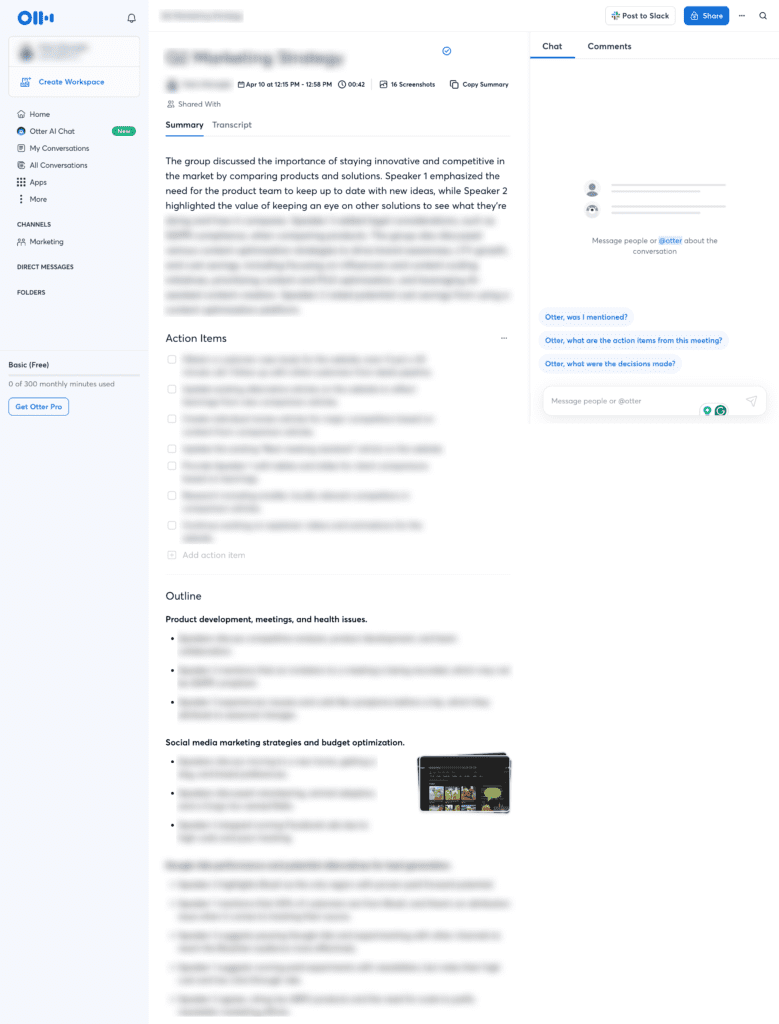
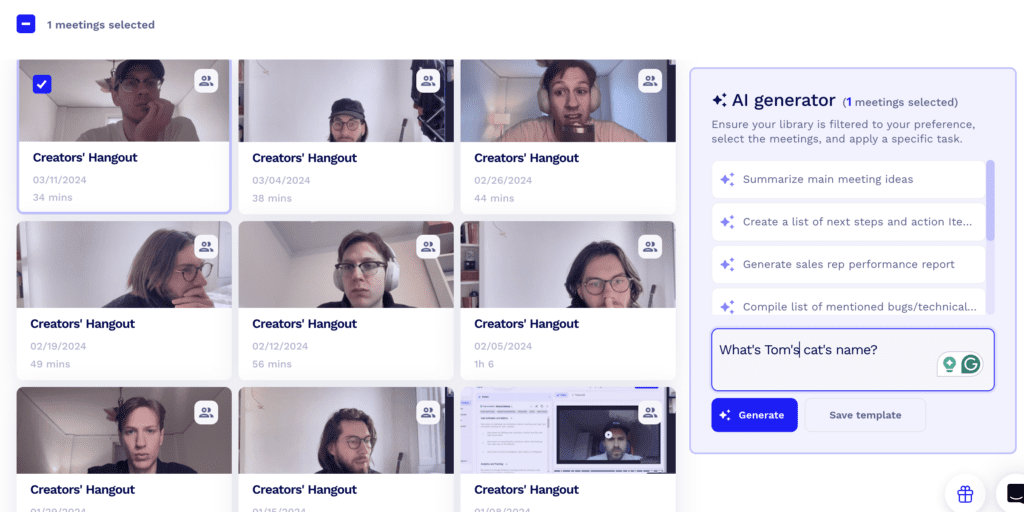
Both tools let you ask AI questions about a meeting. tl;dv’s free plan includes 10 Ask tl;dv queries. Otter’s free plan is more generous here, with 20 AI chat queries a month, up to 3 per conversation. On paid plans, Otter raises that to 50 queries a month on Pro and 200 on Business, while tl;dv Pro removes the limit.
Multi Meeting AI Insights
Both tools can also answer questions across several meetings, which helps you spot trends over time. tl;dv’s free plan includes 10 multi-meeting reports, and paid plans add recurring reports that land in your inbox on a schedule you set. Otter’s free plan gives more queries (the same 20 a month), but it doesn’t offer scheduled reports.

Keyword Tracking
tl;dv lets you choose specific terms, such as a competitor name or pricing objection, and track when they come up across all your meetings. Otter automatically pulls out keywords for each conversation, but you can’t set your own terms to track across meetings.
Speech Analytics
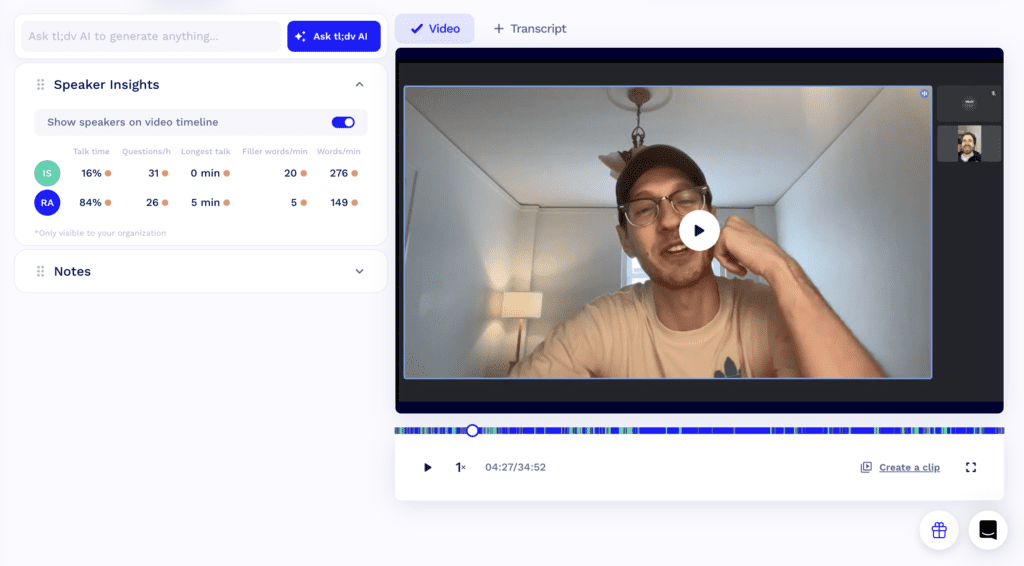
tl;dv gives you detailed speech analytics, including talk time, monologue length and filler word counts, which helps managers see how conversations are going. Otter shows how long each speaker talked as a percentage of the meeting, but doesn’t go deeper than that.
Question Detection
tl;dv automatically picks out questions asked during a meeting, so important ones don’t get lost when you’re writing up notes or following up.
Otter doesn’t detect questions automatically, so you’d need to scan the transcript or ask Otter’s AI chat to find them.
Automation Capabilities
| Automation Capabilities | tl;dv (12) | Otter (7) |
|---|---|---|
| CRM Integrations | 🟢 in Pro plan, fills CRM fields | 🟠 Salesforce and HubSpot in Pro plan, syncs notes rather than filling fields |
| Email Integrations | 🟢 | 🔴 |
| Zapier Integrations | 🟢 in Pro plan | 🟢 in Pro plan |
| Post-Meeting summary email | 🟢 | 🟢 |
| Schedule AI Reports | 🟢 | 🔴 |
| Slack Integration | 🟢 | 🟢 |

CRM Integrations
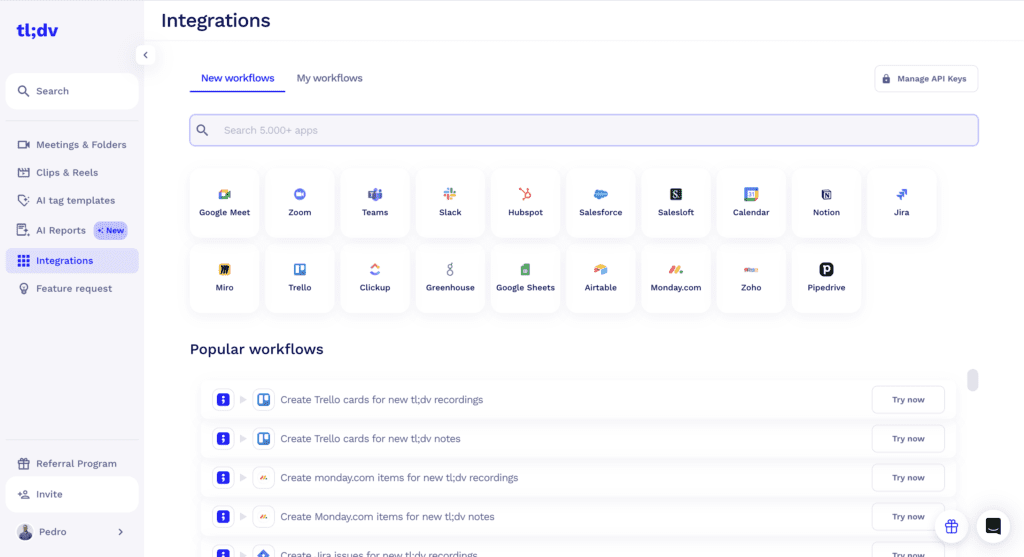
tl;dv offers CRM integrations on its Pro plan. You can build a meeting template around your CRM fields, and tl;dv fills them in automatically after each call, which saves sales and customer success teams from updating records by hand.
Otter also connects to Salesforce and HubSpot on its Pro plan. The difference is what gets sent: Otter syncs transcripts and notes to the CRM record rather than filling in specific fields, so you’ll still need to update deal fields yourself.
Email Integrations
tl;dv connects to your email, so meeting summaries and action items can go straight to your inbox and the right people after each call.
We couldn’t find an equivalent email integration in Otter, although it does send post-meeting summary emails.
Zapier Integrations
Both tools connect to Zapier on their Pro plans. That lets you send meeting data to thousands of other apps, such as project management tools, spreadsheets or messaging apps, without any code.
Schedule AI Reports
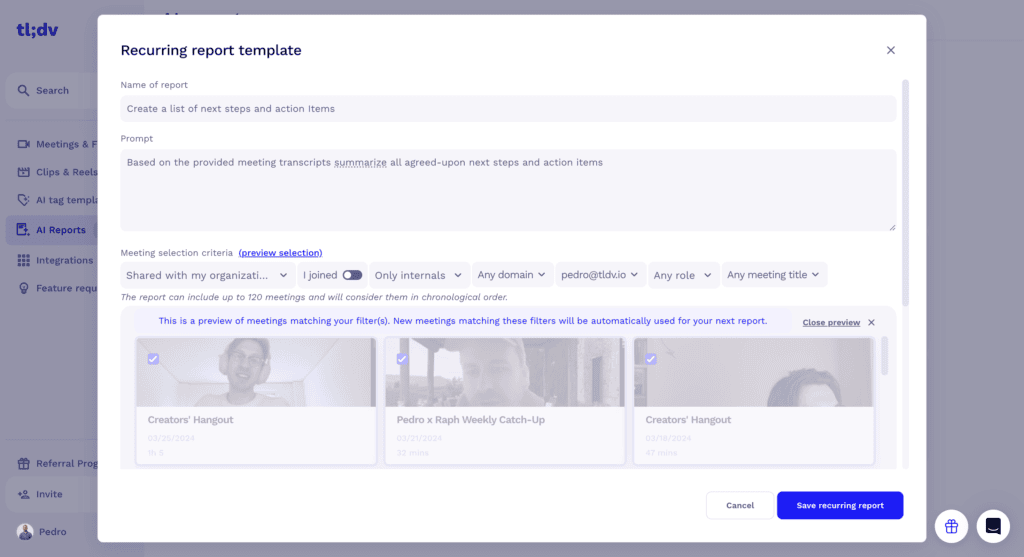
tl;dv lets you schedule AI reports that arrive in your inbox on a regular basis. For example, you could get a report every Monday on which prospects mentioned a competitor last week. It’s a quick way to keep track of trends without opening individual meetings.
Otter doesn’t offer scheduled AI reports. You can ask its AI chat about past meetings, but you’ll need to run each question yourself.
Note-taking capabilities
| Note Taking Capabilities | tl;dv (11) | Otter (12) |
|---|---|---|
| AI Notes | 🟢 | 🟢 |
| Manual notes during calls | 🟢 needs app | 🟢 |
| Tag people in notes | 🟢 | 🟢 |
| Assign tasks | 🔴 | 🟠 assign action items to teammates, but no way to track completion |
| AI Tags / Bookmarks | 🟢 | 🟠 in Enterprise |
| Custom AI Prompts/Chat | 🟢 | 🟢 |
| Comments | 🟠 | 🟢 with Channels |
Assign Tasks
tl;dv doesn’t let you assign tasks from your notes or AI insights. You can tag colleagues on the transcript so they get a link to that moment, but you can’t assign them an action item to follow up on inside tl;dv. Otter lets you assign action items to teammates on its Pro plan. When we tested it, though, there was no way to track whether those tasks had been completed, so the feature is limited.AI Tags / Bookmarks
tl;dv provides AI tags and bookmarks on all its plans, so you can use AI to create meeting notes around the topics that matter to you. Otter offers something similar, called Sales Insights, but only on its Enterprise plan.Comments
tl;dv supports comments, with some limitations. Otter lets you comment within a specific meeting (which it calls a conversation) and adds more ways to collaborate through Channels, where teams can discuss meetings and notes in one place. For teams that work through comments a lot, Otter is the stronger choice here.
Security capabilities
| Security Capabilities | tl;dv (23) | Otter (15) |
|---|---|---|
| Data retention | 🟠 3 months on Free plan, unlimited on all paid plans | 🟠 Customisable in Enterprise plan |
| SOC2 Compliant | 🟢 SOC 2 Type II | 🟢 SOC 2 Type II |
| SAML-based SSO | 🟢 Only on Enterprise | 🟢 Only on Enterprise |
| GDPR Compliant | 🟢 | 🟢 |
| EU AI Act Compliant | 🟢 | 🟢 |
| Uses your data to train AI | 🟢 (No, your data is kept private) | 🔴 (Yes, trains on de-identified recordings and transcripts by default) |
| Private storage | 🟢 Only on Enterprise | 🔴 |
| Anonymised sensitive data sent to LLMs | 🟢 | 🟢 |
| Meeting data chunking and randomizing | 🟢 | 🔴 |
| BAA with LLM providers | 🟢 | 🟢 |
| 0-day data retention policy with vendors | 🟢 | 🟢 |
Data Retention
tl;dv keeps recordings for 3 months on its Free plan and for as long as you like on all paid plans.
Otter lets Enterprise customers set custom retention policies. On other plans, recordings stay on Otter’s servers until you delete them.
SOC2 Compliant
Both tools are SOC 2 compliant with a Type II report, which means an independent auditor has checked their security controls over a period of time.
AI Training on Your Data
This is one of the biggest differences between the two tools. tl;dv doesn’t use your recordings or transcripts to train AI models.
Otter does. Its privacy policy says it trains its own AI on de-identified audio recordings and transcriptions, and this happens by default. Otter says it removes identifying details first, but if your meetings include client, candidate or other sensitive information, check your account’s data settings before you start recording.
Legal Scrutiny
Otter is facing a consolidated federal class action over consent and AI training (In re Otter.AI Privacy Litigation, in the Northern District of California). In August 2026, the court allowed several claims to go ahead, including those under California’s privacy law, the federal wiretap law and Illinois’ biometric privacy law, while dismissing others. No court has ruled on whether Otter broke the law. It does mean anyone recording other people with Otter should make sure everyone on the call knows and agrees.
Private Storage
tl;dv offers private storage on its Enterprise plan, giving large organizations more control over where their data is kept.
Otter doesn’t offer private storage, which matters if your company has strict data residency or security requirements.
Meeting Data Chunking and Randomizing
tl;dv splits meeting data into small, randomized chunks before AI processes it, which makes it much harder to piece together a full conversation from the data sent to AI providers. Otter doesn’t say whether it does anything similar.
Coaching capabilities
| tl;dv (8) | Otter (2) | |
|---|---|---|
| Playbooks Scorecards | 🟢 | 🔴 |
| Custom Playbooks | 🟢 | 🔴 |
| Template Playbooks | 🟢 | 🟠 Live BANT/MEDDIC tracking with Sales Agent (Enterprise) |
| Objection Handling | 🟢 | 🟠 Real-time tips with Sales Agent (Enterprise) |
Playbooks Scorecards
tl;dv scores calls against a sales playbook, so managers can see how closely each rep followed the process and where they need coaching.
Otter doesn’t offer playbook scorecards. On its Enterprise plan, the Sales Agent can track sales methodologies like BANT during a call and give live tips on handling objections, which helps reps in the moment. It doesn’t score calls afterward for managers to review, though.

Custom Playbooks
tl;dv lets you build your own playbooks around the way your team sells or runs customer calls, so coaching reflects your actual process rather than a generic framework.
Otter doesn’t let you create custom playbooks, so there’s no way to customize coaching around your own methodology or goals.
Template Playbooks
tl;dv includes ready-made playbook templates you can adapt, from sales methods like BANT and SPIN to customer success business reviews and management performance reviews. They make it quick to start structured coaching without building everything from scratch.
Otter’s Sales Agent, on its Enterprise plan, can track common sales methodologies like BANT and MEDDIC during a call. It’s limited to sales, though, and doesn’t cover templates for customer success or internal reviews.
Objection Handling
tl;dv analyzes how reps handle objections in their calls and gives tips on how to respond better, which helps sales and customer-facing teams improve over time.
Otter’s Sales Agent also helps with objections, on its Enterprise plan. It flags objections during the call and gives live tips on how to respond, so reps get help in the moment rather than afterward. If real-time coaching matters most to your team, that’s an advantage for Otter.
Admin Capabilities
| Administrative Capabilities | tl;dv (8) | Otter (4) |
|---|---|---|
| Apply auto-record of all meetings in the team members’ calendar | 🟢 | 🟠 Enterprise only |
| Apply auto-share of meetings recorded by team members | 🟢 | 🟠 Enterprise only, members can override |
| Prevent Deletion | 🟢 | 🟠 Enterprise only |
| Admin rights over all recordings | 🟢 | 🟠 Enterprise only |
Apply Auto-record of All Meetings in the Team Members’ Calendar
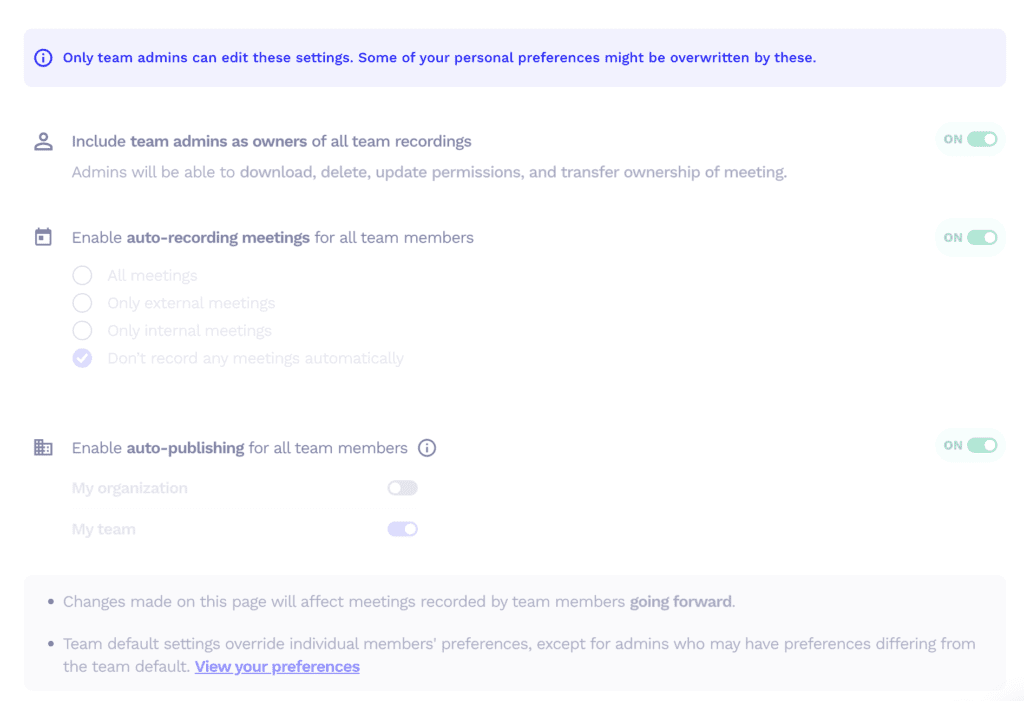
tl;dv lets admins automatically record every meeting on their team members’ calendars, so nothing gets missed and nobody has to remember to start a recording.
Otter offers the same kind of workspace-wide auto-recording, but only on its Enterprise plan.
Apply Auto-share of Meetings Recorded by Team Members
tl;dv lets admins automatically share recordings made by team members, so the right people can see meeting content straight away.
Otter’s Enterprise admins can set a default sharing audience for everyone’s meeting recordings. The setting isn’t locked, though, so individual members can change it for their own meetings.
Prevent Deletion
tl;dv lets admins stop meeting recordings from being deleted, which protects important content from being removed by accident or on purpose.
Otter offers this too, but only on Enterprise, where admins can switch off deletion for everyone in the workspace.
Admin Rights over All Recordings
tl;dv gives admins control over all meeting recordings in the workspace, so they can manage access and sharing in one place.
Otter’s Enterprise admins can also see and manage every conversation their team records, including deleting them. It’s not available on lower plans.
Otter’s Enterprise plan has one more admin feature worth knowing about: admins can make sure every meeting attendee gets an email notification before recording starts.
Organizational Capabilities
| Organizational Capabilities | tl;dv (12) | Otter (11) |
|---|---|---|
| Team Workspaces | 🟢 | 🟢 |
| Meetings Library | 🟢 | 🟢 |
| Smart Filters | 🟢 | 🟠 Filter search by speaker and date (advanced search on paid plans) |
| Global Search | 🟢 | 🟢 |
| Search within meetings | 🟢 | 🟢 |
| Folders | 🟢 | 🟢 |
Smart Filters
tl;dv has smart filters for your meetings library, so you can quickly narrow meetings down by things like date, participants or topic and find the right one without scrolling.
Otter lets you filter search results by speaker and date, with more advanced search on paid plans. It’s useful for tracking down a specific conversation, but it doesn’t work as filters for sorting your whole meetings library.

Support Capabilities
| Support | tl;dv (4) | Otter (2) |
|---|---|---|
| Support in Free Plan | 🟢 chat & email | 🟠 Email in Free plan |
| Priority Support | 🟢 in Pro plan | 🟠 Only on Business |
Support in Free Plan
tl;dv offers support by both chat and email on its Free plan, so you can get help quickly even if you haven’t paid for a subscription. Otter supports free users by email only, which usually means waiting longer for an answer than you would with live chat.Priority Support
Both tools offer priority support, but on different plans. tl;dv includes it from the Pro plan, while Otter only offers it on the more expensive Business plan.Revenue Intelligence Capabilities
| tl;dv (0) | Otter (0) | |
|---|---|---|
| Forecasting | 🔴 | 🔴 |
| Deal execution | 🔴 | 🔴 |
Forecasting and Deal Execution
Neither tl;dv nor Otter includes forecasting or deal execution tools. Both are built around meetings, notes and collaboration rather than managing a sales pipeline.
If you need forecasting built in, you’ll need a dedicated revenue intelligence platform. These tend to cost considerably more per seat than meeting assistants, so they’re usually only worth it for larger sales teams.
A Caveat: MCP Changes What’s Possible
Both tools now offer an MCP server, which lets AI assistants like Claude or ChatGPT read your meeting data directly. That means you can combine meeting insights with data from your CRM and other tools to build your own pipeline reviews, deal summaries or rough forecasts, without buying a separate revenue intelligence platform.
tl;dv’s MCP server is available on its Pro plan and gives read-only access to your meetings, transcripts and notes. Because tl;dv already fills CRM fields and tracks playbooks, it gives an AI assistant more structured sales data to work with. We tested this approach by building a Claude dashboard to manage 400 deals. Otter’s MCP server is available on its free plan.
It won’t replace a dedicated forecasting tool for a large sales team, but it closes much of the gap for smaller ones. And if your main goal is improving how your reps sell, tl;dv’s coaching features already cover that.
Who is it for?
| tl;dv (6) | Otter (3) | |
|---|---|---|
| G2 Rating | 🟢 4.7 (530+ reviews) | 🟠 4.4 (500+ reviews) |
| Ease of set up | 🟢 Generous free plan + Clean UI | 🟢 Easy |
| Localised platform | 🟢 (7 languages) | 🔴 No |
| Best suited for whom | SMB sales and customer-facing teams | Individuals and small teams who want low-cost live transcription |
Both tl;dv and Otter suit a similar audience. tl;dv adds more for managers, particularly sales managers, thanks to its coaching features, scorecards and reports across meetings.
Otter is a good fit for people who mainly want live transcription and straightforward notes at a low price. Some of its more advanced features, including video replay and the Sales Agent’s live coaching, are only available on its Enterprise plan.
Both tools are easy to set up and both have free plans, but the free plans are generous in different ways. tl;dv gives you unlimited recordings and transcripts, with AI notes capped at your first 10 meetings. Otter caps transcription at 300 minutes a month and 30 minutes per meeting, but gives you more AI chat queries.
On G2, tl;dv scores 4.7 out of 5 from more than 530 reviews, compared with Otter’s 4.4 from more than 500.
For teams outside the English-speaking world, tl;dv has the edge. Its interface is available in 7 languages and it transcribes in 30+, while Otter now transcribes in six languages.
Verdict: tl;dv vs Otter – which one is the best for you?
| tl;dv | Otter | |
|---|---|---|
| Transcription | 20 🟢 | 18 |
| Recording | 18 🟢 | 11 |
| Conversational Intelligence | 12 🟢 | 9 |
| Automation & Integrations | 12 🟢 | 7 |
| Note-taking | 11 | 12 🟢 |
| Security | 23 🟢 | 15 |
| Coaching | 8 🟢 | 2 |
| Admin | 8 🟢 | 4 |
| Organizational | 12 🟢 | 11 |
| Support | 4 🟢 | 2 |
| Revenue Intelligence | 0 | 0 |
| Other | 6 🟢 | 3 |
| Total | 134 🟢 | 94 |
Which AI meeting assistant is right for you comes down to what your team needs. tl;dv scores higher overall, 134 to 94, and suits SMB sales teams that want strong transcription, full video recording, conversational intelligence and coaching in one tool.
tl;dv leads on the things that matter most to growing teams: transcription in 30+ languages, unlimited recordings and transcripts, stronger security (including a clear commitment not to train AI on your meetings), and more control for admins. It can also record with or without a bot. That’s useful now that Google Meet flags third-party notetaker bots, although Otter’s desktop app offers bot-free recording too.
Otter is closer than the old version of this comparison suggested. It now transcribes in six languages, connects to Zapier and CRMs on its Pro plan, and wins on note-taking thanks to task assignment and team comments. It’s the better pick if your priority is live, real-time transcription at a low price, with Pro starting at $8.33 a month billed annually. Keep in mind that Otter trains its AI on de-identified meeting data by default, and that several of its more advanced features, including video replay and live sales coaching, are only on its Enterprise plan.
For sales-led teams that need multilingual support, recordings and coaching, tl;dv is the better choice. It covers meeting transcription and organization, and adds insights across meetings and coaching tools that help teams improve over time.
If you mainly need low-cost, real-time transcription and simple notes, Otter is a solid option.
Both tools are good at what they’re built for. For most teams that want more than a transcript, tl;dv’s wider feature set and higher G2 rating make it the stronger all-round choice.
FAQs About tl;dv vs Otter
What are the main differences between tl;dv and Otter.ai?
- tl;dv (stands for “too long, didn’t view”) is an AI notetaker that goes beyond the simple recording, transcribing and summarizing your team’s meetings.
- tl;dv provides insights from meetings that are relevant across various teams and individuals within your organization. It seamlessly integrates with Customer Relationship Management systems (CRMs), ticketing systems, knowledge management platforms, and over 5000 other tools.
Is Otter.ai free?
Yes. Otter’s free Basic plan includes 300 transcription minutes a month, up to 30 minutes per conversation, 20 AI chat queries and 3 lifetime file imports. Pro costs $8.33 a month billed annually, or $16.99 monthly. tl;dv’s free plan includes unlimited recordings and transcripts, kept for three months, with full AI notes on your first 10 meetings.
What languages does Otter.ai support?
Otter transcribes in six languages: English, Spanish, French, German, Japanese and Simplified Chinese. That’s a big step up from its English-only days, but still far fewer than tl;dv, which transcribes in 30+ languages and offers its interface in 7. For multilingual teams, or meetings that switch languages, tl;dv covers much more ground.
Can Otter record meetings without a bot?
Yes. Otter’s desktop app for Mac and Windows records meetings without a bot joining the call, and OtterPilot can still join as a bot when you prefer. tl;dv offers the same choice: record with its bot or bot-free through its desktop app. The difference is that tl;dv’s bot recordings include full video, not just audio.
Does Otter use your data to train AI?
Yes, by default. Otter’s privacy policy says it trains its own AI on de-identified audio recordings and transcriptions. It’s also facing a consolidated class action over consent and AI training, although no court has ruled on those claims. tl;dv doesn’t use your recordings or transcripts to train AI models, which matters for client and candidate calls.
Is tl;dv better than Otter?
For most teams, yes. tl;dv scores 134 to Otter’s 94 in our comparison, with full video recording, far more languages, CRM automation, coaching and stronger privacy defaults. Otter is still the better pick if you mainly want low-cost, real-time transcription, and it edges ahead on note-taking thanks to task assignment and team comments.