Skip to content





TL;DR of the Otter.ai Lawsuit
What’s happening: Otter.ai is facing four consolidated lawsuits in federal court over how its AI notetaker records participants without their explicit consent. Fireflies.ai has two separate biometric privacy suits filed against it in Illinois. Neither case has concluded.
The category risk: The lawsuits target a design pattern, not an isolated mistake by two companies. Any AI meeting recorder that joins and records without affirmative consent from everyone in the room is operating in the same territory these cases are now testing in federal court.
What compliance actually requires: Knowing what your tool does by default and whether participants can genuinely decline, not just see a disclaimer in a calendar invite.
What this piece is not: Legal advice. If you operate in an all-party consent state or your work touches biometric data, talk to a lawyer who knows your situation. This piece can explain the allegations and what they mean for anyone running recorded calls. It cannot tell you what your exposure is.
The Otter.ai lawsuit filed in August 2025 is not really about Otter.ai.
When a lawsuit targets not just one product but the way an entire category of products works by design, every user in that category has a reason to pay attention.
I’m not a lawyer, and nothing in this piece is legal advice. If you’re based in California, Illinois, or another state with specific consent laws around call recording, the only person qualified to tell you what your actual exposure looks like is a legal professional who knows your situation. What this piece can do is explain the allegations and what they mean for anyone running recorded calls.
The plaintiffs suing Otter allegedly never had an account. They were in a meeting where someone else had OtterPilot running, and that was enough to end up in a recording.
That’s the design question. But it doesn’t belong to Otter alone. It applies to any AI meeting recorder that joins a call and starts capturing audio without first getting affirmative consent from every participant in the room. Whether that describes your current setup is worth knowing now, before a court ruling firms up the legal standard and makes the answer more expensive to get wrong.
What is the Otter.ai lawsuit?
The Otter.ai lawsuit is a consolidated federal class action currently pending in the Northern District of California. It bundles four separate suits filed against Otter between August and September 2025.
The first, Brewer v. Otter.ai Inc., was filed August 15, 2025, by Justin Brewer, a California resident who alleges he had never signed up for Otter. His February 2025 sales call was recorded because another participant on the call had OtterPilot running. Brewer didn’t know the bot was there. He had no account, no privacy policy to accept, and no opportunity to decline. The recording happened anyway.
Three more cases followed within weeks: Walker (filed August 26), Theus (September 3), and Winston (September 10). Judge Eumi K. Lee consolidated all four on October 22, 2025. A consolidated complaint was filed on December 5. Interim co-lead counsel came from Levin Law, Clarkson Law Firm, and Werman Salas.
What the plaintiffs are actually alleging
The core complaint across all four cases is the same. OtterPilot, now rebranded as Otter Meeting Agent, syncs with a user’s calendar and auto-joins any scheduled call as a visible participant. According to the complaints, it records audio, transcribes in real time, takes screenshots, and captures speaker voiceprints. Non-account holders get none of this disclosed to them before the recording starts.
The Walker case focuses specifically on voiceprints. It alleges that Otter captures and stores biometric identifiers during video calls, then uses those voiceprints to identify the same speakers across future meetings. According to the complaint, people who have never created an Otter account are being enrolled in a biometric identification system they don’t know exists.
The Theus case adds something that doesn’t get much coverage: the complaint alleges Otter sends transcripts and promotional emails without the knowledge or consent of participants. According to the Theus complaint, you don’t need an Otter account to end up on their mailing list. Being in a recorded call is enough.
The Winston case brings the sharpest detail. That complaint alleges Otter sends follow-up emails containing partial transcripts and screenshots to all meeting invitees, including people who never attended the call. And the complaint notes that Otter only offers the option to notify non-user attendees that they’re being recorded on its Enterprise plan, the most expensive tier available.
The legal claims run across the federal Electronic Communications Privacy Act, California’s Invasion of Privacy Act, Illinois’s Biometric Information Privacy Act, and the Computer Fraud and Abuse Act. The damages exposure under these statutes is significant. ECPA allows for the greater of $10,000 per violation or $100 per day. CIPA runs to $5,000 per violation. BIPA adds $1,000 for negligent violations and $5,000 for intentional ones. Otter’s own December 2025 press release put its user base at more than 35 million, with over a billion meetings processed. The math is not comfortable.
Otter’s defense
Otter has not made a formal public statement about the litigation. In a motion to dismiss reply brief filed in April 2026, the company denied any interception had occurred, and argued that the plaintiffs had not made a plausible case on the core legal elements.
The company’s other position is its terms of service, which tells accountholders to make sure they have the necessary permissions before deploying the bot. Consent, in other words, is the user’s responsibility.
Not all privacy lawyers are convinced by that position. Writing for the Jackson Lewis Workplace Privacy Report, attorney Joseph Lazzarotti described the complaint’s framing of Otter as “an unauthorized third-party eavesdropper” and called the single-consent model “risky in states like California that require all-party consent.”
CEO Sam Liang gave the closest thing to a public response in a TechCrunch interview on October 7, 2025. “If they accuse us, then they could accuse everyone else, all the tools you heard about doing meeting notes. My view is that we are on the right side of history,” Liang told TechCrunch.
He’s not wrong that the category is exposed. The motion-to-dismiss hearing is scheduled for May 20, 2026, in Courtroom 7 of the San Jose federal courthouse. Judge Lee’s ruling will be the first federal test of whether decades-old wiretap statutes reach an AI bot sitting in the corner of a video call.
What is the Fireflies.ai lawsuit?
The Fireflies.ai lawsuit is a separate case from the Otter litigation, built on a different legal theory. Where the Otter cases center on wiretap statutes, the Fireflies complaints are BIPA claims. And BIPA is a different kind of problem.
Cruz v. Fireflies.AI Corp., No. 3:25-cv-03399, was filed December 18, 2025, in the U.S. District Court for the Central District of Illinois. The plaintiff, Katelin Cruz, never had a Fireflies account. She joined a virtual meeting hosted by an Illinois nonprofit that had enabled Fireflies. The bot joined the call. And when it did, it generated a voiceprint of her.
Illinois’s Biometric Information Privacy Act defines voiceprints as biometric identifiers. Fireflies’ “Speaker Recognition” feature, which identifies different speakers in meetings and audio files, necessarily generates them. Cruz alleges she never consented to having a biometric profile created from her voice. She never even knew it was happening.
The three BIPA violations alleged
The complaint sets out three specific failures. First: Fireflies had no publicly available policy for how long it retains biometric data or when it destroys it. Second: participants were never told in writing that their voiceprints were being collected, what they’d be used for, or how long they’d be kept. Third: Fireflies collected voiceprints without getting a written release from anyone in the meeting, including people who had never created an account.
All three are requirements under BIPA. All three, the complaint alleges, were ignored.
Damages sought are $1,000 per negligent violation and $5,000 per reckless or intentional violation, plus attorneys’ fees and injunctive relief. A second suit followed shortly after, in March 2026. Fricker v. Fireflies.AI Corp., Case No. 1:26-cv-02675, was filed in the Northern District of Illinois by plaintiff Ethan Fricker, represented by Werman Salas, the same firm acting for plaintiffs in the Otter litigation. The allegations are substantially the same.
Fireflies has not issued a public statement in response to either case. Its terms of service, like Otter’s, places responsibility for obtaining participant consent on the account holder.
Why this is a harder problem than the Otter cases
The Otter litigation is fundamentally a consent question: did participants know they were being recorded? The Fireflies cases go further. Even if a participant knows a recording is happening, they may not know their voice is being converted into a biometric identifier and retained indefinitely. Recording a meeting and building a biometric database from the people in it are not the same act.
BIPA is also one of the most litigated privacy statutes in the US. Illinois courts have consistently upheld it, and the statutory damages don’t require plaintiffs to prove actual harm, which makes it an effective vehicle for class action litigation. Cruz attended a meeting at a nonprofit, not a sales call. Fricker’s claim covers any Illinois resident whose voiceprint was collected in the five years preceding the filing. The exposure is not limited to any industry or call type.
One broader note from the SGR Law analysis of the Cruz case: BIPA liability isn’t always limited to the vendor named in the complaint. Organizations that deploy or enable AI notetakers in meetings involving Illinois residents can, in some circumstances, find themselves drawn into the same legal territory. It’s worth being aware of, particularly if your team regularly records calls with external participants across state lines.
What do these lawsuits mean for AI meeting recorder users in 2026?
At the time of writing (30 April 2026), neither case has concluded. No court has ruled that using an AI meeting recorder is illegal, and no individual user has been held personally liable for running one. That’s worth saying clearly before anything else.
But “no ruling yet” is a different thing from “no risk.” What these cases have done is put the design assumptions of the entire category under federal scrutiny for the first time. Anyone running recorded calls has good reason to pay attention now, while there’s still time to act on them.
The consent gap is the issue
Both the Otter and Fireflies cases turn on the same underlying problem: participants ended up in recordings, without any meaningful opportunity to say no. The plaintiffs weren’t rogue actors trying to catch companies out. They were people on ordinary calls who happened to be in a room where someone else had a bot running.
What the May 20 hearing begins to answer is whether the person who enabled the bot bears responsibility for everyone else in the room, or whether responsibility sits with the platform. Otter’s terms of service place responsibility for obtaining consent on the account holder. The plaintiffs’ position is that a product designed to auto-join and auto-record without affirmative all-party consent is a problem by design, regardless of what the terms of service say.
That question doesn’t only apply to Otter. Any AI meeting recorder that joins automatically and starts capturing without first collecting explicit consent from every participant is operating in the same territory. The tool name on the bot is irrelevant. The design pattern is what’s being tested.
What this means if you’re running sales calls
Sales teams are in a particular spot here. High call volume, external prospects who haven’t agreed to anything beyond a calendar invite, participants dialing in from states with all-party consent requirements, discovery calls where the person on the other side is almost certainly not a user of your notetaker. Every one of those calls is a scenario where the consent gap is real.
The generic “this meeting may be recorded” disclaimer in a calendar description is not the same as affirmative consent. It may not satisfy the requirements in California, Illinois, or other all-party consent states. And in a remote sales environment, participants can be anywhere. Nobody is tracking participant location in real time.
Do I need consent to record a Zoom call?
Yes. The specifics vary by where your participants are based, but the direction is the same everywhere: participants should know they’re being recorded and have a real opportunity to say no before it starts.
Zoom’s own recording notification doesn’t cover this. The banner that tells participants a recording is in progress is a notification, not a consent mechanism. Participants can’t decline it. They can leave the call, but that’s not the same as being given a genuine choice before the recording starts. The same applies to Google Meet, Microsoft Teams, and any other platform with a built-in recording alert. Better than nothing. Not consent.
What actually satisfies the requirement is giving every participant the ability to say no before the recording begins, with a real consequence if they use it. Not a banner. Not small print. A screen, before they enter the room, with a decline option that blocks the recording entirely if they choose it.
Do these AI meeting recorder lawsuits apply outside the US?
The Otter and Fireflies cases are US litigation, but the consent question they’re testing doesn’t stop at the border. Where you’re based changes which legal framework applies. It doesn’t change the underlying requirement.
If you’re based in the US
The federal baseline is one-party consent, meaning one person on a call can legally record it. But all-party consent states, including California, Illinois, Maryland, Connecticut, Pennsylvania, Washington, Oregon, Montana, and New Hampshire, require everyone on the call to consent. In a remote environment where participants can be anywhere, you don’t always know which standard applies. The simplest answer is to stop trying to track it and just ask every time. Verbal confirmation at the start of a call, or a tool that collects consent before anyone enters the room, removes the guesswork entirely and puts you in a better position regardless of where your participants are dialing in from.
If you’re based in the EU
The Otter and Fireflies cases are US litigation, filed under US statutes. They don’t apply to you directly. But you’re not operating without obligations. Under GDPR, recording a call involves processing personal data, which requires a lawful basis. Consent is the cleanest basis available, and it needs to be freely given, specific, and unambiguous before processing starts. A calendar invite with small print doesn’t meet that standard. The destination is the same. The route is just different.
EU hosting doesn’t settle consent: bot-free tools like Jamie still lean on you or their consent emails (see the Jamie AI breakdown).
If you’re outside the US and EU
Recording consent laws vary significantly by country, and regulators everywhere are moving in the same direction: more explicit consent, not less. The US cases are the furthest along, but they won’t be the last. If your jurisdiction hasn’t addressed AI meeting recorders yet, it’s probably a matter of when, not whether.
A note on where we are with this
This area of AI law, and particularly around AI meeting recorders, is moving fast. tl;dv is monitoring the Otter and Fireflies cases closely, and we’ll update this piece as the situation develops. The May 20 hearing is the next significant milestone. We’ll reflect the outcome here.
Update, September 2026: The consent question has now reached bot-free tools too. A proposed class action, Chamberlain v. Granola, Inc., was filed on July 30, 2026, alleging that Granola captures meetings without most participants knowing and uses that data to train its AI by default. No court has ruled on it. If you use Granola and want to compare tools with different consent and data defaults, see our roundup of Granola alternatives.
Ultimately, the lawsuits don’t require you to stop recording calls. They require you to think about how you’re collecting consent before you do. Specifically: does your current tool have a mechanism that lets participants genuinely decline before a recording starts? Not a notification. Not a disclaimer. A mechanism with a real no option, where declining actually blocks the recording.
How to record meetings compliantly in 2026
There’s no single tool that makes this completely automatic, and anyone telling you otherwise is overselling. What compliance actually requires is a consent mechanism that gives participants a genuine choice before a recording starts, and a system that respects that choice when they decline. Here’s how to build that in practice.
The general principles, whatever tool you use
Before getting into tl;dv specifically, the basics apply regardless of what you’re running:
Get consent before the recording starts, not during it. A verbal “is everyone okay if I record this?” at the top of the call is better than nothing, but it’s not airtight. People feel social pressure to say yes. A written, pre-meeting consent screen is harder to argue with in court.
Make sure declining is a real option. If participants can’t say no without consequences, losing their seat in the meeting, being excluded from the call, it isn’t genuine consent. The mechanism needs to work both ways.
Don’t manually start a recording before everyone has responded. This one matters more than it sounds, and we’ll come back to it.
Document it. Know which calls were recorded, when consent was collected, and what your retention policy looks like for those recordings.
How tl;dv’s consent collection feature works
tl;dv has a built-in consent collection feature. It is not on by default. You have to switch it on, and it has specific requirements to function correctly.
When enabled, tl;dv replaces the meeting room link in your calendar event with a redirect link. External invitees clicking that link land on a consent screen before they can enter the meeting room. They can accept or decline. If they decline, they can still join the meeting, but tl;dv is blocked from recording it, automatically or manually, for that entire session. There is no override.
If any invitee hasn’t responded yet when the meeting starts, recording is blocked until they do. Consent cannot be implied. The system waits.
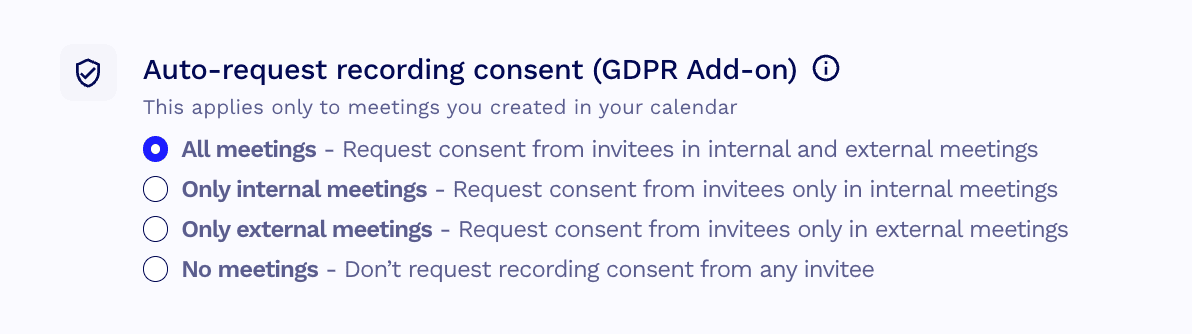
To enable it, go to: Settings > Personal Settings > Preferences > Automations. Toggle on automatic consent collection. If you’re a team admin, you can also enable it across your whole team from the same settings area, though note the admin toggle doesn’t apply to you personally. You’ll need to enable your own separately.
Two requirements before it will work:
- You need a fully synced calendar integration. If your calendar isn’t connected to tl;dv, the feature has no way to pull your meeting details or replace the room link.
- Auto-recording needs to be enabled for calendar events.
One critical limitation: if you manually start a recording before the scheduled event start time, the consent collection is bypassed entirely. The feature only works for meetings that are automatically recorded. Starting early skips it.
Your compliance checklist for recording meetings with tl;dv
tl;dv is a European product, built from day one under GDPR. Consent isn’t a feature that was bolted on in response to a lawsuit. It’s been part of how the product thinks about recording from the start. The lawsuits covered in this piece are US-specific, and the legal culture around recording in the US is genuinely different from most of the world. But the underlying principle, that participants should know they’re being recorded and have a real opportunity to say no, is one tl;dv has always designed around.
If you’re a tl;dv user, here’s what to check today.
- Enable consent collection. Go to Settings > Personal Settings > Preferences > Automations and toggle on automatic consent collection. If you’re a team admin, enable it for your team from the same screen, then enable it for yourself separately. The admin toggle doesn’t cover you.
- Confirm your calendar is fully synced. Consent collection only works if tl;dv can read your calendar events and replace the meeting room link. If your calendar integration isn’t active, the feature doesn’t fire. Check it’s connected before your next external call.
- Confirm auto-recording is enabled. The consent screen only appears for automatically recorded meetings. If auto-recording is off, the consent flow won’t trigger.
- Don’t manually start a recording before the event start time. This bypasses consent collection entirely. If you start recording early, the redirect link is irrelevant. Wait for the scheduled start.
- Don’t record if someone declines. If a participant declines consent, tl;dv blocks recording automatically. Don’t work around it. That’s the point.
This checklist is not legal advice. It reflects tl;dv’s consent feature as documented in the help centre at the time of writing. Your obligations depend on where you and your participants are based. If you’re unsure, talk to a legal professional.
At tl;dv, consent has always come first
At the heart of it, AI meeting recorders exist to help. Meetings are busy, chaotic, and most people in them are already juggling more than they should be. The legal picture we’ve covered here is US-specific and still developing. What’s accepted, legally and etiquette-wise, is moving fast and we’re watching it closely.
What doesn’t move is the principle. At tl;dv, we build on the assumption that nobody should end up in a recording they didn’t agree to. Not because a court said so. Because it’s the right thing to do. We ask ourselves what we’d expect if we were on the other side of the call, and the answer is always the same: to know, and to have a real choice.
That’s what we’ll keep building toward, whatever the law catches up to next.
FAQs about AI meeting recorder lawsuits
Is Otter.ai illegal?
Not currently. No court has ruled that Otter.ai or its recording practices are illegal. The consolidated class action, In re Otter.AI Privacy Litigation, is still working through the federal court system. A motion-to-dismiss hearing is scheduled for May 20, 2026. Until a ruling is issued, Otter.ai remains an active product. What the lawsuit is testing is whether its design, auto-joining and recording without affirmative consent from all participants, violates federal wiretap law and state privacy statutes. That question hasn’t been answered yet.
What should I do before recording a meeting?
Tell participants a recording is happening and give them a genuine opportunity to say no before it starts. A verbal heads-up at the top of a call is better than nothing, but a pre-meeting consent screen that participants interact with before entering the room is more defensible. If you’re using tl;dv, the consent collection feature handles this automatically once it’s switched on. Make sure your calendar is synced, auto-recording is enabled, and you’re not manually starting a recording before the scheduled event start time, which bypasses consent collection entirely.
Does tl;dv record without consent?
It depends on how you’ve set it up. tl;dv has a built-in consent collection feature, but it isn’t on by default. Without it enabled, auto-recording will run as normal. With it switched on, tl;dv won’t record until every participant has actively consented, and a single decline blocks recording entirely with no override. If recording compliantly matters to you, enabling consent collection is the step that makes the difference. You can find out how to do that here.
A note on consent: Regardless of which tool you use or how it’s configured, you should always get explicit consent from every participant before recording a meeting. Not because a court has told you to. Because it’s the right thing to do.
What happens if someone declines tl;dv consent?
They can still join the meeting and participate as normal. tl;dv is simply blocked from recording that session. The message you’ll see is: “tl;dv recording is disabled because some participants declined recording consent.” The meeting goes ahead. The recording doesn’t.
Is tl;dv GDPR compliant?
Yes. tl;dv is a European product, based in Germany, built under GDPR from the start. It is SOC2 compliant, stores data in EU data centers, and does not use customer data to train its AI. GDPR compliance covers how personal data is collected, stored, and processed within the EU framework. It doesn’t automatically resolve questions under US state law, which operates under different statutes. If your specific concern is US consent law or biometric privacy legislation, GDPR compliance is relevant context but not a complete answer to those questions.