Skip to content




TL;DR: Is Sybill Worth It?
What it is: An AI sales assistant built for B2B account executives. It records calls, generates summaries structured around frameworks like MEDDPICC, and offers field-level CRM autofill on the Business plan.
Best for: Sales teams running Zoom with HubSpot, Salesforce, Zoho, or Dynamics 365, a work email address, and a budget for $90 per user per month.
Not for: Google Meet teams, freelancers and consultants on Gmail, smaller teams using Notion or Airtable as a CRM, or anyone who needs bot-free recording on a non-Apple machine.
Verdict: The call intelligence is genuinely good. The problem is that the feature Sybill is built around requires three things simultaneously that a lot of the people reading this review won’t have. Read the pricing section before you commit to anything.
Pricing: Free / Pro at $30/user/month / Business at $90/user/month.
I think Collin from Sybill has a bit of a thing for me.
I mentioned this to my colleagues at tl;dv and they assured me it’s just “marketing,” but man, he emails a lot. “I’m lazy and I’m busy.” “I see London, I see France.” An April Fools post about taking a role at Gong, designed to trigger some kind of loyalty panic in the subscriber list. There was one about pipeline bloat, one about stopping rep turnover, and one that opened with a sports metaphor despite the sender’s stated ambivalence about sports.
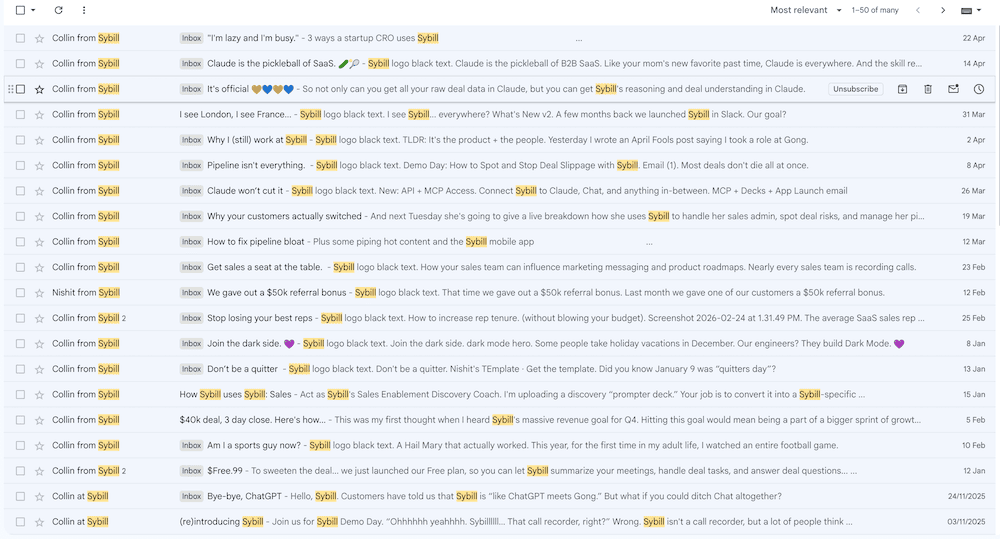
It’s kind of sweet, honestly. But I’m married, Collin.
I trialled Sybill a while back and came away with a pretty specific opinion. But the product has changed, and more notably, the messaging has changed. The “call recorder that also does some AI stuff” energy is gone. Sybill is now firmly positioning itself as the Gong killer that won’t make your CFO cry. That’s a different claim, and it deserves a fresh look.
So at 6am on a Tuesday, before the working day started, I signed up and spent three hours testing it properly.
Before I go further: tl;dv is a client of mine. They’re Sybill’s direct competitor, and I write for them regularly. You deserve to know that. I’ll be recommending tl;dv in the comparison section. I’ll also tell you where Sybill is genuinely better, because in some cases, it might actually be. The piece doesn’t work if I’m not honest about both.
Here’s what I specifically tested: Magic Summaries, Ask Sybill, CRM autofill, transcription in English and French, bot-free recording, and the onboarding flow. I signed up with a Gmail address, which turned out to matter more than I expected. I’ll get to that shortly.
What is Sybill AI?
Sybill is an AI meeting assistant that has pivoted to be specifically for B2B sales teams. It records and transcribes calls, generates summaries structured around sales frameworks like MEDDPICC and BANT, drafts follow-up emails, and offers field-level CRM autofill on its Business plan.
It also analyzes participant behaviour using video signals like facial expressions and engagement levels, a feature it calls behavioral AI. Plans start at free, with the Business plan at $90 per user per month.
But Sybill is not really a meeting recorder. The pitch is more specific than that. The biggest time drain for an account executive isn’t the call, it’s the hour that follows it. The CRM update. The follow-up email. The “wait, what did they actually say about budget?” moment three days later when the deal has gone quiet and your notes say “TBC.” Something we have covered in our recent Sales Memes article.
Many tools in this space are transcription tools with a summary feature added later, like a well-dressed intern. Sybill is trying to be the thing that does the actual admin, so you don’t have to.
Whether it pulls that off is a different question. And the answer has some important caveats. We’ll get to those.
How Easy Is Sybill to Set Up?
Pretty easy, right up until it isn’t.
Sign-up took two minutes via Gmail. Had to manually invite the bot rather than it joining automatically. Small friction, but worth noting for a tool that promises frictionless capture. I’ll be honest: I am not a Zoom person. I live in Google Meet, which means navigating Zoom to locate an invite link is not the natural, muscle-memory action it probably is for someone whose entire working life runs through it. I’m sure if you’re Zoom-native this takes about four seconds. I am not the most reliable narrator on this particular point. (For what it’s worth, tl;dv’s desktop app does bot-free recording across whatever platform you actually use, so I’ve never had to think about this particular problem before. Smug? Me? Yes.)
Once the bot was in, it did its job without fuss. The calendar connection, though, didn’t pull in any of my meetings. I connected it, it accepted, and then nothing appeared. Worth noting if you’re expecting your upcoming calls to populate automatically from day one.
So: minor navigation friction that is almost certainly a me problem, and a calendar sync that didn’t behave as expected. Not a disaster, but not the seamless out-of-the-box experience the onboarding suggests.
Then I tried to connect a CRM. I have my own Notion that I run my business from, complete with pipelines,
“Sign up with your work email to connect to your CRM. You are currently using a non-work email account.”
The only option on screen was “Sign out and switch email.” Not “connect anyway and verify later.” Not “use a limited version while you sort this out.” Just: go away and come back differently.
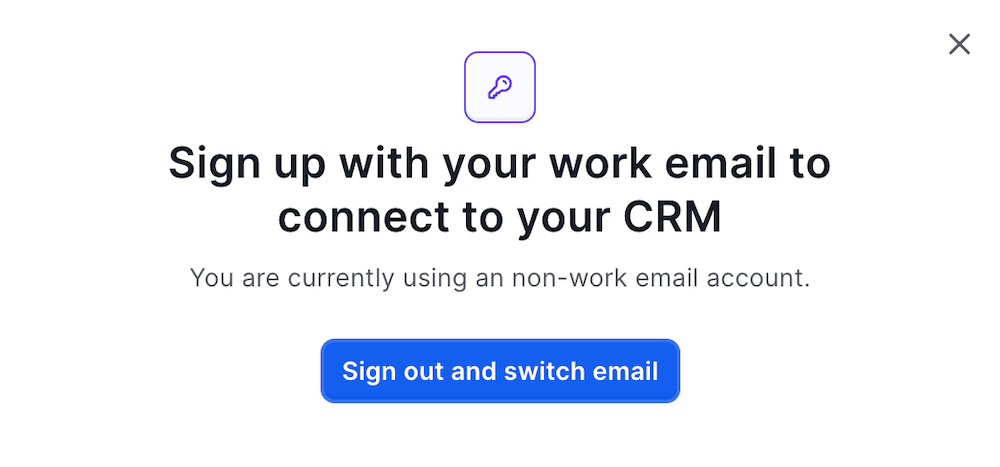
Here’s why that matters. CRM autofill is not a secondary feature on Sybill. It’s the headline, the thing on the homepage, the reason the copy says it saves you fourteen hours a week. And you cannot access it with a Gmail address, full stop. It doesn’t matter if you have a CRM connected to that Gmail address. It doesn’t matter if you’re a freelancer or a founder running your entire sales operation through a personal Google account. The wall is the wall.
That’s the first layer of what I’m calling the Three-Layer CRM Problem. There are two more. I’ll get to them in the pricing section, but file this away now: if you’re planning to test Sybill properly, use a work email from the start. Don’t make my mistake.
What Do Sybill’s Magic Summaries Actually Look Like?
This is the feature that made me sit up and think, right, okay. I see what you’re doing.
Testing at that hour does present one logistical problem: there’s nobody else awake to have a call with. So I ran a solo discovery call roleplay on Zoom. One voice, both sides. Me as an AE for a revenue intelligence platform, and also me as Sophie, a sales director at a software company in Reading who has twelve reps running eighty discovery calls a week and absolutely no idea what’s being said on any of them. It’s a throwback to the great actress I could have been. Wasted, genuinely.
Sophie had real problems. Deals dying in stage two with no explanation. A competitor win they only found out about after the fact. A VP named Richard who signs off anything over fifteen thousand annually and has told her to sort it out by end of Q2.
Sybill pulled it correctly.
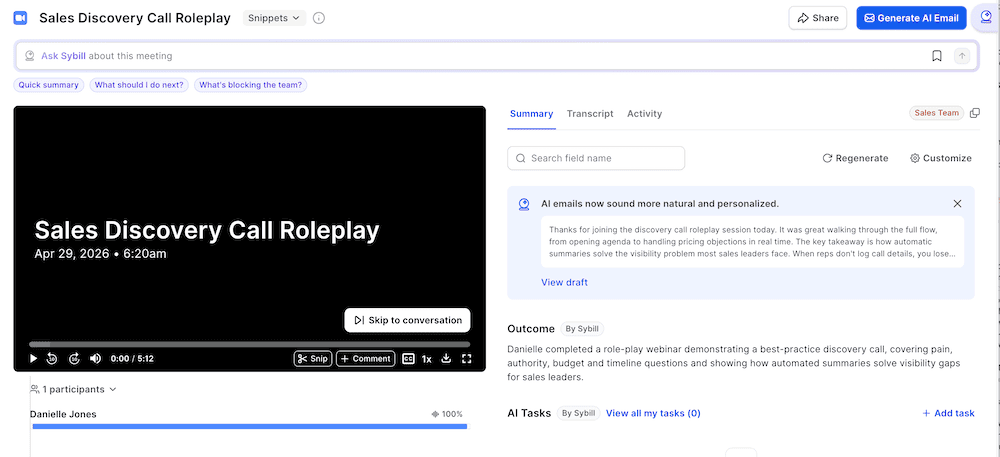
MEDDPICC elements captured. Pain quantified. Budget and authority identified. The pricing objection noted and the rep’s reframe logged. And then this, surfaced automatically in the summary: “No confirmed next step.”
That detail right there is the difference between a transcription tool and actual sales intelligence. A sales manager could see that flag before the rep had sent a single follow-up email. Not after the deal went quiet. Not after stage two. Before. That’s the version of this product that justifies the marketing.
It also built a participant profile on Sophie from the call data alone, noting her pain points, her buying authority, her timeline. It’s designed to do that for real prospects. On a fictional character I invented on the spot, it still worked.
The honest caveat: I was playing both sides, one voice, with a structured conversation that had clear MEDDPICC coverage throughout. Real discovery calls are messier. Buyers go off topic, talk over each other, circle back to things they said twenty minutes ago. I couldn’t test how Magic Summary handles chaos, because my test call wasn’t chaotic. Worth bearing in mind.
What Is Ask Sybill?
Ask Sybill is essentially a ChatGPT for your deal history. You can query across all your recorded calls in natural language: what objections came up most in competitive deals this quarter, which deals have gone quiet since stage two, what did this specific prospect say about budget three weeks ago. It’s designed to be the thing you turn to instead of scrolling back through a transcript at 8pm trying to remember what was actually agreed.
I tested it on the Sophie call with two queries.
First: “What were Sophie’s main objections and what were the agreed next steps?”
It came back with both objections correctly identified. The pricing concern, “that’s more than we’re currently paying,” and the previous tool’s poor integration. It quoted the rep’s reframe accurately. And it correctly noted that no confirmed next steps had been established, connecting that back to the deal risk flag in the Magic Summary.
Second query: the MEDDPICC elements confirmed on the call. Same result. Specific, accurate, pulled from the right moments in the conversation.
This is not a summary rehash with better punctuation. A real AE would find this genuinely useful post-call, and more to the point, genuinely useful three days post-call when the deal has gone quiet and the details have started to blur.
One thing to note: Ask Sybill runs on credits. Five hundred a week on the free plan, two and a half thousand on Pro, unlimited on Business. I couldn’t confirm my actual depletion rate during testing as I was likely on an elevated trial tier. Worth checking before you assume it’s unlimited on the plan you’re considering.
How Reliable Is Sybill’s Transcription?
The English test I’ve already covered and it held up well. French is where things got interesting.
Sybill claims 100+ language support. I ran three attempts at a French-language discovery call: Sophie Marchand, directrice commerciale, fictional software company in Paris, full MEDDPICC script, proper nouns, budget in euros. The works.
Attempt one: the bot failed to join entirely. “Unable to join” in the dashboard.
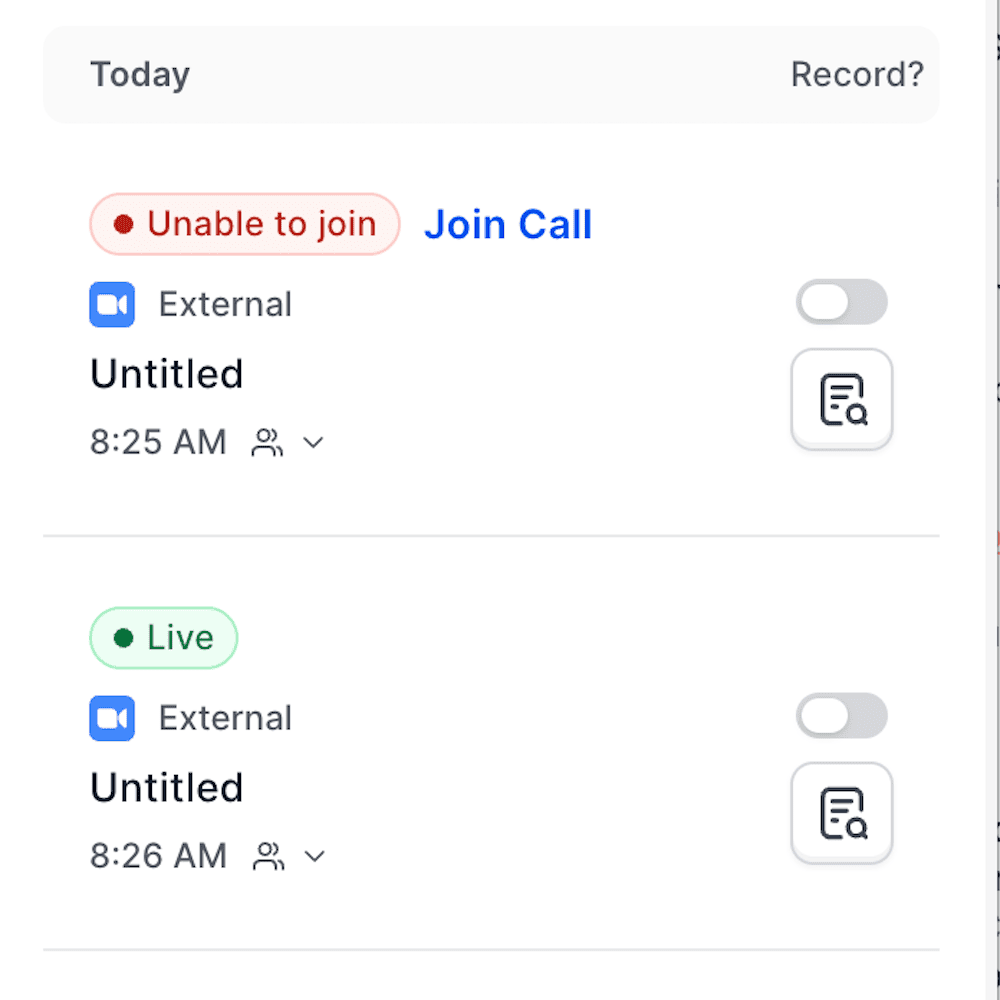
Attempt two: joined after forty-five seconds, processed, then disappeared from the dashboard with no error message, no notification, no failed state. Just gone.
Attempt three: same result. Twenty-seven seconds to join, then silence.
Two recordings vanished during processing and I had no way of knowing why or recovering them. The reason this matters more than a bad transcript would have: a rep who depended on Sybill to capture a call with a Paris prospect would find out the recording had gone when they sat down to write the follow-up email. Not before. After.
I can’t tell you whether the French transcription is accurate because I never got one. What I can tell you is that three attempts on the same account on the same morning produced one full failure and two silent disappearances. File that wherever you keep your risk assessments.
What Is Sybill’s Behavioral AI, and Should You Trust It?
I have to be honest: I couldn’t test this properly. My camera dropped mid-call during the English test, and the French recordings disappeared entirely before producing any output. And actually… even if they hadn’t, I’m based in the UK, where UK GDPR treats biometric data processing with the level of seriousness you’d expect from a regulator that genuinely enjoys sending strongly worded letters. Running AI emotion analysis on call participants without their explicit informed consent would have put me on very uncertain legal ground. So: couldn’t test it, probably shouldn’t have anyway. Make of that what you will.
What I can tell you is what the feature is, what its confirmed limitations are, and why I’d want some serious answers before switching it on.
Sybill’s behavioral AI goes beyond the transcript. It analyzes video: facial expressions, body language, engagement levels, attention signals. The premise is that a prospect leaning in at the pricing slide is more serious than one checking their phone, and that this should inform how you follow up. If you’re a US-based sales team running Zoom calls with US-based prospects, that probably sounds compelling. And I think that’s exactly who this feature was built for.
The rest of us have some things to think about.
If you’re in the EU, or selling into it, this feature has been illegal since February 2025. Article 5(1)(f) of the EU AI Act prohibits AI emotion recognition in workplace settings, covering both the vendor selling the software and the company using it, regardless of where either is headquartered. Fines run to €35 million or 7% of global annual turnover. The bans are staying. Sybill is still selling the feature. I’d want a very specific answer from their team before switching it on in any European context, and I’d want it in writing.
Beyond the legal question, there’s a scientific one that the EU AI Act’s own Recital 44 puts plainly: “expression of emotions vary considerably across cultures and situations, and even within a single individual.” The regulation is acknowledging the problem in its own text. Think about what behavioral AI is actually measuring across a global sales call. An American AE running a high-energy discovery call with a prospect in Japan. A British buyer who smiles warmly while internally composing their rejection email. Someone from a culture where sustained eye contact signals respect sitting opposite someone from a culture where it signals aggression. The model was not trained on all of them equally, and the outputs will reflect that.
And then there’s the question nobody in this category seems to want to ask. What does this feature do to neurodivergent people? An autistic rep whose facial expressions don’t map to neurotypical engagement signals will score differently in a behavioral analysis. Someone with ADHD who appears to be looking elsewhere while actually processing the conversation more intently than anyone else on the call. Behavioral AI infers engagement from physical signals, and the assumptions baked into what those signals mean are not neutral. They’re a set of norms. Not everyone is inside them.
I couldn’t test the output, so I can’t tell you how Sybill’s implementation handles any of this. What I can tell you is that “we support 100+ languages” is not the same as “we built this for a global, neurodiverse workforce.” If those questions matter to your team, ask them directly before you sign.
What Integrations Does Sybill Support?
The integration set tells you exactly who Sybill was built for. If you’re running a traditional enterprise sales stack, you’re well served. If you’re not, the gaps are noticeable.
On the CRM side, the live integrations are HubSpot, Salesforce, Zoho, and Dynamics 365. Pipedrive and NetSuite are listed as coming soon. For collaboration, Slack is live and Microsoft Teams is coming soon. For meeting platforms, Zoom, Teams, Google Meet, Webex, and Zoho Meeting are all supported for recording purposes.
Enterprise customers get webhooks and API access for custom workflows.
Two notable absences: no Notion, no Gmail. Both are standard tl;dv integrations. If you’re a smaller team running your sales operation through those two tools, Sybill’s integration set doesn’t serve you. That’s not a criticism exactly, it’s a positioning statement. Sybill is built for the Salesforce and Slack crowd, and it knows it.
One thing worth being specific about: the depth of CRM integration varies significantly by plan. The headline field-level autofill is Business-only at $90 per user per month, which brings us neatly to the part of this review I’ve been building towards since the onboarding section.
Sybill Pricing: How Much Does It Cost?
Before I get into the numbers, I need to finish a story I started in the onboarding section.
I called it the Three-Layer CRM Problem. Here’s the full picture.
Sybill’s headline feature is CRM autofill. It’s on the homepage, it’s in the marketing emails, it’s the thing that “saves fourteen hours a week.” To access it, you need three things simultaneously:
- A work email. Gmail gets you a wall at the connection stage with no workaround.
- A Business plan at $90 per user per month. On Free and Pro, the feature doesn’t appear at all.
- An active HubSpot, Salesforce, Zoho, or Dynamics 365 account. Pipedrive and NetSuite are coming soon. Notion, Airtable, and anything else are not supported.
A freelancer or solo operator running Gmail and Notion as their sales stack cannot access the headline feature at any price point. Not on a trial, not on a paid plan, not at all. That’s worth knowing before you spend an afternoon testing it.
Now, the plans:
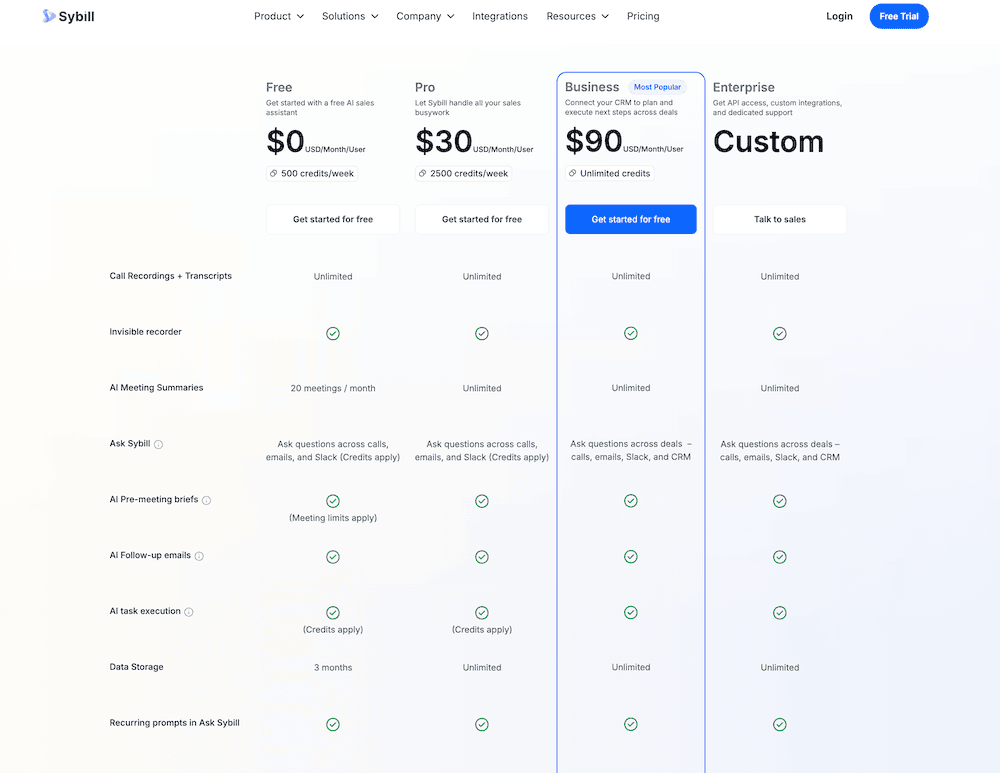
Free: $0 per user per month. 500 credits per week, 20 AI summaries per month, three months of data storage. Enough to get a feel for Magic Summary and Ask Sybill, not enough to evaluate the full product.
Pro: $30 per user per month. 2,500 credits per week, unlimited summaries, unlimited storage. The credits still apply to Ask Sybill and AI task execution, so heavier users will feel that constraint.
Business: $90 per user per month. Unlimited credits, CRM autofill across ten fields, deal workspace. This is where the product Sybill is marketing actually lives.
Enterprise: Custom pricing. Unlimited CRM fields, API access, dedicated support.
One more thing worth flagging. Sybill offers bot-free recording via a desktop app called Invisible Recorder, which is currently free. Before you get excited: it’s macOS only, and it requires Apple Silicon, so M1 chip or newer. If you’re on Windows, or on an older Mac, it doesn’t apply to you. tl;dv’s desktop app does bot-free recording across operating systems with no hardware restriction. I’m not laboring the point, just noting it because it matters if bot-free recording is why you’re here.
What works:
Magic Summary is the real deal. It pulled MEDDPICC elements, deal risk, buying signals, and objections from a solo roleplay with one voice playing both sides. A sales manager seeing “no confirmed next step” flagged automatically before the rep has sent a follow-up email is genuinely useful intelligence, not a dressed-up transcript.
Ask Sybill is impressive. The responses were specific, accurate, and actually useful post-call. Not a summary rehash.
Contact profiling builds automatically from call data. It built a full participant profile on a fictional prospect I invented on the spot. For real prospects, that compounds across a pipeline.
What doesn’t:
The Three-Layer CRM Problem. Work email required, Business plan required, traditional CRM required. Three simultaneous conditions for the headline feature. A significant portion of people reading a Sybill review will not meet all three.
Had to manually invite the bot rather than it joining automatically. Small friction, but worth noting for a tool that promises frictionless capture.
Behavioral AI is Zoom only, camera required, thirty-minute delay, and carries real legal exposure for anyone in the EU or the UK. The feature that gets the most marketing has the most asterisks.
The French recordings disappeared silently. No error state, no notification, no way to know until you go looking. That’s a reliability issue, not a transcription issue.
Bot join was inconsistent: one full failure, forty-five seconds, twenty-seven seconds, across three attempts on the same account on the same morning.
Invisible Recorder is macOS and Apple Silicon only. If you’re on Windows, it doesn’t exist for you.
No Notion. No Gmail. If that’s your stack, Sybill doesn’t meet you there.
What Are Real Users Saying About Sybill?
I’ve spent one morning with Sybill. Other people have spent months. So here’s what the people actually logging in every day are saying.
G2 has the most data: 4.8 out of 5 from 144 reviews at the time of writing. Capterra has zero reviews. Trustpilot has no verified listing. If you’re looking for a broad spread of third-party opinion, G2 and Reddit are where it lives, and both skew strongly positive.
What people like:
The praise is pretty consistent once you strip it back. It’s not about the AI being clever. It’s about not having to write anything after a call.
On G2, Evan D., Head of Marketing, wrote: “Excellent AI summaries and next steps. And I’ve used a lot.” Jose F., a CEO in IT services, called it one of the most useful tools in his daily routine. Carla K. put it simply: “Can’t live without Sybill.”
Reddit tells the same story with more detail. One user in r/SalesOperations described switching from Gong: “Our VP Sales was a diehard Gong fan before we evaluated Sybill. It’s been about a year now and we are way happier with Sybill than we ever would have been with Gong. Plus it was like a third of the price.” Another in r/sales reported a team of 50 using it with “absolutely 0 issues.” Over in r/sales, darren_dead put it plainly: “Tried every other one and nothing compares. (I don’t work there.)”
The pattern is admin removal. Anything that means fewer post-call notes, fewer CRM updates, fewer follow-up emails written from scratch gets praised hard. One r/CRM user described Sybill reading emails, listening to calls, filling deal fields, and writing follow-up emails automatically. “Our AEs absolutely love it. Has cut down on a lot of admin work for them and helps things not fall through the cracks.”
What people don’t like:
The negatives are thinner, and most of them are “this could be better” rather than “don’t touch it.”
The most concrete G2 complaints: no mobile app, an occasional missed next step or customer question, and the bot feeling “kinda intrusive” on calls. Monica R., a Senior Success Manager, found the pricing tiers confusing. Terry W., a CEO, called it “a little on the pricey side.” At $90/user/month for the Business plan, which is what you need to actually access CRM autofill, that’s underselling it.
On Reddit, the negative material is mostly about recording friction rather than Sybill specifically. One thread in r/sales captures it well: prospects declining to be recorded, privacy concerns, the social awkwardness of having a bot on a call. One user in r/AIAssisted rated the AI accuracy as very good but flagged the bot-joins-for-video as a downside worth knowing about.
The honest read:
G2 says impressive with rough edges. Reddit says it saves real time. Capterra, Trustpilot, and GetApp don’t have enough data to form a view either way.
Sybill Alternatives
Sybill isn’t the only tool in this space, and depending on your setup, it might not be the right one. Here are the two most relevant comparisons.
tl;dv
tl;dv is a meeting intelligence platform built for any team, any function, any platform you actually use. It records, transcribes, and summarizes every call as standard. Not as a premium feature. Not behind a work email requirement. As standard. The summary is there when the call ends, whether you’re a sales rep, a product manager, or someone in customer success who just needs to remember what was agreed.
On the Business plan, it goes further: BANT and MEDDIC playbook monitoring, AI objection handling, rep performance data, and CRM integration that pushes call outcomes into Salesforce, HubSpot, and Pipedrive. The free plan doesn’t expire. Unlimited recordings, unlimited transcripts, 30+ languages, forever. Not a fourteen-day trial. Forever.
The thing to note here is that Sybill’s Magic Summary is built specifically around how a salesperson processes a call. The MEDDPICC framing, the deal risk flags, the buying signal identification, the pre-meeting briefs. It’s a pre-packaged sales intelligence layer that’s ready to go out of the box. tl;dv gives you the transcript and the summary, and with Ask tl;dv, the plugins, and MCP access you could absolutely build a deal intelligence interface on top of it.
Where it stops being an advantage is the moment you hit the Three-Layer CRM Problem. The pre-packaged sales intelligence is only as useful as your ability to get the data into your CRM automatically, and that requires a work email, a Business plan at $90 per user per month, and one of four supported CRMs. tl;dv’s CRM integration works at the summary level rather than individual field level, but it doesn’t require three simultaneous conditions to access.
The desktop app comparison is straightforward. tl;dv does bot-free recording across whatever platform you actually use, no hardware restriction, no pricing caveat, no expiry. Sybill’s Invisible Recorder is macOS only, Apple Silicon only, and free for a limited time.
And tl;dv integrates with Notion and Gmail. If that’s your stack, you’re covered.
| tl;dv | Sybill | |
| Best for | Any team, any function | Sales teams, AEs |
| Free plan | Yes, unlimited forever | Yes, limited (20 AI summaries/month, 500 credits/week, 3 months storage) |
| Recording | Bot and desktop app | Bot only (Invisible Recorder: Mac/Apple Silicon) |
| Platforms | Any | Zoom only for behavioral AI |
| Transcription languages | 30+ | 100+ |
| Meeting summaries | Yes, as standard | Yes, Magic Summaries |
| Sales framework framing | Business plan | Built in |
| CRM integration | Summary level | Field level (Business only, $90/user/month) |
| MCP server | Yes, Pro+ | No |
| Notion integration | Yes | No |
| Gmail integration | Yes | No |
| Behavioral AI | No | Yes (EU/UK legal caveats apply) |
| Pricing | Free / $18 / $29 per seat/month | Free / $30 / $90 per user/month |
Gong
Gong is what Sybill is pitching itself against, and the comparison is flattering to Sybill almost by design. Gong doesn’t publish pricing. Based on reported market data as of April 2026, the Foundation plan runs around $1,400 to $1,600 per user per year, before a mandatory platform fee of $5,000 to $50,000 on top. Implementation costs $7,500 or more. Contracts are annual, sometimes multi-year, with automatic renewal uplifts of 5 to 15% baked in by default. A 25-person team on the full bundle is looking at roughly $90,000 in year one before anyone has made a single call.
What you get for that: deeper revenue intelligence than either Sybill or tl;dv, including forecasting, deal execution, and pipeline analytics that neither competitor currently matches. The conversation intelligence is best-in-class and the coaching infrastructure is built for enterprise sales operations at scale.
But let’s be clear: Gong is enterprise software with enterprise pricing, enterprise setup requirements, and enterprise contracts. If your CFO is already wincing at $90 per user per month for Sybill, Gong is a different category of conversation entirely.
For most teams, tl;dv is the better starting point. For a pure sales operation with a structured process, a supported CRM, and a work email, Sybill is worth a serious look.
Who Should Actually Use Sybill?
Sybill has a specific customer in mind. The product works best when you are that customer.
Use Sybill if:
- You’re running a B2B sales team on Zoom with work email addresses
- Your CRM is HubSpot, Salesforce, Zoho, or Dynamics 365
- You have budget for $90 per user per month and you want the CRM autofill to actually work
- You want sales framework framing baked in rather than configured yourself
- You’re comparing it to Gong and the price difference is the main argument
Don’t use Sybill if:
- You’re a freelancer, consultant, or founder running on a Gmail address
- Your team runs primarily on Google Meet
- Your CRM is Notion, Airtable, Pipedrive, or anything outside the four supported options
- You’re in the EU or UK and want to switch on the behavioral AI without a legal conversation first
- You’re on a Mac without Apple Silicon and bot-free recording is the reason you’re here
- You need a free plan that doesn’t expire
Is Sybill Worth the Money?
Sybill is positioning itself as the Gong killer that won’t make your CFO cry. I understand the pitch. Gong is expensive, the contracts are opaque, and a lot of sales teams are paying enterprise money for features they use a fraction of. If Sybill can deliver the core of what most reps actually need at $90 per user per month instead of whatever Gong’s sales team decides to charge you, that’s a real argument.
And if you are genuinely operating at the level where Gong is your benchmark, you probably already have a work email, a Salesforce instance, and the budget. In which case, Sybill might genuinely serve you well. The Magic Summary is good. The deal intelligence is real. The CRM autofill, if you can access it, saves real time.
But every business in the world needs to sell. Not just enterprise teams with RevOps functions and dedicated CRM administrators. Freelancers pitch clients. Founders close their first ten customers. Small agencies have one person handling all the commercial conversations from a Gmail address on a Google Meet call. Sybill’s marketing speaks to all of them. The product, at its most useful layer, doesn’t.
That gap isn’t an accident. Products are allowed to have a target market. But when the homepage says “save fourteen hours a week” and accessing that feature requires a work email, a $90 plan, and a Salesforce account simultaneously, the ladder gets pulled up for a lot of people who thought they were climbing it.
On the behavioral AI: tl;dv doesn’t offer it, and that’s not an oversight. tl;dv is an EU-based company operating under EU law, which has prohibited workplace emotion recognition from biometric data since February 2025. Beyond the legal question, there’s a philosophical one. Behavioral AI built primarily on American data, calibrated to American norms of what engagement looks like on a sales call, is not a neutral tool. tl;dv covers the majority of what Sybill offers without needing to make those assumptions. For most teams, that’s a reasonable trade.
Sybill is a genuinely good product for a specific kind of team. If you are that team, the Magic Summary alone is worth serious attention. If you’re not, the marketing will make you think you are, right up until you hit the work email wall at the CRM connection stage.
Start with tl;dv’s free plan. See how much of what you actually need is already there before committing to a stack built for someone else.
FAQs About Sybill.ai
Does Sybill work with Google Meet?
Sybill supports Google Meet for recording and transcription. The behavioral AI feature, which analyzes facial expressions and engagement levels, is Zoom only and requires camera access. If your team runs primarily on Google Meet, you’ll get summaries and transcripts but not Sybill’s most-marketed differentiator.
How much does Sybill cost?
Sybill has four plans. Free at $0, Pro at $30 per user per month, Business at $90 per user per month, and Enterprise at custom pricing. CRM autofill, the headline feature, is only available on the Business plan at $90 per user per month and requires a work email and a supported CRM to function.
Can you use Sybill with a Gmail address?
You can sign up and use the core recording and summary features with a Gmail address. You cannot connect a CRM. Sybill blocks CRM integration for non-work email accounts with no workaround currently available.
Is Sybill better than Gong?
Sybill is significantly cheaper and easier to set up than Gong, which starts at around $1,400 to $1,600 per user per year before mandatory platform fees and implementation costs. For small and mid-sized sales teams, Sybill delivers most of what Gong offers at a fraction of the price. Gong pulls ahead on revenue forecasting, deal execution analytics, and pipeline intelligence at enterprise scale.
Which meeting platforms does it work with?
It depends on your setup. If you have a work email, a supported CRM like HubSpot or Salesforce, and budget for $90 per user per month, Sybill’s Business plan is a strong option for a small sales team. If you’re running on Gmail, Google Meet, or a non-traditional CRM like Notion or Airtable, the headline features are not accessible at any price point.