Skip to content





TL;DR: Is Bluedot AI the Right Tool for You in 2026?
Bluedot is a slick AI notetaker that quietly records, transcribes, and summarizes your meetings (no bot in the room) with multilingual support, speaker insights, and some handy integrations.
It gets transcription and UX right, but it’s a limited platform support, shallow CRM/project tool integrations, and missing advanced collab features.
If you’re shopping around in 2026, here are five solid alternatives:
- tl;dv — the closest all-rounder with broader platform support, the choice between bot (for video) or bot-free recording (with a built-in consent collection mechanism), and deeper integrations (and a generous free plan).
- Otter.ai — live transcription with strong collaboration.
- Gong.io — sales-heavy analytics and coaching (pricey but powerful).
- Loom — perfect for async video updates instead of yet another meeting.
- Fireflies.ai — solid automation and action-item tracking.
Bottom line: Bluedot has real potential, but depending on your stack, budget, and exact needs, one of these alternatives might fit you better right now.
Drawing inspiration from the interconnectedness of our “blue dot”—Earth itself—Bluedot claims to redefine how teams collaborate and communicate in a digital world. By automating recording, transcription, and summarization, this AI-powered notetaking tool offers to eliminate the hassle of manual documentation. Essentially empowering any team to focus on meaningful discussions and actionable results, transforming meetings into efficient, productive experiences.
This tool holds particular significance for busy professionals—entrepreneurs, sales teams, recruiters, and customer success representatives—who juggle multiple meetings daily. By providing integration with platforms like Google Meet, Microsoft Teams, and Zoom, and offering features such as multilingual transcription and CRM updates, Bluedot simplifies workflows and boosts productivity.
The purpose of this review is to dive deep into Bluedot’s features, usability, and potential limitations, offering insights into how it stands against competitors. Whether you’re seeking an automated solution for capturing meeting insights or exploring alternatives to Bluedot, this guide will equip you with the information needed to make an informed decision.
What Is Bluedot AI?
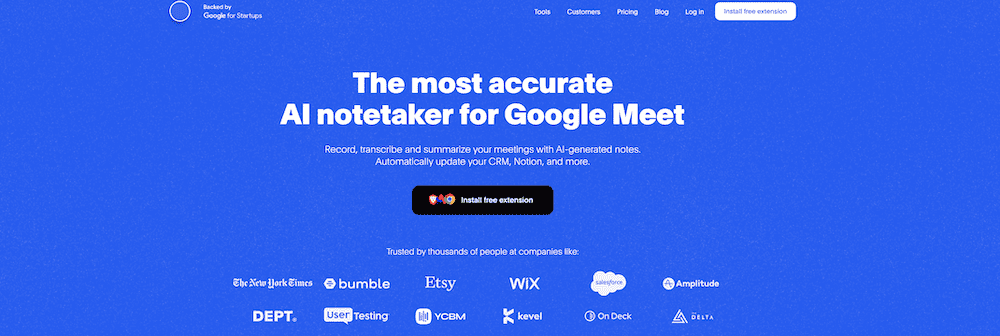
Bluedot is an AI-powered productivity tool designed to transform how organizations handle meeting documentation.
It automates the process of recording, transcribing, and summarizing meetings, offering concise, actionable insights tailored to specific use cases, such as customer calls or team strategy sessions.
Bluedot AI’s unique selling proposition used to be the fact that it could record calls without a bot joining the meeting. However, tools like tl;dv have added this feature, along with a consent collection mechanism that keeps you and your team fully compliant with GDPR, APPI, and other major regulatory frameworks.
That’s not the only feature that makes Bluedot AI an interesting tool though. It also offers multilingual transcription capabilities (in over 100 languages), and integration with platforms like Slack, Notion, and CRMs.
Bluedot primarily targets professionals and industries that rely heavily on meetings for collaboration and decision-making, including startups, engineering teams, sales representatives, and recruiters. Its ability to streamline workflows, enhance transparency, and foster knowledge sharing makes it a valuable asset for businesses aiming to improve productivity and communication.
What Are The Key Features of Bluedot AI in 2026?
Bluedot delivers its promises through a suite of targeted features designed to tackle the challenges of modern meetings head-on. It’s not about doing more; it’s about doing better—offering tools that integrate into existing workflows while eliminating unnecessary friction. From multilingual transcription to CRM-ready insights, each feature is crafted to save time and amplify productivity. But how does Bluedot’s functionality translate into real-world impact? Let’s explore the key capabilities that set it apart.
Meeting Recording and Transcription
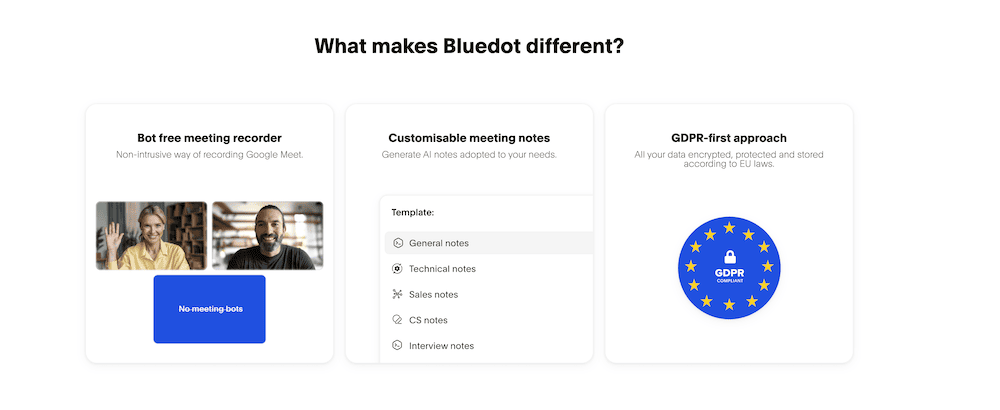
- Bluedot records meetings on platforms such as Google Meet, Microsoft Teams, and Zoom without the need for intrusive bots, making the process seamless.
- Transcription is done in real-time with support for over 100 languages, ensuring inclusivity for diverse teams.
- This feature is particularly useful for industries where accurate records are essential, such as legal, healthcare, or education.
AI-Generated Summaries and Notes
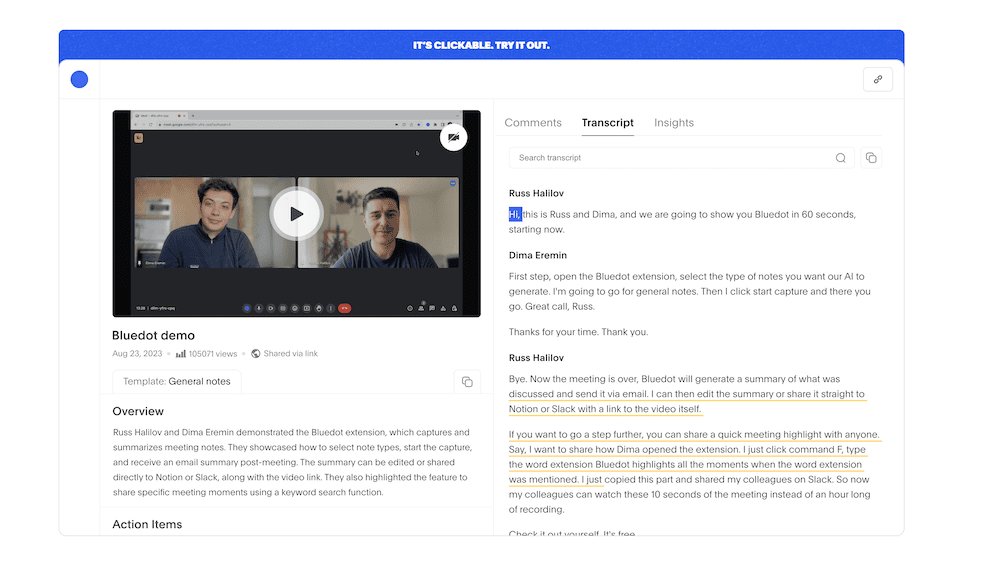
- Using advanced AI, Bluedot generates concise and actionable summaries tailored to the type of meeting, whether it’s a client discussion or team brainstorming session.
- Notes highlight key points, decisions, and action items, saving time for users who need quick takeaways rather than combing through long transcripts.
- This makes it easier for professionals to stay on top of follow-ups and decisions without manual note-taking.
Speaker Insights and Analytics
- The tool identifies individual speakers and provides analytics on speech patterns, including participation levels and speech pace.
- This can help teams understand communication dynamics and ensure balanced contributions during meetings.
- These insights are particularly helpful for managers or team leads aiming to refine collaboration and communication strategies.
Secure Cloud Storage
- Bluedot stores meeting recordings, transcripts, and notes securely with end-to-end encryption to protect sensitive data.
- It allows users to manage permissions, ensuring only authorized individuals can access specific materials.
- The ability to share files with team members or clients further facilitates smooth collaboration.
Platform Integration
- Integrates with tools like Slack, Notion, and various CRMs, enabling automatic updates and reducing manual tasks.
- Meeting summaries and notes are shared directly within these tools, ensuring that teams have access to vital information without needing to switch between platforms.
- This makes Bluedot especially effective for teams managing multiple workflows simultaneously.
User-Friendly Interface
- Bluedot is designed for ease of use, ensuring quick adoption by teams of varying sizes and technical expertise.
- Its intuitive interface allows users to navigate, search, and manage meeting content efficiently, minimizing the learning curve.
Feedback and Reviews of Bluedot AI
Bluedot has garnered attention for its AI-driven meeting recording and transcription capabilities. User feedback across various platforms highlights both its strengths and areas for improvement.
What Does User Feedback Say About Bluedot AI?
On G2, Bluedot holds a positive reputation, scoring 4.8/5 from 226 users who frequently praise a lot of its features.
Positive Feedback
- Users appreciate Bluedot’s non-intrusive recording feature, which allows meetings to be recorded without the presence of bots. This discreet approach enables participants to focus on discussions without distractions. However, it’s worth noting that a lot of these reviews are from back when bot-free recording was a rare thing. Tools like tl;dv now offer bot-free recording and video recording via a bot for ultimate flexibility.
“Bluedot’s non-intrusive recording feature is a dream. We can focus on our customers without worrying about taking notes.” —
Read more on G2 - The tool’s AI-generated summaries and notes are praised for their accuracy and time-saving benefits, allowing users to concentrate on meeting content rather than manual note-taking.
“Bluedot has totally changed how we handle external and internal meetings. The auto-generated emails and meeting summaries are fantastic.” —
Read more on G2
Critical Feedback
- Some users have expressed a desire for broader platform compatibility, noting that Bluedot’s primary focus on Google Meet may limit its usability for teams using other platforms. Other bot-free solutions like tl;dv allow device audio to be recorded across any platform.
“It would be nice to have more compatibility with different video platforms.” —
Read more on G2 - There are requests for additional integrations, particularly with various CRM systems, to enhance workflow automation.
“It would be even better with more CRM integrations.” —
Read more on G2
Expert Insights About Bluedot AI
While specific expert reviews are limited, tools like Bluedot AI are often praised for their focus on enhancing productivity through non-intrusive recording, customizable AI-generated notes, and data security. These features, combined with its seamless integration into workflows, position Bluedot as a strong contender for businesses aiming to streamline meeting documentation and collaboration processes.
Industry experts highlight the growing demand for tools that not only automate tasks but also reduce meeting fatigue. Bluedot’s ability to deliver concise, actionable summaries and insights aligns with these trends, making it particularly valuable for time-pressed professionals in fast-paced industries such as sales, recruitment, and customer success. Additionally, its emphasis on security and user-friendly design resonates with organizations prioritizing both data privacy and ease of use.
Overall Trends in Feedback About Bluedot AI
What Users Love:
- Non-Intrusive Recording: The ability to record meetings without bots joining enhances the user experience by reducing distractions. This is a great feature but now also par for the course for many AI meeting assistants.
- AI-Generated Summaries: Automated, accurate meeting summaries save time and allow users to focus on the conversation.
- User-Friendly Interface: The sleek and intuitive design facilitates easy adoption across teams, even for less tech-savvy users.
- Multilingual Support: With transcription capabilities in over 100 languages, Bluedot supports diverse teams and international collaboration.
Areas for Improvement:
- Integration Capabilities: Developing integrations with a broader range of CRM systems and productivity tools would enhance workflow efficiency and attract more enterprise users.
- Customization Options: Offering more tailored settings for meeting summaries and note formats could provide a more personalized experience for users with specific needs.
Bluedot is well-regarded for its discreet recording capabilities, efficient AI-generated summaries, and multilingual transcription support. Addressing user concerns regarding platform compatibility, integration options, and customization could further solidify its reputation as a comprehensive solution for modern meeting documentation challenges. As businesses continue to prioritize efficiency and collaboration, Bluedot’s potential to evolve and adapt positions it as a promising player in the productivity tool landscape.
Bluedot AI Pricing: How Much Does Bluedot Cost?
Bluedot AI offers a structured pricing model designed to cater to individuals, teams, and large organizations, ensuring flexibility and scalability.
Pricing Tiers:
Free Plan:
- Cost: $0
- 5 meetings (lifetime limit).
- Max 1 hour per recording.
- No imports.
- Chrome screen recorder.
- Slack integration.
Basic Plan:
- Cost: $14 per member per month.
- Unlimited meetings (audio only).
- Max 1 hour per recording.
- No custom meeting templates.
- No imports.
- Limited free members.
Pro Plan:
- Cost: $20 per member per month.
- Includes all Basic features.
- Unlimited meetings (with video).
- Unlimited duration.
- Custom meeting templates.
- Zoom & Google Drive import.
- Limited imports.
- Limited free members.
Business Plan:
- Cost: $32 per member per month.
- Includes all Pro features.
- Unlimited imports.
- HubSpot integration.
- Salesforce integration (coming soon).
- Topic trackers (coming soon).
- Unlimited members.
Unlimited Plan:
- Cost: Custom pricing.
- Data retention policies.
- Single Sign-On (SSO) and SCIM.
- Advanced controls.
What’s Bluedot AI’s Value Proposition?
- Free Plan: Good enough for a quick try but 5 audio-only meetings in a lifetime is laughable compared to competitors. tl;dv, for example, provides unlimited transcripts with video included for free.
- Basic Plan: Ideal for regular users requiring unlimited audio meetings with straightforward features, but again, it’s pricey compared to Bluedot AI alternatives.
- Pro Plan: Designed for power users with the need for video meetings, custom templates, and imports.
- Business Plan: Tailored for sales and customer success teams, with integrations and advanced tracking tools, but it lacks sales features or advanced tools like multi-meeting memory and intelligence.
- Enterprise Plan: Built for large organizations with extensive needs for security, control, and scalability.
How Cost-Effective is Bluedot AI Compared to Competitors?
When compared to similar tools in the market, Bluedot AI’s pricing falls flat. Its features don’t stand up to scrutiny when sat side by side with their competitors. The value simply isn’t there.
Both Bluedot and tl;dv offer comprehensive meeting management solutions with competitive pricing. tl;dv provides a Free Plan with unlimited recordings and transcripts, appealing to budget-conscious users. It can also record video (unlimited) with a bot, or audio-only (also unlimited) without a bot — both options have a consent collection method that allows you to rest assured that you’re legally following GDPR and other regulatory frameworks.
tl;dv’s Pro Plan, at $18 per user per month, includes advanced features like unlimited Ask tl;dv AI conversations, unlimited multi-meeting intelligence, and over 5,000 integrations. Bluedot’s Pro Plan is priced at $20 per member per month, but it only unlocks video recording (something that tl;dv provided for free).
What Are Drawbacks and Limitations of Bluedot AI in 2026?
While Bluedot offers numerous benefits, there are certain limitations to consider:
Feature Depth
- Lacks some advanced functionalities present in more established competitors.
Integration Constraints
- Limited integration options with certain project management and CRM tools, potentially hindering workflow automation.
Potential Barriers to Adoption
- Learning Curve: Users unfamiliar with AI-powered tools may require time to adapt, though Bluedot’s reported user-friendly interface helps mitigate this challenge.
- Data Privacy Concerns: Despite being GDPR compliant, some organizations may prefer on-premise solutions due to data security reservations.
Scenarios Where Bluedot AI May Not Be the Best Fit
- Sales Teams: Bluedot AI doesn’t provide any sales features, making it difficult to make use of conversational intelligence in a sales setting.
- Value for Money: Teams that want to have the best value for money aren’t going to find it with Bluedot AI. Its pricing structure simply isn’t comparable to the biggest tools in the space.
- Advanced Feature Requirements: Teams seeking sophisticated features like real-time collaborative editing may need to explore alternative solutions.
5 Alternatives to Bluedot AI in 2026
If Bluedot AI doesn’t fully meet your needs, several other tools offer similar or complementary features. Here are five alternatives to consider, each catering to different use cases for meeting documentation and collaboration.
1. tl;dv
Best For: Comprehensive meeting recording, post-meeting automation, and AI-driven insights.
tl;dv is a cutting-edge AI-powered tool that revolutionizes meeting management. It seamlessly records, transcribes, and summarizes meetings across platforms like Google Meet, Zoom, and Microsoft Teams with a bot, or absolutely any platform at all if you go botless. The trade-off is that the bot provides video whereas the bot-free method is audio-only. However, rest assured: both options have clear consent gathering mechanisms built-in so you’re always compliant.
With state-of-the-art speaker recognition, highly accurate transcription with automatic language detection in over 40 languages, tl;dv ensures no detail is missed. It also has dozens of other features that elevate it above and beyond anything that Bluedot AI attempts, such as sales coaching, sales playbook monitoring, recurring reports, multi-meeting intelligence, custom note templates, automatic CRM sync and much more.
Its intuitive interface and 5,000+ integrations with tools like Slack, Notion, and various CRMs streamline workflows, making it an indispensable asset for teams aiming to enhance productivity and collaboration.
Strengths: High-quality transcripts, notes, and speaker recognition, seamless post-meeting workflows, multi-meeting memory and intelligence, customizable CRM syncs, and a sales coaching dashboard.
Drawbacks: Some advanced features may require premium plans.
Pricing: Generous free plan available; Pro plans start at $18/month per user.
Learn more at tl;dv
2. Otter.ai
Best For: Advanced transcription and shared note-taking.
Otter.ai is renowned for its real-time and post-meeting transcription capabilities. It integrates seamlessly with platforms like Zoom and Microsoft Teams and includes features such as live transcription, speaker identification, and shared note-taking. As organizations continue to embrace technology for efficient collaboration, many are exploring the best free ai note takers for 2026. These tools not only enhance productivity but also streamline the process of capturing important discussions. Comparing features across various options can help users identify the best fit for their specific needs and workflows.
Strengths: Highly accurate transcription, live capabilities, search functions, and collaboration options.
Drawbacks: Lacks video recording and integration with some CRM tools.
Pricing: Free plan available; Premium plans start at $8.33/month. Click here to learn more about Otter AI’s pricing.
Learn more at tl;dv vs Otter.ai
3. Gong.io
Best For: Sales teams needing actionable conversation intelligence.
Gong.io focuses on analyzing sales calls and meetings, providing insights into performance and actionable next steps. It transcribes and analyzes conversations for trends and coaching opportunities, integrating with leading CRM platforms.
Strengths: AI-driven analytics, sales-focused insights, and excellent CRM integration.
Drawbacks: Expensive and primarily applicable to sales and customer success teams.
Pricing: Custom pricing; higher cost compared to general-purpose tools. Follow the link to learn more about Gong’s pricing.
Learn more at tl;dv vs Gong.io
4. Loom
Best For: Asynchronous communication and screen recording.
Loom is designed for quick, asynchronous video communication and screen recording. It’s ideal for teams that need to share quick updates or explanations across time zones without live meetings.
Strengths: User-friendly interface, excellent for screen recording, and wide sharing options.
Drawbacks: Limited transcription features compared to Bluedot; no live meeting capabilities.
Pricing: Free plan available; Business plans start at $12.50/month per user.
5. Fireflies.ai
Best For: Automated meeting transcription and action item tracking.
Fireflies.ai automates meeting transcription and offers integrations with platforms like Zoom, Slack, and Microsoft Teams. It allows users to annotate transcripts and set reminders for action items discussed during calls.
Strengths: Automated transcription, collaborative features, and action item tracking.
Drawbacks: Transcription accuracy can vary, and advanced features may require premium plans.
Pricing: Free plan available; Pro plans start at $10/month.
Learn more at tl;dv vs Fireflies.ai
Final Thoughts: Is Bluedot AI the Right Tool for You?
Bluedot positions itself as an innovative solution for meeting documentation and collaboration, drawing inspiration from the concept of interconnectedness that defines our “blue dot”—Earth itself. With features like automated transcription, AI-generated summaries, and seamless integration with tools like Google Meet, Microsoft Teams, and Zoom, it aims to transform meetings into focused, productive experiences. Bluedot’s focus on multilingual support and workflow integration makes it a valuable choice for professionals across industries.
However, as explored in this review, Bluedot has its limitations. Its price, for starters, does not reflect the value received when stacked side-by-side with the big dogs. It also has limited integrations with project management tools, and some advanced features, like sales coaching, are entirely absent. This might pose challenges for certain teams. While it excels in user-friendly design and security compliance, some organizations may require more customization or robust CRM compatibility to fully optimize their workflows.
If Bluedot AI doesn’t fully meet your needs, other tools like tl;dv are a great bot-free alternative.
Ultimately, selecting the right tool depends on your team’s priorities—whether it’s affordability, integration flexibility, or advanced features. Bluedot holds significant promise for potential growth, but right now it’s worth looking elsewhere.