Skip to content





TL;DR: Airgam Has Been Acquired by Notta, but tl;dv is the Best Alternative
Want the honest answer to “tl;dv vs Airgram”? You can’t actually pick Airgram anymore. It merged into Notta in early 2024 and no longer exists as a standalone product. The real choice in 2026 is tl;dv vs Notta (the tool Airgram funneled its users into), and for most teams, tl;dv is the best choice.
Notta’s free plan gives you three minutes of transcription per conversation, trains its AI on your data unless you pay for Enterprise, and has racked up a wall of billing complaints. tl;dv gives you unlimited free transcription in 40+ languages, doesn’t ever train models on your meetings, and adds the CRM automation and multi-meeting intelligence a plain transcription tool never had.
Choose tl;dv for a free-forever recorder with real meeting intelligence. Notta only really leads for mobile-first Japanese teams.
If you typed “tl;dv vs Airgram” hoping to compare the two side by side, I have news: Airgram is dead. It folded into Notta, another AI transcription tool, in a move announced at the start of 2024, and airgram.io stopped operating as its own platform.
That leaves anyone searching for an Airgram alternative in an awkward spot: you didn’t choose Notta, you were migrated into it. And with unproductive meetings costing U.S. businesses an estimated $37 billion a year, the tool you use to record and act on them is worth getting right. So the useful comparison isn’t tl;dv against a ghost — it’s tl;dv against Notta. I’ve tested both. Here’s the whole picture.
What Happened to Airgram? (Is It Still Available?)
Airgram is no longer available as a standalone notetaker. It merged into Notta in early 2024, and the two “joined forces to build an integrated solution for AI meeting notes and audio transcription.”
If you’re hunting for Airgram today, you’ll land on Notta — now run by the same company (Airgram Inc.) that originally built Airgram.
Did Airgram Shut Down or Merge With Notta?
It merged. Airgram was a functioning product with funding and an active user base when it consolidated into Notta. The framing was a strategic combination, but for most users the result was identical to a shutdown: the Airgram app you signed up for stopped existing, and your account was routed into a different platform with different pricing, limits, and data policy.
What Happened to My Airgram Account and Data?
Airgram accounts were transitioned into the Notta ecosystem, so the path of least resistance was to keep working inside Notta. But “least resistance” and “best fit” aren’t the same thing. Searching for an Airgram alternative is still popular because many users never looked for anything else after the switch. Those on the free plan likely left long ago though as Notta’s free plan is notoriously bad.
tl;dv vs Airgram (Now Notta): The Quick Verdict
For most teams, tl;dv is the stronger choice. It simply provides more value for money. tl;dv records, transcribes, and summarizes unlimited meetings free, works in 40+ languages with automatic language detection, and adds CRM auto-sync, multi-meeting intelligence, and sales coaching.
Notta’s strengths are in Japanese transcription (in which tl;dv still came out on top when compared side by side among 6 Japanese transcription tools, including Notta) and a well-liked mobile app. Outside those, tl;dv excels in everything that matters after the meeting ends.
| Feature | tl;dv | Airgram (now Notta) |
|---|---|---|
| Status | Active | Airgram discontinued merged into Notta |
| Free plan transcription | Unlimited | 3 min / conversation 120 min/mo |
| Cheapest paid plan | $18/seat/mo (Pro, annual) | $8.17/seat/mo (Notta Pro, annual) |
| Transcription accuracy (2026 test) | 97.3% | ~93.8% (Notta) |
| Languages | 40+ auto-detect + mid-call switching | 58 manual select, no auto-detect |
| Bot-free recording | Yes desktop app, any audio | No bot is always required |
| Video recording on free plan | Yes | Business tier only |
| Native CRM auto-sync | Pro HubSpot, Salesforce, Zoho, Pipedrive, and more | Business share/store only |
| Multi-meeting intelligence | Up to 100 calls | Weekly reports (newer) |
| Trains AI on your conversations | No any plan | Yes opt out on Enterprise only |
| Verified June 2026 · Sources: tl;dv & Notta pricing pages, tl;dv 2026 transcription test. Airgram discontinued 2024 (merged into Notta). | ||
What tl;dv Does That Airgram Didn’t
Airgram was a meeting recorder with notes and templates. tl;dv is that plus the work after the meeting: it auto-fills CRM fields, drafts follow-up emails, runs recurring AI reports across dozens of calls, and scores sales calls against playbooks like BANT and MEDDIC.
It also plugs into an MCP server so you can query your meeting history from AI tools directly. Airgram never dabbled in MCPs, and Notta still hasn’t either.
tl;dv vs Airgram Pricing and Free Plans in 2026
tl;dv is free forever with unlimited recording and transcription, while Airgram’s old plans are now irrelevant because the product is gone. The pricing that actually matters is Notta’s.
Notta’s cheapest plan is less than half the price of tl;dv’s. On paper, that sounds great, but that’s because it makes up for its abysmal free plan. tl;dv doesn’t need the starter step because its free plan is strong enough to work on its own. tl;dv’s real value comes from the post-meeting workflows that it unlocks later. Notta banks on you paying more for basic features.
How Much Does tl;dv Cost in 2026?
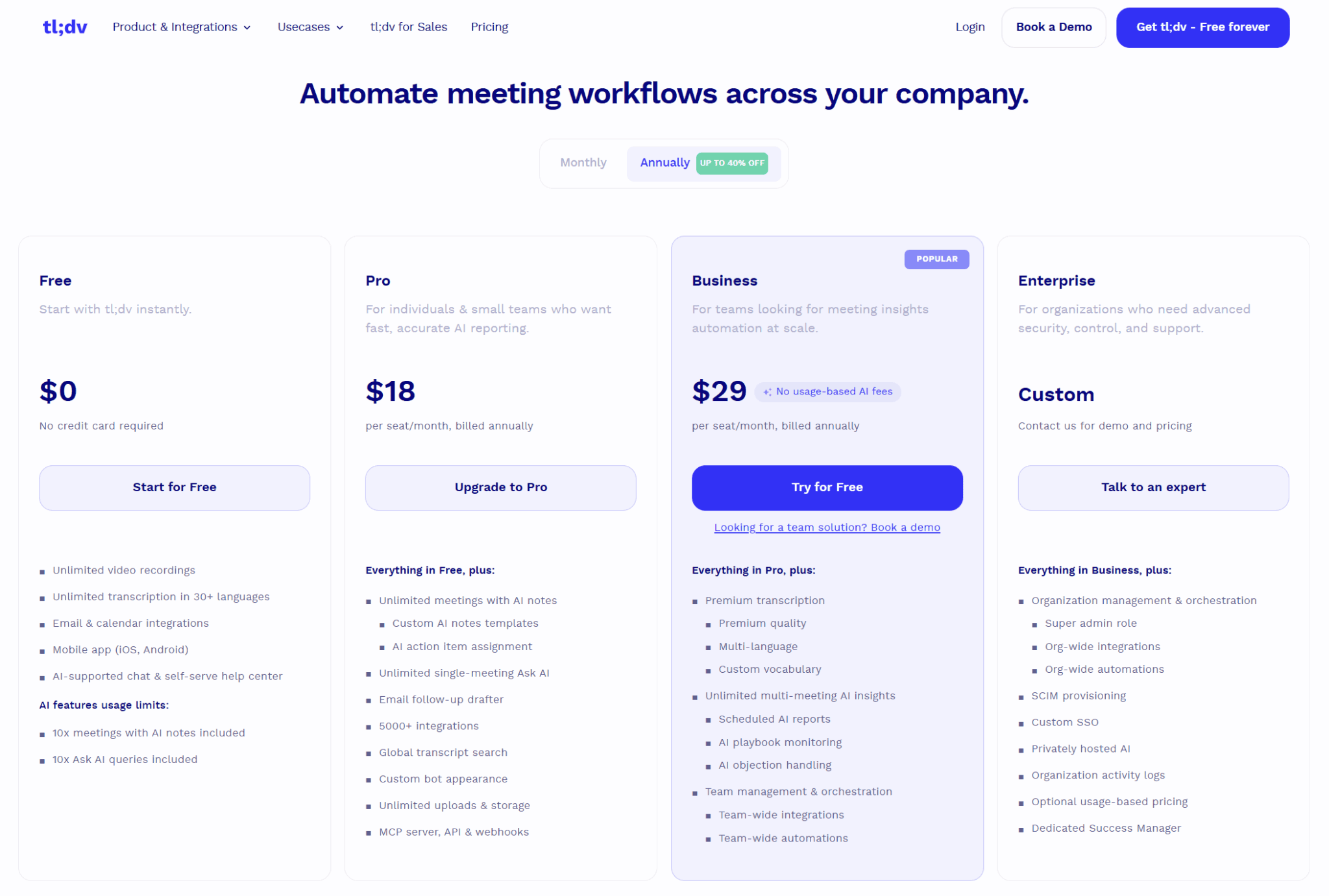
tl;dv has four tiers:
- Free is $0, no card required.
- Pro is $18 per seat/month.
- Business is $29 per seat/month.
- Enterprise is custom.
All prices are when billed annually.
The free plan is the highlight: unlimited video recordings, unlimited transcription in 40+ languages, and AI notes on up to 10 meetings per month. CRM auto-sync, the MCP server, API, and webhooks unlock on Pro. Business nets you unlimited multi-meeting intelligence, sales playbook monitoring, as well as objection handling and team-wide automations.
How Much Does Notta Cost (and What Did Airgram Cost)?
Notta also has four tiers:
- Free is $0.
- Pro is $8.17 per seat/month.
- Business is $16.67 per seat/month.
- Enterprise is custom.
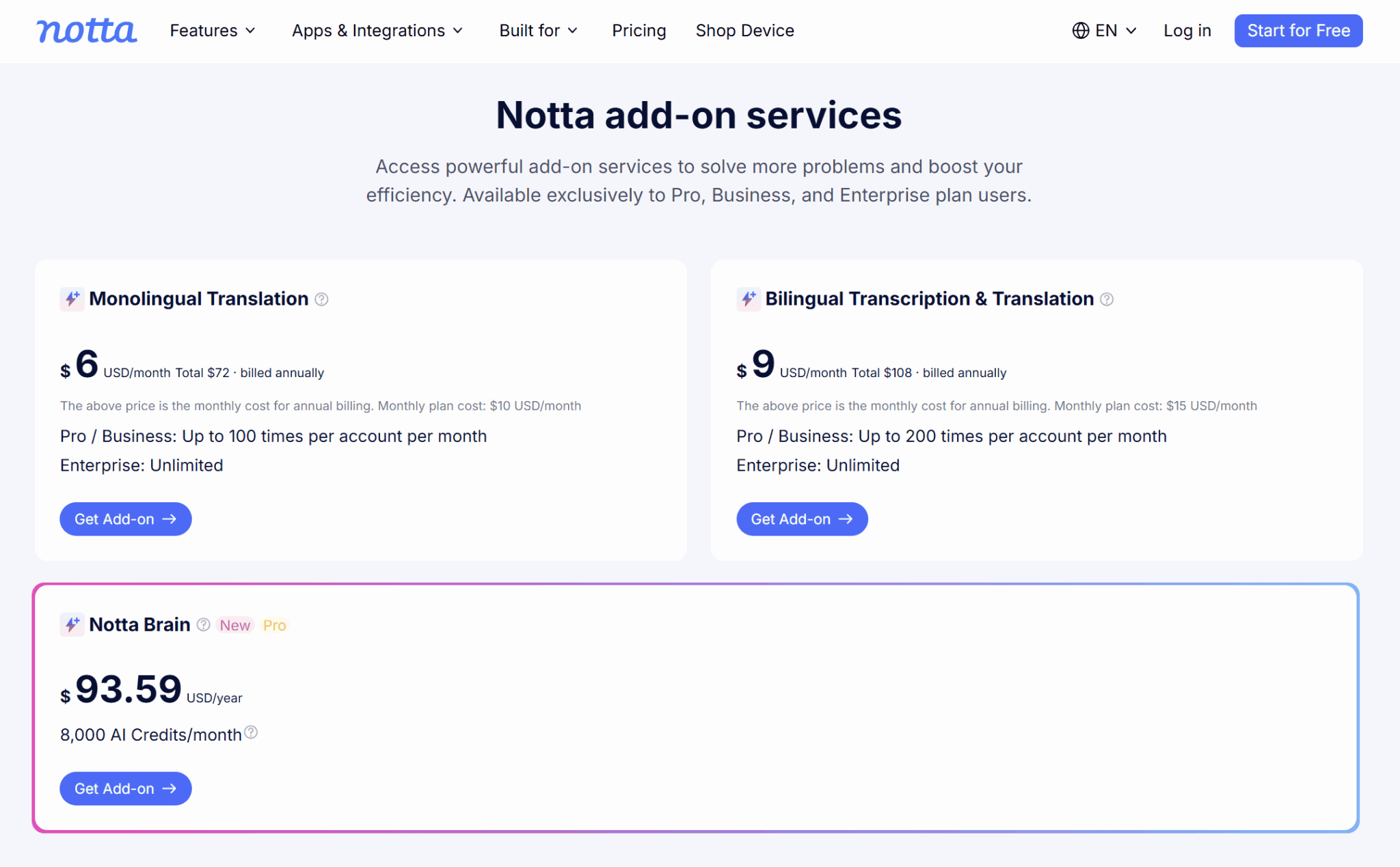
It’s more affordable than tl;dv, but you’re not getting the same tool. Notta gates a lot of simple features: video recording starts on Business, bilingual transcription is a separate add-on from $9/month, and opting out of AI training is locked behind Enterprise. These are all things that tl;dv includes for free.
Notta also charges a yearly package of $93.59 for 8,000 AI credits, known as Notta Brain.
Airgram’s historical pricing was around $18 per month but that is irrelevant in 2026.
Which Has the Better Free Plan?
tl;dv, and it isn’t close.
Notta’s free plan caps you at 120 transcription minutes per month with a hard limit of three minutes per conversation. That’s just enough to get a transcript of everybody saying “Hello”. There’s also no AI chat included.
When I tested it, I watched it “transcribe” a 20-minute chat and then show me a single word before demanding an upgrade. tl;dv’s free plan gives you unlimited transcripts, every time, in any of 40+ languages. For a transcription tool, hiding the transcript behind a paywall is a strange hill to die on.
For my full experience, read this honest Notta review.
Total Cost for a 5-Person and 25-Person Team
Five seats on tl;dv Business (annual) run $145/month versus about $83/month on Notta Business; at 25 seats it’s $725/month versus roughly $417/month.
On raw seat price, Notta wins. Factor in unlimited free transcription for teammates who don’t need paid features, no translation add-ons, and no Enterprise upsell just to keep your data private, and the value math tilts back toward tl;dv fast. Not to mention sales playbook monitoring, MCP access, analytics, multi-meeting intelligence and more that Notta doesn’t even offer.
Transcription Accuracy and Language Support
tl;dv edged out Notta on transcription accuracy in head-to-head testing, and it handles multilingual meetings far more gracefully. In our 2026 transcription accuracy test, tl;dv scored 97.3% across 30 calls; Notta came in around 93.8%, strongest on noisy multilingual audio but weaker on clean English.
Which Has More Accurate Transcription?
In general, tl;dv is supreme for most calls. Notta’s Japanese transcription is great, but even that was beaten by tl;dv’s Japanese in thorough 2026 tests.
In my own English testing, Notta turned “teacher” into “t-shirt” and “productive” into “proud of this” inside the first minute. Accuracy for any AI transcriber drops with overlap, heavy accents, and noise, so test both on your own audio (make use of those first three minutes if you’re testing on free), but tl;dv’s baseline was noticeably cleaner for all tested languages.
How Many Languages Does Each Support?
Notta supports 58 languages, versus 40+ for tl;dv.
The count alone hides the real difference: tl;dv detects languages automatically and handles speakers switching mid-call, producing one clean transcript with potentially multiple languages. Notta makes you select the language in advance with no automatic detection. Switch mid-meeting and you get gibberish.
I tested this by dropping into Russian mid-call; Notta transcribed it as “goo goo, ga ga.” For a multilingual team, that’s a huge problem. tl;dv’s language support is detailed here.
Accents, Overlapping Speakers, and Noisy Audio
All tools wobble on messy audio. Notta held up best on noisy multilingual calls in testing — a real point in its favor for chaotic international meetings — while tl;dv was more consistent on accented English and cross-talk. Neither is magic; both benefit from a decent mic.
AI Meeting Notes, Summaries, and Cross-Meeting Intelligence
Both tools auto-generate summaries and action items, but tl;dv goes well beyond the single-meeting recap that Airgram pioneered and Notta still centers on. The gap widens most on cross-meeting intelligence — the ability to analyze many calls at once — which is where a plain notetaker stops and a meeting-intelligence platform begins.
Which Produces Better AI Summaries and Action Items?
For a single meeting, they’re comparable. Notta’s summaries are fine, tl;dv’s are more customizable. Both extract action items and decisions. The difference is control and format: tl;dv offers custom AI note templates (sales playbooks, HR, CS, and your own), and you can map each section to CRM fields so the export drops straight into HubSpot or Salesforce. Notta’s summaries are competent but comparatively fixed, and its deepest reporting features sit on higher tiers.
Can You Analyze Multiple Meetings at Once?
This is tl;dv’s clearest advantage. It can generate recurring reports that cross-reference up to 100 calls at once, uncovering objections, patterns, and trends across entire batches of meetings at once, automatically, on whatever schedule you set.
Notta recently added a weekly-reports feature that’s getting good early feedback, but it’s newer, narrower, and higher-tier. If you record meetings to spot what’s happening across your pipeline, not just to remember one call, tl;dv is built for it. Airgram never was.
Custom Templates and “Ask AI” Across Your Library
tl;dv lets you ask questions across your entire meeting library, not just one transcript. It’s the difference between “what did we decide on Tuesday” and “how many times did prospects mention our competitor last quarter.” For teams turning meetings into a searchable knowledge base, that cross-library recall is the whole point.
Recording Zoom, Google Meet, and Microsoft Teams (Bot vs Bot-Free)
Both tools record Zoom, Google Meet, and Microsoft Teams, and Notta adds Webex via its bot. However, tl;dv is the more flexible recorder because it can also capture calls with no bot in the room at all. That matters more than ever after Google’s 2026 change that puts third-party notetaker bots in a “potential risk” queue by default on Google Meet.
Does Each Tool Record Zoom, Meet, and Teams?
Yes to both, across all three major platforms. Notta uses a meeting bot to join Zoom, Meet, Teams, and Webex. tl;dv offers a native bot for Zoom, Meet, and Teams too, but it also ships a desktop app that records without any bot joining, capturing your device’s audio directly. For tl;dv, both methods come with built-in compliance flows.
Can You Record Without a Meeting Bot?
tl;dv can; Notta can’t. tl;dv has a desktop app that records any audio on your device, so it isn’t limited to a fixed platform list like Notta. That means it works with Webex, Preply, browser-based calls, YouTube, or any source, and sidesteps the Google Meet bot-approval problem because there’s no bot to approve.
In-Person Meetings and File Uploads
Both handle in-person and pre-recorded audio. Notta leans hard into this with its mobile app and the Notta Memo handheld device for offline capture. tl;dv lets you upload existing audio or video files (5 free, unlimited on paid) and run them through the same AI, so you can pair any recorder with its intelligence.
If your meetings are mostly face-to-face, Notta’s mobile-first kit is handy. If it’s primarily calls, tl;dv’s post-call automation matters more.
Integrations and CRM Automation
tl;dv is built to push meeting data into the tools you already use, with native CRM auto-sync that Airgram never had and Notta gates behind its Business tier. This is where the tools become more about workflows than simple transcription.
Does tl;dv Sync With HubSpot and Salesforce Automatically?
Yes. tl;dv has deep native integrations with HubSpot and Salesforce that fill the correct CRM fields automatically after a call. It’s unlocked on the Pro plan and there are several other native CRM integrations and 6,000+ more via Zapier.
Notta connects to a handful of CRMs too, but in practice you’re mostly sharing notes and summaries, and its CRM connections sit on Business. For a sales team, “the CRM updates itself after every call” is the feature that pays for the tool, and Notta simply doesn’t have it.
Slack, Notion, Zapier, API, and Webhooks
tl;dv connects to Slack, Notion, and 6,000+ tools via Zapier, and features a video meeting API, webhooks, and an MCP server on Pro and above. Notta covers Slack, Notion, Salesforce, and Zapier, but its integrations are shallower. They can share and store but not field-map automatically. There have been no new native CRMs added to Notta in 2026.
Which Requires Fewer Manual Steps After a Meeting?
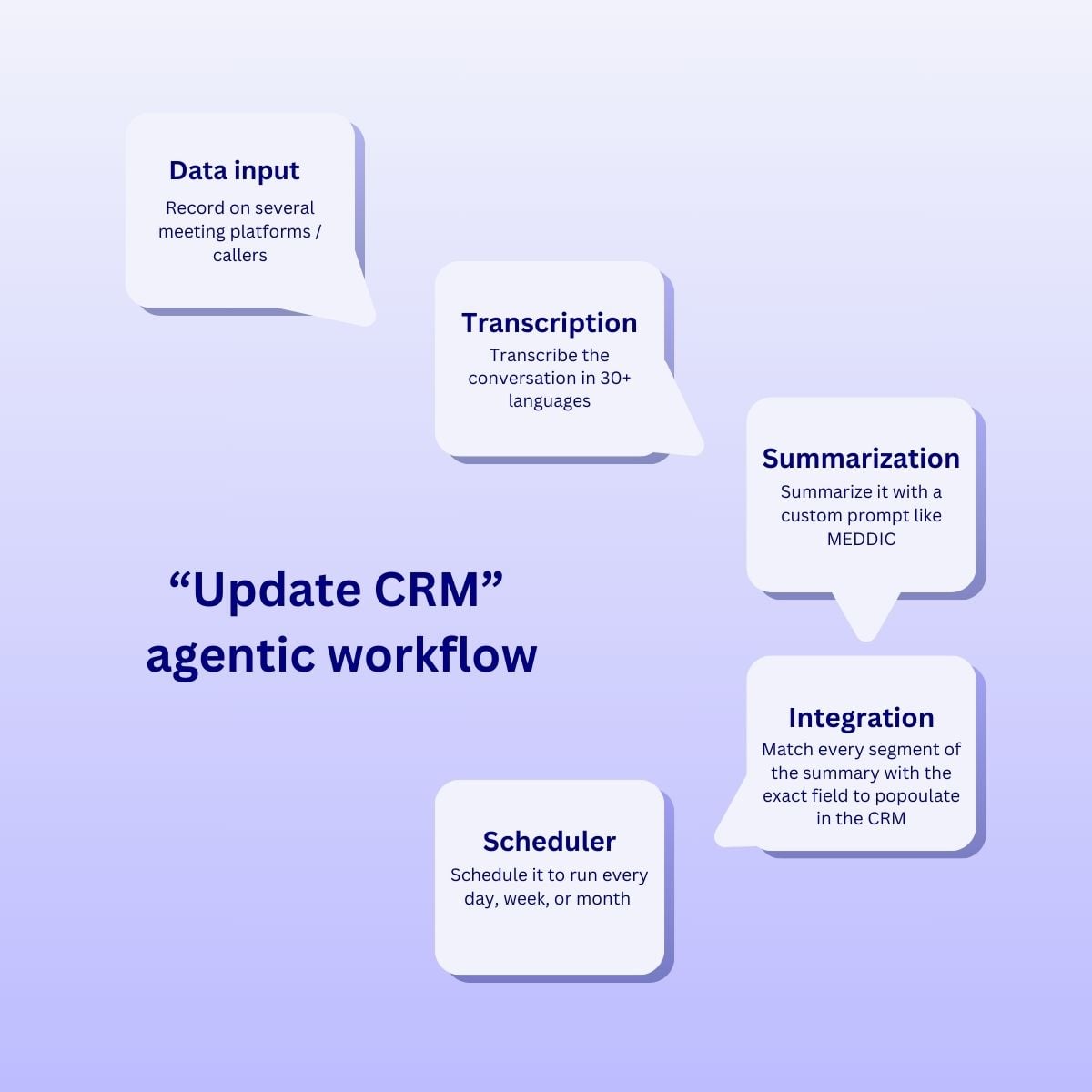
For anyone with a CRM or a follow-up routine, it’s tl;dv, hands down. Its design goal is that the busywork after the meeting, like CRM entry, follow-up drafts, task creation, all runs itself.
Notta gets your transcript into other tools; tl;dv acts on it.
Privacy, Security, and Compliance
Both tools are GDPR-conscious and used by business teams, but there’s one difference that should decide the matter for privacy-minded organizations: Notta trains its AI on user conversations by default, and you can only opt out on Enterprise. tl;dv doesn’t train models on your meetings.
Is tl;dv GDPR and SOC 2 Compliant?
tl;dv is built in Germany with GDPR at its core and publishes its security commitments openly, including bot-free recording paired with active consent collection. Under the GDPR, how a vendor processes and reuses personal data, including feeding it into model training, is exactly the kind of thing you’re accountable for, which makes the next point important.
As a German-based company, tl;dv is also fully compliant with the EU AI Act.
Does Either Tool Train AI on Your Meetings?
Notta does; tl;dv doesn’t. By Notta’s own disclosure, Japanese-language user conversations train its AI unless you’re on Enterprise, so the customers relying on its Japanese transcription are feeding it sensitive data. Paying for the privilege of not training a vendor’s model is a pattern plenty of teams (and SOC 2 auditors) won’t sign off on. tl;dv doesn’t use your conversations for training on any plan, including free.
Which Is Best for Your Use Case?
The right pick depends on what you do all day. tl;dv is the stronger all-rounder and the clear winner for sales and customer teams; Notta is best for mobile-first Japanese teams.
Best for Sales Teams (Coaching, Deal Intelligence, CRM)
tl;dv, comfortably. It’s built for revenue teams: automatic CRM updates, follow-up drafts, objection and competitor tracking, sales coaching against playbooks like BANT, SPIN, and MEDDIC, and recurring reports that compare reps across calls. Airgram never offered deal intelligence, and Notta’s sales features are thin by comparison. For the full field, see our best AI notetakers for sales.
Best for Customer Success and Recruiting
tl;dv again. Cross-meeting intelligence lets CS leaders track recurring complaints and churn signals across every account, and recruiters can standardize interview notes with custom templates. Notta works fine for straightforward interview transcription, especially if your candidates speak Japanese.
Best for Solo Users, Freelancers, and Small Teams
For a solo user who just needs clean transcripts on a budget, Notta Pro is cheap and does the job so long as you don’t mind pre-selecting your language and skipping video.
For a freelancer or small team that wants a real free plan and room to grow into automation, tl;dv is the better long-term home. Compare the field in our best free AI notetaker guide.
The Best Airgram Alternatives Besides tl;dv
If tl;dv isn’t your fit, the strongest Airgram alternatives are Notta (the official successor), Fireflies, Otter, and Fathom, each suited to a different job.
Notta, Fireflies, Otter, and Fathom
Notta is the direct successor and the pick for mobile-first users. Fireflies has great integrations and a solid free plan. Otter is the veteran, strong on real-time English but light on languages. Fathom is a favorite for individual Zoom users with a generous free tier. All four appear in our best AI meeting assistants roundup, and we have something on Notta-specific alternatives too.
Which Alternative Fits Which Workflow
Let’s cover the basic workflows:
- Sales and CRM automation: tl;dv.
- Mobile-first teams: Notta.
- Japanese transcription: tl;dv or Notta.
- Budget English transcription: tl;dv or Fireflies.
- Live transcription: Otter.
- Solo Zoom users: Fathom.
- Cross-meeting intelligence: tl;dv.
Pick for the job you do, not the logo you recognize.
How to Migrate From Airgram to tl;dv
There’s no one-click Airgram-to-tl;dv importer. Airgram is gone and its data now lives in Notta, but migrating is still simple: export your recordings and transcripts, then upload them into tl;dv.
The switch is more about changing your default recorder than moving a mountain of history.
Can You Import Airgram (or Notta) Recordings and Transcripts?
Yes, via upload. Export your audio or video files from Notta (or wherever your Airgram recordings ended up) and upload them to tl;dv, which transcribes and analyzes them with the same AI it uses on live calls. You get five uploads free and unlimited on paid.
Connect tl;dv to your calendar and it starts recording new meetings automatically from day one.
What to Check Before You Switch
Confirm you can export your data before you cancel anything, check your meeting platforms are covered (tl;dv handles Zoom, Meet, Teams, plus bot-free capture for nearly anything else), and use the free plan to test transcription on your own audio before you pay. Given Notta’s widely reported billing friction, read the cancellation fine print carefully on your way out.
So Long, Airgram
“tl;dv vs Airgram” only has one answer now that Airgram is gone. Notta is the default option, but for most teams, tl;dv is the better pick. It has a free plan that actually transcribes in 40+ languages with automatic detection, CRM automation, cross-meeting intelligence, and no AI trained on your private calls.
Notta earns its keep for mobile-first teams who run a lot of in-person meetings, and it undercuts tl;dv on seat price. But that means nothing detached from value. Don’t settle for what was forced upon you. You can test tl;dv free, forever, to decide for yourself in an afternoon.
FAQs About Airgram
Is tl;dv a good Airgram alternative?
Yes. For most teams, it’s the best one. Since Airgram merged into Notta and no longer exists on its own, tl;dv gives ex-Airgram users a free-forever recorder with unlimited transcription in 40+ languages, CRM automation, and multi-meeting intelligence that Airgram never had.
Is tl;dv cheaper than Airgram was?
They were around the same. Airgram’s old paid tier sat around $18/user/month; tl;dv Pro is $18/user/month. However, tl;dv’s free plan is far more generous than Airgram’s was.
Which supports more languages, tl;dv or Airgram?
Airgram is discontinued, so the live comparison is with its successor, Notta, which supports 58 languages to tl;dv’s 40+.
However, tl;dv detects languages automatically and handles mid-call language switching, while Notta requires you to select the language in advance and pay extra for bilingual transcription.
Did Airgram shut down?
Effectively, yes. Airgram merged into Notta in early 2024 and stopped operating as a standalone product. Existing users were migrated to Notta, which is run by the same company that originally built Airgram.
What is the best free Airgram alternative?
tl;dv has the most generous free plan of the major options: unlimited video recording and transcription with AI notes on up to 10 meetings a month, no card required. Notta’s free plan, by contrast, caps you at a ridiculous three minutes of transcription per conversation.
Can I still get my data out of Airgram?
Airgram data now lives in the Notta ecosystem, so you’d export recordings and transcripts from there. You can then upload those files into tl;dv to keep your meeting history searchable.