Skip to content






tl;dr Of SuperWhisper
SuperWhisper is a local-first AI dictation app for Mac, Windows, and iPhone. It turns your voice into text anywhere on your system, with an optional AI cleanup layer and a meeting mode on top.
It is best for solo users who want fast, private, mostly offline dictation, plus the odd recorded meeting for their own notes. It is not for teams that need shared transcripts, speaker-labeled libraries, CRM sync, or anything one person has to hand off to another.
The basic version is free. Pro costs $8.49 a month, $84.99 a year, or $249.99 for a lifetime license that works on all three platforms.
It can work offline, but only with two on-device models. Everything else uses the cloud.
In short, SuperWhisper is a strong dictation tool that can also record meetings. It is not a full meeting assistant, and that difference is what this review is all about.
I wrote this SuperWhisper review after weeks of testing, since so many people recommended it. I usually test meeting recorders and AI meeting assistants. SuperWhisper does have a meeting mode, but most people are right: it’s mainly a dictation app.
I was skeptical at first. I’m a typist and have been since I was young, chatting on MSN and coding on MySpace. My typing speed is 93 words per minute, so I admit I’m a bit proud of that. I write the way I talk, so you’d think dictation would suit me, but it took a while for me to be convinced.
What is SuperWhisper?
SuperWhisper is a Mac-first dictation app that turns speech into text anywhere on your system. It could be from Slack to Gmail; you could even talk to it in a code editor. I have used it for writing in Google Docs and to help me with prompting with Claude. You hit a shortcut, you talk, and the text lands wherever your cursor is. It also has a record-meeting section where the marketing gets quite ambitious, and that is where a lot of my testing went.
So as you read this review, keep in mind that SuperWhisper is a personal dictation tool that can also record meetings. It’s not a team platform with dictation as a side feature.
How SuperWhisper Works
SuperWhisper does not transcribe your voice with one model. It runs two, and you can see both in the models library.
The first layer is the speech engine. That is the part that turns your sound into words. SuperWhisper lets you pick from a long list: its own S1 Voice, Scribe from ElevenLabs, Nova models, Deepgram, NVIDIA’s Parakeet, the Whisper family, and more.
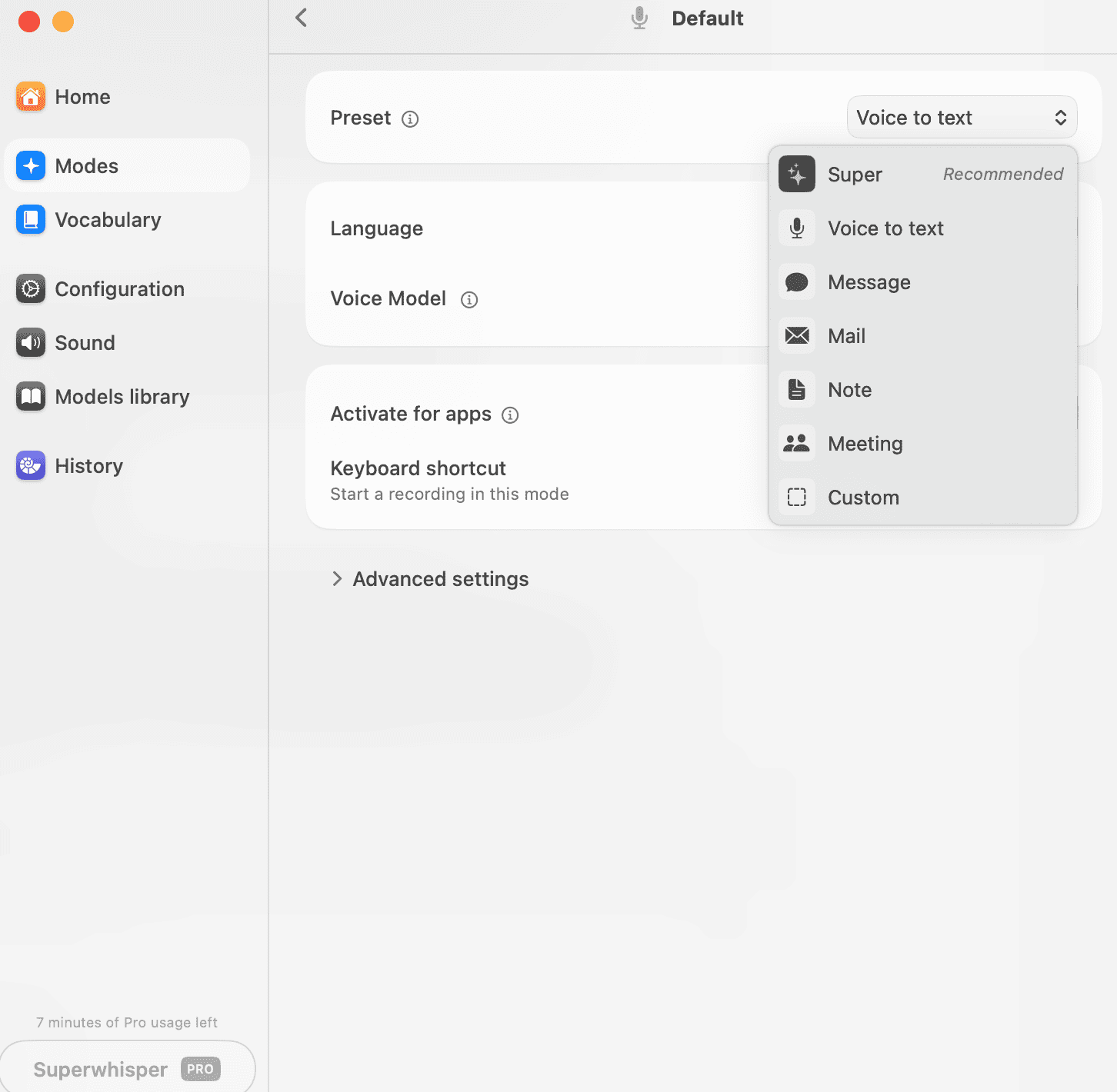
The second layer is optional. It is a language model. Super is the preset marked recommended, and it takes the raw transcript and rewrites it into cleaner text. It strips the ums, fixes false starts, tidies the grammar. You can skip it and keep the raw version, but the tidy-up is on by default.
That default matters. The language model is rewriting what you said before it reaches the page; for some people, that is the whole appeal. I have a client who finds writing emails hard, and this lets him talk in a flow and get something clean enough to read back and send. Useful.
But there are two different ways a dictation app can get your words wrong, and the second one is sneakier than the first.
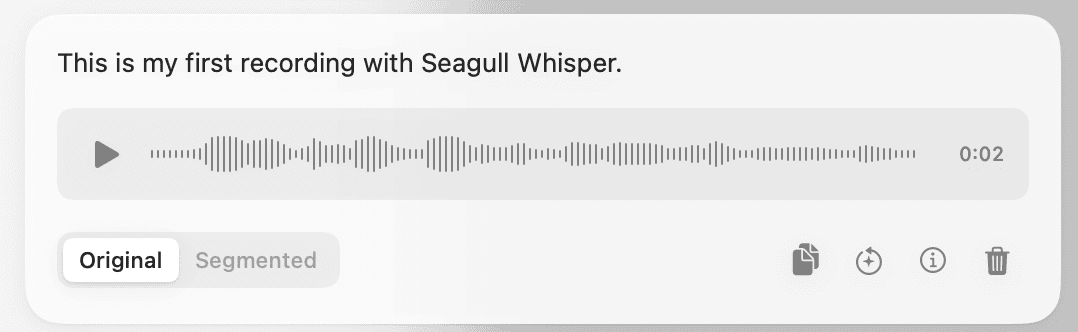
The first is an engine error. It mishears a word. When I first tested it, it turned its own name into something about seagulls. You notice that kind of mistake because it looks wrong.
The second is the cleanup model, and it does not mishear you; it rewrites you. It can take a sentence you genuinely said and turn it into a tidier one you did not, because it decided what you meant. I watched this happen on the simplest possible input. I dictated “start before I check my email,” and the cleanup turned it into “start without checking my email.” It is quite small, and it reads perfectly, but it completely changes the meaning, and nothing flags it.
You can go back and listen to the original voice note. I found that out later. But a feature that is meant to save you time is not one I would lean on to double-check the tool against itself.
So if you do a lot of this, switch the preset from Super to plain Voice to Text. You get the raw transcript, no rewriting. Most people will not bother, because the recommended setting is doing a lot of quiet work on their behalf.
How Accurate is SuperWhisper?
SuperWhisper’s accuracy depends entirely on what you feed it.
I ran quite a few little tests. The first was a raw script on the S1 Voice model, no cleanup, and the number landed around about 88% on hard, technical speech. Then I ran a plain everyday paragraph, and that jumped up to 98%. Same tool, same model, same room, and the only thing that changed was how technical it was.
The hard script was built to break things: proper nouns, a price, a date, some jargon. The easy paragraph was just normal sentences about my mornings. Near flawless on the easy text, and on the hard text it fell over exactly where I thought it would.
Names are where it really falls down. I had a person called Priya Venkatesan in the script, and I read it three times, the same way each time. I got Katasan, then Venkatasan, then Verkatasen. None of those is her name. A place name landed right once and then turned into Ashland on the next go. So which proper noun it gets is basically luck, and reading the same thing twice does not get you the same answer.
The number was the dangerous one. The invoice figure in my script was €4,217. It got it right twice, and then on the middle run it quietly became €4,270. You would catch a mangled name, because it looks wrong on the page. A transposed number like that just reads clean, and you would never spot it unless you had the source sitting right next to you. That is the kind of error that ends up in a client email.
It is not technical words on their own that defeat it. I had Kubernetes in there, and it came out perfectly all three times. Common terms in the training data are fine. Rare human names and specific figures are the soft spot; this is the pattern I see across many speech engines I test.
There is a fix worth knowing about. SuperWhisper has a custom vocabulary panel where you can add names and terms, so a client’s name shouldn’t turn into three other things. Most people will not bother with it. That is how you end up with three spellings of your own client’s name in one document.
| What I fed it | Result | Caught it? |
|---|---|---|
| Easy everyday paragraph | ~98% accurate | Near flawless |
| Hard technical script | ~88% accurate | Fell over as expected |
| “Kubernetes” (jargon) | Perfect, all 3 reads | Common term, no problem |
| “Priya Venkatesan” (name) | 3 wrong spellings in 3 reads | You catch it, it looks wrong |
| Place name | Right once, wrong after | You catch it |
| €4,217 (invoice figure) | Became €4,270 on the middle run | No. Reads clean. |
Other Languages?
A quick note on languages, since I test transcription across several. SuperWhisper lists over 100, so I ran my badly accented French, Italian, Spanish, Japanese, and German through it.
French and Italian held up, Spanish was okay, and Japanese came out in romaji rather than the proper script. Treat that as a smoke test, not a benchmark, since I read those as a non-native speaker. Things like this is where “supports a language” and “is good at it” come apart. That is what our German transcription test and upcoming Japanese transcription test are for.
Does Superwhisper Work Offline?
Superwhisper sells itself as local-first and private. That holds up, but only if you pick the right model. Open the models library and look at the offline column (see image below).
The engines you would reach for first- Scribe, the Nova models, the Gemini and GPT options- all run in the cloud, which means your audio leaves your machine.
Only three models have a download size and run on-device: Parakeet (476MB, English-only), Parakeet Multilanguage (494MB), and Mistral 7B (4.37GB for the cleanup layer).
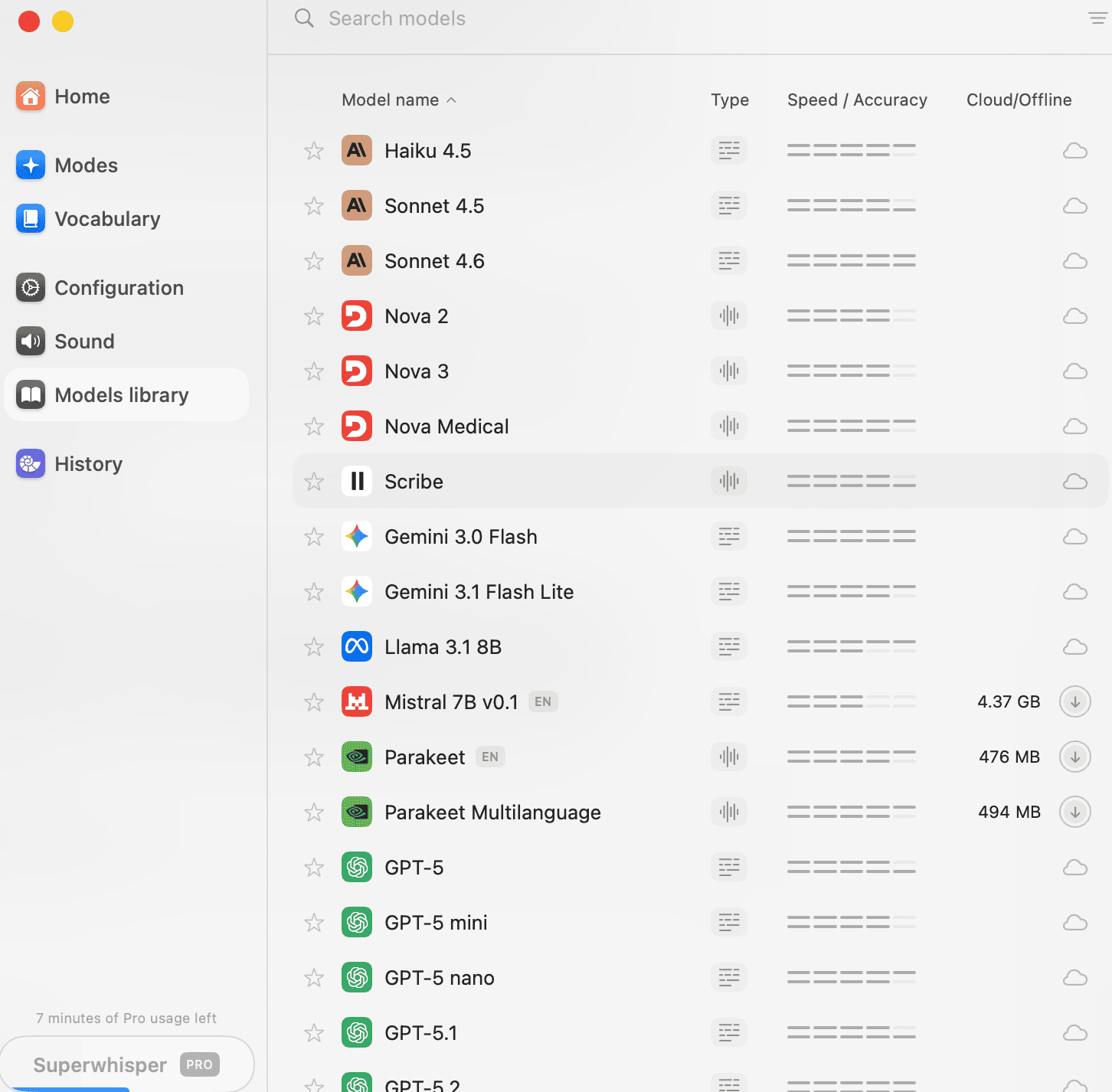
So real offline use has one recipe: Parakeet for transcription, Mistral for cleanup, nothing leaving the device. Pick anything else and your audio goes to someone’s server.
I checked it, in airplane mode, with the connection fully cut, Parakeet transcribed fine. So the offline promise is real; it is just narrower than the marketing suggests, and it is most solid on a Mac with Apple Silicon.
SuperWhisper Pricing in 2026
SuperWhisper is free to start, then splits into a subscription or a one-time lifetime license.
The free tier is genuinely usable for getting a feel. Voice-to-text, the app, meeting recordings, and the 100-plus languages. The catch is that it holds you to the smaller models, so it is not quite enough to judge the tool fairly.
- Pro is $8.49 a month, $84.99 a year, or $249.99 for a lifetime license (plus local taxes).
- One license covers Mac, Windows, and iPhone.
- Students get 40% off, and there is a 30-day refund on every plan.
- Enterprise is custom-priced (SOC 2 Type II certification is listed under the Enterprise tier only.)
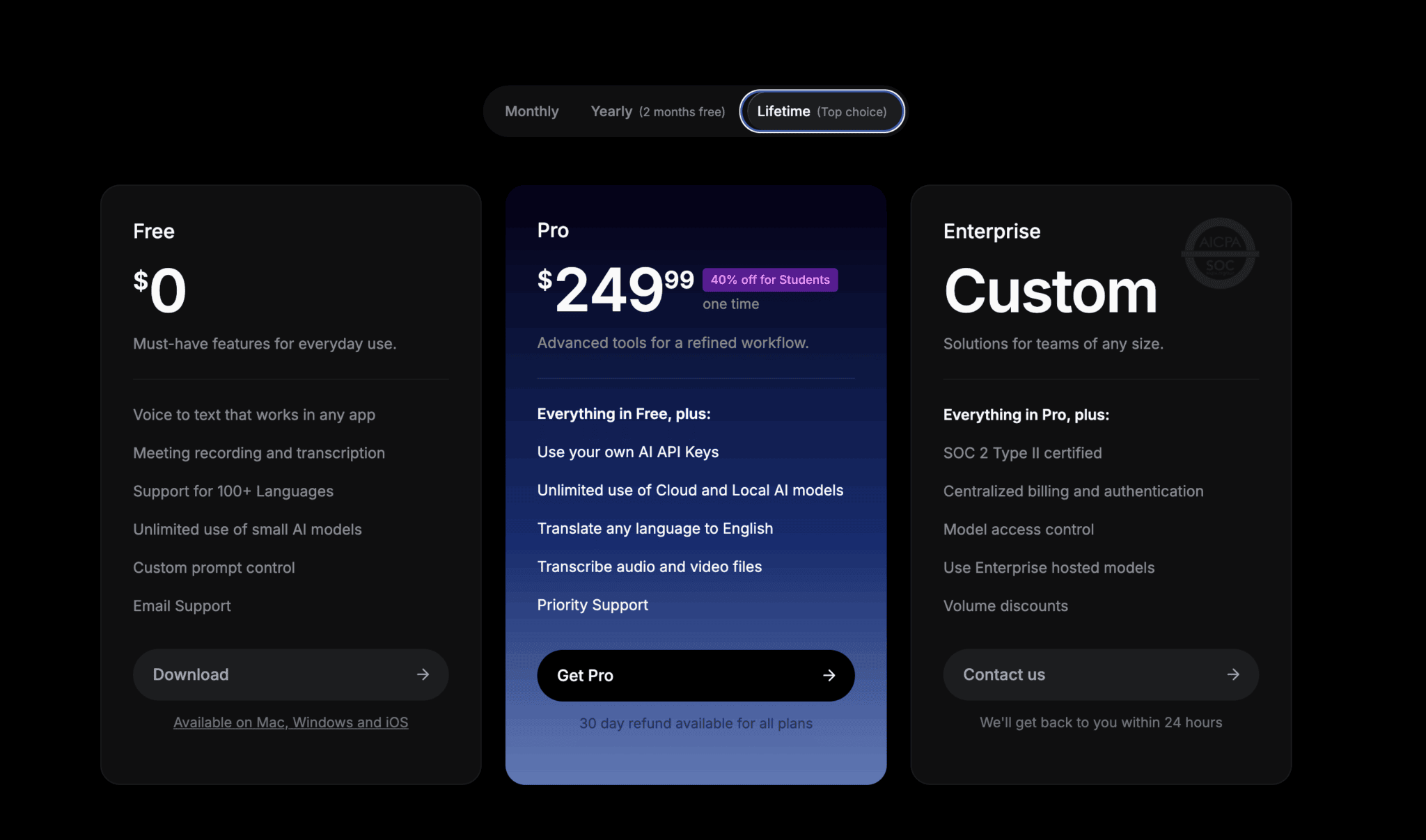
The price splits people, and both sides are fair.
Some push back hard on the lifetime figure, since it costs more upfront than twoyears of a competitor. Others run the opposite math: that a one-time payment you are still using in three years beats any monthly plan.
Where you land depends entirely on you. Daily users tend to defend it, and occasional users tend to balk.
I ended up on Pro monthly, and not by the original plan. I had tested the dictation side hard but not touched the meeting section, and I ran out of minutes on the free tier. I tried to sign out of the desktop app to reset but couldn’t. So for the sake of $10, I took the plunge.
Is SuperWhisper Private?
Privacy is SuperWhisper’s real focus, and it comes back to the two-layer model again.
In local mode, with Parakeet handling transcription and a local model doing cleanup, the audio never leaves your computer. No server, nothing retained anywhere off your own disk. That is about as private as voice-to-text gets, and it is a real reason people stay. If you deal with numbers or confidential information, the kind of thing that lives under GDPR or CCPA.
The recordings sit in a SuperWhisper folder in your Documents, and you can change the location. Clearing them is manual work, and on a small machine, it could quickly eat into your disk space.
One more thing the app does that is worth flagging. It can essentially record calls, but there is no consent prompt, no banner, and no bot announcing itself. Depending on where you and the other participants sit, you may be legally required to tell them before you record. I have written separately about the legal side of meeting recorders, and there are cases moving through the courts right now.
Does SuperWhisper Record Meetings?
SuperWhisper has a meeting mode. It records the call, transcribes it, and writes you a summary afterward.
I ran a test to see how it worked. I fed it 10 minutes of a Salt Lake City council budget session, a multi-speaker meeting with an opening by the chair and the council’s executive director presenting. I checked the output against the actual transcript from the meeting.
The summary was good. Meeting mode hands you a summary as the output, not the full transcript, though the raw transcript and a segmented version are there if you dig around in the history. It also records the sound, so you are covered for playback.
The summary caught a property tax increase, matching cuts, and a reminder to review the CRA budget on Tuesday. Every claim was true and matched the meeting.
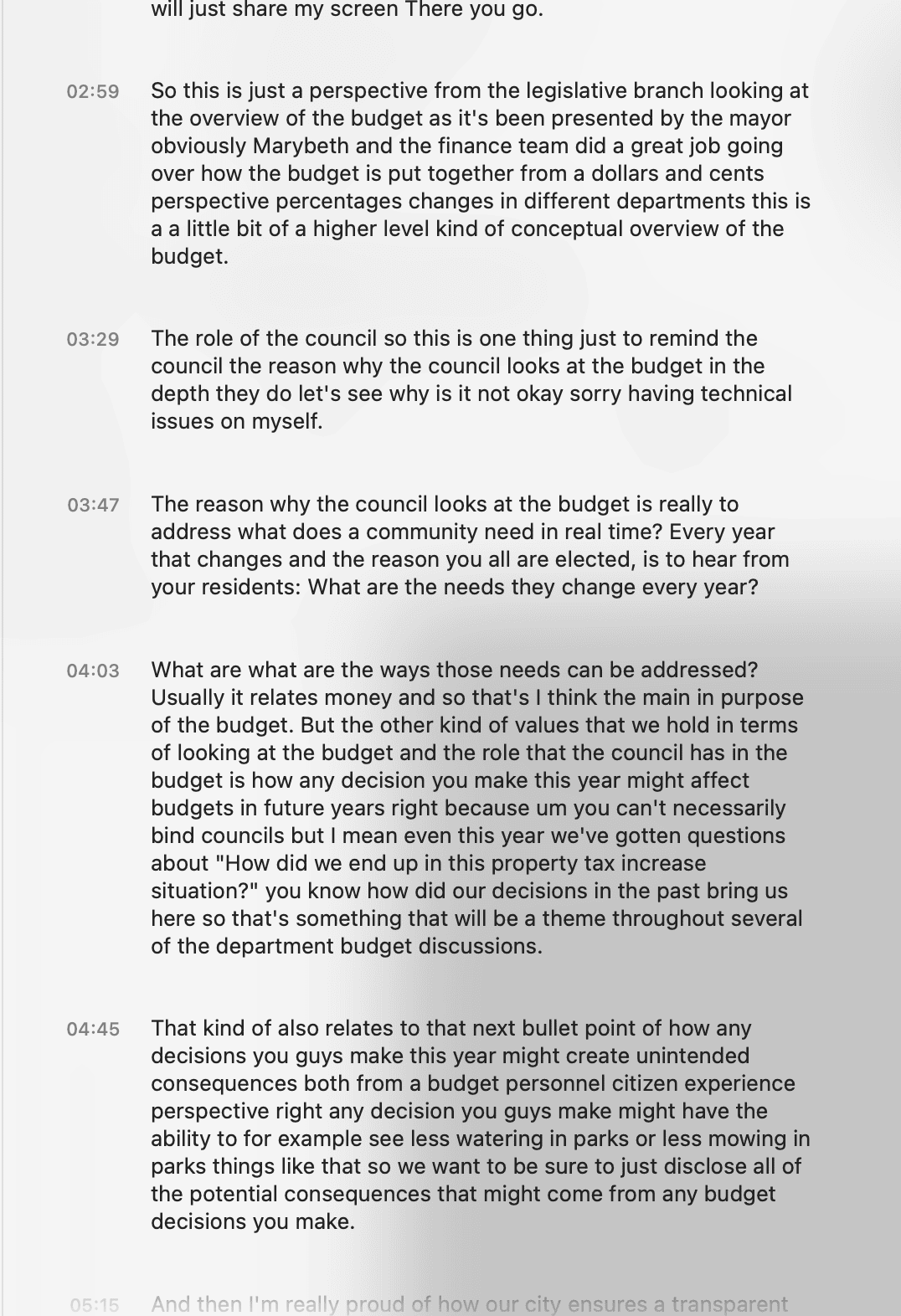
The transcription in the history was solid too. It caught names, acronyms, even a phone number. But it did not tell you, in any of the three views, who said what. No speaker labels, no speaker identification. Because of the way it records, this is how it will always behave.
If you are alone, that is fine. But the moment a second person needs anything, attribution falls apart. No shared library to search across calls, no way to hand a colleague a transcript, no CRM push, no Slack clip, no bot that joins the call. It captures audio on the machine it is installed on, and the output stays there unless you move it by hand.
So as a meeting recorder, it records the meeting and summarizes it pretty well, but it simply isn’t as useful as other tools.
SuperWhisper vs tl;dv
The truth is that SuperWhisper and tl;dv do not really compete because they are built for different people doing different jobs with different requirements. SuperWhisper is designed for a single person and their laptop. It dictates, it takes private notes, it keeps your audio local. Yes, it can record meetings, but this feels like an add-on slapped on to join another market.
tl;dv is built for the handoff. The moment of recording becomes something others can use: a shared library, speaker-attributed transcripts, search across every call, clips you can drop to a colleague, a push into your CRM. These are all documented features. SuperWhisper does not do them.
So choosing between them is probably the wrong question. If a recording only needs to be you talking to yourself, SuperWhisper is plenty. If a recording has to be findable, shareable, pushed into your other tools, part of your business’s meeting memory, then that is where tl;dv has its purpose.
| The job | Best fit | Why |
|---|---|---|
| Dictating a draft or email | SuperWhisper | Fast local dictation with a cleanup pass |
| Private notes that never leave your Mac | SuperWhisper | Local-mode audio stays on your disk |
| A solo record of one meeting | SuperWhisper | Records and summarizes well for one person |
| A transcript a colleague can use | tl;dv | Speaker-attributed, shareable, searchable |
| Calls pushed into your CRM or Slack | tl;dv | Documented integrations and a bot that joins |
| A team’s shared meeting memory | tl;dv | Library searchable across every call |
The bottom line. Yes, it has a meeting mode, but I would not recommend it for meetings.
It has, though, earned a slot in my own stack, for talking through a rough draft or just getting what is in my head out. The fact that I can dictate to it, have it tidy up, and get the raw transcript in single-person mode is more useful than I expected and something I had overlooked before.
SuperWhisper Vs. Wispr Flow, MacWhisper
The comparison most people actually search for is not against a meeting tool. It is against things like Wispr Flow.
Wispr Flow is very similar. A person I knew who uses it runs it much the way I would, and had hit some patchiness with it. That tracks with the wider picture, and the recurring trade-off on Reddit is consistent: Flow gets the credit for speed, ease, and a smoother out-of-the-box feel, especially on desktop.
SuperWhisper gets it from the privacy-minded and the cost-minded, for local processing and the lifetime pricing. Neither camp is unanimous, and both tools cop complaints about reliability and setup, but that is the split.
MacWhisper is a different job altogether. It transcribes audio and video files in batches with speaker separation, which SuperWhisper’s meeting mode does not do. So if I were processing recordings, I would reach for MacWhisper. For live dictation, SuperWhisper.
| Tool | Best at | I’d reach for it when |
|---|---|---|
| SuperWhisper | Private, local live dictation on Mac | I’m talking text straight into apps and want it kept on my own machine |
| Wispr Flow | Speed and polish (per user reports) | I want a slicker dictation feel and care less about local-only privacy |
| MacWhisper | Batch file transcription with speaker separation | I’m processing existing audio or video files, not dictating live |
Where SuperWhisper Falls Short
The main headline weakness of SuperWhisper is its handling of proper nouns.
In my testing, it mangled one name into three different spellings across three reads. It transcribed its own name as “Seagull Whisper”. Seagulls do not whisper. If you dictate many names, you are either training the vocabulary panel or fixing them by hand.
The second problem is the lack of speaker labels in meetings.
The rest is smaller. Recording is hold-to-record by default, which is uncomfortable for anything long until you find the hands-free toggle. (Tip: Pick a shortcut key you use infrequently!)
The Parakeet model stalled on me once, mid-recording, just dropped out, and needed a restart. That matches what users report: it’s a bit flaky. The other thing is that accuracy drifts the most on long, messy audio, so I would know that before trusting it with anything that really matters.
I would not call any of these deal-breakers for solo use. But they are all reasons to test it against your own work before you rely on it. And if what you actually need is a meeting tool, get a meeting tool, rather than a dictation app that decided to add a meeting mode.
Is SuperWhisper Worth It In 2026?
For the right person, yes. The right person might be me, which I didn’t expect.
I came to this as a committed typist. People comment on how fast I type; it is one of my party tricks, and the tool’s hidden typing test clocked me at 93 words per minute, which is quick. It also clocked my dictation at 111. So even for someone fast on a keyboard, there is a speed gap. But the speed is not what changed my mind.
The reason is my hands. Writers get RSI, and with the amount I write, I type a lot. Sometimes my brain wants to go, and my hands do not agree. If dictation takes some of that load off, even not every day, that is worth something. I would do it in raw voice-to-text and tidy up as I edit, rather than trusting the smooth version.
So here is the honest test I put it to. I tried to write this entire review by dictation. Not the polished sentences you see here; those I ended up typing, because of the cleanup-layer trust issues I now have. But the rough, talking-out-loud draft, the part where I work out what I actually think, I spoke that.
And the live recording failed. Twenty-five minutes of me talking, and SuperWhisper came back with “No voice found in recording.” The exact long-audio weakness I had just written about, happening to me, on the piece about it. I managed to dig around in the source files, however, and extract what I had workshopped, so while the interface kind of failed, it wasn’t a lost cause.
So no, it is not going to replace typing in full. Not yet, not for a whole article. But maybe I do not need it to. Maybe I work with it for rough drafts and thinking out loud, and keep typing for the rest.
I came to argue with it. It lost the recording and talked me into a subscription anyway.
Oh, and if you need something to transcribe a meeting, I’d always use tl;dv instead!
FAQs About SuperWhisper
Does SuperWhisper use your audio to train AI?
No, not by its stated policy. It says your data is not used to train AI models, and in local mode the question is moot anyway, since nothing leaves your machine. Worth knowing the policy states this across the board and does not separately spell out how cloud mode is handled.
Can you turn off the AI rewriting on SuperWhisper?
Yes. Go into settings and switch the preset from Super to plain Voice to Text. You get the raw transcript with no cleanup.
Does SuperWhisper label who said what in meetings?
No. In my testing, it transcribed a two-speaker meeting with no speaker labels in any of its three views.
Does SuperWhisper work on Windows and iPhone?
Yes. One license covers Mac, Windows, and iPhone. There is no Android version, and none on the roadmap as of 2026.
Is the SuperWhisper lifetime plan really one-time?
Yes. It is a single $249.99 payment covering Mac, Windows, and iPhone, and the vendor lists it as including unlimited future updates.
SuperWhisper vs Apple Dictation: which is better?
SuperWhisper has the edge in accuracy, custom vocabulary, and the cleanup layer. Apple Dictation is free and fine for light use.